Google Ads counts two conversions for one Shopify order because something is firing on a page load instead of on the order itself. The buyer sees a thank-you page, then an order status page, and often reloads it or returns from the confirmation email. A tag triggered by those page views records each one. The other common cause is two tools reporting the same sale.
Both are fixable in an afternoon. The hard part is working out which one you have, because Google Ads shows the same symptom for both: more purchases than orders.
How do you confirm Google Ads is really double-counting?
Compare one day’s paid orders in the Shopify admin with that day’s purchase conversions in Google Ads, then look at a single test order. If one order produces two conversions, you’re double-counting. If the totals merely differ, you may just be looking at different attribution rules, which is a separate problem.
That distinction matters. Google Ads reports a conversion on the date of the ad click by default, and only for buyers it can tie to an ad. Shopify reports every order on the date it was placed. So “Google says 48, Shopify says 41” is not proof of duplication on its own.
The clean test is one order:
- Place a real, low-value order yourself from a Google Ads click. Note the Shopify order number.
- After the order status page loads, reload it once. Then open the order link in the confirmation email.
- Wait for Google Ads to process conversions (it can take several hours), then open Goals → Conversions and check each purchase action.
If the count went up by two or three for that one order, you have a trigger problem. If it went up by exactly two, split across two different conversion actions, you have a two-source problem. Many stores have both.
Why does a page-load trigger count the same order twice?
Because the tag fires every time the page renders, and the confirmation pages render more than once. Shopify’s own pixel type definitions say page_viewed “is available on the online store, checkout, and Order status pages.” Any Google Ads conversion wired to a page view, or to a URL rule like “Page URL contains /thank_you”, counts each view as a sale.
Real buyers generate those extra views without trying:
- Reloads. A slow payment confirmation, a mobile browser that restores tabs, or a buyer checking the page again.
- The confirmation email. Shopify’s order email links back to the order status page. Every click is another page view.
- Two confirmation URLs. Some setups fire once on the thank-you step and again when the order status page loads, because the trigger matches both.
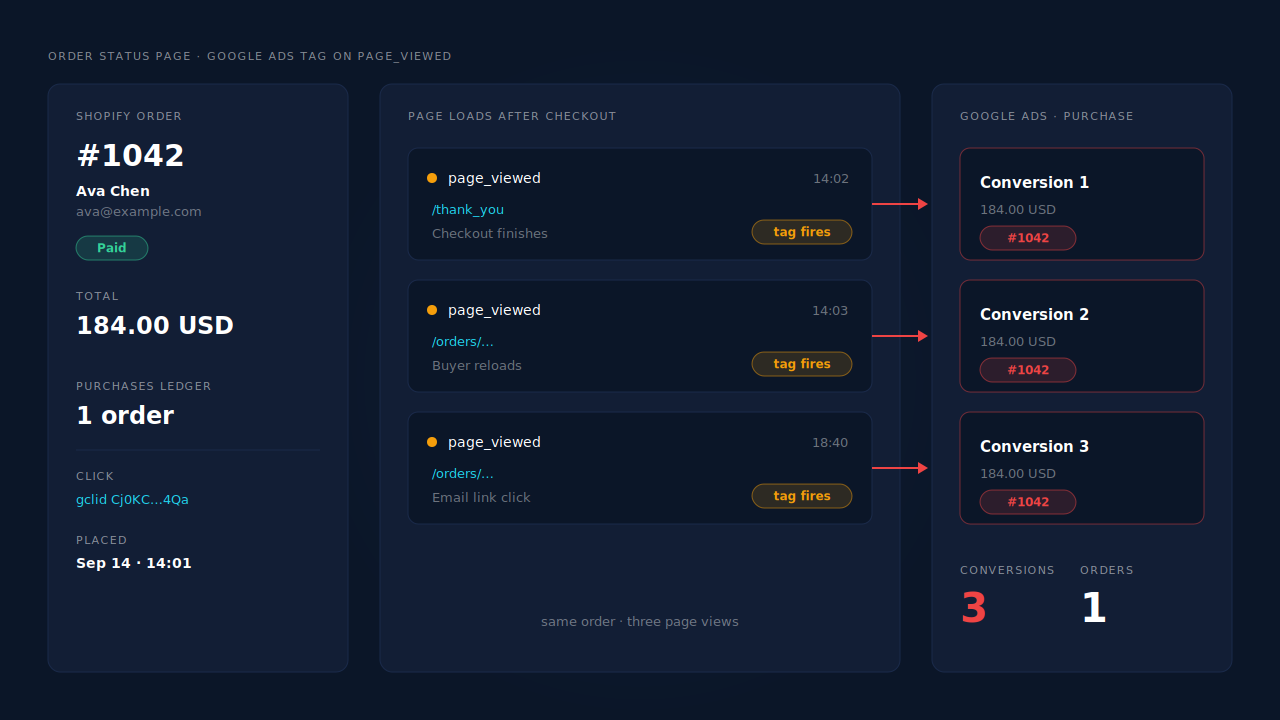
The old Additional Scripts box had a Liquid guard for this, first_time_accessed, that stopped the snippet running on repeat visits. Many stores copied their Google tag into Google Tag Manager or a custom pixel during the checkout upgrade and lost that guard along the way. If your double-counting started around then, why ad conversions dropped to zero after Shopify’s thank-you page upgrade covers the same migration from the other side.
Why does firing on checkout_completed fix most of it?
Because it’s an order event, not a page event. Shopify’s type definitions describe checkout_completed as the event that “logs when a visitor completes a purchase,” and note that the order ID “will be null for all events except checkout_completed.” Subscribe your Google Ads conversion to that event and pass the order ID, and a reload no longer looks like a new purchase.
A minimal version inside a custom pixel looks like this:
// Shopify admin → Settings → Customer events → custom pixel
analytics.subscribe('checkout_completed', (event) => {
  const c = event.data.checkout;
  gtag('event', 'conversion', {
    send_to: 'AW-XXXXXXXXX/abcDEF123',   // your conversion ID / label
    value: c.totalPrice?.amount,
    currency: c.currencyCode,
    transaction_id: c.order?.id          // same order → same ID
  });
});
The transaction_id is what does the de-duplication. Google Ads drops a second conversion carrying the same transaction ID on the same conversion action. Google states the same rule for imported conversions: an order ID “can only be used for one conversion per conversion action.”
Two limits are worth knowing. The order ID only protects one conversion action, so it does nothing if a second tool sends the same sale to a different action. And this is still a browser event: a closed tab, a blocker or a payment flow that never returns to Shopify can still lose the conversion entirely.
Why do two tools report the same Shopify sale?
Because each one creates or feeds its own conversion action, and Google Ads adds them up. The usual pair is Shopify’s Google & YouTube app plus a tag someone added through Google Tag Manager, a custom pixel or a theme edit. Both are working correctly. Together, they report every sale twice.
Here’s how to find it in Google Ads:
- Open Goals → Conversions and filter to purchase-type actions.
- For each action, note its source (website, import or an app) and whether it’s primary. Primary actions are the ones counted in the Conversions column and used for bidding.
- Look at the last seven days. Two primary purchase actions with nearly the same count is the signature.
Keep one primary purchase action. Set the other to secondary while you test, then remove it. Don’t try to reconcile them with matching transaction IDs, because the order ID only de-duplicates within a single action.
It’s the same logic as Google Ads and Meta both claiming the same conversion, except here both claims sit inside one ad account and inflate the same bidding signal.
What does double-counting cost you?
It inflates the number Smart Bidding learns from. If every sale shows up twice, the account thinks each click is worth twice what it is. Target ROAS and Maximise Conversion Value then bid for traffic that your real margins can’t pay for, and the reported return on ad spend looks healthy right up to the month-end reconciliation.
It also hides the real signal. A campaign that drove a buyer who reloaded the order page three times looks better than one whose buyer closed the tab. That’s noise, and the bidding algorithm can’t tell it from performance.
Fix the count first, then give bidding a clean week or two before judging any campaign. Changing budgets while the numbers are still inflated only locks in the wrong decisions.
Which purchase source should you keep for Google Ads?
Keep exactly one, and pick it by what triggers the conversion. A source triggered by the order can’t be repeated by a reload. A source triggered by a page can, unless you key it to the order ID. Here’s the trade-off:
| Source | What triggers it | Can a reload add a conversion? |
|---|---|---|
| URL or page-view trigger (GTM, old snippet) | Any load of the confirmation page | Yes, every load |
Custom pixel on checkout_completed with transaction_id |
The order event in the browser | No, same order ID is dropped |
| Google & YouTube app | Shopify’s own integration | Depends on the app; don’t stack a second tag on it |
| Offline conversion import | A paid order, joined to a stored click ID | No, one row per order |
An offline conversion import sends Google Ads rows built from orders instead of page views. Each row carries the click ID Google issued at the ad click (gclid, gbraid or wbraid), a conversion time with a timezone, and the value and currency. The catch is that Shopify doesn’t store the click ID on the order, so it has to be captured at landing and joined later. If rows don’t match, the guide to offline conversions not matching the gclid walks the usual causes.
How does PartialLeads stop one Shopify order becoming two Google Ads conversions?
It writes one Google Sheet row per paid Shopify order, taken from the order webhook rather than any page load. You schedule that sheet as an offline conversion import in Google Ads. A reload, a second confirmation URL or a click from the order email never reaches the sheet, because nothing on those pages writes rows.
The mechanism, step by step:
- Capture the click at landing. The PartialLeads tag records
gclid,gbraidandwbraid, plus UTMs and the referrer, when the visitor arrives from the ad. - Take the order from Shopify’s webhook. Only paid orders go further (
financial_status = paid). A cash-on-delivery or bank-transfer order is sent once it’s marked paid. - Match the order to the session. The visitor ID echoed from the storefront comes first, then email, then phone, then IP. A buyer who clicked on Monday and paid on Thursday keeps Monday’s click ID. This is the same join described in attributing ecommerce revenue to the ad click.
- Write one row. Click ID, hashed email and phone, value and currency. The value is the full order total, including tax and shipping, after discounts. There’s no subtotal option, so check how dynamic conversion values reach Google Ads offline imports if your old tag sent something else.
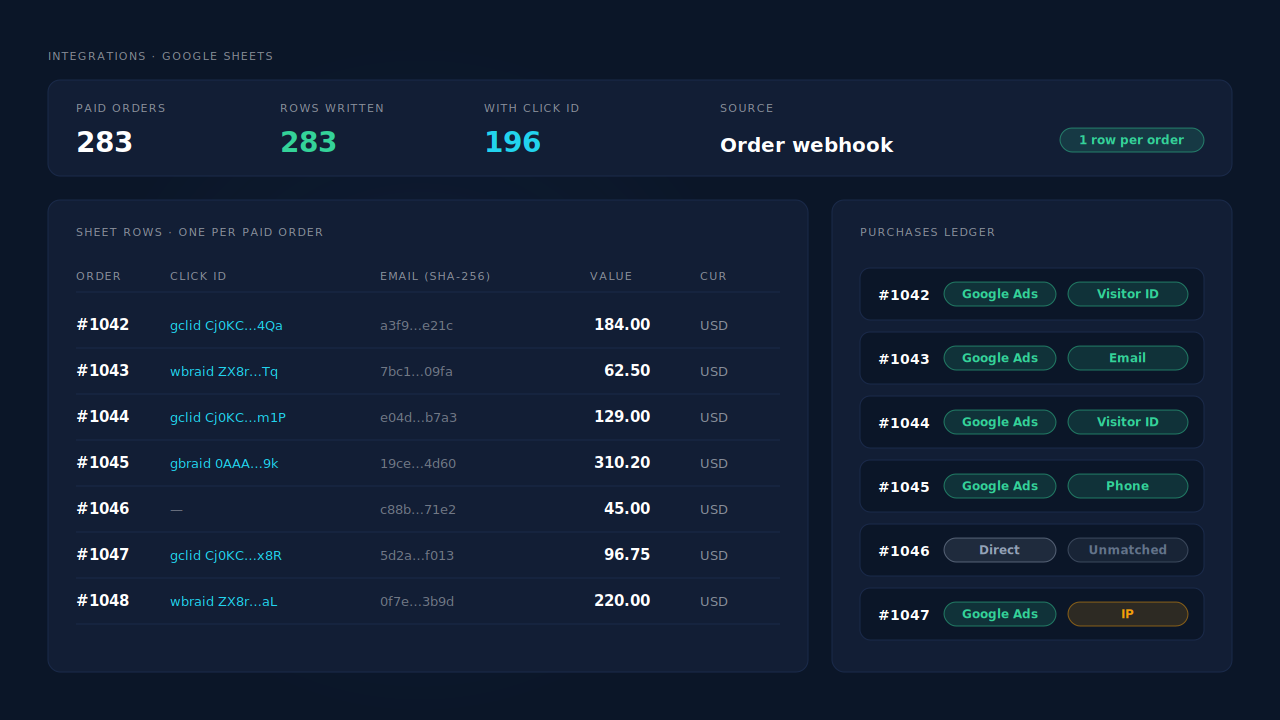
It isn’t the Google Ads API and it isn’t GA4. It’s a sheet you point an import at. The same webhook-driven approach is covered for Meta in firing Shopify purchase events server-side without an app.
The honest constraints. PartialLeads never writes the same order twice, but it doesn’t de-duplicate against the Google & YouTube app, a GTM tag or a custom pixel. If you switch to the sheet import, retire the old page-load purchase action or set it to secondary, or Google Ads will count each sale twice again, just from a different pair. Each order is recorded once, so a later edit, such as a post-purchase upsell added to the same order, doesn’t update the row. And the split that matters: every paid order produces a row, but whether Google ties that row to a click depends on the identifiers captured and on Google’s own matching. PartialLeads controls the first half. Nobody controls the second.
| What breaks | The mechanism | Where you see it in the dashboard |
|---|---|---|
| Reloads and email clicks fire the tag again | Rows come from the paid-order webhook, not a page load | Google Sheets integration: one row per order |
| Two tools report the same sale | One source per event; retire the other purchase action as primary | Google Sheets integration next to your Google Ads conversion actions |
| Click ID gone by the time the buyer pays | gclid, gbraid and wbraid captured at landing, joined by visitor ID, email, phone or IP | Purchases ledger: match tier per order |
| Unpaid or pending orders inflate the count | Only paid orders are written | Purchases ledger: paid orders only in the sheet |
Tell us what's broken. We'll fix your tracking — free.
Describe the tracking/attribution problem you're stuck on and we'll map it to a fix: server-side conversions to Meta, Google, TikTok and Pinterest, plus first-party tracking that survives Safari. No code required.
Sources
- https://registry.npmjs.org/@shopify/web-pixels-extension/-/web-pixels-extension-2.18.0.tgz
- https://raw.githubusercontent.com/googleapis/googleapis/master/google/ads/googleads/v22/services/conversion_upload_service.proto