Send the real amount each conversion was worth, one value per row, instead of one flat number applied to every lead. Value-based bidding optimises toward the values you report, so a column of 1.00 teaches it nothing. The number to send is what you actually keep, in the currency the customer paid, beside that row’s click ID and conversion time.
The hard part is not the upload. It is deciding which number belongs in that column, and keeping it honest after a refund.
What is a dynamic conversion value, and why does a flat one hold you back?
A dynamic conversion value is a per-row amount that differs between conversions — 40 for one lead, 4,000 for another. A static value is the same figure on every row. Google’s offline import accepts both, and the difference only becomes expensive once you move a campaign onto a value-based bidding strategy.
Value-based strategies — Maximise Conversion Value, and Target ROAS on top of it — work by predicting how much value a given auction is likely to produce, then bidding accordingly. That prediction is built from the values you reported. If every conversion you ever uploaded was worth exactly 1.00, the model’s honest conclusion is that all conversions are interchangeable, and the strategy quietly degenerates into conversion-count maximisation under a different name.
The cost is invisible because nothing errors. Uploads succeed. The conversion column fills in. A ROAS figure appears, computed from numbers you invented. Meanwhile the campaign spends the same acquiring a tyre-kicker as it does acquiring an enterprise deal, because nobody ever told it the two differ.
Which number should you send: order total, net revenue, or gross profit?
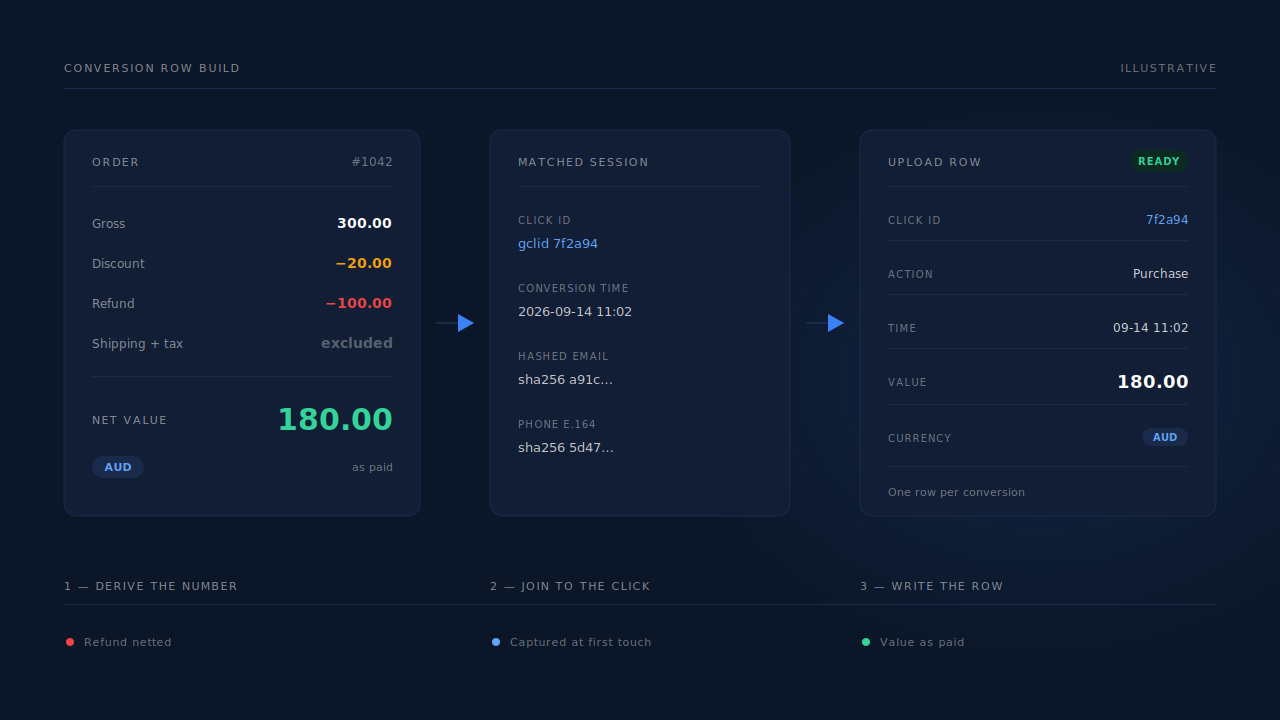
Send the number you would defend in a finance meeting, and send the same definition every time. For ecommerce that is usually order total minus discounts and refunds, excluding shipping and tax. For lead gen it is the expected value of that lead, not the headline deal size.
Three common choices, and what each does to your bidding:
- Order total (gross). Easiest to pull, and it over-values thin-margin products. A campaign optimising on gross revenue will happily buy your worst SKU all day.
- Net revenue. Gross minus discounts, returns and refunds. The default recommendation for most advertisers: defensible, available in every order system, and it penalises the traffic that buys and sends things back.
- Gross profit. Net revenue minus cost of goods. The most correct signal and the hardest to maintain, because COGS moves and somebody has to keep the mapping current.
Pick one and stop switching. From inside the bidding model, a definition change halfway through a learning period is indistinguishable from a market shift. If you must change, change it at a campaign boundary and write down the date.
Whatever you pick should reconcile with the same revenue you see when you attribute ecommerce revenue to the ad that started it. Two systems reporting two different figures for one order is a problem you will have to solve eventually. Solve it before you hand one of those figures to a bidding algorithm.
How do you value a lead that has not bought anything yet?
Use expected value: the average closed amount for that lead type multiplied by the rate at which that type closes. A demo request that closes a fifth of the time at an average of 5,000 is worth 1,000 on the row. It is an estimate, and an estimate that differentiates beats a constant that does not.
Work it from your own CRM, per lead type. Illustrative figures, to show the shape:
| Lead type | Avg closed value | Close rate | Value to send |
|---|---|---|---|
| Demo request | 5,000 | 20% | 1,000 |
| Pricing enquiry | 5,000 | 8% | 400 |
| Newsletter signup | 5,000 | 1% | 50 |
The point is the spread, not the digits. Three tiers already gives a bidding model something to work with, and three tiers is a pivot table.
Two refinements once the basics hold. First, segment on anything that reliably moves the close rate — company size, country, which form they filled. Second, if you grade leads before sales ever touches them, use the grade: a lead rated a strong match against your ideal customer is not worth what an unlikely one is, and if you already score leads against your ideal customer those tiers exist already.
The trap is sending full deal size for an unclosed lead. Upload 5,000 for every demo request and you have told Google that demo requests are five times more valuable than they are. It will bid on that belief until your real ROAS argues otherwise, several thousand dollars later.
What currency should the value be in?
Send the currency the customer actually paid in, with its ISO code on the row, and let Google do the conversion. Converting yourself before upload introduces a second exchange rate into a system that already has one, and the two will disagree on every reconciliation you ever run.
The rule matters more than it sounds. A row that carries an amount but no currency code is read in the account’s currency — so a €120 order uploaded into a USD account is counted as $120, silently, on every international row, in a direction that moves with the exchange rate. Confirm the exact behaviour in Google’s own import specification before your first multi-currency file; the field names change more often than the principle does.
Three things to check before that first upload:
- Every row carries a currency code, not only the rows that are not in your home currency.
- The code matches the amount. Pulling the value from one column and the currency from a billing country is how a Canadian customer’s USD payment ends up labelled CAD.
- Your own reporting converts on a stated date. Google’s converted figure and your internal one will differ slightly regardless, because they use different rates on different days. That is fine as long as you know which is which — the same discipline that applies when you report attribution across multiple currencies.
The principle is not Google-specific. On the Meta side, a purchase event carries its own value and currency pair rather than a pre-converted amount, which is why the guidance to send purchase value and currency to Meta reads almost identically.
What do you do when a conversion is refunded after you have uploaded it?
Restate it. Google Ads supports conversion adjustments — retracting a conversion you already uploaded, or restating it at a lower value — so a refund becomes a correction instead of a row you wish you could take back. Check the current adjustment format in Google’s documentation; the mechanics change more often than the concept.
Refunds are the most common reason an advertiser’s reported ROAS and their bank balance disagree. The uploaded value is a snapshot of the moment the order was placed. The refund arrives days or weeks later, into a system that never hears about it. Do nothing and the bidding model keeps optimising toward revenue that was returned — and toward the audiences that return it most, because in a gross-revenue column a high-refund segment is indistinguishable from a high-value one.
Two workable shapes:
- Restate on a schedule. A second weekly pass looks back over the previous window, finds orders refunded or partly refunded since, and uploads the adjustment.
- Delay the first upload. If your return window is short and your click window has room, hold the conversion until the return period closes and upload the settled figure once. Simpler, but it delays the signal, and delayed signal is worth less to a bidding model than prompt signal.
Most advertisers should restate rather than delay. Either way your own reporting should net refunds the same way, which is the practical reason to understand why refunds inflate your attributed revenue before you start reporting on gross.
How do you build the value column without an engineering team?
Export orders, join them to click IDs, write one row per conversion into the sheet your import reads, and schedule it. The join is the hard part: your order system knows the amount, your ad account knows the click, and almost nothing knows both.
The manual version, honestly described:
- Export orders for the period with order ID, amount, currency and customer email.
- Export leads with the click ID captured at the ad visit and the email typed into the form.
- Join on email, lowercased and trimmed.
- Map each joined row to click ID, conversion action name, conversion time, value, currency.
- Upload. Repeat next week. Forever.
It works, and it fails in predictable places. The email does not match, because the customer bought with a different address from the one they typed on the form. The click ID is missing, because it never survived the trip to the form. And step 3 silently drops every buyer who used two addresses — frequently the enterprise account you most wanted to value correctly.
That is the moment most teams notice the join is an identity problem rather than a spreadsheet problem. The upload pipe itself is the easier, separate question covered in how to import lead conversions into Google Ads.
How does PartialLeads put a real value on a Google Ads offline conversion?
By matching the purchase to the session that produced it, so the amount and the click ID land on one record before anything is exported. Orders arrive from Shopify, WooCommerce, Stripe, GoHighLevel or a universal webhook, get normalised, and are matched to a session by visitor ID first, then email, then phone, then IP.
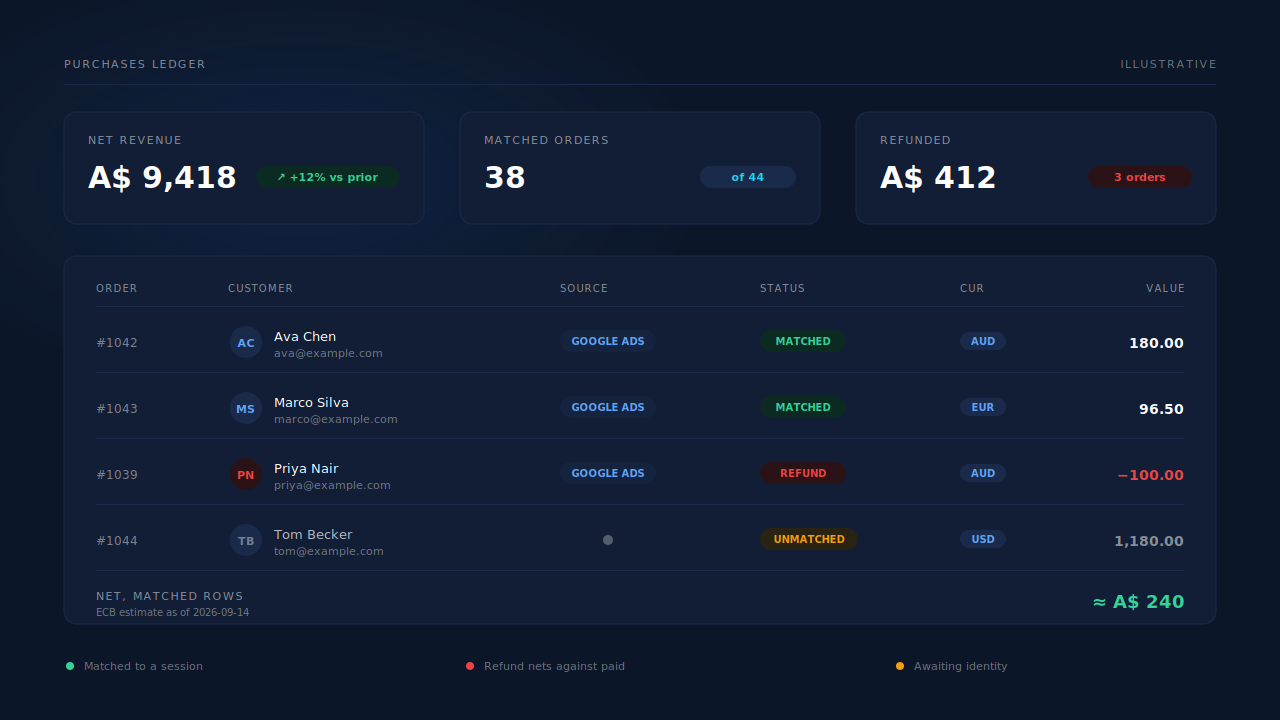
Once matched, the order’s value and its native currency attach to the lead, the lead flips from Partial to Completed, and first-touch and last-touch attribution rows are written carrying the UTMs, click IDs and landing page from that person’s journey. Refunds arrive as their own row with their own status phase and net against the paid amount rather than overwriting it, so the ledger figure is settled revenue rather than order-day revenue.
The Google Ads path dispatches from that matched purchase. Conversion rows are written to the client’s Google Sheet for Google’s scheduled import, carrying the click IDs captured at first touch — gclid, gbraid, wbraid — alongside hashed email and phone. Phones are normalised to E.164 with a country fallback from the session’s geo, and Gmail dot and plus variants are normalised before hashing, so the identifiers arrive in the shape the platform expects rather than the shape your CRM happened to store.
Because capture runs as the visitor types rather than on submit, those identifiers exist even for people who never pressed the button — and a submit-only pipeline has no row at all for that buyer, so there is nothing to put a value on.
The constraints, stated plainly:
- Dispatch runs through a scheduled Google Sheets upload, not a live API write. There is an import cadence between an order settling and Google crediting it.
- The value is only as settled as your refund data. A refund arriving after a row is already uploaded needs a restatement pass; matching does not retroactively edit a row Google is holding.
- Google’s click window is Google’s. A long sales cycle can close a deal after the click is too old to credit, and no vendor extends that deadline.
- We control what goes into the row. Google controls whether it matches. Every identifier can be present and correct and the click can still fail to resolve on Google’s side. Any vendor claiming otherwise is describing the half of the system they do not own.
| What breaks | The mechanism | Where you see it in the dashboard |
|---|---|---|
| Every conversion uploaded at the same flat value | Order value and native currency attached to the matched lead | Revenue column on the Leads list, per-lead revenue block |
| Revenue and click ID sit in two systems that never join | Purchase matched to a session by visitor ID, email, phone or IP | Purchases ledger, matched vs unmatched wedge |
| Refunds left inside the reported figure | Refund rows with their own status phase, netted against paid | Purchases ledger, net revenue |
| Multi-currency orders flattened into one number | Native currency kept per purchase; conversion stated with its rate date | Revenue by currency cards, Attribution report currency selector |
| The value lands against the wrong campaign | First-touch and last-touch attribution rows written per matched purchase | Attribution report, first vs last touch tables |
| Contact identifiers rejected on format | E.164 phone with geo fallback; Gmail dot and plus variants normalised before hashing | Lead Detail contact fields |
| Buyers who never submitted the form have no row to value | Email and phone captured on input, before submit | Leads list, Partial badge |
Tell us what's broken. We'll fix your tracking — free.
Describe the tracking/attribution problem you're stuck on and we'll map it to a fix: server-side conversions to Meta, Google, TikTok and Pinterest, plus first-party tracking that survives Safari. No code required.
Sources
- Meta for Developers — Conversions API: https://developers.facebook.com/docs/marketing-api/conversions-api
- Meta for Developers — Conversions API custom data parameters: https://developers.facebook.com/docs/marketing-api/conversions-api/parameters/custom-data