You import lead conversions into Google Ads by carrying the click identifier from the ad click all the way to the lead record, then uploading the conversion against that identifier. Where the identifier is gone, you upload the lead’s hashed email and phone number instead.
Google already knows which click it sold you. What it does not know is which of those clicks became a lead your sales team wanted, and that gap is why so much lead-gen spend gets optimised against the wrong signal.
The form fill is not the conversion that matters. The qualified lead is, and it usually becomes qualified somewhere Google cannot see: in a CRM, on a phone call, three days later.
How do you import lead conversions into Google Ads from a form tool?
Four steps, and only the first one is hard. Capture the click identifier when the visitor lands. Store it on the lead, not just on the session. Decide what event counts as the conversion. Upload that event against the identifier, with a conversion time and a value.
Concretely:
- Capture at the landing page. With auto-tagging on, the landing URL carries a click identifier —
gclidon most traffic,gbraidorwbraidon iOS app and YouTube traffic. Read it on the first pageview, before a redirect, form step or iframe can lose it; read it at submit time and you have already lost everyone who navigated in between. Which parameter appears when is a topic of its own — see how to capture gbraid and wbraid. - Carry it onto the lead record. The identifier has to travel with the person, not the pageview. A hidden form field is the common approach and the most fragile; storing it server-side against a durable visitor ID is what survives a multi-step funnel.
- Pick the event that means something. Not every form fill. “Qualified lead”, “booked call”, “closed deal” — whichever stage your sales process can actually judge, with a value reflecting what that stage is worth. Uploading raw form fills teaches bidding to find more form fills, which is rarely the problem you have.
- Upload it. Against the click identifier, or — where it is missing — as hashed contact details Google matches on its side. Google’s upload templates are the authority on column names and datetime format; a row whose conversion time does not match is rejected.
The result is a conversion action that fires days after the click, from your records rather than the browser, and that bidding can optimise against.
Why doesn’t Google Ads already know which clicks became leads?
Because the conversion happens outside the browser session Google was watching. Its tag fires on a page — a thank-you page, at best. Everything that decides whether the lead was any good happens later and elsewhere: a sales call, a CRM status change, a contract.
Three walls stand between the click and the outcome.
The event is in the wrong place. A thank-you page view is a proxy for “someone filled in a form”, not “we got a customer” — and if the confirmation is an email rather than a page, even the proxy stops firing.
The event is at the wrong time. Lead-gen cycles run days to months. The browser that made the click is long closed by the time anyone knows whether the lead was real, and client-side tracking has no mechanism for a conversion that becomes true later.
The identity is gone. Someone clicks on their phone and fills the form on a laptop a week later, with no click identifier in that second session. To Google those are two unrelated people — the same mechanism that makes paid conversions show up as Direct in your own reports.
So Google optimises on what it can see, bidding toward cheap form fills because that is the only outcome it was told about.
Should you upload the click ID or hashed contact details?
Click ID when you have it, hashed contact details when you do not, and in practice you want both built. The click identifier is a deterministic join: it names the exact click, so credit lands on the right campaign and keyword. Hashed email and phone are the probabilistic fallback: Google matches them on its side, recovering conversions the identifier lost but handing you less control.
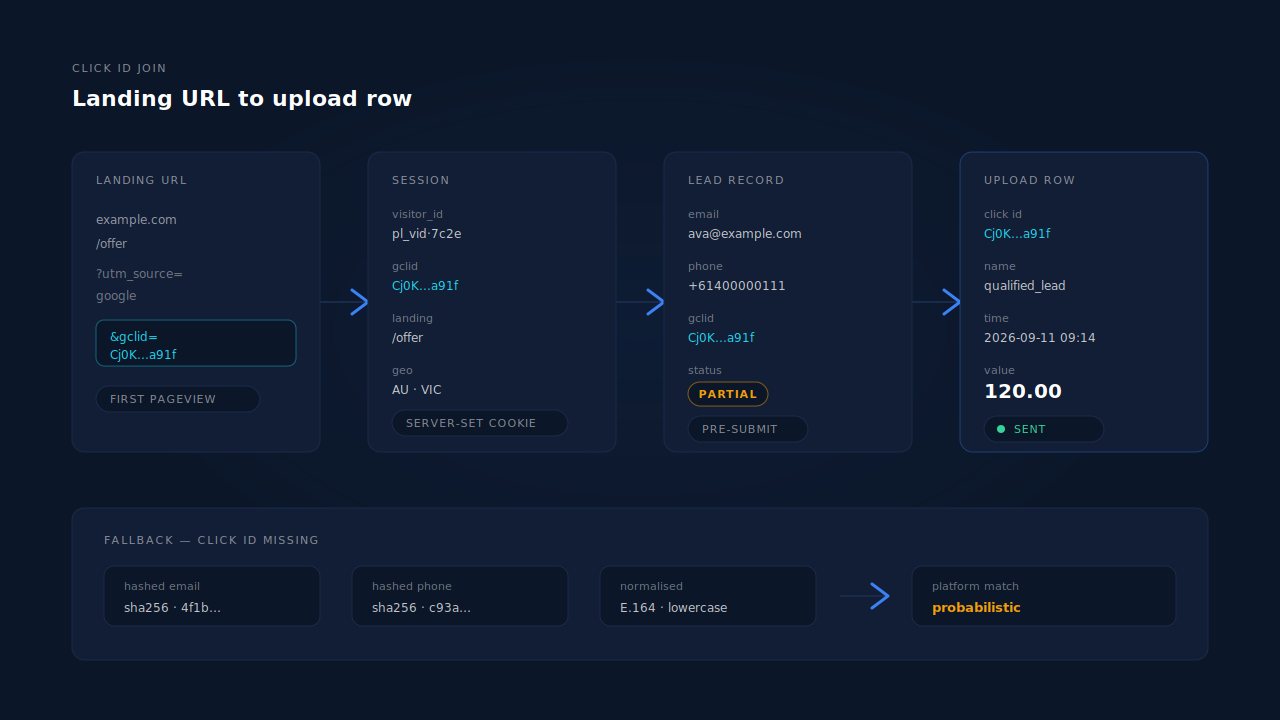
The trade-offs:
- Precision. A click-ID upload attributes to one click. A hashed-identifier upload attributes to whatever Google resolves that person to — which may be a different campaign, or nothing at all.
- Coverage. Click IDs go missing constantly: auto-tagging off, a redirect chain that drops query parameters, an email client rewriting the link, a visitor converting on a later organic visit. Hashed identifiers survive all of those, if you collected a real email or phone.
- What you must collect. The click-ID path needs no personal data — just a parameter you already received. The hashed path needs an email or phone, normalised and hashed before it leaves your systems: a privacy difference that changes what your consent language must cover.
- Freshness. Google limits how old a click can be when you upload against it. Read the current limit off Google’s own documentation; it sets your cadence, and a monthly CSV habit silently drops your longest sales cycles.
Build the click-ID path first: more accurate, no PII, and the hashed fallback is easy to add on top of a pipeline that already stores leads properly. One distinction trips people up here — gclid, fbclid and UTM parameters do different jobs, and UTMs alone will never support an offline conversion import.
What breaks a lead conversion import?
Seven failure modes, roughly in order of how often they bite:
- Auto-tagging is off. No auto-tagging, no gclid, no click-ID import. One account setting, and the first thing to check when an upload returns nothing but unmatched rows.
- The identifier is captured too late. Read at submit time rather than at landing, it is already gone for anyone who clicked through a redirect, a funnel step, or an embedded form.
- It is stored on the session, not the person. The lead record ends up with a name and an email and no click ID, so there is nothing to upload against.
- The conversion action is the wrong type. An offline import needs an action configured to receive imported conversions. Pointing an upload at a tag-based action fails unhelpfully.
- Time and timezone. A conversion time in the wrong format, or in a timezone that disagrees with the account’s, produces rejected rows or conversions landing on the wrong day. Treat the upload template as the spec.
- Double counting. The same lead uploaded by a scheduled job and again by a manual backfill becomes two conversions, unless each row carries a stable, deterministic identifier.
- Hashing mistakes. Hashed identifiers must be normalised the way Google normalises them — lowercased, trimmed, phone numbers in international format. A Gmail address typed with dots one time and without them the next hashes to two different values, and neither matches.
None of these announce themselves. The symptom is always the same: your conversion count is lower than your CRM’s and nobody can say why.
Can you do this without buying a tool?
Yes, and the DIY version is viable for a simple funnel. Four steps, each with its ceiling.
Add a hidden field. Populate a hidden input from the URL with a few lines of JavaScript and let the click ID ride in with the submission. Limit: it only works if the form is on the landing page. Any redirect, second step, or embedded form and the parameter has already left the URL.
Persist it in a first-party cookie. Write the click ID on landing and read it back at submit, so it survives navigation. Limit: cookies written by JavaScript are aggressively capped in Safari, so long sales cycles lose them.
Add a column in the CRM. Store the click ID on the contact record and let sales set a “qualified” stage. Limit: manual data entry decays. Within a quarter the column is half empty and nobody trusts the upload.
Schedule a spreadsheet upload. Google Ads can pull conversions from a scheduled Google Sheet, so a weekly CRM export into a fixed template is a real pipeline with no vendor in it. Limit: it is only as good as the export. Leads whose click ID never reached the CRM are invisible to it, disqualifications never net back out, and nothing notices when the export breaks.
All four share one ceiling: they start working at submit time. Every visitor who typed an email address and then closed the tab is, to all four, identical to someone who never arrived — the group partial leads exist to describe.
How does PartialLeads import lead conversions into Google Ads?
PartialLeads captures the click identifier server-side on the first pageview and keeps it attached to the person, not the pageview — so the upload row has something to join on even when the converting session does not.
The tag reads gclid, gbraid, wbraid and gad_source from the landing URL, along with UTMs and a referrer fallback for when the parameters never arrive. Those land on the session, bound to a durable visitor ID: localStorage with a first-party cookie backup, and the cookie is set by the server rather than by script, so Safari’s cap on script-written cookies does not apply.
From there, identity does the work a hidden field cannot. A six-tier identity cluster unions a person’s sessions by visitor ID, email, phone, IP and user-agent, device fingerprint, and click ID — so a lead who clicked the ad last Tuesday and filled the form today arrives with last Tuesday’s gclid already on the record. Within a single visit, sibling-session inheritance fills in a converting session that shows no source from the one next to it that does.
Dispatch runs through a scheduled Google Sheets upload, one row per lead, carrying the click identifiers plus hashed email and phone so both match paths sit on the same row. The normalisation that breaks most hand-rolled uploads is done for you: phone to E.164 with the country code inferred from session geography, email lowercased and trimmed, and Gmail dot and plus-alias normalisation applied before hashing.
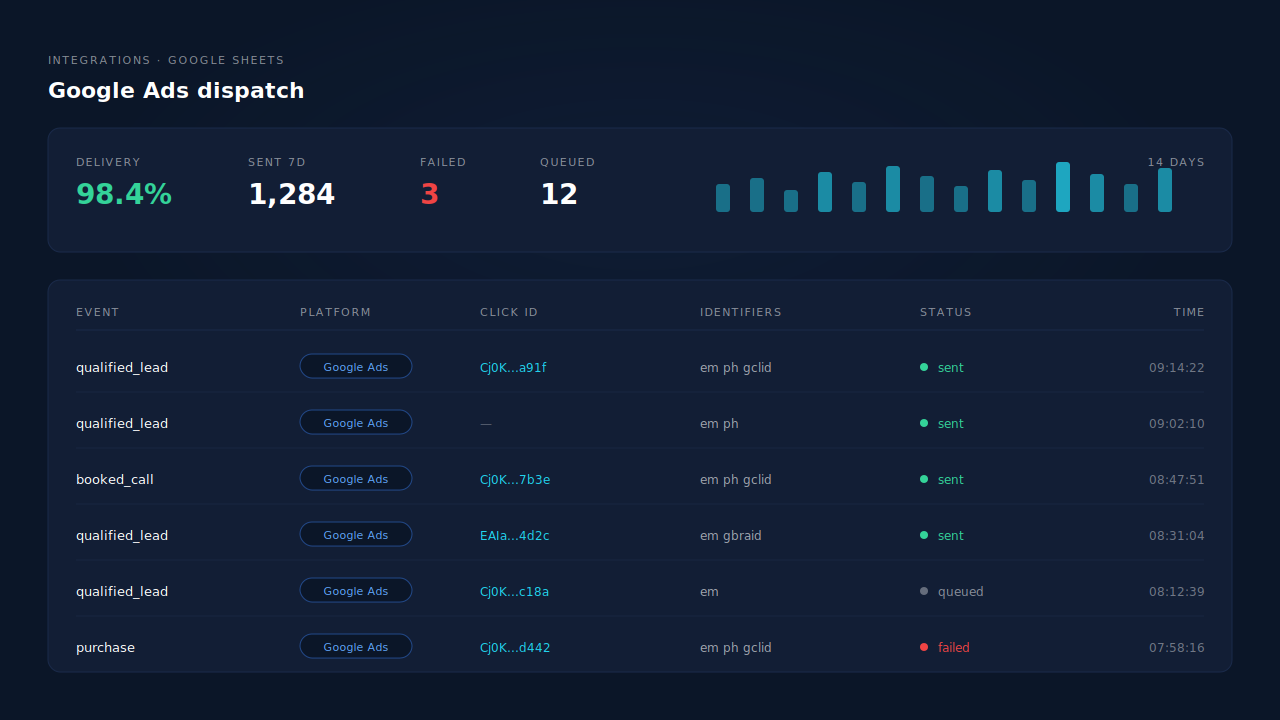
Two more mechanics matter in production. Each dispatched event carries a deterministic event ID derived from the config and the record, written into dedup tables with a uniqueness constraint — so a redelivered webhook or a re-run worker physically cannot produce the same conversion twice. And failures are sorted rather than retried blindly: an authentication failure flags the integration for reconnection, transient failures retry on the next worker cycle, a permanently malformed payload stops.
The part that has nothing to do with Google is what there is to upload at all. Because email and phone are captured as they are typed rather than on submit, the leads available to send include the people who abandoned — and each carries its own AI qualification verdict, scored against your ideal-customer description, so you can see which were strong matches before deciding what deserves to be a conversion. That is the same identifier set feeding the Meta, Pinterest and TikTok dispatches on the Conversions API side of the product; Google is one destination of several off one capture.
| What breaks | The mechanism | Where you see it in the dashboard |
|---|---|---|
| Google Ads never learns which clicks became leads | Scheduled Google Sheets dispatch, one row per lead with attribution | Integrations → Google Sheets |
| The click ID is gone by the time the form is submitted | gclid, gbraid, wbraid and gad_source read from the landing URL server-side |
Click-ID fields on the session and lead |
| The lead converted on a later visit with no ad click on it | Six-tier identity cluster unions sessions by visitor ID, email, phone, IP, fingerprint and click ID | Customer Journey timeline |
| The converting session shows no source at all | Visit-sibling attribution inheritance within the visit | Journey ribbon on the Leads list |
| Safari drops the cookie holding your click ID | Durable visitor ID with a server-set first-party cookie | Returning visitors stay stitched to one person |
| Phone numbers arrive in a dozen formats | E.164 normalisation with the country code inferred from session geography | Phone on the lead record |
| The same Gmail address hashes two different ways | Dot and plus-alias normalisation applied before hashing | Hashed identifiers on the upload row |
| One conversion gets uploaded twice | Deterministic event ID plus a uniqueness constraint per dispatch config | Activity log |
| An upload quietly stops working | Retry taxonomy — auth failures flag reconnection, transient retry, permanent stop | Integration status and activity log |
| You can only upload people who submitted | Email and phone captured before submit, as they are typed | Leads list, Partial badges |
| Every lead gets uploaded, including the junk | Two-step AI enrichment scored against your ideal-customer persona | Customer Match card, STRONG MATCH inbox |
Three honest constraints. PartialLeads controls dispatch, not matching — every lead you send gets sent, but whether Google ties it to a click depends on the identifiers present and on Google’s own graph, which no vendor controls. Google’s limit on click age applies here exactly as it does to a manual upload; capture earlier, and do not expect a backfill to rescue a quarter of history. And rule-based gating of which leads dispatch automatically is configured per integration, so check how yours is set rather than assuming “only strong matches” is the Google default.
Tell us what's broken. We'll fix your tracking — free.
Describe the tracking/attribution problem you're stuck on and we'll map it to a fix: server-side conversions to Meta, Google, TikTok and Pinterest, plus first-party tracking that survives Safari. No code required.
Sources
- Meta for Developers — Conversions API, customer information parameters: https://developers.facebook.com/docs/marketing-api/conversions-api/parameters/customer-information-parameters
- Meta for Developers — Conversions API: https://developers.facebook.com/docs/marketing-api/conversions-api