To attribute a Shopify draft order to the ad that started it, match the paid order back to the buyer’s original ad visit by email or phone, then send it to the ad platforms from the server. The draft order itself carries no ad click. It is paid days later through an invoice link, or marked paid by your team, so the browser never connects it to the ad.
The pattern is common in any store that sells by quote: wholesale, custom work, furniture, equipment, anything with a sales conversation. A buyer finds you through Google Ads, fills in a quote form or calls, and your team builds a draft order and emails the invoice. The buyer pays. Shopify shows the revenue. Google Ads and Meta show nothing.
The ad did its job. The tracking just lost the thread between the click and the invoice.
What is a Shopify draft order?
A draft order is an order your team builds by hand in the Shopify admin instead of the buyer building a cart. You add the products, custom prices or discounts, then send the buyer an invoice with a checkout link, or record the payment yourself. When it is paid or completed, the draft becomes a regular order in your admin.
That makes draft orders the default tool for quote-led sales. They let you:
- Price by conversation. Volume discounts, custom quotes and one-off line items that the storefront cart cannot express.
- Take payment later. The invoice link lets the buyer pay by card whenever they are ready.
- Take payment offline. Bank transfers, cheques and phone payments get marked as paid by your team.
Every one of those paths ends in the same place: a paid order in Shopify with no ad click attached to it.
Why do paid draft orders never show up as ad conversions?
Because the ad click lives on the buyer’s first visit, and the draft order is paid in a different visit, or with no visit at all. Browser pixels credit the ad only when the session that buys also carries the click. An invoice link opened days later from email has no gclid and no fbclid on it.
Walk through a typical sale:
- Monday. A buyer clicks your Google ad. The landing URL carries a
gclid. They browse, then fill in your quote form. - Tuesday. Your team builds a draft order and emails the invoice.
- The following Monday. The buyer opens the email on their work laptop and pays through the invoice link.
The checkout on step 3 starts from an email client, on a different device, a week after the click. There is no click id in that URL, so any browser tag that fires treats the purchase as email or Direct traffic. If the buyer pays by bank transfer and your team marks the order paid, there is no browser at all.
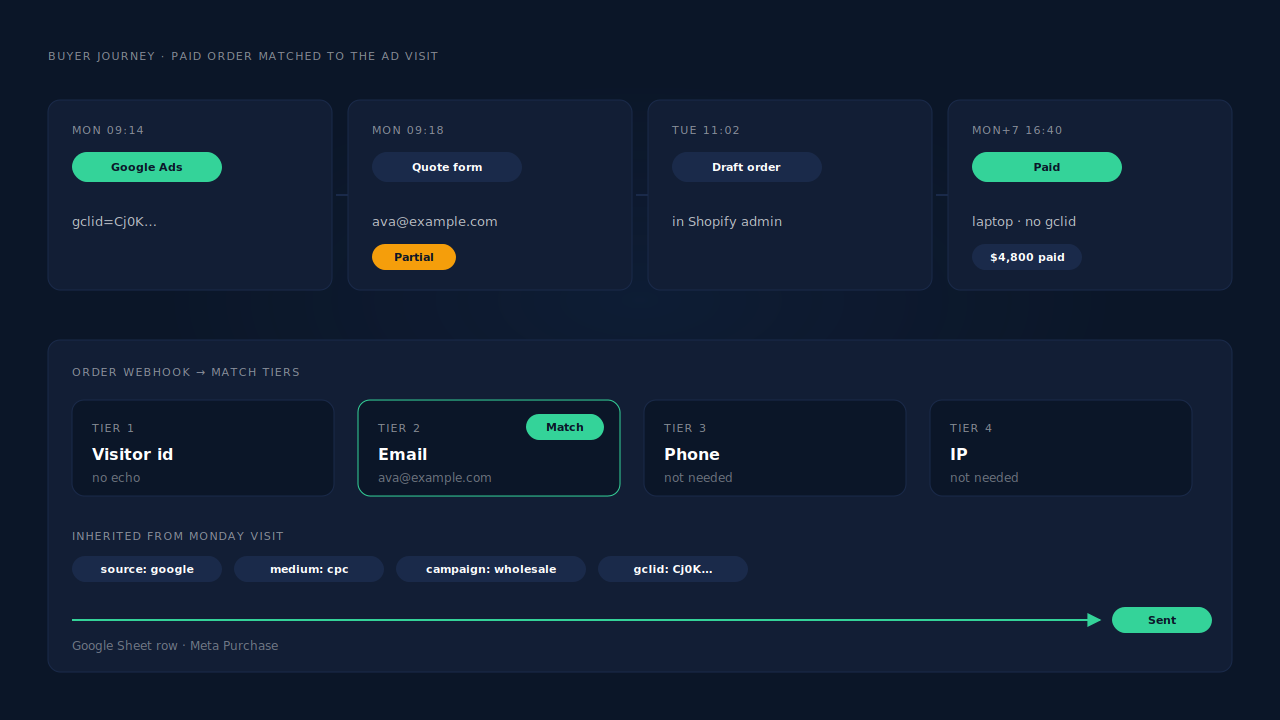
Merchants run into both halves of this: paid draft orders missing from Google Ads conversion data, and Meta ads that start quote-led sales with no purchase attributed to them.
Can you add the gclid to the draft order by hand?
You can, but it only works if the gclid was saved when the buyer first arrived. A hidden field on your quote form that copies the gclid from the landing URL into the submission is the classic manual fix. Your team then pastes it into the draft order’s notes and uploads it to Google Ads later.
The manual route breaks in predictable places:
- The buyer never submits the form. They start typing, then call you instead. The hidden field is never sent.
- The buyer arrives from an iPhone. Google often sends
gbraidorwbraidinstead ofgclidon iOS traffic, and your hidden field may not capture them. The details are in how to capture gbraid and wbraid for offline conversions. - Someone forgets. Copying ids between systems by hand fails quietly. Nobody notices a missing note.
- Meta gets nothing. A gclid note helps Google Ads only. Meta needs its own server event with the buyer’s hashed email and phone.
The hand-copy approach proves the principle, though: the attribution has to come from the first visit, and it has to reach the paid order by some key other than the browser.
What should join the paid order to the original ad visit?
The buyer’s email address, with phone as the backup. A draft order almost always carries the email the invoice was sent to. If that same email was typed on your site during the ad visit, the order can be joined to that visit and inherit its click id, UTMs and landing page, without any browser involvement.
This is identity matching, not session tracking. The order does not need to happen in the same browser, on the same device, or within a cookie’s lifetime. It needs one shared identifier between the visit and the order. Visitor identity resolution is the general version of the same join: sessions and orders that share an email or phone belong to one person.
The weak spot is obvious. If the buyer never typed an email or phone on your site, there is nothing to match. A buyer who phones in straight from the ad and gives their details only to your sales team leaves no identifier on the ad visit.
How do you send a matched draft order to Google Ads and Meta?
Send it from the server once the order is paid, not from any page the buyer loads. For Google Ads, that means an offline conversion import: one row per order with the click id, conversion time, value and currency. For Meta, it means a Purchase event through the Conversions API with the buyer’s hashed email and phone.
Three details matter more for draft orders than for normal checkouts:
Send only paid orders. A draft order can sit unpaid for weeks, get renegotiated, or never close. Only a paid order is a sale. Counting the invoice as a conversion teaches the algorithms that quotes are purchases.
Mind Meta’s event-time rule. Meta accepts server events with an event_time up to seven days in the past. A draft order paid today is sent today, so a long quote cycle is fine as long as the send happens promptly after payment. The mechanics are in the 7-day event time window in Meta CAPI.
Keep one sender. If another app already sends Purchase for Shopify orders, check whether it also sends draft orders. Meta deduplicates a browser event and a server event only when both carry the same event name and event_id. Two tools with their own ids count the same order twice.
How does PartialLeads attribute Shopify draft orders?
PartialLeads receives Shopify’s order webhooks, so a draft order is handled like any other order once it becomes a paid order. It is matched to the earlier ad session by the buyer’s email or phone, then sent server-side: a Purchase to Meta, and a row with the gclid, gbraid or wbraid to a Google Sheet for offline import.
The ad visit is recorded up front. The PartialLeads pixel captures UTMs and click ids on landing, including gclid, gbraid, wbraid and fbclid. It also captures the email and phone a visitor types into your quote or contact form before they hit submit. A buyer who starts the quote form and then picks up the phone instead still leaves an identifier on the ad visit. That is partial lead capture doing the work the hidden field cannot.
The paid order is matched without a browser. When the draft order becomes a paid order, the order webhook arrives with the buyer’s email and phone. PartialLeads matches it in tiers: visitor id echo, then email, then phone, then IP. For an invoice paid on another device, email and phone carry the match. The order then inherits that session’s source, campaign and click ids, first touch and last touch.
Only paid orders are sent. Shopify orders are sent when financial_status is paid. An unpaid invoice, a pending bank transfer or a cancelled order is not sent. A bank-transfer draft order is sent when your team marks it paid. The value is the full order total, total_price, including tax and shipping, after discounts. An order is recorded once; later edits do not re-send it.
Google Ads gets a Sheet row. Each matched order writes a row with the click id, hashed email and phone, value and currency to a Google Sheet that you schedule as an offline conversion import in Google Ads. The drafting of the order never reaches Google Ads; the paid order does.
Meta gets a server-side Purchase with the hashed email and phone, and a deterministic event_id, so a redelivered webhook cannot create a second send.
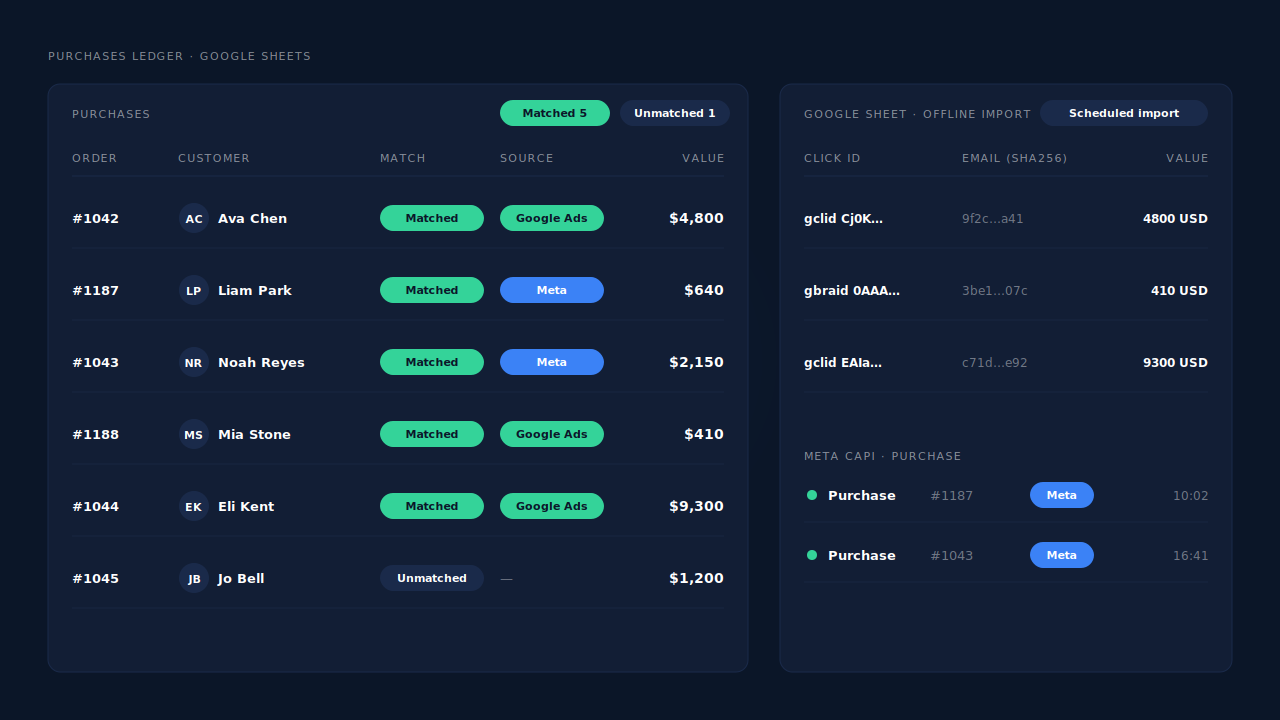
Where you see it working. The Purchases ledger lists the paid draft order with the source it matched to, or an unmatched flag. The Google Sheets integration shows the row waiting for the next scheduled import. The Journey timeline on the lead shows the path: Google Ads visit, quote form, then the purchase a week later. The pillar guide on attributing ecommerce revenue to the ad click covers the same join for every Shopify order type.
The honest constraints. Delivery is the part PartialLeads controls: every paid order is sent. Matching is maximised, not guaranteed. A draft order is matched only if the buyer’s email or phone was seen on your site during an earlier visit, and only if the draft order uses that same email or phone. A buyer who calls straight from the ad without typing anything, or whose invoice goes to a colleague’s address, arrives unmatched. Creating a draft order is not tracked as an event. PartialLeads’ event ids are its own, so it does not deduplicate against Shopify’s Facebook & Instagram app or another tool that sends Purchase. Keep one source per event.
| What breaks | The mechanism | Where you see it in the dashboard |
|---|---|---|
| Invoice paid with no click id on the URL | Paid order matched to the earlier ad visit by email, then phone | Purchases ledger with matched source |
| Buyer starts the quote form, then calls | Email and phone captured before submit on the ad visit | Leads list, Partial status |
| Invoice paid on another device, days later | Tiered match: visitor id, email, phone, IP; sessions joined into one person | Journey timeline on the lead |
| Bank transfer marked paid by your team | Webhook-driven send once financial_status is paid |
Purchases ledger, CAPI activity log |
| Google Ads never sees the sale | gclid, gbraid or wbraid row with value and currency for offline import | Integrations → Google Sheets |
| Meta never sees the sale | Server-side Purchase with hashed email and phone, deterministic event_id |
CAPI activity log on the Meta CAPI page |
Tell us what's broken. We'll fix your tracking — free.
Describe the tracking/attribution problem you're stuck on and we'll map it to a fix: server-side conversions to Meta, Google, TikTok and Pinterest, plus first-party tracking that survives Safari. No code required.
Sources
- https://developers.facebook.com/docs/marketing-api/conversions-api
- https://developers.facebook.com/docs/marketing-api/conversions-api/parameters/server-event
- https://developers.facebook.com/docs/marketing-api/conversions-api/parameters/customer-information-parameters
- https://developers.facebook.com/docs/marketing-api/conversions-api/deduplicate-pixel-and-server-events