An offline conversion upload that matches nothing has usually been accepted, not rejected. Google validated the file, took the rows, then failed to tie each row’s click ID to a real click. Three causes cover most of it: the click ID was never captured, the click is older than Google’s click window, or the conversion action name does not exist under that exact name.
Three different problems, three different fixes, and the diagnostic that separates them takes two minutes.
What does a “0 conversions matched” upload actually mean?
It means your file passed the format gate and failed the identity gate. Upload success only says the columns parsed. Matching is a separate step where Google looks for a recorded click with that ID, on that account, inside its click window, against a conversion action that exists and accepts imports.
So “uploaded successfully, 0 conversions imported” is not a contradiction — the rows were readable and unusable. Nothing in that message says which gate failed, which is why people re-upload the same file three times and change nothing. The gates, in order:
- Format — columns present, dates parseable, values numeric.
- Identity — the click ID resolves to a click Google recorded for this account.
- Recency — that click falls inside the maximum click age Google allows.
- Destination — the named conversion action exists, is the right type, and accepts imports.
A row can die at any of the last three and still be reported as uploaded.
Where does the click ID get lost before it reaches your upload?
Most of the time it was never in your system. The ID is stripped by a redirect, lost when the visitor navigates to a second page, or never appended because auto-tagging was off at the moment of the click. By the time you build the file, the column is empty and no upload tuning fixes it.
Four places it dies, roughly in order of how often:
- Auto-tagging is off on the account, so the landing URL never carried a click ID at all.
- A redirect chain drops the query string. A click lands on a vanity URL, geo-router or consent gateway, and the parameter does not survive the hop.
- The form is not on the landing page. The visitor arrives with the ID in the URL, clicks through to a contact page, and the ID is gone from the address bar before they type anything.
- The form is an iframe embed. The parent page has the ID; the embedded form does not see it.
If you have not ruled these out, start there — gclid missing on landing pages is the same failure from the capture side. The click ID has to be read off the landing URL at first touch and stored somewhere that survives the rest of the journey; a hidden form field only survives if the visitor fills that form in that session.
Is your click ID too old for Google to accept?
Google will not attribute an imported conversion to a click beyond a maximum click age. That limit is Google’s rule, not a setting in your stack, and no vendor can extend it. Check the current window in Google Ads’ own documentation before building a pipeline on a number you half-remember.
This catches B2B advertisers hardest. If your median time from ad click to closed deal is longer than the window, a share of your rows is structurally unmatched no matter how clean the data is — a constraint to design around, not a bug to fix. Two practical consequences:
Your upload cadence eats the window. A weekly export plus a weekly import can burn a fortnight of headroom before a row is ever sent. If your deals close slowly, upload daily.
Import the earliest defensible conversion, not only the final one. A qualified lead, a booked call, or a trial start happens weeks before the sale and lands well inside the window. Importing that with a sensible value keeps Smart Bidding fed on signals that arrive in time, which beats an accurate revenue row Google refuses to match.
One related trap produces a different error rather than a silent zero: the conversion time in a row must fall after the click time. Exports that write timestamps in the spreadsheet’s local zone while the account reads another will push some conversions to before their own clicks. If your daily totals already disagree with Google’s, your dashboard timezone is changing your numbers too, and the two share a root cause.
Why does the conversion action name break more uploads than the click ID does?
Because it is an exact string comparison, and spreadsheets are hostile to those. The name in your row has to equal the name in Google Ads character for character — same spelling, case and spacing. A row with Qualified Lead and a trailing space does not match an action called Qualified Lead.
The usual offenders are boring and expensive:
- A trailing space introduced by a CSV export or a spreadsheet formula.
- A curly apostrophe where the account has a straight one, courtesy of autocorrect.
- Someone renamed the action in Google Ads and did not tell whoever owns the export.
- The action exists but is the wrong type, or does not accept imported conversions.
- The import is running against a different account from the one that served the click.
Diagnose it by copying the name out of the Google Ads interface and pasting it into your template rather than retyping it. If rows suddenly start matching, that was your bug.
Why do gbraid and wbraid rows fail when gclid rows succeed?
Because they are different parameters with different rules, and they belong in their own columns. iOS traffic and some app and YouTube paths return gbraid or wbraid in place of gclid, and dropping one of those into the gclid column produces a row that parses cleanly and matches nothing.
They also behave differently once matched. Both are deliberately aggregated rather than user-level, so the reporting is coarser than the gclid path. Expect a lower attributed count there, and do not read the gap as a pipeline defect.
The capture-side fix is to store whichever parameter arrives in its own field, rather than normalising all three into one “click id” column — capturing gbraid and wbraid for offline conversions covers the mechanics. The upload-side fix is to map each field to its matching column.
How do you tell a capture failure from an upload failure?
Count the rows that carry a click ID at all, before you look at what Google matched. If most rows go up with an empty click-ID column, the failure is upstream in capture and nothing in the file will help. If nearly every row carries an ID and Google still matches nothing, the failure is in the file: the name, the age, the account, or the column.
Run these six checks in order and stop at the first that fails:
- What share of your rows have a click ID? Under half means fix capture first.
- How old is the oldest click you are sending, measured to conversion time?
- Does the conversion action name match exactly, pasted rather than typed?
- Is each value in the right column — gclid, gbraid and wbraid kept separate?
- Is every conversion time after its click time, in the account’s timezone?
- Is the import pointed at the account that served the click?
You can do all of this without a vendor: capture the click ID into a hidden form field, push it into the CRM record, and export a weekly file with the click ID, conversion name, timestamp and value — importing lead conversions into Google Ads walks the build. Two honest limits: the hidden field only catches people who fill the form on the page they landed on, and a CRM field overwritten on the second visit loses the original click.
Once rows do start matching, Google’s attributed numbers and your own reports will disagree for a while. That is normal rather than a new bug — reading an attribution report without fooling yourself is a separate skill from getting rows to land.
How does PartialLeads keep the click ID attached to the conversion?
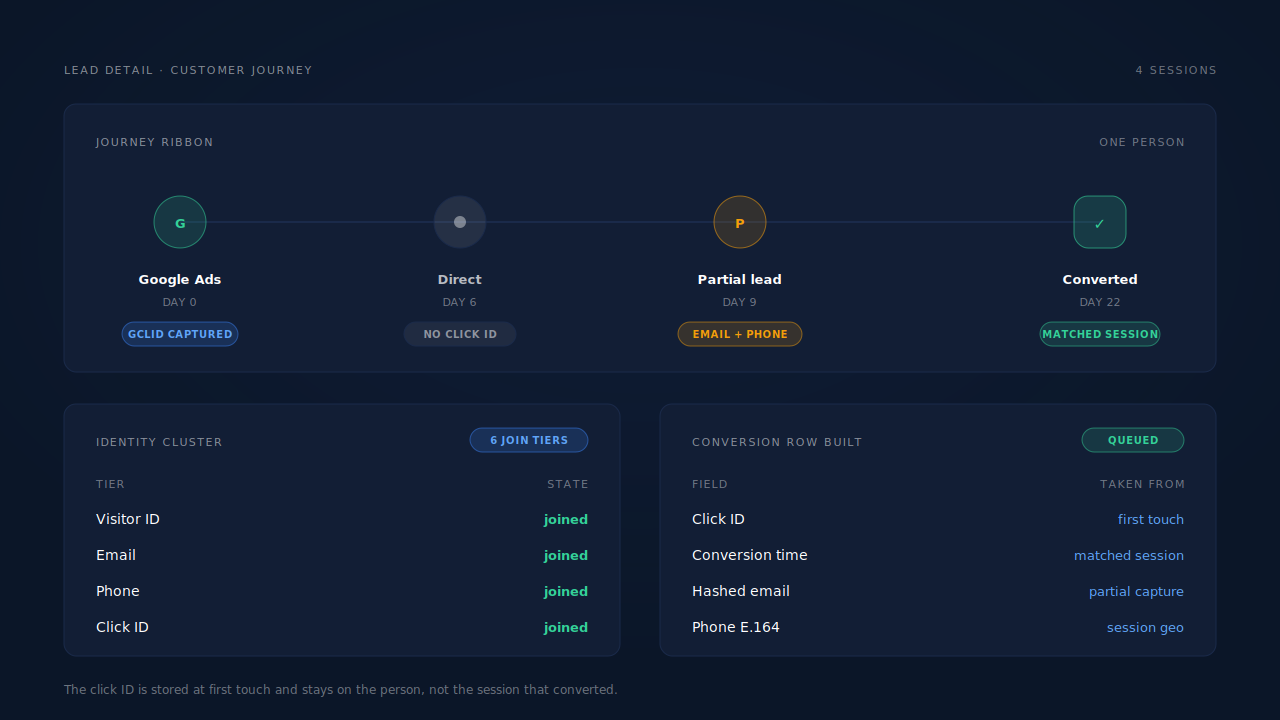
By reading the click ID off the landing URL at first touch and keeping it on the person rather than the session. The tag captures gclid, gbraid, wbraid and gad_source, with a referrer fallback for iframe embeds where the frame URL carries nothing, and stores each in its own field on the session.
From there, the identity layer does the part hidden form fields cannot. Sessions are unioned into one cluster across six tiers — visitor ID, email, phone, IP and user agent, device fingerprint, and the click ID itself — so a visitor who arrives from an ad on Monday and converts on a direct visit three weeks later still has Monday’s click ID on their record. That is how visitor identity resolution works, and it is why the ID survives the journey instead of the session.
Because capture happens on input rather than on submit, the email and phone are on the record even when the visitor never pressed the button, so the row carries hashed contact data alongside the click ID. Phones are normalised to E.164 with a country fallback from the session’s geo, and Gmail dot and plus variants are normalised before hashing — Meta documents the same shape for its own Conversions API, and the rules rhyme across platforms.
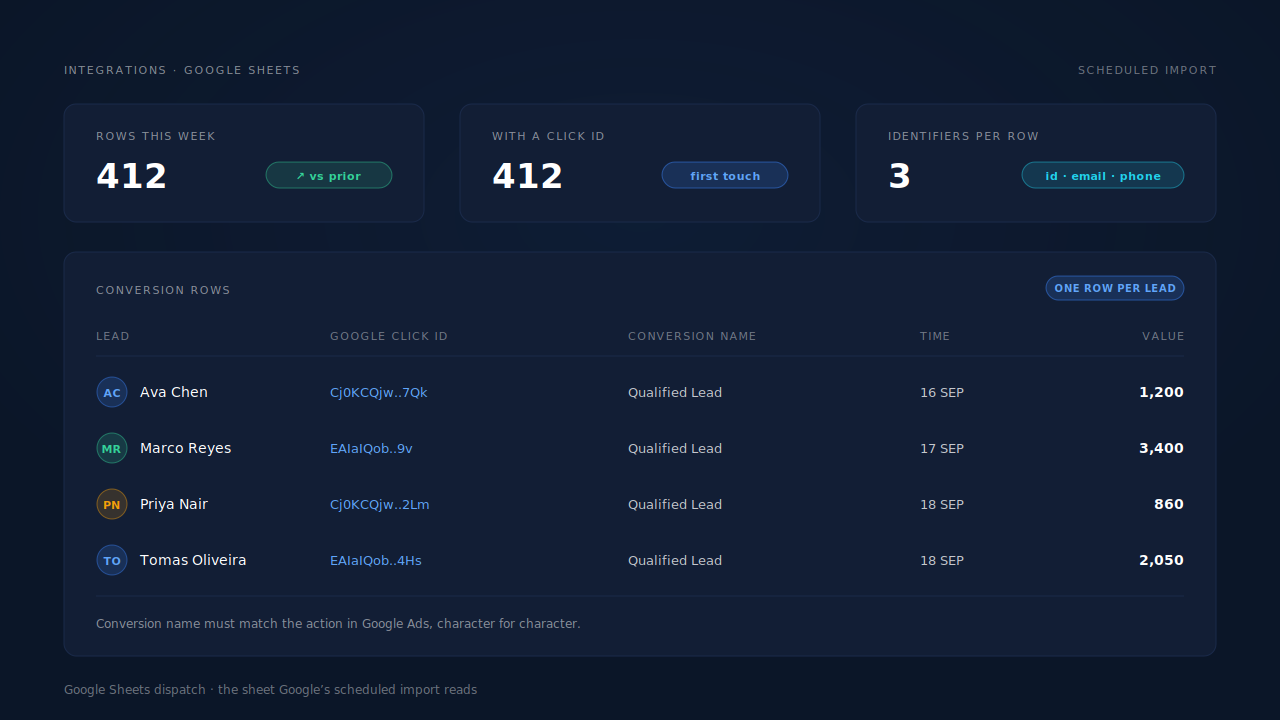
Conversion rows are written to the client’s Google Sheet for Google’s scheduled import, one row per lead, with the click ID from first touch and the conversion time from the matched session record.
The constraints, stated plainly:
- If no click ID ever reached the browser, nothing recovers it. Auto-tagging off, or a redirect stripping the query string before the tag loads, leaves a session with no ID and no reconstruction path for Google’s parameters.
- Google’s click window is Google’s. Rows beyond it will not match, and keeping the ID on the cluster does not extend the deadline.
- Dispatch runs through a scheduled Google Sheets upload, not a live API write, so there is an import cadence between a lead converting and Google crediting it.
- We control what goes into the row. Google controls whether it resolves. Every identifier can be present and correct and the click can still fail to resolve on Google’s side. Any vendor claiming otherwise is describing the half of the system they do not own.
| What breaks | The mechanism | Where you see it in the dashboard |
|---|---|---|
| Click ID never captured | gclid / gbraid / wbraid / gad_source read from the landing URL at first touch, referrer fallback for iframes |
Click-ID fields on the session, Lead Detail |
| Click ID lost between the ad visit and the conversion | Six-tier identity cluster keeps the ID on the person, not the converting session | Customer Journey timeline on the lead |
| The converting visitor never submitted the form | Email and phone captured on input, before submit | Leads list, Partial badge |
| Contact data rejected on format | Phone normalised to E.164 with geo fallback; Gmail dot and plus variants normalised before hashing | Lead Detail contact fields |
| Conversion time taken from the wrong event | Time read from the matched session record, not the export date | Purchases ledger, lead journey |
| Rows older than Google’s click window | Nothing on our side extends it — the limit is Google’s | Google Ads conversion reporting |
Tell us what's broken. We'll fix your tracking — free.
Describe the tracking/attribution problem you're stuck on and we'll map it to a fix: server-side conversions to Meta, Google, TikTok and Pinterest, plus first-party tracking that survives Safari. No code required.
Sources
- Meta for Developers — Conversions API: https://developers.facebook.com/docs/marketing-api/conversions-api
- Meta for Developers — Conversions API customer information parameters: https://developers.facebook.com/docs/marketing-api/conversions-api/parameters/customer-information-parameters