Your dashboard and your ad platform disagree about yesterday because they are not measuring the same yesterday. A reporting timezone decides where midnight falls, and midnight decides which date a conversion lands on. Change the timezone and no event changes — only the bucket it falls into. That single mechanic explains most “the numbers don’t match” arguments.
It is also the most under-diagnosed reporting bug in paid media, because it never looks like a bug. Nothing errors. No events go missing. You just get two numbers that are each internally consistent and mutually contradictory, and a meeting about which one to trust.
Why do two reports show different totals for the same day?
Because “day” is not a property of the data. It is a decision made at read time. Every conversion is stored as an instant — a moment on a universal clock — and a report turns that instant into a date by asking which calendar day it fell on in some timezone. Two reports with two timezones will sort the same instants into different days.
Meta’s Conversions API makes this explicit: the event_time field is a Unix timestamp in seconds, which is a count from a fixed point in UTC with no timezone attached. The platform stores the instant. The date you later see in a report is applied afterwards, in whatever timezone that account reports in.
So when your dashboard says 38 conversions on Friday and the ad platform says 41, the honest first hypothesis is not “the tracking is broken.” It is “three conversions fell on the other side of somebody’s midnight.”
You can test this in about two minutes: widen both reports to the same full month. If the monthly totals agree and only the daily rows disagree, you have a boundary problem, not a measurement problem. If the monthly totals also disagree, you have something else — and you can stop blaming the timezone and go read the attribution report properly instead.
What is a reporting timezone actually doing?
A reporting timezone is a display setting that maps stored instants onto calendar days. It does three things: it decides which day each event belongs to, it decides when “today” starts for a live report, and it decides where the edges of a week or a month sit.
What it does not do is change any stored value. This is worth being pedantic about, because the fear in the room is usually “are we losing conversions?” You are not. A timezone change is a re-bucketing, and it is reversible.
Three places each keep their own version of this setting, and they are rarely the same:
- The ad platform account. Each ad account reports in a timezone that was chosen when the account was created, and on most platforms that choice is difficult or impossible to change later. Agencies inherit accounts set to whatever the last agency picked.
- Your analytics or attribution tool. A separate setting, usually changeable, often left at its default.
- Your CRM, spreadsheet or billing system. Frequently the server’s timezone, which is frequently UTC, which is frequently nobody’s actual working day.
Find all three before you argue about a number. Write them down. Most reconciliation work is finished at this step, because the offset you discover explains the exact shape of the disagreement you were seeing.
Why does a small offset move more than a small share of your conversions?
Because conversions are not spread evenly across the day. Traffic has a shape — a morning ramp, an afternoon plateau, an evening peak — and a timezone boundary does not slice a flat distribution. It slices wherever it happens to land.
Move the boundary by three hours and you do not move one-eighth of the day’s conversions. You move whatever volume sits in those three specific hours. If the offset cuts through your evening peak, a small shift in the boundary can move a visibly large share of the day’s total. If it cuts through 4am, it moves almost nothing.
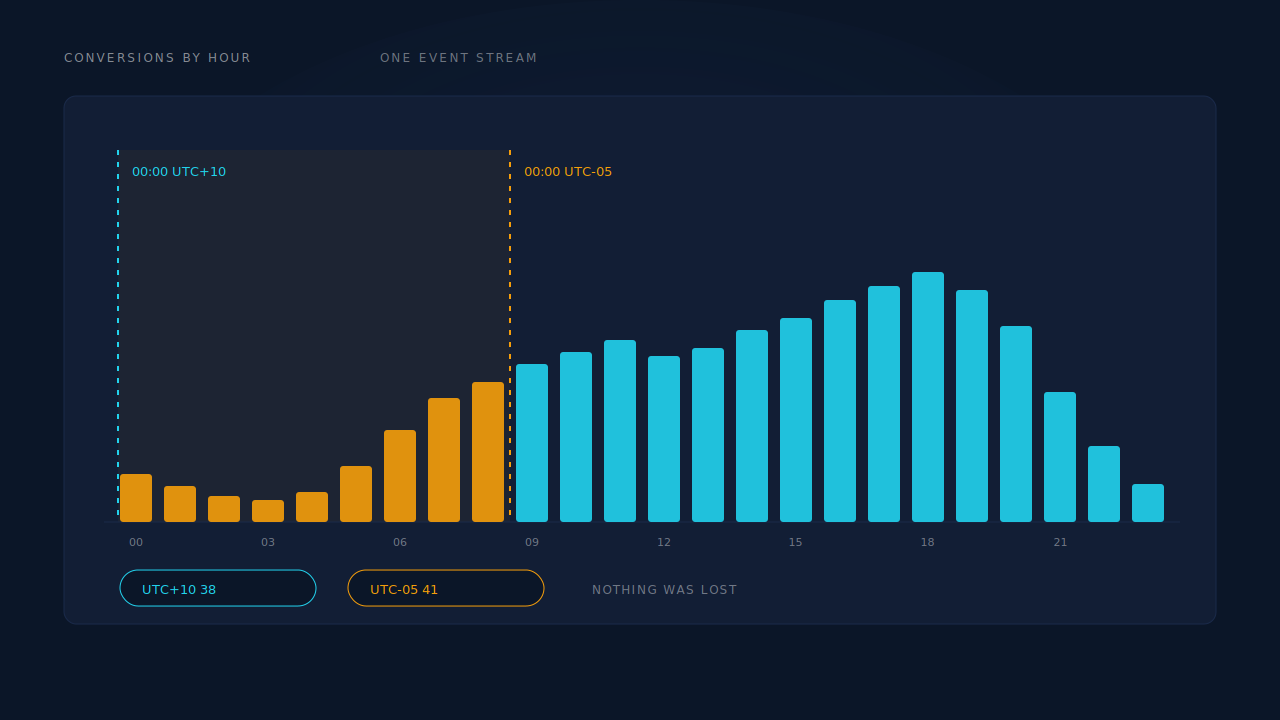
This is why the disagreement feels arbitrary. On a Tuesday it is two conversions and nobody notices; on a Saturday, when the evening peak is bigger, it is nine and somebody opens a ticket. Same offset, same data, different slice.
It also explains a pattern that looks like a broken week: if your offset pushes the tail of Sunday into Monday, every Monday reads high and every Sunday reads low, permanently. That is not a weekday effect in your audience. That is a boundary sitting in a bad place.
What does daylight saving do to a week-over-week comparison?
It changes the length of two days a year and the offset between your reports for several weeks a year. A spring-forward day has 23 hours, an autumn day has 25, and any “vs last week” comparison that crosses one is comparing unequal containers.
The messier problem is that regions change clocks on different dates, and some do not change at all. Between the US and EU transition dates, the offset between a New York account and a London account is not what it is for the rest of the year. Southern hemisphere regions move in the opposite direction. If your ad account, your dashboard and your CRM sit in three regions with three different rules, the offset between them is not a constant — it is a function of the date.
Practical handling, in order of how much it helps:
- Don’t compare single days across a transition. Use seven-day rolling windows, which absorb a one-hour shift instead of exposing it.
- Expect a step in hourly reports on transition weekends, and don’t chase it.
- Store instants, report in a timezone. If you are building anything yourself, keep UTC in the database and apply the timezone at display time. Storing local times without offsets is how you get an hour that exists twice.
Is your mismatch a timezone problem or a conversion-lag problem?
Timezone offsets move conversions by hours. Conversion lag moves them by days, and the two get blamed for each other constantly.
Here is the distinction. Many ad platforms report a conversion against the date of the click that earned it, not the date the conversion happened — that is what makes ROAS for a campaign keep rising after the campaign stopped spending. Your CRM does the opposite: it records revenue on the day the money arrived. Both are defensible. They are simply different questions, and no timezone setting reconciles them.
Check your own platform’s documentation for which date basis its conversion columns use, because it varies by platform and by column, and it is the single most valuable thing to know before your next reconciliation meeting.
The tell is the shape of the gap. A timezone offset produces a stable, small, bidirectional difference — some days high, some days low, netting to roughly zero over a month. Conversion lag produces a one-directional difference that shrinks as the data matures: yesterday looks badly wrong, last week looks nearly right, last month agrees. If your gap heals with age, it is lag, and the fix is to stop reading yesterday’s numbers as final.
Lag also interacts with journey length. A business where people buy in an hour barely notices. A business where the purchase happens weeks after the ad click will see today’s report understate every campaign, every day, forever — and a timezone change will do nothing about it.
One more source of legitimate non-agreement, so you stop hunting it: some metrics are designed not to sum. Assisted revenue credits full value to every assisting channel, so the column deliberately exceeds total revenue. That is the metric working, not a boundary bug.
How do you reconcile your dashboard with your ad platform?
Work top-down, in this order, and stop as soon as the numbers agree:
- Match the period. Same start date, same end date, both reports.
- Match the timezone. Set your dashboard to the ad account’s timezone, or accept a known offset and note it on the report.
- Widen to a month. If the totals converge, the daily rows were a boundary artefact and you are done.
- Check the date basis. Click date versus conversion date, per the previous section.
- Check the currency. A revenue mismatch with matching conversion counts is usually an FX question, not a time question — reporting attribution across multiple currencies has its own failure modes.
- Only then question the tracking. If counts still disagree over a full month in a single timezone on a single date basis, you have a real attribution gap — often conversions the platform recorded as Direct because the click identifier never survived the journey.
The order matters. Teams that start at step six spend a week auditing a pixel that was fine.
How does PartialLeads handle reporting timezones?
The Attribution report carries a timezone selector beside its period and currency selectors, so you can set the report to the timezone you actually manage campaigns in — or switch it to your ad account’s timezone when you need the two to line up. Day-grain figures are bucketed in the client’s display timezone, which is what makes a daily ratio safe to compute: the numerator and denominator are cut on the same boundary.
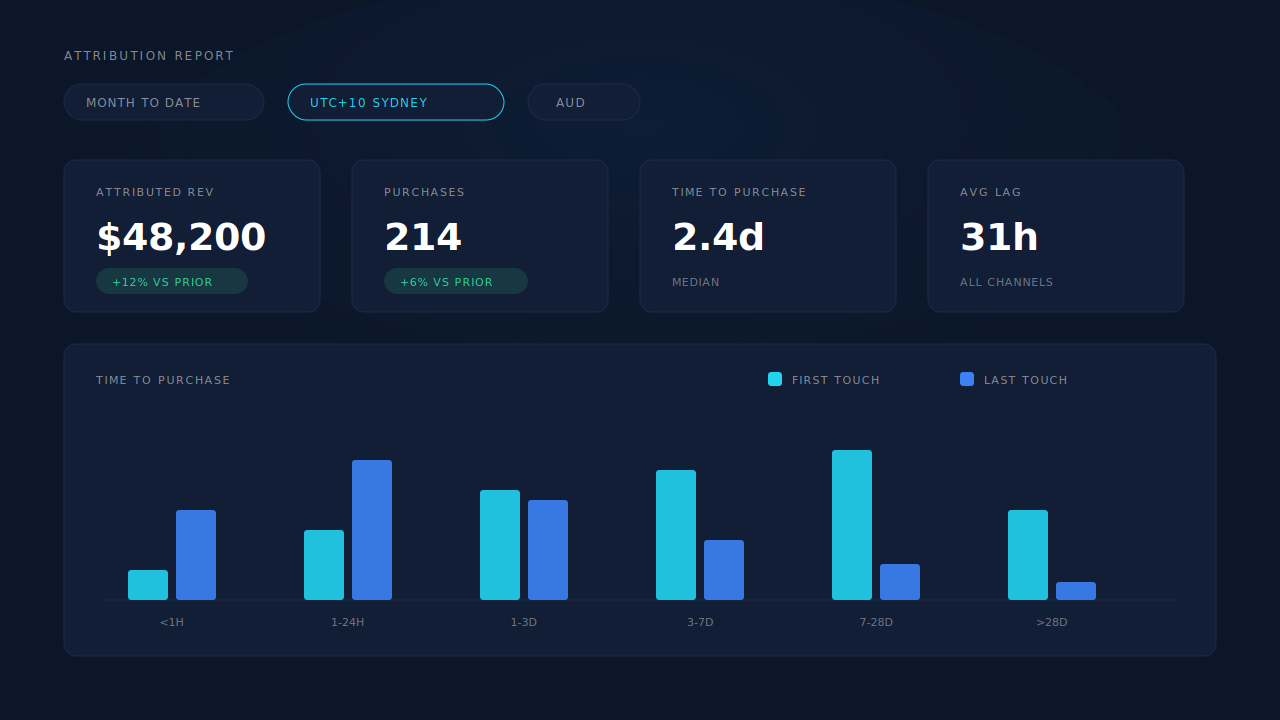
For the lag half of the problem, the report gives you the measurement rather than an opinion. Every matched purchase writes both a first-touch and a last-touch attribution row, snapshotting the UTMs, click IDs, landing page and time-to-purchase at the moment of the match. The Time to Purchase panel then plots first-touch and last-touch as two series across fixed buckets — under an hour, 1–24 hours, 1–3 days, 3–7 days, 7–28 days, over 28 days — so you can see how long your journeys actually run before deciding whether today’s total means anything yet. The channels table carries an Avg Lag column for the same reason, and every KPI carries a vs-prior comparison.
Two deliberate design choices are worth knowing. The display layer uses last-non-direct attribution with a 28-day decay window, chosen to match Meta’s standard so the reports agree with Ads Manager instead of fighting it. And on the dispatch side, event timestamps sent to Meta’s Conversions API are clamped to the platform’s 7-day event window — historical sends still deliver, with a clamped timestamp, which is why there is no unlimited backfill and why a long-dormant lead cannot be resurrected onto its original date.
Honest constraints: the timezone selector is a reporting control, not a rewrite. It cannot change the timezone your ad account was created in, it cannot make a click-date column agree with a conversion-date column, and it does not alter what was dispatched. What it does is let you put both reports on the same clock before you compare them — which, for a large share of “the numbers don’t match” tickets, is the entire fix. If the numbers still disagree after that, the problem is real and worth chasing; the report’s model comparison is where you go next to decide which channel to scale.
| What breaks | The mechanism | Where you see it in the dashboard |
|---|---|---|
| Daily totals disagree with the ad platform | Report timezone selector sets where midnight falls | Attribution report, timezone selector beside period and currency |
| A daily ratio divides on two different grains | Day-grain figures bucketed in the client’s display timezone | Pages report, day-bucketed columns |
| “Today looks wrong” because journeys are long | First-touch and last-touch rows written per matched purchase, plotted as two series | Time to Purchase buckets: <1h / 1–24h / 1–3d / 3–7d / 7–28d / >28d |
| No sense of how long to wait before judging a day | Lag measured per channel | Channels table, Avg Lag column |
| Reports quietly disagree with Ads Manager’s window | Last-non-direct display model on a 28-day decay window, matching Meta’s standard | Attribution models, first / last / resolved side by side |
| Late events silently land on the wrong date | event_time clamped to Meta’s 7-day event window on dispatch |
CAPI activity log |
Recover the leads you're already earning
Tell us what you're trying to track or fix. We'll show you which visitors your forms miss — and how PartialLeads recovers and qualifies them.
Sources
https://developers.facebook.com/docs/marketing-api/conversions-api/parameters/server-event https://developers.facebook.com/docs/marketing-api/conversions-api https://developers.facebook.com/docs/marketing-api/conversions-api/deduplicate-pixel-and-server-events