Meta uses fbclid. Google Ads uses gclid, and gbraid or wbraid when the click crosses between an app and the web. Microsoft Advertising uses msclkid. TikTok uses ttclid. Pinterest uses epik. LinkedIn uses li_fat_id. Each is appended to your landing page URL at the moment someone clicks your ad, and each is readable only by the platform that issued it.
Here is the whole reference in one table, then the part that actually costs people money: what happens to these parameters between the click and the conversion.
Which click ID does each ad platform use?
| Platform | Click ID parameter | Companion cookie | Notes |
|---|---|---|---|
| Meta (Facebook, Instagram) | fbclid |
_fbc (click), _fbp (browser) |
The server-side API expects the cookie-format value, not the raw parameter |
| Google Ads | gclid |
none | Requires auto-tagging to be switched on in the account |
| Google Ads (app↔web) | gbraid, wbraid |
none | Issued in place of gclid; behave differently in offline uploads |
| Microsoft Advertising (Bing) | msclkid |
_uet* |
Paired with the UET tag’s own cookies |
| TikTok | ttclid |
none in wide use | Sent alongside hashed email and phone for match quality |
epik |
_epik |
The cookie is the fallback when the parameter is gone | |
li_fat_id |
none in wide use | First-party ad tracking identifier |
Two things this table will not tell you, and both matter more than the names.
The first is that a click ID is not a tracking cookie. It is a one-time token that exists in exactly one URL, in exactly one browser, for exactly one click. Nothing refreshes it. Nothing regenerates it. If you do not read it on the first pageview, it is gone — and no amount of tag configuration later recovers it.
The second is that these parameters are not versions of the same thing. A gclid means nothing to Meta. An fbclid means nothing to Google. If you store “the click ID” in a single column and overwrite it whenever a new one arrives, a visitor who clicks a Meta ad on Monday and a Google ad on Thursday leaves you with one parameter and no idea which conversion belongs to which channel.
What is a click ID actually for?
A click ID is the platform’s own receipt for a click it can no longer see. When someone leaves the ad and lands on your site, the platform loses visibility — your domain is not their domain. The click ID is the token they hand you so that you can hand it back later and say: this conversion came from that click.
That return trip is the entire point. Without it, a conversion you report is an anonymous event the platform cannot tie to any campaign, ad set or creative, which means it cannot use the conversion to optimise. This is why click IDs matter more now than they did five years ago — the Conversions API and every server-side pipeline like it depends on identifiers you captured, not on identifiers the browser still holds.
Click IDs are also distinct from UTM parameters, which people routinely conflate. UTMs are tags you write yourself, they are readable by any analytics tool, and they describe your intent. Click IDs are issued by the platform, opaque to everyone else, and describe an actual click. That distinction is worked through properly in gclid vs fbclid vs UTM parameters; the short version is that you need both, for different jobs.
Why does Google have three click IDs?
Because one of them stopped working in a specific context, and Google issued two replacements rather than one.
gclid is the standard Google Ads click identifier and has been for years. gbraid and wbraid appear in its place when a click crosses an app-to-web boundary — a tap inside an app that opens your page in a browser. They are privacy-preserving variants built for a context where the ordinary click ID could not be used, and which of the two you receive depends on the direction of that handoff.
The practical consequence is the part people get wrong. Code that reads gclid and nothing else silently records an empty field on a meaningful share of mobile traffic, and then reports those leads as untracked. They were tracked. Your parser just did not look for the right parameter. The capture mechanics are covered in capturing gbraid and wbraid, and if gclid is missing on traffic you expected it on, the four reasons gclid goes missing is the diagnostic to run first.
Google’s rules about how these three behave in offline conversion uploads differ between them and change over time. Read Google’s documentation for the current behaviour rather than trusting a number in any article, including this one.
What destroys a click ID between the click and the conversion?
Four things, and they are worth knowing individually because each has a different fix.
A redirect drops the query string. Link shorteners, geo-redirects, www-to-apex rules, tracking-template hops, and any server-side redirect written without care will hand the browser a clean URL. The parameter was there on the request your server received and absent from the page that finally rendered. Fix this at the redirect, not at the tag.
Internal navigation washes it out. The parameter lives on the landing URL only. Click one nav link and the address bar no longer carries it. If your form reads window.location at submit time, and the form is two pages deep, it reads a URL that never had a click ID in it. This is the single most common cause of “the parameter is there but we never stored it.”
An iframe hides it. A form embedded from another domain sees its own frame URL, not the parent page’s. Every UTM and every click ID on the parent is invisible inside that frame unless something explicitly passes them in.
The conversion happens somewhere else entirely. A click on a phone and a form fill on a laptop share no browser, no storage and no cookie. The click ID was captured correctly and is sitting in the wrong device’s storage. This is not a capture problem at all — it is why so many paid conversions show up as Direct.
Where should you store a click ID once you have it?
Server-side, against the person, the first time you see it — and never overwrite one platform’s identifier with another’s.
Browser storage is the default answer and the weakest one. localStorage is per-browser, so it bridges nothing across devices. Cookies written by JavaScript are subject to browser restrictions on script-written storage, which means the value may expire far sooner than the length of your sales cycle. Neither survives someone clearing their browser.
The durable pattern is: read every click parameter on the first pageview, post it to your own server immediately, and store it against a stable visitor record rather than against the current session. Then keep a first-touch value and a last-touch value separately. A person who arrives via Meta, leaves, and returns via Google has a genuine first touch and a genuine last touch, and collapsing them into one field destroys the only evidence you had that both channels were involved.
How do you capture every platform’s click ID with one piece of code?
Read them all by name on the first pageview, keep each in its own key, and write first-touch once.
// Every click parameter, by platform. Read on the FIRST pageview.
const CLICK_PARAMS = [
  'fbclid',                      // Meta
  'gclid', 'gbraid', 'wbraid',   // Google Ads
  'msclkid',                     // Microsoft Advertising
  'ttclid',                      // TikTok
  'epik',                        // Pinterest
  'li_fat_id'                    // LinkedIn
];

const url = new URLSearchParams(window.location.search);
const found = {};

for (const param of CLICK_PARAMS) {
  const value = url.get(param);
  if (value) found[param] = value;    // own key per platform — never one shared column
}

if (Object.keys(found).length) {
  // Send to YOUR server. Do not rely on browser storage as the system of record.
  navigator.sendBeacon('/collect/click-ids', JSON.stringify({
    click_ids: found,
    landing_url: window.location.href,
    referrer: document.referrer,
    ts: Date.now()
  }));
}
Three details decide whether this works in production. Run it on the landing page, not on the form page. Use sendBeacon so the request survives someone bouncing immediately. And send the full landing URL alongside the parsed values, because when a new platform introduces a new parameter next year, the raw URL is the only record that will let you backfill.
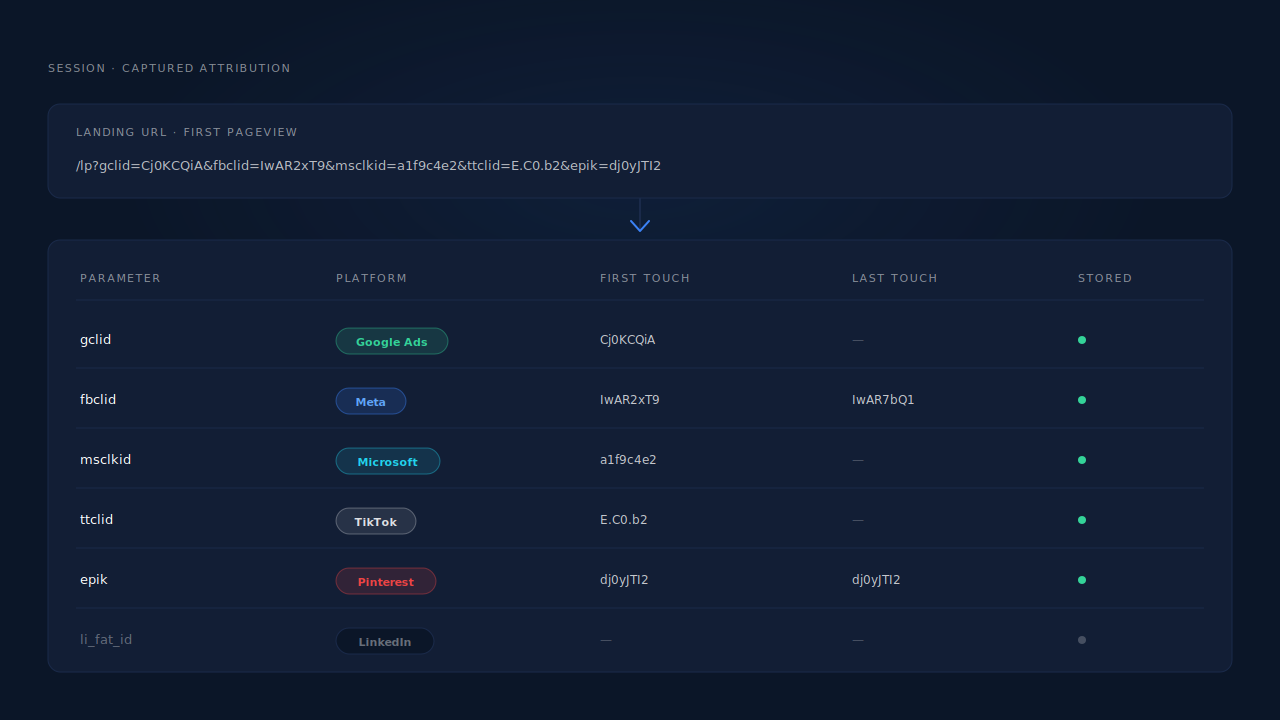
How does PartialLeads capture click IDs across platforms?
By reading every platform’s parameter on the first pageview, storing each in its own column against the person rather than the visit, and sending the right one back to the right platform.
The tag reads the landing URL once, for all of them. gclid, gbraid, wbraid and gad_source for Google; fbclid along with the _fbp and _fbc cookies for Meta; msclkid for Microsoft Advertising; ttclid for TikTok; epik for Pinterest. UTMs are captured in the same pass, with document.referrer as the fallback when the parameters are already gone.
Meta’s _fbc is rebuilt when the cookie is missing. Meta’s server-side API expects the click value in the _fbc cookie format rather than the raw parameter, and that cookie is routinely absent or malformed. When the fbclid is present in the URL, the backend reconstructs _fbc in Meta’s documented fb.1.<timestamp>.<fbclid> form, treating the URL parameter as the source of truth.
An embedded form does not sever the chain. The tag relays attribution into iframes by postMessage and listens for the same from parent frames, which is what keeps click IDs alive through a hosted form platform or a funnel widget.
The visitor ID is set by the server, not by script. A cookie written by document.cookie is subject to Safari’s cap on script-written storage; a server-set first-party cookie is not. For a click ID to be useful weeks after the click, the record it is attached to has to outlive the browser’s patience.
The click ID is itself an identity signal. The same gclid or fbclid appearing on two sessions is evidence those sessions are one person — it is one of the six tiers in the identity cluster described in how visitor identity resolution works. There is also a narrower rule for mid-journey network changes: a matching fbc cookie on the same user agent within a short window lets a session inherit attribution even when the IP address changed, which covers a phone switching from wifi to mobile data during checkout.
Each platform gets its own identifier back. Meta CAPI receives fbc and fbp unhashed alongside hashed contact fields. Pinterest receives epik, TikTok receives ttclid, Microsoft receives msclkid, and Google Ads receives gclid, gbraid or wbraid through a scheduled Sheets upload with hashed email and phone.
Honest constraints, because they change what you should expect:
- Server events still want the client-side cookie. Match quality on Meta and Pinterest depends partly on
_fbp/_fbcand_epikbeing captured in the browser. Keep your base tag installed._fbcis reconstructed fromfbclid;_fbpis not synthesised from nothing. - LinkedIn’s
li_fat_idis not in the captured set. Meta, Google, Microsoft, TikTok and Pinterest identifiers are captured and dispatched; LinkedIn traffic is attributed through UTMs, referrer and identity matching instead. - A click ID that never reached your site cannot be captured. If a redirect stripped it before your page loaded, first-party capture has nothing to read. Fix the redirect.
- The Google Ads path is a scheduled Sheets upload, not a live API push — reliable, not instantaneous.
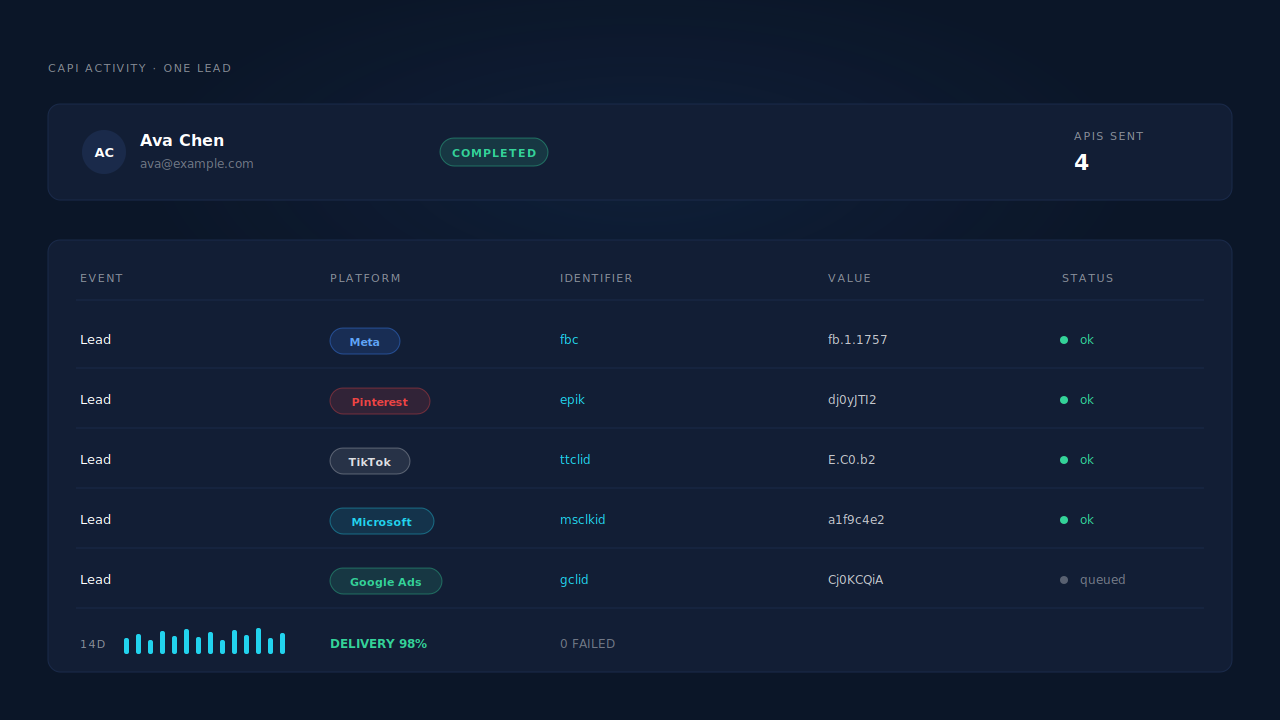
| What breaks | The mechanism | Where you see it in the dashboard |
|---|---|---|
Parser reads gclid only, misses app-to-web clicks |
gclid, gbraid, wbraid and gad_source all read on the first pageview |
Click ID columns on the session record |
| One shared click-ID column overwritten by the next platform | A separate stored field per platform identifier | Captured attribution on the lead record |
Meta’s _fbc cookie missing or malformed |
_fbc reconstructed from the URL fbclid in Meta’s documented format |
CAPI activity log payload |
| Parameter invisible inside an embedded form | postMessage attribution relay in and out of iframes |
Correct source badge on embedded-form leads |
| Click ID captured, then the visitor is forgotten | Server-set first-party visitor ID, durable rather than script-written | “N SESSIONS” label on the Journey column |
| Two sessions from one person look like two people | Click ID as an identity-cluster tier, plus the fbc cellular-handoff rule |
Customer Journey timeline, stitched into one record |
| The platform never learns the conversion happened | Per-platform dispatch carrying that platform’s own identifier | API column on the Leads list, CAPI activity log |
Tell us what's broken. We'll fix your tracking — free.
Describe the tracking/attribution problem you're stuck on and we'll map it to a fix: server-side conversions to Meta, Google, TikTok and Pinterest, plus first-party tracking that survives Safari. No code required.
Sources
- https://developers.facebook.com/docs/marketing-api/conversions-api/parameters/fbp-and-fbc
- https://developers.facebook.com/docs/marketing-api/conversions-api/parameters/customer-information-parameters