To keep the gclid with a WooCommerce order, capture it when the visitor lands, store it in first-party storage, and copy it onto the order server-side when the order is created. WooCommerce doesn’t do it by default. Its order attribution saves UTMs, the referrer and session details, but has no field for gclid, gbraid or wbraid.
That gap is why so many stores give up on offline conversion import. The export looks easy: one row per order, a click id, a time, a value. Then you open an order and the one column Google Ads needs to match it to an ad click is empty.
Why doesn’t WooCommerce save the gclid with the order?
Because WooCommerce’s built-in order attribution, added in version 8.5, was built around UTM parameters, not ad-platform click ids. Its field list covers source type, referrer, nine UTM fields, the session entry page, session start time, pages viewed, visit count and user agent. There’s no field for gclid, gbraid or wbraid, so nothing puts them in the order’s meta.
Here’s the full list of fields WooCommerce’s code stores on each order, under a wc_order_attribution_ prefix:
| Group | Fields stored |
|---|---|
| Main | source_type, referrer |
| UTM | utm_campaign, utm_source, utm_medium, utm_content, utm_id, utm_term, utm_source_platform, utm_creative_format, utm_marketing_tactic |
| Session | session_entry, session_start_time, session_pages, session_count, user_agent |
The data is collected in the browser by a bundled library called Sourcebuster and posted with the checkout. Useful in the admin, but not built to hand Google Ads a click id.
Two more details from the same code matter here. The default session length is 30 minutes, set by the wc_order_attribution_session_length_minutes filter. And tracking can be switched off entirely with wc_order_attribution_allow_tracking, which some consent setups do. So even the fields it does store describe one visit, under conditions you may not control.
If every Google Ads order in your admin just reads “google / cpc”, the guide to attributing ecommerce revenue to the ad click explains why a label isn’t the same thing as a click Google can match.
What does a Google Ads offline import need from each order?
Each row needs a click identifier Google issued, the name of the conversion action it counts toward, the conversion time with a timezone, and ideally the order value and currency. The click identifier is the only field WooCommerce can’t produce after the fact. Everything else sits on the order already.
The click identifier comes in three forms:
gclid— the standard Google click id added to the landing URL by auto-tagging.gbraidandwbraid— sent instead ofgclidon some iOS traffic. If you only storegclid, those buyers arrive with nothing to match. Capturing gbraid and wbraid for offline conversions covers why they exist.
The value and time come from the order. The status matters too: a pending, failed or cancelled order shouldn’t become a conversion, because Google’s bidding will learn from it.
Where does the gclid get lost between the ad click and the order?
On the second page view. Google adds the click id to the landing URL only, so it exists for exactly one request. Unless something reads it and saves it right then, it’s gone by the product page, and the order placed three pages or three days later has no way to recover it.
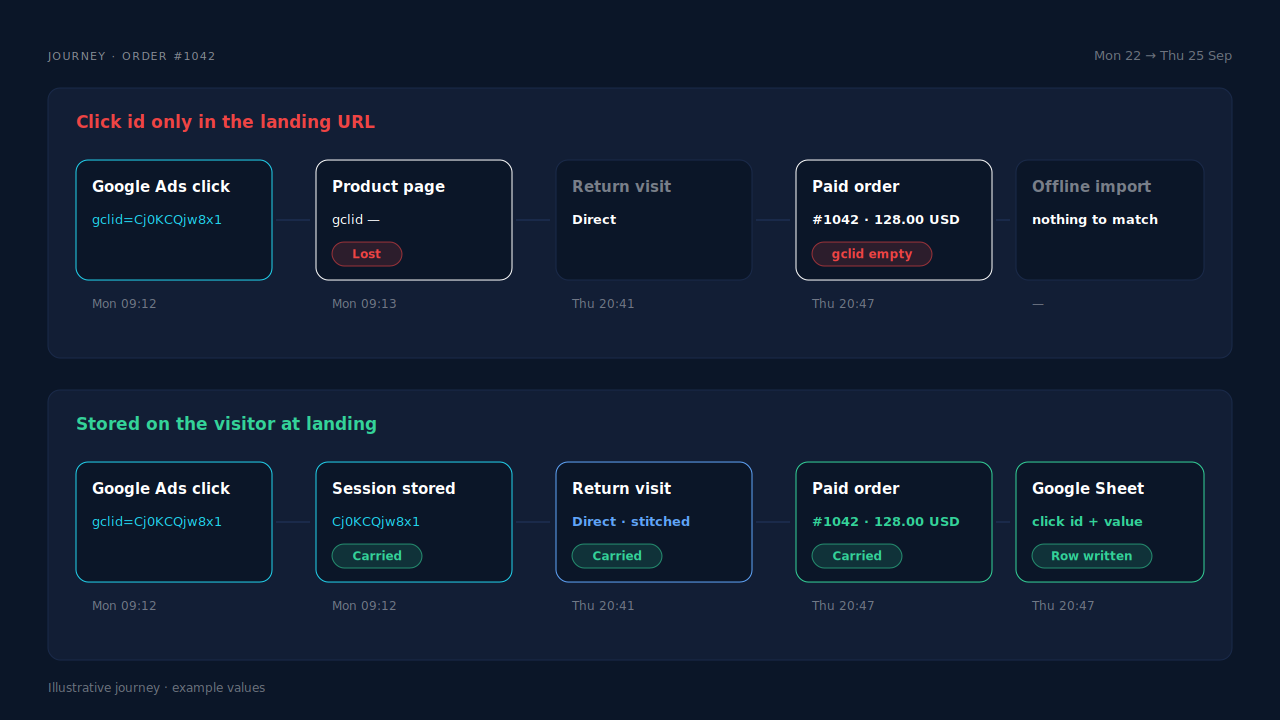
The usual failure points, in the order they bite:
- The gclid never reaches the page. Redirects, link shorteners and some consent or cache setups strip query strings before any script runs. Why the gclid goes missing on landing pages walks through each.
- Nothing saves it at landing. No script reads the URL, so the id dies on the next click.
- It’s saved, but the buyer comes back later. A shopper clicks an ad on Monday and returns by typing your URL on Thursday. If your storage expired or was cleared, Thursday’s order has no click.
- It’s saved on the wrong device. They clicked the ad on a phone and paid on a laptop. Browser storage doesn’t travel between devices.
- Checkout happens somewhere else. A separate checkout domain or subdomain doesn’t share cookies with the landing page. Attributing WooCommerce orders when the checkout is on another page covers that join.
How do you store the gclid on a WooCommerce order yourself?
Three steps. Read the click id from the landing URL and save it in a first-party cookie. At checkout, read that cookie on the server and write it to the order as meta. Then export paid orders with that meta to the file Google Ads imports. Hook both checkout types, because classic and block checkout fire different actions.
Step 1: save the click id at landing. Put this on every page, not just your homepage, because ads land on product pages too:
// Save Google click ids from the landing URL into a first-party cookie.
(function () {
  var p = new URLSearchParams(window.location.search);
  ['gclid', 'gbraid', 'wbraid'].forEach(function (key) {
    var v = p.get(key);
    if (!v) return; // never overwrite a stored id with nothing
    var days = 90;
    document.cookie = 'pl_' + key + '=' + encodeURIComponent(v) +
      '; path=/; max-age=' + days * 86400 + '; SameSite=Lax';
    document.cookie = 'pl_' + key + '_ts=' + Date.now() +
      '; path=/; max-age=' + days * 86400 + '; SameSite=Lax';
  });
})();
The 90 days is a storage choice, not Google’s rule. Set it to match your conversion action’s click-through window.
Step 2: copy it onto the order. WooCommerce’s classic checkout fires woocommerce_checkout_create_order. The block checkout fires woocommerce_store_api_checkout_update_order_meta. Both hand you the order object before it’s saved:
// Copy stored Google click ids onto the order (classic + block checkout).
function pl_attach_click_ids( $order ) {
    foreach ( array( 'gclid', 'gbraid', 'wbraid' ) as $key ) {
        if ( ! empty( $_COOKIE[ 'pl_' . $key ] ) ) {
            $order->update_meta_data( '_' . $key, sanitize_text_field( wp_unslash( $_COOKIE[ 'pl_' . $key ] ) ) );
        }
    }
}
add_action( 'woocommerce_checkout_create_order', 'pl_attach_click_ids', 10, 1 );
add_action( 'woocommerce_store_api_checkout_update_order_meta', 'pl_attach_click_ids', 10, 1 );
Step 3: export paid orders only. Pull orders in processing or completed, skip pending, on-hold, failed and cancelled, and write one row per order with the click id, your conversion action’s name, the order’s paid time with timezone, the total and the currency. A Google Sheet or a scheduled file both work as the import source.
Which conversion time should each row use?
Use the time the order was paid, in a timezone you state. It must be after the click. A row timed before its click is rejected, and a server clock or timezone mix-up is the usual cause; why Google Ads rejects uploads with “conversion time precedes click time” covers the fix.
What does the do-it-yourself version still miss?
Every buyer whose click id isn’t in that browser’s cookie at checkout. That’s the returning shopper whose storage was cleared, the buyer who switched from phone to laptop, the checkout on another domain, and the visitor whose landing URL lost its query string. The code works for the same-browser, same-device path and silently skips everyone else.
It also creates two jobs nobody owns:
- Matching the rows that do go out. A misspelled conversion action name or a click outside the window makes rows fail quietly. Why offline conversions don’t match the gclid lists the causes.
- Keeping the export honest. Someone has to filter by status, handle refunds, and make sure an order that’s edited later isn’t uploaded twice.
How does PartialLeads keep the gclid with a WooCommerce order?
It stores the click on the visitor, not the browser’s checkout request. The PartialLeads WooCommerce plugin records gclid, gbraid and wbraid on the visitor’s session at landing. When a paid order arrives by webhook, it’s matched back to that visitor, and a row with the click id, hashed email and phone, value and currency is written to a Google Sheet your Google Ads account imports on a schedule.
The click is captured where it appears. The tag reads Google’s click ids from the landing URL, alongside UTMs and the referrer, on the first page view.
The order is joined to the person, not the cookie. The purchase is webhook-owned; nothing fires on the thank-you page. The order is matched to a session by visitor ID first, then email, then phone, then IP. Sessions are stitched into one person across visits, so a buyer who clicked Monday and came back Direct on Thursday still carries Monday’s click.
Only paid orders become rows. processing and completed orders are written. pending, on-hold, failed and cancelled aren’t. For WooCommerce Subscriptions, only the first payment is written; renewals are recorded in PartialLeads but never sent to the sheet.
The value is the full order total. Including tax and shipping, after discounts, in the order’s currency. There’s no subtotal option. An order is recorded once, so a later edit doesn’t change its row or add another.
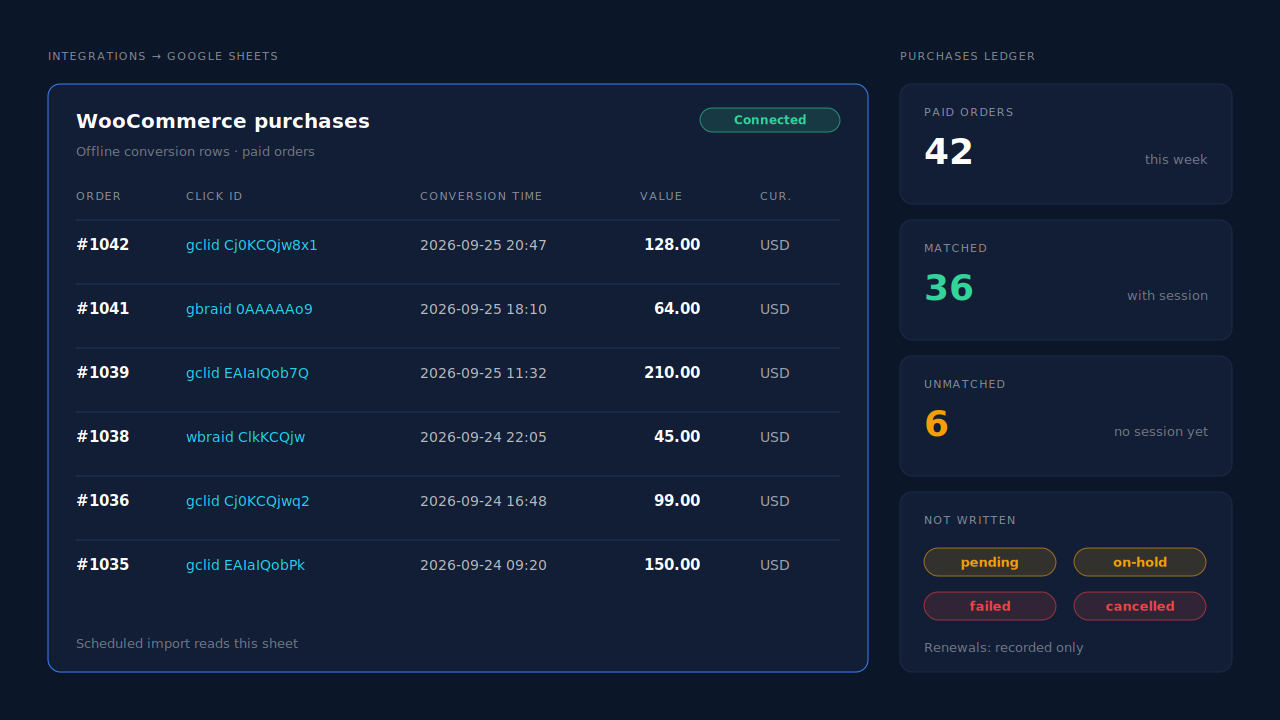
Where you see it working. Integrations → Google Sheets shows the connected sheet and the rows written for paid orders, with their click ids. The Purchases ledger lists every paid order, matched or unmatched, so you can reconcile it against WooCommerce’s order list. On the Leads list, the API column shows which integrations each buyer was sent to.
The honest constraints.
- Google Sheet, not an API. PartialLeads writes rows. You create the import conversion action in Google Ads and schedule the import from the sheet. Google credits orders after the next import runs.
- No click, no credit. If the landing URL had no click id, or the buyer never came from a Google ad, the row has nothing for Google to match.
- It doesn’t write the gclid into WooCommerce’s order meta. The click lives on the PartialLeads visitor and on the sheet row, not in your WooCommerce admin.
- Keep one source per purchase. PartialLeads uses its own event ids and doesn’t deduplicate against Google for WooCommerce or another plugin’s tag. Make one purchase action primary.
- Purchases only, for Google. There’s no GA4 integration, and WooCommerce funnel events go to Meta, Pinterest and TikTok, not Google.
- We control the row; Google controls the match. Every paid order is written. Whether Google ties it to a click is Google’s side.
| What breaks | The mechanism | Where you see it in the dashboard |
|---|---|---|
| WooCommerce stores UTMs but no click id on the order | gclid, gbraid and wbraid captured on the visitor’s session at landing |
Leads list, Journey column |
| Buyer returns days later or on another device, cookie gone | Sessions stitched into one person; order matched by visitor ID, email, phone or IP | Purchases ledger, matched vs unmatched |
| Export needs one clean row per paid order | Paid order from the webhook written as a row with click id, value and currency | Integrations → Google Sheets |
| Unpaid, cancelled or renewal orders inflate conversions | Only processing/completed orders; first subscription payment only |
Purchases ledger |
| Two tools report the same purchase | Own event ids, no cross-tool dedup, so one primary action | Leads-list API column |
Tell us what's broken. We'll fix your tracking — free.
Describe the tracking/attribution problem you're stuck on and we'll map it to a fix: server-side conversions to Meta, Google, TikTok and Pinterest, plus first-party tracking that survives Safari. No code required.
Sources
- https://raw.githubusercontent.com/woocommerce/woocommerce/trunk/plugins/woocommerce/src/Internal/Traits/OrderAttributionMeta.php
- https://raw.githubusercontent.com/woocommerce/woocommerce/trunk/plugins/woocommerce/src/Internal/Orders/OrderAttributionController.php
- https://raw.githubusercontent.com/woocommerce/woocommerce/trunk/plugins/woocommerce/includes/class-wc-checkout.php
- https://raw.githubusercontent.com/woocommerce/woocommerce/trunk/plugins/woocommerce/src/StoreApi/Routes/V1/Checkout.php