A lost click ID is usually not lost. It is unrecorded. The identifier arrived in the landing URL as a query parameter, and the copy every integration downstream reads is a first-party cookie a browser tag writes from it. If the tag never ran, the copy never existed — but the parameter was there, in plain text, for at least one page load.
Read it yourself at that moment and you can rebuild what the cookie would have held — and for most platforms there is no format to rebuild at all, only a value to keep.
Why does a click ID go missing when the URL had it?
Because two different artefacts get called “the click ID,” and only one of them is fragile. The durable one is the query parameter on the landing URL. The fragile one is the first-party cookie a platform’s browser tag writes from it — and that cookie is what most server-side integrations reach for later.
Four ways the cookie fails to exist while the parameter existed:
- The tag never ran. A blocker matched it, a consent gate held it back, a script error broke the queue, or it loaded after the visitor had clicked through to page two. Nothing read the parameter. Same failure surface that makes ad blockers break conversion tracking for the pixel itself.
- The cookie was written and then capped. Browser policies limit the lifetime of cookies written by JavaScript, so someone who clicks today and buys next week can arrive with it already expired.
- A domain hop dropped it. A cookie set on the landing domain is not readable on the checkout domain, and hosted checkouts move visitors there routinely.
- An in-app browser cleared it. Someone who tapped the ad inside a social app and later opened your site in Safari or Chrome is, as far as cookies go, two people.
In every case the identifier the platform minted at click time was readable. Recording it is a decision, not a capability.
Which click IDs can you rebuild from a landing URL?
Two classes. Most platforms want the raw parameter value, so there is nothing to rebuild once you have stored it. Meta wants a formatted value, and that format is documented and derivable.
| Platform | Landing-URL parameter | What the server event wants | Rebuildable from the URL? |
|---|---|---|---|
| Meta | fbclid |
fbc, in Meta’s _fbc cookie format |
Yes — format is documented |
| Meta | none | fbp, from the _fbp cookie |
No — no URL parameter contains it |
| Google Ads | gclid, gbraid, wbraid |
the raw value on the conversion row | Yes — store it, no reformatting |
| Microsoft Advertising | msclkid |
the raw value | Yes — store it, no reformatting |
| TikTok | ttclid |
the raw value | Yes — store it, no reformatting |
epik |
the raw value, unhashed | Yes — store it, no reformatting |
So for four of the five platforms, “rebuilding the click ID” means only that you wrote the parameter down at landing and kept it somewhere that outlives the visit. For the parameter names themselves, which click ID each ad platform uses is the reference.
One naming trap: gbraid and wbraid are Google’s iOS-privacy click identifiers and arrive instead of gclid. Code that only looks for gclid files those sessions as untagged traffic.
How do you rebuild Meta’s _fbc from an fbclid?
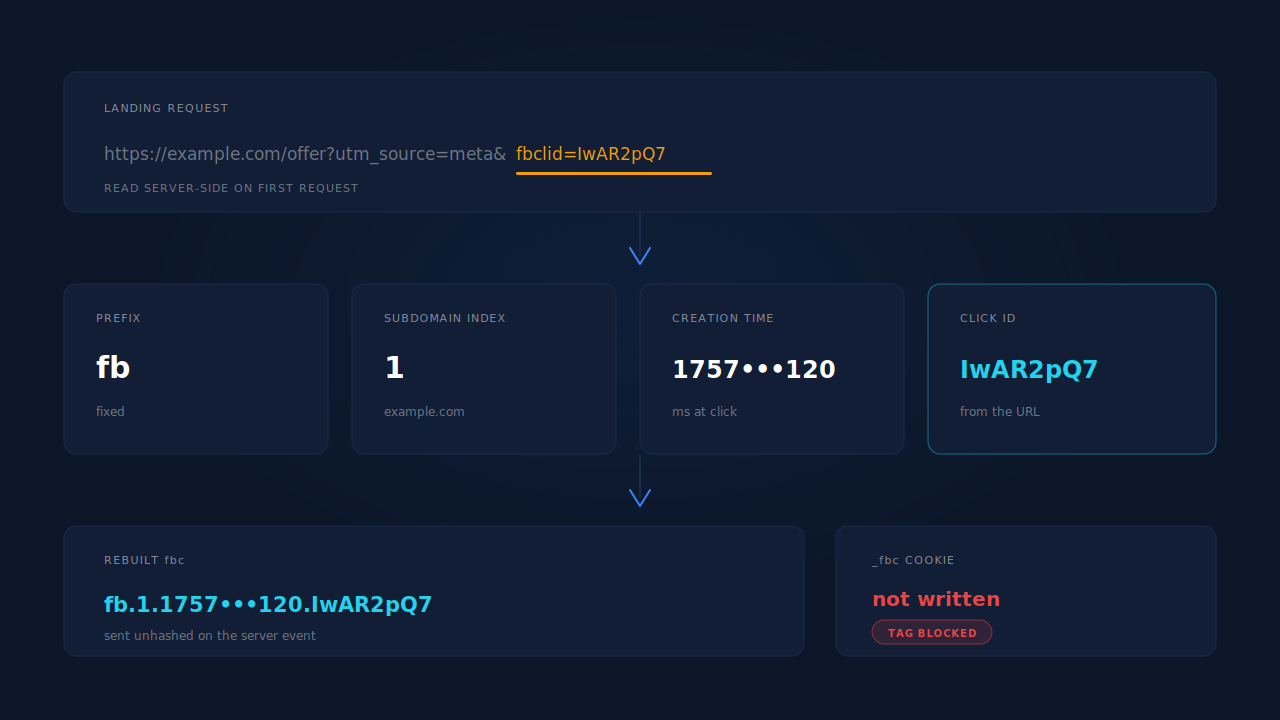
By assembling three parts. Meta documents the _fbc cookie as fb.<subdomainIndex>.<creationTime>.<fbclid> — a fixed prefix, a number describing which domain the cookie belongs to, a millisecond timestamp, and the fbclid value exactly as it appeared in the URL.
The subdomainIndex counts domain parts: com is 0, example.com is 1, www.example.com is 2 — most sites use 1. creationTime is a UNIX timestamp in milliseconds, taken from when you first observed the fbclid, not from when you send the event.
// Read the fbclid at landing and build the value Meta's fbc parameter expects.
function buildFbc(fbclid, subdomainIndex) {
  if (!fbclid) return null;
  return ['fb', subdomainIndex || 1, Date.now(), fbclid].join('.');
}

// Prefer the URL parameter over a cookie that may be stale or malformed.
var params = new URLSearchParams(location.search);
var fbclid = params.get('fbclid');
var fbc = fbclid ? buildFbc(fbclid, 1) : readCookie('_fbc');
Two rules of precedence. The URL parameter wins: a fresh fbclid describes the click that actually brought the visitor, a cookie left over from last month describes one that did not. And a malformed cookie — truncated, wrong part count, missing the fb. prefix — is better treated as absent than passed through.
Send fbc unhashed. It is an opaque platform identifier, not personal data you SHA-256, and hashing it produces a match parameter the platform cannot read. Same for fbp, the IP address and the user agent.
What timestamp should a rebuilt click ID carry?
The time of the click — in practice, the moment the landing page was requested with the parameter attached. Not the moment you fire the conversion. A creationTime set at send time claims the ad was clicked at checkout, which is wrong on every journey longer than one session.
Two timestamps are in play and they are not the same field:
creationTimeinside the_fbcvalue describes when the click ID was observed. It belongs to the click.event_timeon the server event describes when the conversion happened. It belongs to the purchase or the lead.
The two can sit weeks apart, so conflating them loses attribution quietly. Platforms also limit how old a server event’s event_time may be — Meta clamps it to 7 days — and that limit applies to event_time, not to the click ID’s age.
Where do you store the click ID so it survives the journey?
Server-side, on a record keyed to the visitor, written on the first request that carried the parameter. The browser is where you read it, not where you keep it. Three options, worst to best:
- Nowhere — read it at conversion time. By the time someone converts they are several navigations away from the landing URL.
- A JavaScript-written cookie or
localStorage. Covers a same-session conversion, loses the long tail: script-written storage is what browser privacy policies cap and clear. - A cookie written by your server, with the click ID held server-side against it. The cookie carries only a durable visitor ID; the click IDs, UTMs, landing page and referrer live in your own records, where no browser policy expires them.
Option 3 also survives a different device or a cleared cookie jar: the click ID stops being a browser artefact and becomes a property of a person you can re-identify by email or phone. That is visitor identity resolution, and it is why Monday’s click can still attach to Friday’s purchase on another machine.
What can’t you rebuild, no matter what?
Three things, and being straight about them keeps the rest of your setup honest.
_fbp. No URL parameter is behind it. Meta’s own tag generates it in the browser, so if the tag never ran there is nothing to derive it from. Anyone offering to generate _fbp for you is generating a random number, and a fabricated identifier does not match a real person — it occupies the field. Keep your client-side base tag running. Same logic as Event Match Quality: a full match-parameter set raises it, a padded one does not.
A parameter that was never in the URL. Auto-tagging off, a redirect that stripped the query string, a link pasted without its tag — nothing to read. Different problem, different fix: why gclid goes missing on landing pages.
The platform’s decision to match. Rebuilding fbc and attaching gclid improves the chance the platform resolves your event to a user and a click. It does not guarantee it: consent state, tracking opt-outs and the platform’s own identity graph decide that half, and no vendor controls it. Dispatch completeness is yours; matching is theirs.
How does PartialLeads rebuild a lost click ID?
By reading the parameters at landing and keeping them server-side, so the cookie’s existence stops being load-bearing.
The tag captures the attribution set from the landing URL on every session — gclid, gbraid, wbraid, gad_source, fbclid, msclkid, ttclid, epik, plus UTMs, landing page and referrer — and falls back to document.referrer when the URL carries no UTMs, which keeps attribution alive inside iframe embeds where the frame URL is bare.
For Meta, when fbclid is in the URL and the _fbc cookie is missing or malformed, the backend reconstructs the value in Meta’s fb.1.<timestamp>.<fbclid> format, treating the URL fbclid as source of truth over a stale cookie. It does not synthesise _fbp from nothing, for the reason above.
Identity keeps that stored click ID useful days later. The visitor ID lives in a server-set first-party cookie with a one-year lifetime — server-set so the policies that cap script-written cookies do not apply — and sessions are unioned into one person across six tiers: visitor ID, email, phone, IP plus user agent, device fingerprint, and a shared click ID. A conversion session with no parameters of its own inherits the click from the session that had them.
When the conversion fires, the stored identifiers go out on the server event to each platform that wants them — fbc unhashed to the Conversions API, msclkid to Microsoft, ttclid to TikTok, epik unhashed to Pinterest, gclid/gbraid/wbraid onto the Google Ads offline conversion row — each with a deterministic event ID so a retry cannot double-count. The CAPI activity log shows the outbound payload per event: that is where you confirm the click ID was attached rather than assumed.
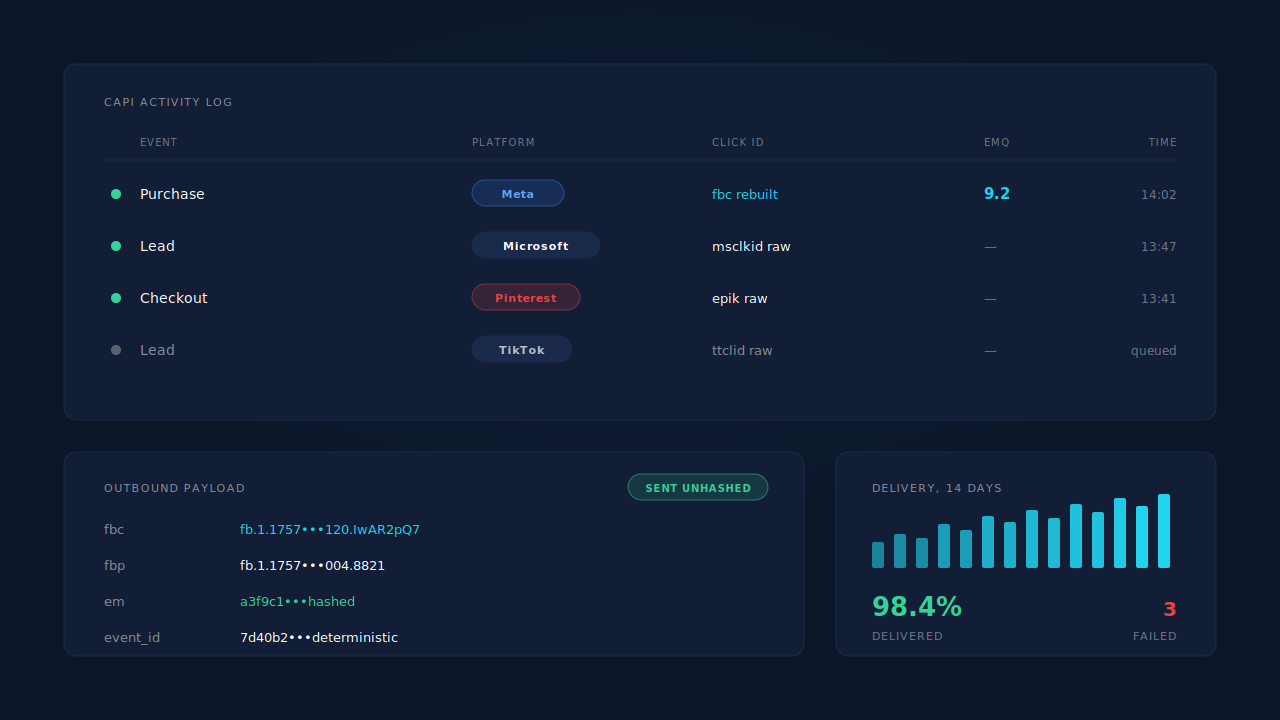
One honest constraint. Reconstruction needs the parameter to have reached your site at least once. If no session in the cluster ever carried it, there is nothing to rebuild, and the event goes out with the identifiers you do have — hashed email, hashed phone, IP, user agent — a weaker but still matchable payload.
| What breaks | The mechanism | Where you see it in the dashboard |
|---|---|---|
The platform’s browser tag was blocked, so no _fbc cookie exists |
Click IDs read from the landing URL server-side and stored on the session | CAPI activity log — click ID present on the outbound payload |
The _fbc cookie is stale, truncated or malformed |
Backend reconstruction in Meta’s fb.1.<timestamp>.<fbclid> format, URL fbclid treated as source of truth |
CAPI activity log payload; Event Match Quality in Events Manager |
| Cookies capped or cleared before the conversion happened | Server-set first-party visitor ID cookie with a one-year lifetime | Returning visitors still stitched to their original session |
| The converting session carries no parameters of its own | Six-tier identity cluster unions sessions by visitor ID, email, phone, IP and user agent, fingerprint, shared click ID | Journey timeline on the lead |
| Each platform wants a different identifier | Per-platform dispatch: fbc to Meta, msclkid to Microsoft, ttclid to TikTok, epik to Pinterest, gclid/gbraid/wbraid to Google Ads |
Per-lead API column listing the conversion APIs it went to |
The short version: read the parameter at landing, store it where no browser can expire it, rebuild Meta’s format rather than hoping for the cookie, and never invent an identifier with no source.
Tell us what's broken. We'll fix your tracking — free.
Describe the tracking/attribution problem you're stuck on and we'll map it to a fix: server-side conversions to Meta, Google, TikTok and Pinterest, plus first-party tracking that survives Safari. No code required.
Sources
https://developers.facebook.com/docs/marketing-api/conversions-api/parameters/fbp-and-fbc
https://developers.facebook.com/docs/marketing-api/conversions-api/parameters/server-event