Send the order’s total as a plain decimal number in the currency’s major unit — 1299.00, not 129900, not "$1,299.00" — together with the three-letter code of the currency the customer was charged in, on the same event. One currency per event. Both values belong to the order record, so read them from it instead of hardcoding either one.
That is the whole contract. Breaking it does not produce an error message — it produces a number, and the number looks like performance.
What does Meta actually require on a Purchase event?
A Purchase event needs both a value and a currency, and Meta treats them as one unit: the amount is meaningless without the code that says what the amount is denominated in. The value goes in the event’s custom data as a number, the currency as its standard three-letter code, and Meta’s Conversions API reference is the authority on the exact field names and the event names that require them.
Three constraints do most of the damage in practice.
The value is expressed in the currency’s major unit — dollars, euros, yen — not the minor unit your payment processor stores. Most processors hold money as an integer number of cents to avoid floating-point rounding. Meta wants the human-readable amount.
The value must be a number, not a formatted string. A currency symbol, a thousands separator, or a locale that writes decimals with a comma turns a valid amount into something either rejected or silently coerced into a figure you did not intend.
The currency applies to the whole event, not to line items. You cannot send a mixed-currency basket in one event, and you cannot leave the currency off and let Meta infer it from your ad account.
Why does a currency mistake cost more than a missing event?
Because a missing event under-reports, and a wrong value mis-teaches. A missing Purchase costs you one conversion. A wrong value corrupts the ranking your bidding strategy uses to decide who to show ads to next, and it does so consistently, in the same direction, for as long as the mistake lives.
Value-based bidding optimises toward high-value purchases. If a subset of your orders arrives inflated — one currency’s orders going out as raw cent integers, say — the campaigns and audiences producing those orders look like your best performers and budget follows them. Nothing in the interface tells you the input was wrong.
The reporting damage is the part people notice first. A store selling in four currencies that sends all four with the same hardcoded code produces an Ads Manager total that adds yen to dollars. The fix is not a conversion rate in the report, it is sending the right code in the first place — the same discipline that makes it possible to report attribution across multiple currencies honestly.
The error is also sticky: a week of inflated values does not stop mattering the day you fix the payload, because the campaigns trained on them keep their learned preferences for a while.
Which value should you send: gross, net, with tax and shipping?
There is no universal right answer, so pick the number you would defend to your finance team and then never change it silently. In order of how defensible they are:
Product subtotal after discounts, excluding tax and shipping. This is the figure most stores should send. It is the revenue you actually control, it excludes a tax rate that varies by the buyer’s address, and it excludes shipping, which is usually a cost recovery rather than income.
Order total including tax and shipping. Defensible if that is what your P&L and ROAS targets use. It inflates high-shipping orders relative to their margin, which matters under value-based bidding.
Gross-of-discount value. Hard to defend. A 40%-off order sent at full price teaches the algorithm it was worth full price, and your discount-heavy campaigns look better than they are.
Margin or contribution value. The most useful signal and the hardest to wire, because margin usually lives in a different system than the order. If you can get it, bidding on margin beats bidding on revenue.
Two rules regardless. Every path that sends a Purchase must send the same amount for the same order — pixel and server both — or you get the disagreement described below. And write the choice down, because whoever reconciles Ads Manager against the store admin in six months will otherwise assume the other definition.
Where do the value and the currency actually come from?
From the order record, and this is where most implementations quietly go wrong.
A browser-side pixel usually reads the value off the page: a template variable, a data layer, sometimes the rendered text of the confirmation screen. Each of those is a presentation of the order, and presentation is where currency gets localised, prices get rounded, and a discount gets applied visually but not in the variable you grabbed.
A server-side event reads the order itself — the record the store or processor created when money moved. That record carries one authoritative amount and one currency code, which is why server-side dispatch is the more reliable path for value even where the pixel is doing fine on identity.
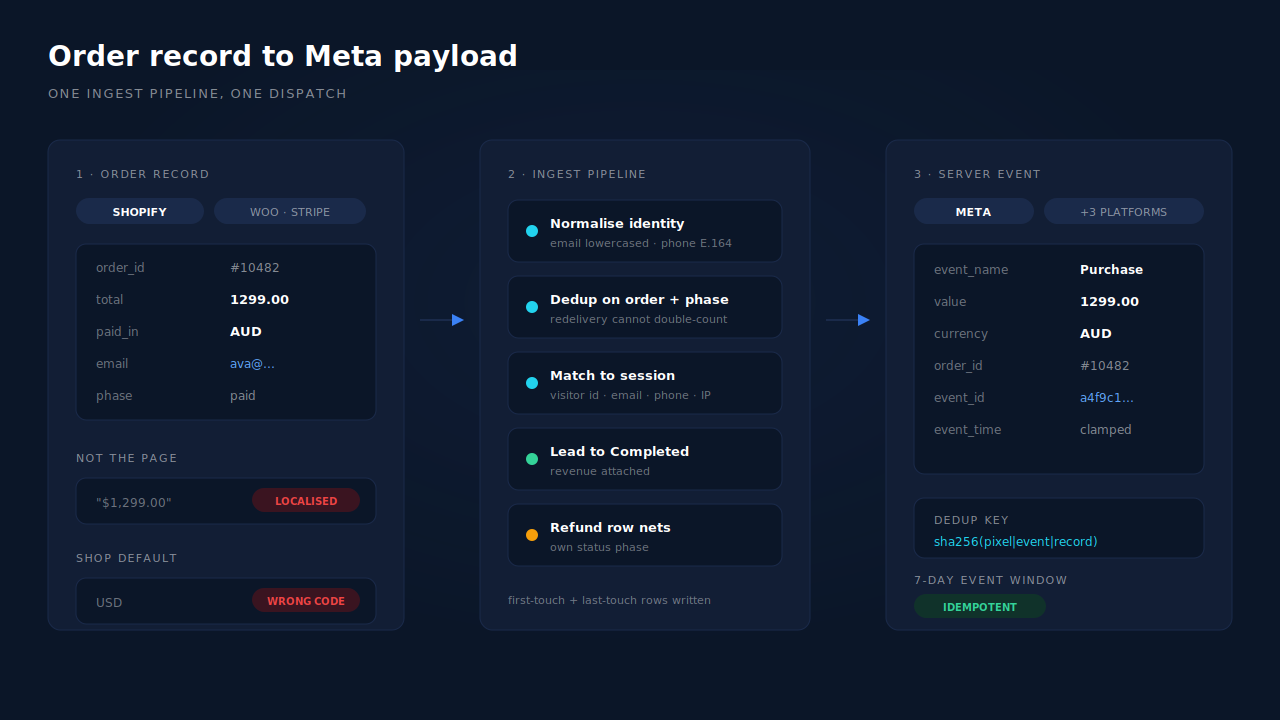
Multi-currency stores have one extra trap. Platforms usually distinguish the currency the shop is configured in from the currency the customer was presented with and charged in, and the one you want is the one the customer paid. Reading the shop default and attaching it to every order is the most common way a multi-currency store ends up reporting nonsense — the amounts vary correctly, and every one of them is labelled wrong.
What are the five ways value breaks on the wire?
1. Minor units sent as major. An amount stored as 129900 cents dispatched as 129900 — a 100× inflation. The tell is a ROAS figure that is absurd rather than merely good, and an average order value that matches your real AOV with two extra zeros.
2. A formatted string instead of a number. "$1,299.00" or "1.299,00" reaching a field that expects a number. Depending on the path, that is a rejected event or a coerced value — most likely truncated at the first separator, so 1,299.00 becomes 1.
3. Zero, null, or missing value. Common on subscription renewals, trials converting to paid, manual orders, and any flow where the amount resolves after the event fires. Value-based bidding ignores these, and they drag your reported AOV down.
4. Line-item value instead of order total. A three-item order firing three Purchase events, or one event carrying the first line’s price. Both usually mean firing on the wrong hook — a cart or line-item callback rather than one order-completed callback.
5. The pixel and the server disagreeing. Two events for one order, carrying different amounts. Deduplication is supposed to collapse them, and when it works you keep one of the two values — but no longer control which. That is a matter of the event_id you use for Meta deduplication, and the reason both paths must be fed from the same number.
Refunds sit beside this list rather than in it. A refunded order’s Purchase event has already been delivered and counted, with no clean retraction — which is why refunds inflate attributed revenue in nearly every stack, and why the honest place to net them is your own reporting.
How do you verify what you actually sent?
Three checks, worth running once a quarter.
Read one real event’s payload. Not your code, the payload: the exact amount and code that left your server for one order you can look up in the admin. Meta’s test-event route exists for this, and one hand-checked order catches minor-unit and string-formatting bugs immediately.
Reconcile a day, per currency. Take yesterday’s orders from your admin, group them by currency, sum each group, and compare against the conversion value the platform reports for the same day in the same currency. A 100× gap is a unit bug. A consistent small gap is usually tax, shipping or discounts — your value definition is not what you thought it was. A gap in only one currency is a hardcoded code.
Check delivery separately from matching. Meta’s response distinguishes events it received from events it processed, so an HTTP 200 is not by itself proof of a processed event. Keep the two questions apart: did the event with the right value arrive, and did the platform match it to a click. For the browser side of that split, the Meta CAPI on Shopify walkthrough is the implementation guide.
How does PartialLeads send purchase value and currency?
By taking the amount and the currency off the order record itself. Purchases arrive server-side — Shopify’s webhook and Customer Events pixel, the WooCommerce plugin, Stripe, GoHighLevel, or the universal webhook that accepts an order from any system — and all of them run through one ingest pipeline before anything is dispatched.
The chain, in order:
One pipeline, one normalisation. Identity is normalised first (email lowercased and trimmed, phone to E.164 with a country-code fallback from session geo), then the order is deduplicated idempotently on client, source, order ID and status phase. A redelivered webhook cannot create a second purchase row.
Refunds get their own row. A refund is a separate status phase that nets against paid revenue rather than editing the original, so the ledger keeps both facts.
The purchase is matched to a session, in tiers. A visitor_id echo carries the highest confidence, then email, then phone, then IP — and the matched lead flips to Completed with its revenue attached. That match is what makes it possible to attribute ecommerce revenue to the ad click at all.
Then the conversion fans out. Meta CAPI, Pinterest, TikTok and the Google Ads offline path all dispatch from that same normalised purchase, with a deterministic event_id — a SHA-256 of pixel ID, event name and record ID — and a unique dedup table per config, so a retry is idempotent end to end and a conversion cannot double-count. Event time is clamped to Meta’s seven-day window, so a very late order still delivers but with a clamped timestamp.
Where you see it working, on real surfaces:
The Leads list carries a Revenue column that displays multiple currencies, and an API column showing which conversion APIs that lead was dispatched to — per-lead delivery confirmation next to the amount. The Purchases ledger holds the matched and unmatched wedge, refunds netted.
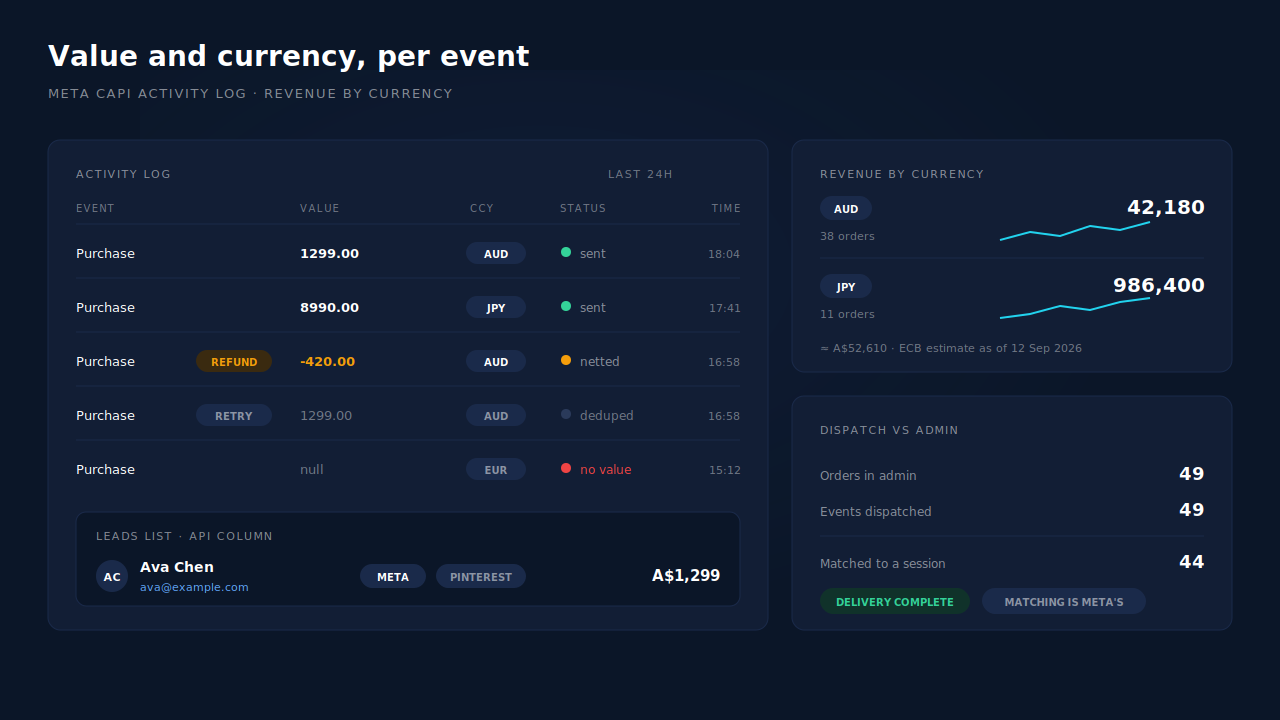
The Attribution report has a currency selector with multi-currency normalisation, and it is explicit about what that means: converted totals carry an estimated-at-ECB-rates-as-of-a-date footnote, next to an AOV column and the revenue-by-match-quality split across partial-captured, submit-completed and unmatched. Conversion is a display choice in a report, and the report says so.
Honest constraints, because they decide whether this solves your problem:
- Your source system defines the value. If the order your store posts carries a tax-inclusive total, that is the number in the pipeline. PartialLeads normalises identity and dedupes orders; it does not re-derive a subtotal or strip shipping out of your totals for you.
- Delivery is ours, matching is the platform’s. Because purchases fire from a server-side order webhook, every order in your admin produces a conversion event, independent of blockers, closed tabs or gateway redirects — verifiable by reconciling admin order count against dispatched events. Whether Meta then ties that event to a person and a click depends on the identifiers captured and on Meta’s own graph. No vendor controls that half.
- Converted figures are a report, not a payload. ECB-rate normalisation exists so a multi-currency dashboard can show one total. Reconcile against your ad platform per currency, in the currency the customer paid.
- Late orders are clamped, not backfilled. The seven-day event-time window is Meta’s. Older events still deliver, with a clamped timestamp; there is no unlimited backfill.
| What breaks | The mechanism | Where you see it in the dashboard |
|---|---|---|
| Value read off a localised page, or hardcoded currency | Purchases ingested server-side from the order record (Shopify, WooCommerce, Stripe, GoHighLevel, universal webhook) | Purchases ledger, Revenue column on the Leads list |
| A redelivered webhook fires a second Purchase | Idempotent dedup on client + source + order ID + status phase, and a deterministic SHA-256 event_id with a unique dedup table |
CAPI activity log, API column per lead |
| Refunds left in attributed revenue | Refund rows as their own status phase, netting against paid revenue | Purchases ledger, net revenue in the Attribution report |
| Revenue that never reaches a campaign | Tiered purchase-to-session match: visitor ID, then email, then phone, then IP; first-touch and last-touch rows written per purchase | Attribution report, three models side by side |
| Multi-currency totals that cannot be summed | Currency selector with ECB-rate normalisation and an as-of-date footnote, AOV per channel | Attribution report currency selector |
| No proof an order was sent onward | Per-lead dispatch record and activity log per config | API column, CAPI activity log |
Tell us what's broken. We'll fix your tracking — free.
Describe the tracking/attribution problem you're stuck on and we'll map it to a fix: server-side conversions to Meta, Google, TikTok and Pinterest, plus first-party tracking that survives Safari. No code required.
Sources
https://developers.facebook.com/docs/marketing-api/conversions-api/parameters/custom-data https://developers.facebook.com/docs/marketing-api/conversions-api/using-the-api https://developers.facebook.com/docs/marketing-api/conversions-api/deduplication https://developers.facebook.com/docs/marketing-api/conversions-api/parameters/server-event