Track Pinterest checkout events server-side by firing them from your order record — the webhook your store emits when payment succeeds — instead of from a browser script on the thank-you page. The order always exists. The browser session often doesn’t. That single change decides whether Pinterest sees most of your checkout revenue or a fraction of it.
This is not a Pinterest-specific idea. It’s the same argument behind the Conversions API on every platform: the most reliable witness to a sale is the system that took the money, not the page that happened to load afterwards. Pinterest just makes the gap easy to see, because Pinterest traffic skews mobile and mobile is where browser-fired checkout events die.
Why do Pinterest checkout events go missing?
Because a browser-fired checkout event has to survive the payment redirect, and frequently doesn’t. The event fires from a script, on a page the buyer may never reach, in a tab they may close, in a browser that may have stripped the script. Each of those failures is silent — nothing errors, the event simply never exists.
Walk a real path. A buyer taps a Pin on their phone. They add to cart on your store, hit checkout, and get handed off to a hosted checkout on a different domain. Their bank throws a 3-D Secure step. They approve it, see “payment successful” from the bank, and close the tab — because as far as they’re concerned, they’re done. Your thank-you page never loads. Your checkout event never fires.
Then there are the quieter versions. A mobile browser reclaims memory and kills the backgrounded tab before the redirect completes. A content blocker removes the tag entirely. A sandboxed pixel environment — Shopify’s Customer Events being the well-known case — hands your script a stripped-down view of the page. On desktop with a same-domain checkout, none of this bites. On mobile with a redirect, it bites constantly.
Here’s the part worth internalising: your revenue is fine. The order is in your admin, the money is in your account. What’s broken is only the report. Pinterest is optimising against a sample of your sales and you have no way to tell which ones it’s missing, because a missing event leaves no trace.
What does firing the event server-side actually change?
It moves the trigger from a page load to a database write. Your server already knows payment succeeded — that’s what created the order. Emitting the conversion event at that moment removes the browser from the critical path entirely.
That buys you something specific, and it’s worth being precise about what it is. Server-side dispatch gives you delivery completeness: every order in your store admin can produce a conversion event, and you can verify it by reconciling your order count against your dispatched event count. Any order that didn’t produce an event is a bug you can find and fix.
What it does not give you is guaranteed attribution matching. Whether Pinterest ties that event back to a Pin click depends on the identifiers you attach and on Pinterest’s own ability to resolve the person behind them. You control dispatch. The platform controls matching. Anyone selling you the second half is overselling.
That distinction matters because it tells you where to spend effort. Missing events are your problem and are fixable. Unmatched events are a shared problem and are only improvable.
Which checkout-path events are worth sending server-side?
Send the events tied to an order or a deliberate action — the checkout event above all, and the funnel steps before it if you have a clean, non-duplicated trigger for each. Skip anything that fires on every pageview.
The failure mode almost everyone hits on their first server-side build is noise. It’s tempting to mirror your whole client-side event stream from the server “for completeness”, including a page-visit event on every request. Don’t. You end up paying an API call to tell Pinterest something its tag already reported, you double-count the top of your funnel, and — worst of the three — you bury the events that matter. When your activity log is 95% page visits, a genuinely failed checkout event is invisible in it.
A workable rule: one event per order, keyed on the order ID. If a second event arrives for order #1042, it is either a retry (deduplicate it) or a different status phase such as a refund (a separate row, not a replacement). Anything that can’t be keyed to an order or a specific user action is probably noise.
One practical constraint before you build: Pinterest accepts a fixed list of event names and rejects anything outside it, and its payload shapes differ from Meta’s in ways that produce unhelpful errors rather than clear ones. Those specifics belong in the build guide — if you haven’t wired the integration yet, set up the Pinterest Conversions API first and check names and field shapes against Pinterest’s own API reference, which is the only version that’s current.
How do you get value, currency and order_id right?
Read all three from the order record, never from the cart or the front end. The cart is what the buyer assembled; the order is what they actually paid. Those differ more often than you’d expect — discount codes, shipping calculated at the last step, a declined card, a partial-stock adjustment.
Some specifics that catch people:
- Currency: send the order’s own currency, in major units. A store selling in three currencies should send three currencies and let the reporting layer normalise, rather than converting at send time with whatever rate the server happened to have.
- Shipping and tax: pick a convention — usually ex-shipping, ex-tax, matching how you judge margin — and apply it everywhere. The number being consistent matters more than which convention you chose.
- order_id: this is your dedup handle and your audit handle. Without it you cannot answer “did this specific order reach Pinterest?”, which is the only question you’ll actually want to ask when the numbers disagree.
- Refunds: a refund is a new status phase, not an edit to the original. Keep the original paid row and net the refund against it. Overwriting the original destroys your audit trail and makes reported revenue drift silently upward over time.
How do you stop the tag and the server double-counting?
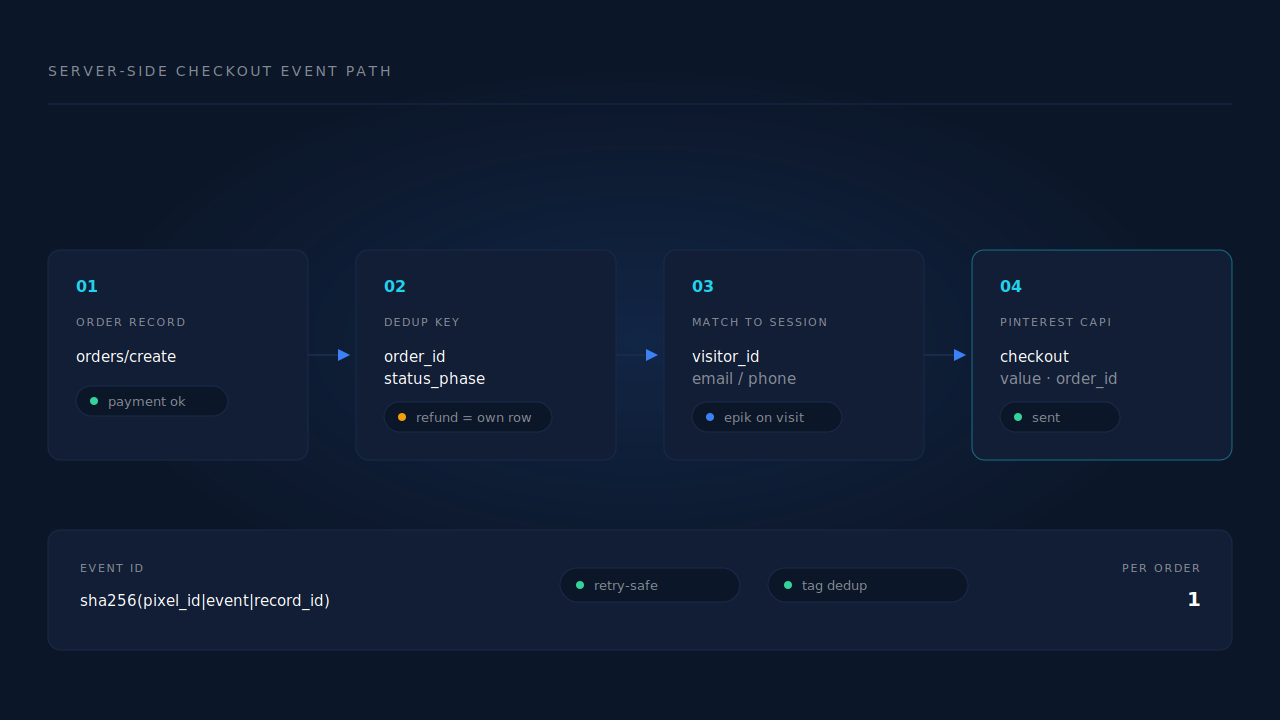
Give both paths the same deterministic event ID, derived from stable inputs rather than generated fresh on each send. If the browser tag and your server both report the same checkout, the platform can only collapse them into one conversion when both carry an identical ID.
The mistake is generating a random UUID per attempt. It looks correct and passes a single test, then breaks the first time a webhook is redelivered: your retry arrives with a new ID, the platform can’t tell it’s the same sale, and one order becomes two conversions. Under-reporting at least looks like a problem. Over-reporting looks like a good week, which is why it survives so long before anyone catches it.
Derive the ID instead from values that don’t change between attempts — the destination config, the event name, and the record it describes. Hash them. The same order now produces the same ID on the first send and the fifth, so a redelivery is harmless. Meta documents this pixel-versus-server pattern in detail (Meta, Deduplicate Pixel and Conversions API Events), and the shape of the idea carries across platforms even though each has its own matching rules.
Then add the belt-and-braces version: store dispatched event IDs yourself with a uniqueness constraint on the destination and the ID. Now a duplicate can’t even leave your server, which means you’re not relying on the platform’s dedup window to save you. If you want to see how many ways this goes wrong in practice, the same failure taxonomy is worked through in detail for Meta in our guide on why deduplication breaks.
Why does the browser tag still matter if the event comes from your server?
Because match quality depends on identifiers that only the browser can capture. Pinterest’s click identifier arrives as the _epik cookie on the visit, and the visitor’s IP address and user agent belong to the session, not to your order table. Your server knows what was bought. Only the browser knows which Pin click preceded it.
So the honest version is: server-side is a completeness fix, not an identity fix. Remove the base tag and your checkout events keep arriving, but they arrive as anonymous server events with a thin identifier set, and match quality drops. Run both — tag for identity, server for delivery — and deduplicate between them.
This is the same arithmetic behind Event Match Quality on Meta: the ceiling is set by what you collect, not by which transport you use. If you want a sense of where your numbers should land before you start tuning, we’ve written up what a good match rate looks like across platforms. The general principle — that the reliable trigger is the order record and the reliable identity is the session — is exactly how you’d fire purchase events server-side on any other platform too.
How does PartialLeads track Pinterest checkout events server-side?
PartialLeads ingests the order from the store rather than the browser. Shopify (webhook plus pixel), WooCommerce, Stripe, GoHighLevel and a universal inbound webhook all feed the same purchase pipeline, so the trigger is the payment, not the page.
Every inbound purchase runs the same path. Identity is normalised — email lowercased, phone converted to E.164 with a country-code fallback from the session’s geography. The purchase is deduplicated on client, source, order ID and status phase, which is what makes a refund its own row that nets against the paid one instead of overwriting it. Then the purchase is matched to a session through a tiered join: a visitor-ID echo carries the highest confidence, then email, then phone, then IP. Matching flips the lead to Completed with revenue attached, writes both a first-touch and a last-touch attribution row, and fans the conversion out server-side — Pinterest’s Conversions API v5 alongside Meta, TikTok and Google Ads, plus your own CRM webhooks.
The Pinterest path captures the _epik click identifier on the visit and sends ecommerce events, including checkout with value and order ID. Dispatch uses a deterministic event ID — a SHA-256 of the config, event name and record ID — against a dedup table with a uniqueness constraint per config, so a redelivered webhook physically cannot fire twice. Failures are typed rather than retried blindly: transient errors retry on the next worker cycle, authentication errors flag the configuration as needing reconnection, and permanent payload errors stop instead of looping.
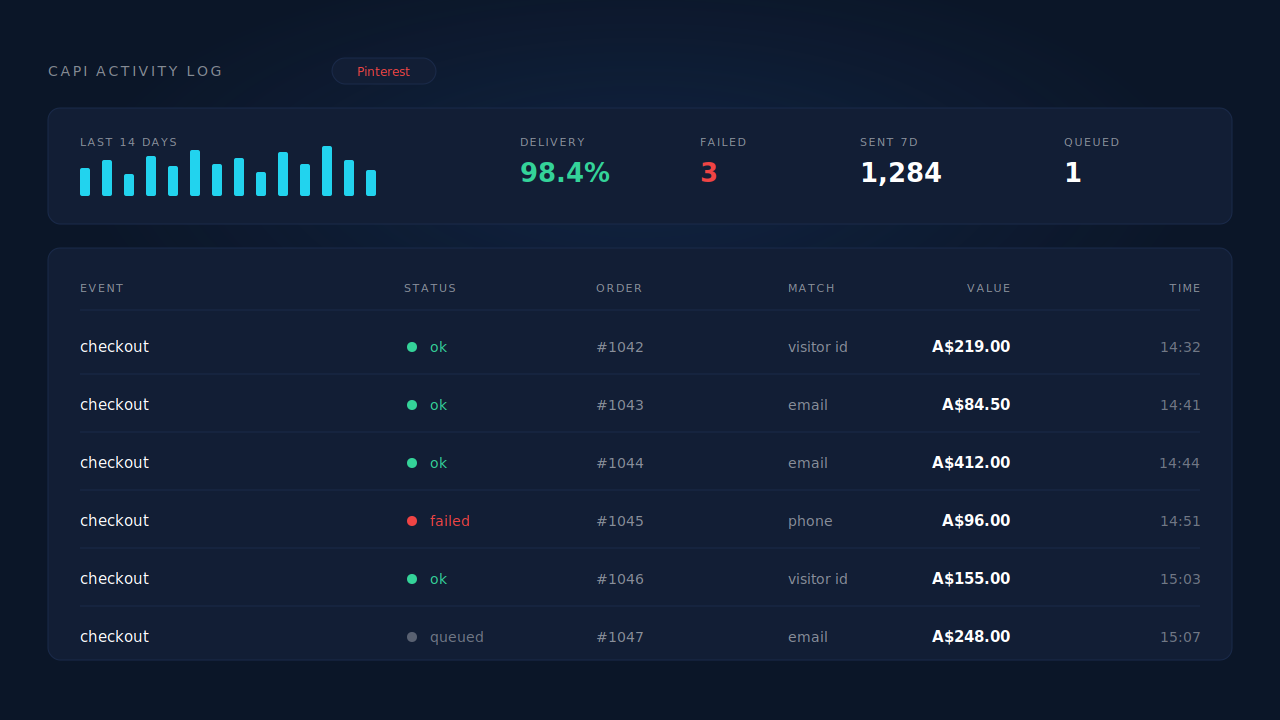
You verify it in three places. The CAPI activity log shows one checkout row per order with its status and the error text when a send fails. The Purchases ledger shows matched against unmatched orders, so a drop in match rate is visible as a shape rather than a vibe. The Attribution report’s Revenue by Match Quality view splits net revenue into partial-captured, submit-completed and unmatched — which answers the question that actually matters, namely how much of your revenue is tied to a session at all.
Two honest constraints. Match quality still depends on the _epik cookie captured client-side, so keeping your Pinterest base tag installed is not optional — PartialLeads improves delivery, not Pinterest’s identity graph. And purchases that can’t be matched to a session still land; they sit as unmatched and become attributable later if identity arrives, with a manual re-match available. That’s a real gap, not a rounding error, and the report shows it to you rather than hiding it in an average.
| What breaks | The mechanism | Where you see it in the dashboard |
|---|---|---|
| Checkout event dies in the payment redirect | Purchase ingested from the store’s order webhook, not the browser | CAPI activity log — one checkout row per order |
| A redelivered webhook fires the same sale twice | Deterministic event ID plus a uniqueness constraint per config | CAPI activity log — no duplicate row |
| Refunds keep inflating reported revenue | Refund lands as its own status-phase row and nets against paid | Purchases ledger |
| Pinterest sees the sale but not the Pin click | Purchase matched to the session by visitor ID, then email, then phone | Attribution report — Revenue by Match Quality |
| Value taken from the cart, or in the wrong currency | Value and currency read from the order record in its own currency | Purchases ledger, per-order line items |
| A send fails and nobody notices for a month | Typed retries; auth failures flag the config for reconnection | CAPI activity log status and delivery rate |
Tell us what's broken. We'll fix your tracking — free.
Describe the tracking/attribution problem you're stuck on and we'll map it to a fix: server-side conversions to Meta, Google, TikTok and Pinterest, plus first-party tracking that survives Safari. No code required.
Sources
https://developers.facebook.com/docs/marketing-api/conversions-api/deduplicate-pixel-and-server-events https://developers.facebook.com/docs/marketing-api/conversions-api/parameters/customer-information-parameters https://developers.facebook.com/docs/marketing-api/conversions-api