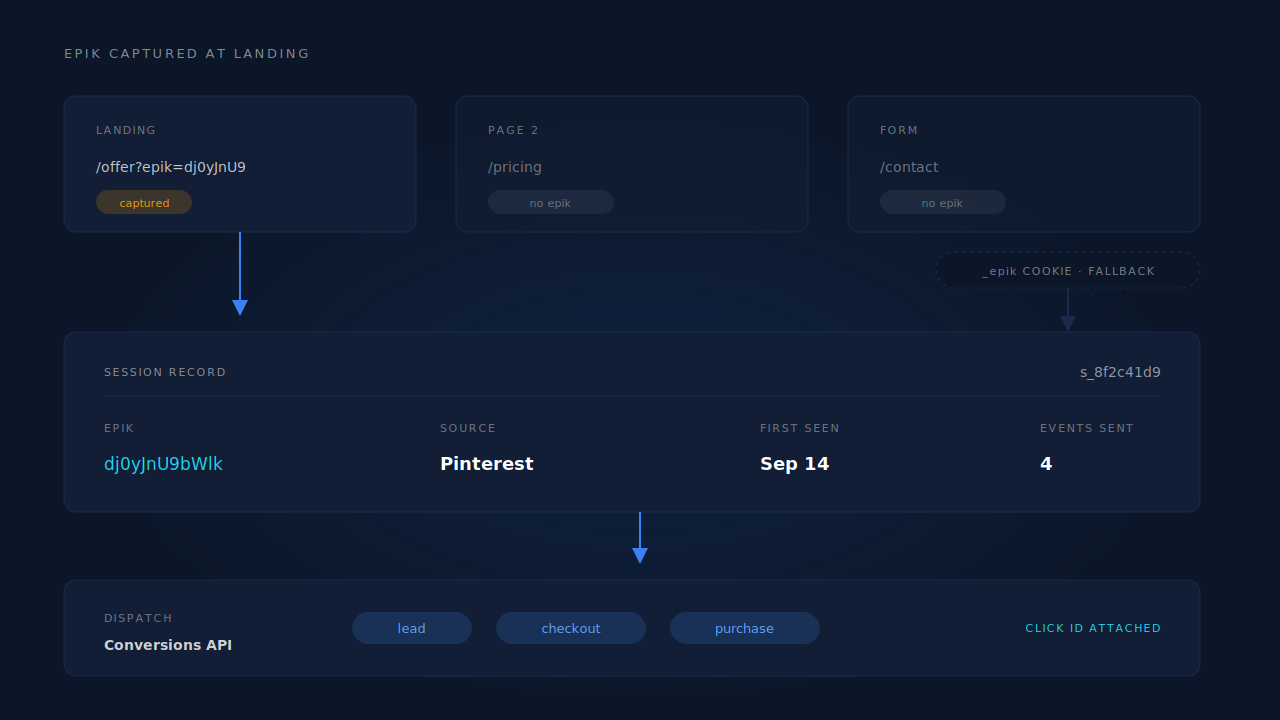
Capture epik from the landing URL the moment the visitor arrives, and store it server-side against their session. The parameter exists on the first URL of the visit and nowhere else. Every internal click after that loads a clean URL with no epik on it. Nothing recovers it later — it was either recorded at landing, or it is gone.
That single sentence is most of the fix. The rest of this article is why the parameter behaves that way, what it costs you when it goes missing, and which of the common workarounds are worth doing.
What is the epik parameter, and where does it actually live?
epik is Pinterest’s click ID: an opaque string Pinterest appends to your destination URL when someone clicks a Pin. It is meaningless to anyone but Pinterest, and it is the single strongest signal you can hand back when you report a conversion, because it names the exact click.
Every platform does this — each ad platform issues its own click ID, and epik is Pinterest’s entry in that family alongside fbclid, gclid, msclkid and ttclid.
Two copies of the value exist in a normal visit, and both live in the browser:
- The URL parameter. The original, attached to the landing URL by Pinterest at the moment of the click.
- The
_epikcookie. A copy that Pinterest’s own tag writes from that parameter so it can read the value on later pages.
Neither copy is permanent, and only the first one is guaranteed to exist. If Pinterest’s tag did not run — blocked, deferred, failed, never installed — the cookie never gets written at all. The parameter was still there.
Why does epik disappear after the first page?
Because a query-string parameter belongs to one URL, not to a visit. A visitor lands on /offer?epik=dj0yJnU9…, clicks your pricing link, and the browser loads /pricing. Nothing carries the parameter across that hop unless you explicitly build it to.
Four things drop it, in rough order of how often they bite:
- Ordinary internal navigation. Your own links point at clean paths. They should — you do not want a unique query string on every page.
- A redirect.
wwwto apex,httptohttps, a country redirect, a link-shortener hop, a landing-page tool bouncing to the real page. Plenty of redirect rules forward the path and drop the query string. - Client-side routing. A single-page app that swaps routes with
history.pushStateto a clean path, taking the parameter off the address bar without a page load. - The form post. The visitor submits and lands on a thank-you URL you generated, which has no reason to carry an ad platform’s parameter.
The cookie is not the safety net it looks like. It is written by a marketing script, so ad blockers remove it, private windows discard it at the end of the session, and browser storage policies age it out. It also cannot exist before Pinterest’s tag runs, which on a slow page can be after your own conversion logic has already fired.
What breaks in Pinterest reporting when epik is missing?
The event still arrives. It just arrives without the thing that makes it easy to attribute. Pinterest has to resolve the person from hashed email and phone, IP and user agent — which works often enough to be reassuring and fails often enough to wreck a report.
This is the exact shape of the complaint where the tag is firing but the conversions column is empty: event volume looks healthy, attributed conversions do not. The gap between those two numbers is usually identifiers, not delivery.
What it costs you, in order:
- Reporting. Pinterest looks unprofitable, so the campaign gets cut. A last-click view hands the credit to whatever channel the buyer used on the way back — usually Direct or branded search.
- Optimisation. Pinterest’s bidding learns from conversions it can attribute. Events it cannot tie to a click teach it very little about which audiences to chase.
- Debugging. You cannot tell a delivery problem from a matching problem by looking at the conversions column alone. They look identical from there.
How do you capture epik before the visitor navigates away?
Read the query string on the landing page before anything else can redirect, and post it to your own server keyed to a session ID. From then on, every event you send reads the click ID from that server-side record instead of from the address bar.
// Run this at landing, as early as you can, on every page.
const params = new URLSearchParams(location.search);
const clickIds = {};
for (const key of ['epik', 'fbclid', 'gclid', 'gbraid', 'wbraid', 'msclkid', 'ttclid']) {
  const value = params.get(key);
  if (value) clickIds[key] = value;
}

if (Object.keys(clickIds).length) {
  // Send once. The server writes it on the session and never overwrites a
  // stored value with an empty one from a later, parameter-free page.
  navigator.sendBeacon('/collect/attribution', JSON.stringify({
    session_id: mySessionId,
    landing_url: location.href,
    referrer: document.referrer,
    click_ids: clickIds,
  }));
}
Three rules make the difference between this working and this half-working:
- Run it on every page, not just the ones you think are landing pages. You do not control which URL Pinterest sends traffic to, and a redirect target is a landing page too.
- Store it server-side. A cookie you write from JavaScript is subject to the same pressures as Pinterest’s, and a first-party cookie set by your server survives more of them.
- Write once, never clear. The most common bug here is page two posting
epik: nullover a value captured thirty seconds earlier. Treat a missing parameter as “no news”, not as “no click ID”.
The principle generalises: this is the same move as rebuilding a lost click ID from the landing URL for Meta or Google. The parameter is almost never lost, only unrecorded.
Should you just append epik to every internal link?
You can, and it is the wrong place to spend the effort. Rewriting internal links to carry the parameter forward keeps it alive for exactly as long as the visitor stays inside links you control — which is not long enough.
It breaks on a form post to a page you generate, on any redirect you do not own, on a link the visitor emails themselves, on a back-button path through a cached page, and on every return visit tomorrow. It also gives every page on your site a unique query string, which muddies your own page reports and gives your canonical tags more work to do.
Worse, it solves the easy half of the problem. The hard half is the visitor who clicked a Pin on Monday and bought on Thursday from a different tab. No amount of link rewriting reaches that one. Capture the value once, server-side, and it never has to travel at all.
How do you attribute a Pinterest visitor who comes back days later?
You stop relying on the URL and start matching on the person. The session that carried epik and the session that converts are usually different sessions, sometimes on different devices. If you can prove they belong to the same person, the click ID recorded on the first one applies to the conversion on the last one.
That proof is what visitor identity resolution does: a durable first-party visitor ID, then email, then phone, then weaker signals like IP and user agent, joined into one cluster with a confidence attached to each join. The click ID lives on the cluster’s first touch, not on whichever session happened to be open at checkout.
Send the hashed email and phone as well, every time. The click ID tells Pinterest which ad; the hashed identifiers tell it which person. The Conversions API expects both, and the two together resolve conversions that neither resolves alone.
How does PartialLeads keep Pinterest attribution when epik disappears?
The tag reads epik off the landing URL along with gclid, gbraid, wbraid, fbclid, msclkid and ttclid, and posts it to the session record on the server — not to a JavaScript cookie. The _epik cookie is used as a fallback on later visits, not as the primary store. The visitor ID that ties sessions together is a first-party cookie set by the server, so Safari’s cap on script-written cookies does not apply to it and a return visit next week still lands in the same identity cluster.
When a lead or a purchase is matched, the Pinterest Conversions API dispatch reads the click ID from that cluster’s session data and attaches it to the event, in its raw form — it is a platform-issued identifier, not personal data, and it is not hashed. The hashed email and phone travel alongside it. Each event carries a deterministic event_id written into a dedup table with a uniqueness constraint, so a retried send or a redelivered webhook physically cannot double-count.
Two honest constraints, because they change what you should expect:
- Keep Pinterest’s own base tag installed. Match quality on server events depends partly on the platform cookie captured in the browser. Without it, server events become anonymous server events and resolve worse. This is not a reason to skip server-side — it is a reason to run both.
- A click ID that never arrived cannot be reconstructed. If the first URL of the visit genuinely carried no
epik— an organic Pin, a saved Pin reshared by someone else, a redirect that stripped the query string before any script ran — there is nothing to capture. You fall back to hashed identifiers and the identity cluster, which is a real fallback, not a full replacement.
| What breaks | The mechanism | Where you see it in the dashboard |
|---|---|---|
epik is on the landing URL and gone by page two |
Click ID read at landing and written to the session record server-side; _epik cookie as a later-visit fallback |
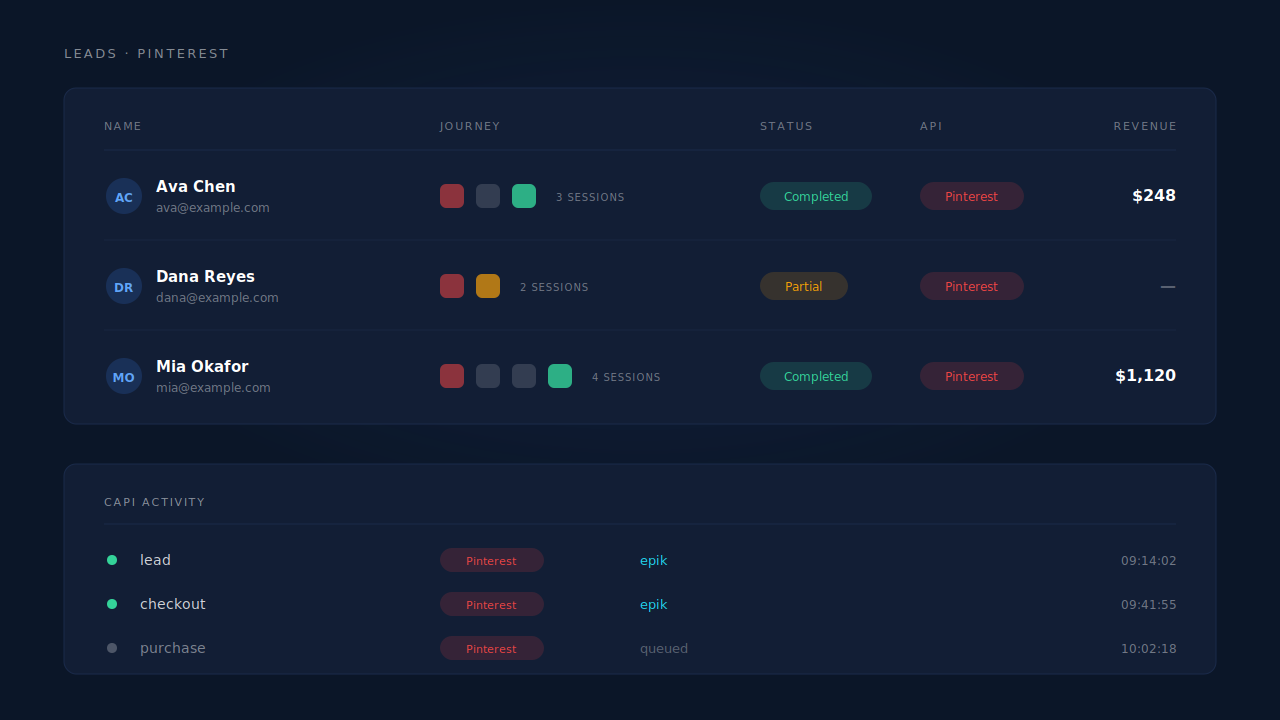
Journey ribbon on the Leads list — the Pinterest touch stays on the person |
| The conversion happens days later in a new session | Six-tier identity cluster stitches sessions into one person; the first touch keeps the click ID | Journey ribbon with its multi-session count, Attribution report first-touch table |
| Events reach Pinterest with no click ID attached | Click ID dispatched on the event in raw form, hashed email and phone alongside | CAPI activity log; the API column on the Leads list shows per-lead dispatch |
| A retry or a redelivered webhook double-counts | Deterministic event_id plus a dedup table with a uniqueness constraint |
CAPI activity log |
Tell us what's broken. We'll fix your tracking — free.
Describe the tracking/attribution problem you're stuck on and we'll map it to a fix: server-side conversions to Meta, Google, TikTok and Pinterest, plus first-party tracking that survives Safari. No code required.