Set event_name to the literal string custom. Pinterest’s Conversions API accepts a fixed, closed list of event names, and your own label — quote_requested, demo_booked, tier_upgraded — is not on it. The label stays in your configuration and your records; the wire carries custom. Anything else is rejected as an unknown event.
That is the whole mechanic, and it takes about four minutes to implement. The reason this article is longer than four minutes is that sending a custom event correctly is the easy half. Keeping two different custom events apart, and knowing when you should not be sending one at all, is the half that bites later.
What counts as a custom event on Pinterest?
Any conversion whose meaning is not in Pinterest’s standard vocabulary. The vocabulary is short and closed, and it covers the familiar commerce funnel: page_visit, view_category, search, add_to_cart, checkout, signup, lead, watch_video. Alongside those sits custom — not a placeholder, but a literal event name you actually send.
That list is versioned, so check Pinterest’s current API reference before you build against it. The structural point does not change: the set is closed, the API validates against it, and a descriptive name of your own invention is not a member of it.
So a B2B quote request, a trial upgrade, a webinar attendance, a document download that you do not want mixed in with your lead volume — each of those is a custom event. The test is not “is this important to my business.” The test is “does a standard name already mean this.”
Should you send a custom event at all, or map it to a standard one?
Map it to a standard name whenever the meaning genuinely matches. Standard events are the names the rest of the platform is built around — campaign optimisation, the conversion columns in your reports, and any comparison you ever want to make against another advertiser’s benchmarks. A custom event arrives as a custom event, and stays one.
The failure mode is not sending too few custom events. It is inventing a private taxonomy for things the standard names already describe:
- A “request a quote” form is a
lead. It is the canonical lead. - A “start free trial” signup is a
signup. - A product page view is a
page_visit, even if you call it a PDP view internally. - A “book a call” flow is a
leadunless you already send a differentleadand need to keep the two separate.
That last one is the honest case for a custom event: you already use the standard name for something else, and collapsing the two would destroy a distinction you need. If you send lead for newsletter signups and lead for sales enquiries, your conversion column becomes an average of two things you price completely differently. Splitting one of them out as a custom event is the right call — and it is a different decision from “my event feels special.”
The opposite mistake is worse and much more common: mapping everything to checkout because it is the one with a value on it. Pinterest’s checkout means a completed purchase. Pointing cart views or checkout-started at it multiplies every real purchase you report. If you are working through which server-side events belong where, which events to send through the Conversions API for lead gen walks the same decision for lead-gen accounts, and tracking Pinterest checkout events server-side covers the ecommerce half.
What does a custom event payload actually look like?
Structurally identical to a standard event, with custom in the event name slot. Everything else — the identifiers, the timestamp, the event ID, the custom data — behaves exactly as it does for checkout or lead:
{
  "data": [
    {
      "event_name": "custom",
      "action_source": "web",
      "event_time": 1758412800,
      "event_id": "a3f1c9e0b2d84f77a1c5e6b93d20f481",
      "user_data": {
        "em": ["e3b0c44298fc1c149afbf4c8996fb924..."],
        "ph": ["7d793037a0760186574b0282f2f435e7..."],
        "click_id": "dj0yJnU9..."
      },
      "custom_data": {
        "currency": "AUD",
        "value": "0"
      }
    }
  ]
}
Three details in there catch people porting a payload over from another platform: the hashed user-data fields are arrays rather than scalars, value is a string rather than a number, and the click ID travels raw while email and phone are hashed. Setting up the Pinterest Conversions API covers those formatting quirks properly; they are the same for a custom event as for any other.
The normalisation rules before hashing are the boring part that decides whether the event matches anyone: lowercase and trim the email, put the phone in E.164 with the country code, then hash. Meta documents the same normalisation for its own customer-information parameters, and the rules are worth reading once because every server-side integration you ever build reuses them.
Where does your own label live if it can’t go in event_name?
In three places, none of which is the wire: your configuration, your deduplication key, and your own reporting. The label is how you know which event this is. custom is how Pinterest knows it is not one of the standard ones.
Keeping the label out of event_name is not optional, and it is where most first attempts die. Sending quote_requested as the event name produces a validation error for an unknown event — the payload is otherwise perfect, so the error reads like a formatting problem when it is a vocabulary problem.
Keeping the label somewhere, though, is equally load-bearing. If you throw it away at dispatch time, you lose the ability to tell your own events apart afterwards. You will want it when you are reconciling your sent-events log against Pinterest’s received count, and you will want it in the deduplication key, which is the next section and the one that actually causes silent data loss.
How do you keep two different custom events from deduplicating into each other?
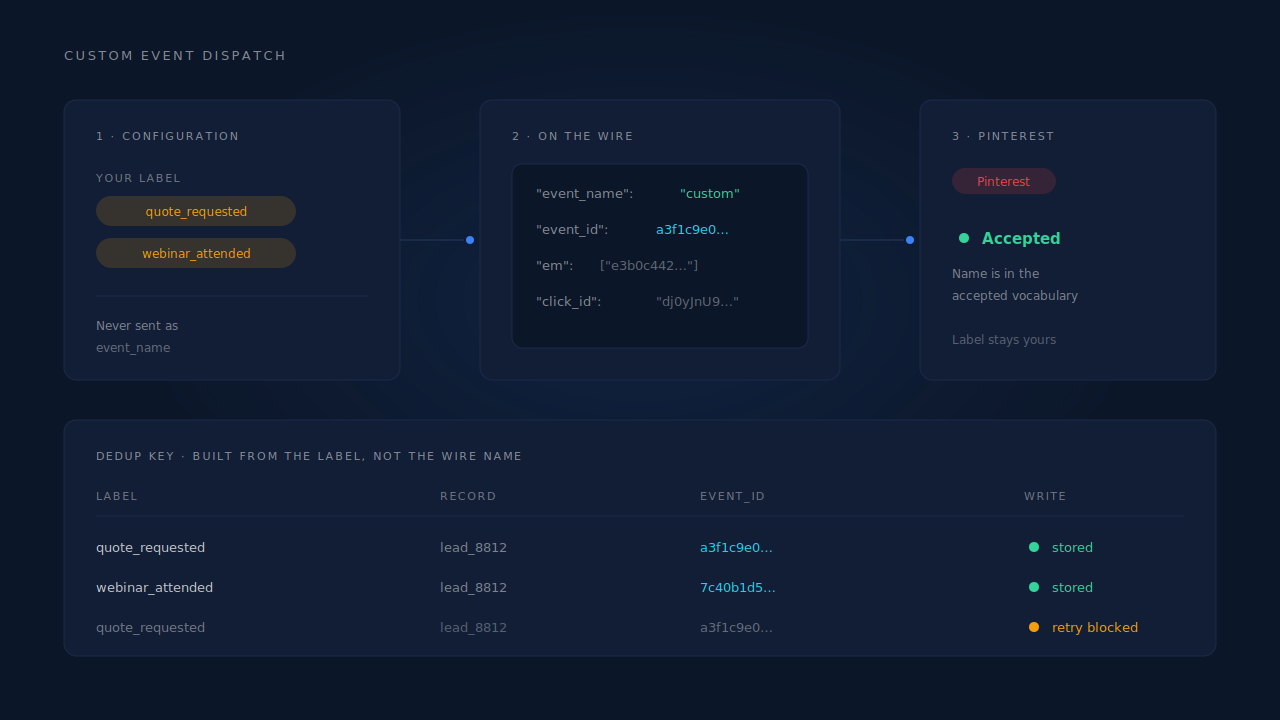
Put the label in the event ID. Deduplication works on the event ID, so if two differently-labelled custom events for the same person at the same moment derive the same ID, the platform is being told they are one event — and one of them disappears without any error.
A deterministic event ID is the right pattern here: hash a fixed set of inputs rather than generating a random value, so a retry of the same event produces the same ID and cannot double-count. The inputs normally look like this:
event_id = sha256( pixel_id | event_name | record_id )
For standard events, event_name does that job on its own — a lead and a checkout on the same record produce different IDs. For custom events it does not, because event_name is the literal custom for every single one of them. Two custom events on the same record hash to the same ID, and the second one is deduplicated away.
The fix is to hash the label rather than the wire name:
event_id = sha256( pixel_id | label_or_event_name | record_id )
Now quote_requested and webinar_attended on the same record are distinct, while a retry of either is still perfectly idempotent. This is the same design discipline as choosing a deterministic event_id for Meta deduplication — the principle carries across platforms, and Meta’s own deduplication documentation is the clearest write-up of why random IDs fail.
Two practical rules that fall out of it:
- Never generate the ID at send time from a timestamp or a random value. A retried send then looks like a second conversion, and retries are normal — networks fail, workers restart, webhooks redeliver.
- Never let the ID depend on something that changes between the browser event and the server event. If you are sending the same conversion from both the tag and the server, both sides must derive the same ID or the platform counts it twice.
What do you give up by sending custom instead of a standard event?
Legibility, mostly. A standard event carries meaning the platform already understands; a custom event carries meaning only you understand. That has three practical consequences worth knowing before you commit:
- Reporting. Your custom events do not roll up into the standard conversion columns your account is otherwise measured on. You will be reading them separately, and so will anyone you report to.
- Comparison. Nobody else’s benchmarks apply to an event you invented. That is fine if you are comparing your own periods, and useless if you are trying to sanity-check against anything external.
- Optimisation. Campaign objectives are built around the standard events. Check what your campaign is actually optimising towards before you assume a custom event is feeding it — an empty conversions column on a campaign that is optimising for something else is a tag firing into the wrong event, not a delivery failure.
None of that is a reason to avoid custom events. It is a reason to spend them deliberately: use the standard name when it fits, and reserve custom for the distinctions that are genuinely yours.
How does PartialLeads send custom events to Pinterest?
You give the event your own label in the Pinterest configuration, and the dispatch handles the split. The wire event name sent to the Conversions API is the literal custom; your label never goes into event_name, so a descriptive internal name cannot produce a rejection. The label stays with the configuration, and it goes into the deduplication key — so two differently-labelled custom events on the same record stay two events.
Each event carries a deterministic event_id written into a dedup table with a uniqueness constraint. A retried send or a redelivered webhook physically cannot write the same ID twice, which is the difference between “we try not to double-count” and “double-counting is structurally impossible.”
The identifiers travel with it automatically: hashed email and phone from whatever the visitor typed — including a form they started and abandoned — plus the raw epik click ID captured from the landing URL, the IP and the user agent. Email is lowercased and trimmed, the phone is normalised to E.164 with a country code inferred from session geo, and the hashing happens on the server before anything leaves.
Two honest constraints:
- Keep Pinterest’s own base tag installed. Match quality on server-side events depends partly on the platform cookie captured in the browser. Removing the tag makes your server events resolve worse, not better. Run both.
- A custom event is still a custom event on Pinterest’s side. Sending it correctly means it arrives, deduplicates and carries identifiers. It does not turn it into a standard event, and no tool can. If you want the reporting and optimisation behaviour of a standard event, use a standard name.
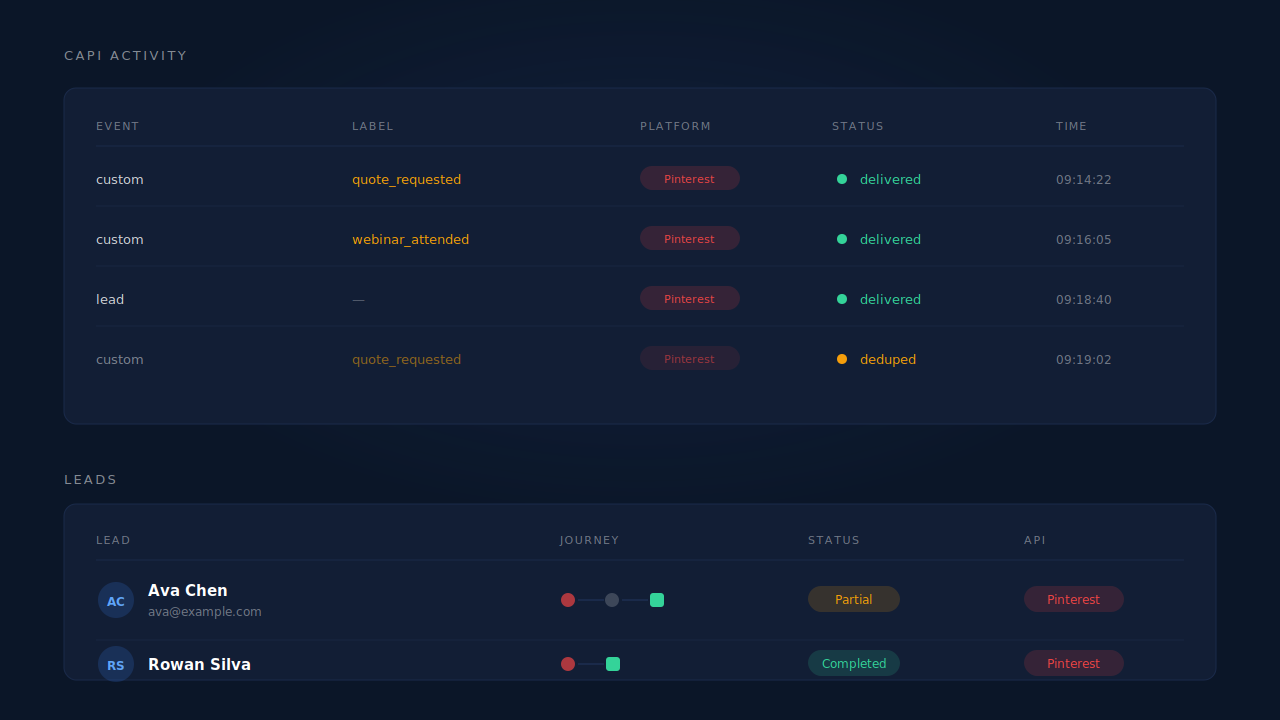
| What breaks | The mechanism | Where you see it in the dashboard |
|---|---|---|
| Your descriptive event name is rejected as unknown | Wire event name constrained to Pinterest’s vocabulary; your label lives in the configuration, never in event_name |
Accepted rows in the CAPI activity log |
| Two different custom events collapse into one | Deterministic event_id derived from the label rather than the literal wire name |
One row per label in the activity log, not one row total |
| A retry or a redelivered webhook double-counts | The same deterministic event_id, written to a dedup table with a uniqueness constraint |
CAPI activity log |
| The custom event arrives with nothing to match on | Hashed email and phone, raw epik click ID, IP and user agent attached from the identity cluster |
Journey ribbon and the per-lead API column on the Leads list |
Tell us what's broken. We'll fix your tracking — free.
Describe the tracking/attribution problem you're stuck on and we'll map it to a fix: server-side conversions to Meta, Google, TikTok and Pinterest, plus first-party tracking that survives Safari. No code required.