Send one event per state change that matters to the business: Lead when someone becomes a lead, Schedule when they book time, Contact when they open a conversation, CompleteRegistration when they create an account, and Purchase when money moves. Everything else — PageView, ViewContent, scroll depth — belongs to the browser pixel, if anywhere. The Conversions API is for states, not traffic.
Lead-gen accounts fail this in two directions. Some send nothing but Lead, so a booked consultation worth $2,000 and a newsletter signup worth nothing land in the same bucket. Others mirror the entire pixel server-side, so Meta receives four events for one human and the account’s reporting stops agreeing with the CRM. Both are fixable by deciding, once, what each event means.
Which events should a lead-gen advertiser actually send?
Five standard events cover almost every lead-gen funnel. Each one marks a state the business can act on — a person who can be called, a slot on a calendar, a signed application, money received. If you cannot describe an event in those terms, it does not belong in the Conversions API.
| Event | Fires when | Typical lead-gen use |
|---|---|---|
Lead |
A person hands over contact details | Form submitted, quote requested, guide downloaded |
Schedule |
A time is booked | Discovery call, demo, clinic appointment |
Contact |
A conversation starts | Phone call, live chat, WhatsApp thread |
CompleteRegistration |
An account is created | Portal signup, free tier, trial start |
SubmitApplication |
A formal application lands | Finance, insurance, enrolment |
Purchase |
Money moves | The deal closes, the invoice is paid |
Meta publishes these as standard events, which means Ads Manager already knows how to report and optimize against them without you configuring a custom conversion first (Meta for Developers, Meta Pixel standard events reference). Custom events still work — send Lead for the generic case and a custom event for the odd one out — but every custom event is a rule you have to build and maintain before it can be optimized on.
Then apply one filter to the shortlist: send the event only if the state is real in your system. If nothing in your CRM changes when the event fires, the event is measuring page behaviour, not lead generation.
Why does sending more events make delivery worse?
Because delivery optimizes toward whatever you tell it a conversion is, and an event that means several things at once teaches it several things at once. If Lead fires for newsletter signups, ebook downloads and demo requests alike, Meta will buy whichever of those is cheapest to produce — and newsletter signups are always cheapest.
That is the quiet failure. The loud one is volume: mirroring every pixel event server-side creates a second copy of your traffic with no business meaning attached. PageView and ViewContent through the server add payload and cost without adding a state; they also double your exposure to the deduplication problems that make reported conversions drift away from your CRM count.
There is a real trade-off underneath this, and it is not “fewer events are always better.” An ad set optimizing for an event it rarely receives stays stuck in learning, and a sparse signal is its own kind of broken. The fix is not to loosen the definition of Lead until volume appears. It is to choose the densest event that still means something — often Lead for high-ticket services, Schedule for booking businesses — and let the rarer, more valuable events ride along as reported-but-not-optimized signals.
What is the difference between Lead, Contact, Schedule, and CompleteRegistration?
They differ by what the person committed to, and that is the whole basis for choosing between them. Lead is identity: you now know who they are. Contact is conversation: they opened a channel. Schedule is time: they put something on a calendar, which is a much stronger commitment than a form fill. CompleteRegistration is account creation: they set up a place to come back to.
Pick one as the optimization event and send the rest for reporting. A law firm that only makes money from consultations optimizes on Schedule and sends Lead underneath it, so the funnel is visible without training delivery on the weaker signal. A B2B SaaS with a free tier usually does the reverse: optimize on CompleteRegistration because it happens often enough to teach, and report Lead and Purchase around it.
Two practical rules keep this from decaying:
- One event name per state, forever. Renaming
LeadtoLeadsnext quarter, or splitting it across two names, resets what the account has learned. - Never fire two standard events for the same moment. A booking is a
Schedule. It is not aScheduleand aLeadand aCompleteRegistrationbecause three systems each saw it. If you want both the identity and the booking recorded, fireLeadwhen the contact details arrive andSchedulewhen the slot is taken — separate moments, separate events, separate IDs. This is the same discipline that makes booked appointments attributable rather than double-counted.
Should you send partial leads to Meta as conversion events?
Sometimes — but never under the same event name as a completed submission without deciding to. A partial lead is someone who typed an email or phone number into your form and left before submitting. They are a real, contactable person, and they are far more numerous than your submitters. That makes them tempting as conversion volume and dangerous as an optimization target.
The honest way to think about it is a ladder, from strictest to loosest:
- Completed submissions only. The default. Highest intent, lowest volume, the signal most likely to match what sales calls a lead.
- Completed plus qualified partials. Fire on partials that meet a condition you set — a work email domain, a particular landing page, a form that reached the phone field. You get more signal without opening the gate to everyone who bounced off the first input.
- All partials. Only when the account is genuinely signal-starved and you accept that the definition of “conversion” has changed. Track the downstream close rate afterwards, because delivery will chase whatever you just defined.
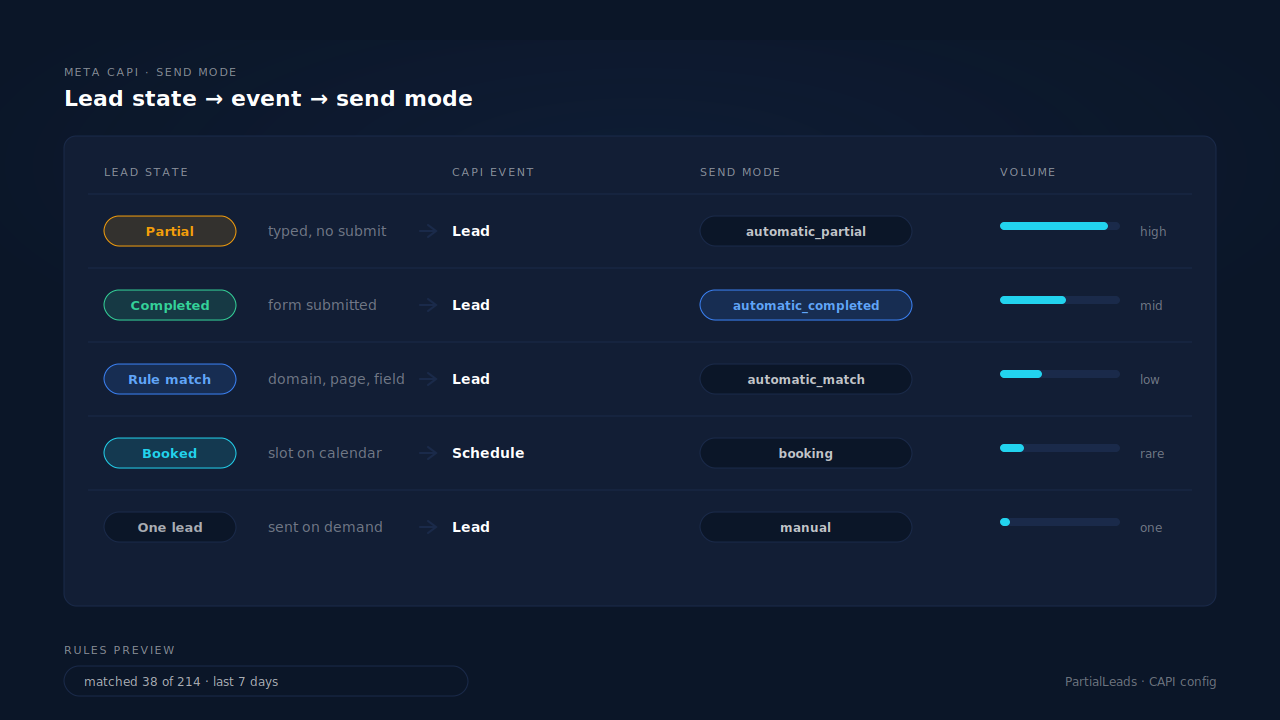
Whichever rung you pick, keep partial-lead events distinguishable — a separate event name, or a parameter you can filter on in reporting. The moment they are indistinguishable from submitted leads, you lose the ability to answer the only question that matters: do these people ever close?
How do you stop one lead from becoming three conversions?
Give every event a deterministic ID and derive it from the record, not from the moment of sending. Two copies of the same event — the browser pixel’s and the server’s — collapse into one when they share an event_id and an event name. Two sends generated with a random ID each never collapse, so a retried webhook, a refreshed thank-you page and a workflow that fires twice each become another conversion in Ads Manager.
Three habits cover nearly all double-counting in lead gen:
- Derive the ID from something stable — the lead record or order ID, hashed with the event name and the pixel it is going to. Same lead, same event, same ID, every time, from every code path.
- Fire on the state change, not the page. A thank-you page that fires
Leadon load fires again on every refresh and every time someone shares the URL. ALeadevent fired when the record is created in your database fires once. - Keep the browser pixel installed. It is not redundant. The pixel sets the
_fbpcookie the server events need for matching, which is the practical reason you run both the pixel and CAPI rather than choosing one.
What does each lead event need to carry?
More than the event name. Which event you pick decides what delivery learns; what you attach to it decides whether Meta can find the person at all. That second half is measured as Event Match Quality, and it is where most lead-gen accounts lose more than they lose on event selection.
A well-formed lead event carries hashed email (em), hashed phone in E.164 (ph), the _fbp and _fbc cookie values unhashed, the client IP and user agent, an external_id you control, and the action_source set to the surface the conversion actually happened on:
{
  "event_name": "Lead",
  "event_time": 1757635200,
  "event_id": "a3f1c9d4e8b27f60",
  "action_source": "website",
  "user_data": {
    "em": ["<sha256 of lowercased email>"],
    "ph": ["<sha256 of E.164 digits>"],
    "fbp": "fb.1.1757635100.1234567890",
    "fbc": "fb.1.1757635100.IwAR0abc123",
    "client_ip_address": "203.0.113.24",
    "client_user_agent": "Mozilla/5.0 ...",
    "external_id": ["lead_88421"]
  },
  "custom_data": {
    "value": 180.00,
    "currency": "AUD",
    "lead_type": "consultation_request"
  }
}
Three details that quietly break events in production:
event_time has a seven-day ceiling. Meta rejects or clamps server events older than seven days, which matters for lead gen specifically because the sale often lands weeks after the lead does. Send the Lead event when the lead happens, not when the CRM gets around to syncing.
Value on a lead event is optional but useful. If you know your average value per lead, send it and let value optimization work. If you are guessing, leave it out — an invented number is worse than no number, because delivery will believe it.
Privacy flags are not optional in some regions. Events from California traffic need data_processing_options set correctly, or they are accepted and then silently dropped. You will see the events leave and never see them land.
How does PartialLeads decide which leads fire a CAPI event?
PartialLeads treats “which leads should fire” as a configuration, not a code change. Each Meta CAPI config has a send mode: automatic_completed (post-submit, the default), automatic_partial (fires on partial leads, pre-submit), automatic_match (rule-based), booking, or manual — the ladder from the partial-leads section above, expressed as a setting.
Rules are conditions, not code. The rule builder takes a combinator — AND or OR over a list of {field, match_type, pattern} conditions — so “work email domains on the pricing page” is a rule, not a deploy. The same matcher runs the preview and the dispatch, so what you test is what fires. On the Microsoft CAPI config, that preview answers the question directly: would have matched N of M capture-ready leads in the last 7 days, computed over the newest records rather than a sample.
Every event carries the full identity payload automatically. Email lowercased and trimmed, phone normalized to E.164 with a country-code fallback from the session’s geography, _fbc reconstructed from fbclid when the cookie is missing or malformed, _fbp/_fbc/IP/user-agent sent unhashed exactly as Meta’s spec requires. With email and phone as required form fields, PartialLeads consistently delivers EMQ 9+ — observed across customer accounts. Email-only forms structurally cap lower, because you cannot transmit what you never collected.
One event per state, enforced by the database. Event IDs are a SHA-256 of pixel_id|event_name|record_id, and the dedup tables are keyed UNIQUE(config, event_id) — a redelivered webhook physically cannot double-fire. Retries are idempotent end to end, across all five dispatch paths.
The same decision fans out to four platforms. Meta, Pinterest, TikTok and Google Ads receive the conversion from one capture, with per-domain and per-account configs so an agency’s clients stay separated.
Honest constraints. Keep your browser base tag installed — PartialLeads reconstructs _fbc from a fbclid in the URL, but it does not synthesize _fbp out of nothing, and match quality drops without it. Event time is clamped to Meta’s seven-day window, so this is not an unlimited backfill tool. And EMQ has a platform-side component: an audience of work emails can resolve lower even with a complete payload.
| What breaks | The mechanism | Where you see it in the dashboard |
|---|---|---|
| One event name means five different things | Per-config event naming and send mode, set once per funnel | Meta CAPI config list, grouped by domain |
| Partials and submissions indistinguishable | Separate send modes for partial vs completed leads | Lead status: Partial (amber) vs Completed (green) |
| A rule change that has to be deployed to test | Trigger rules with a preview on the same matcher the dispatch uses | Rules preview: matched N of M in the last 7 days |
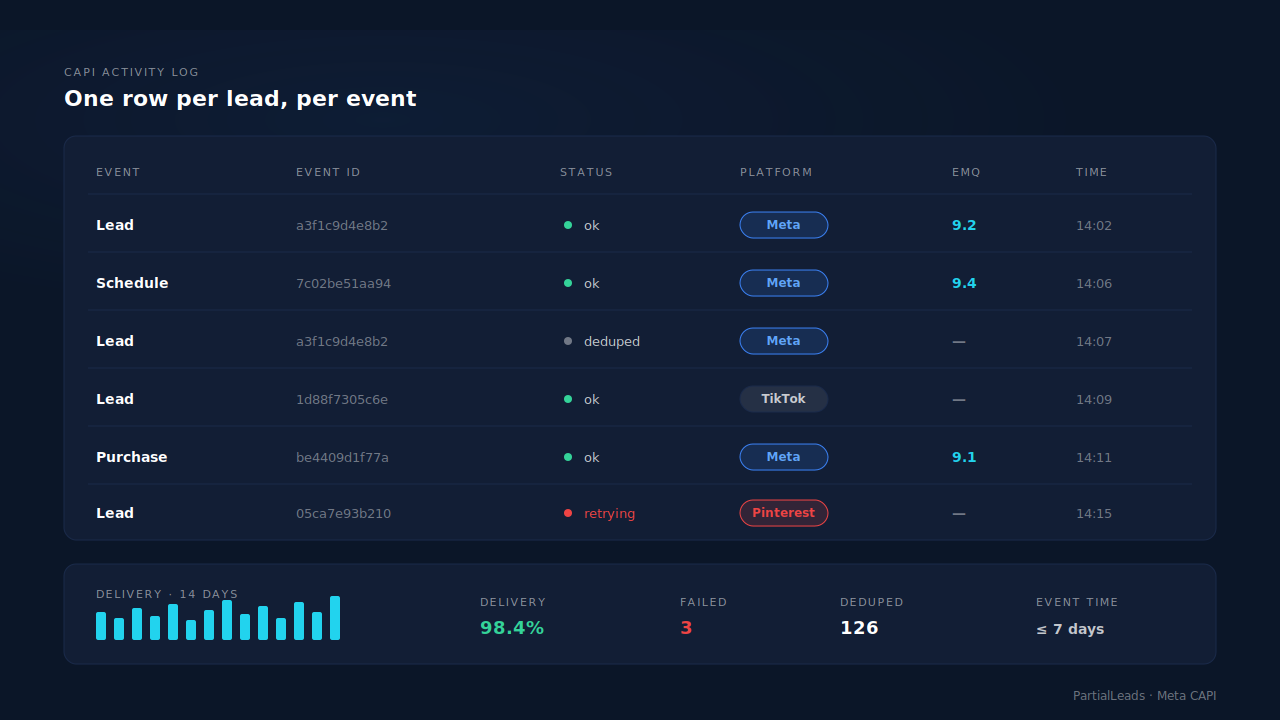
| Same lead counted twice | Deterministic event_id + UNIQUE dedup tables |
CAPI activity log: one row per lead per event |
| Events leave but never land | Retry taxonomy that reads events_received vs events_processed | Activity log status and error text, delivery health strip |
| Low match quality on well-chosen events | Full identity payload: hashed email and phone, _fbc reconstruction, IP and UA |
EMQ column per event, Events Manager match quality |
Start by writing down what each event means in one sentence. If two events share a sentence, you have one event. If one event needs two sentences, you have two.
Tell us what's broken. We'll fix your tracking — free.
Describe the tracking/attribution problem you're stuck on and we'll map it to a fix: server-side conversions to Meta, Google, TikTok and Pinterest, plus first-party tracking that survives Safari. No code required.
Sources
- Meta for Developers — Meta Pixel standard events reference: https://developers.facebook.com/docs/meta-pixel/reference
- Meta for Developers — Conversions API: https://developers.facebook.com/docs/marketing-api/conversions-api
- Meta for Developers — Server event parameters: https://developers.facebook.com/docs/marketing-api/conversions-api/parameters/server-event
- Meta for Developers — Customer information parameters: https://developers.facebook.com/docs/marketing-api/conversions-api/parameters/customer-information-parameters
- Meta for Developers — Deduplicate pixel and server events: https://developers.facebook.com/docs/marketing-api/conversions-api/deduplicate-pixel-and-server-events