You have to put it there, because Shopify never does. The fbc value Meta wants is the _fbc cookie in the shopper’s browser, written from the fbclid on the landing URL. Shopify’s order record doesn’t copy it. Capture it at landing, attach it to the cart as a cart attribute so it reaches the order, then map it into your Zap’s Purchase.
That’s the whole fix in one paragraph. The rest of this article is the detail that makes it work on a real store: what the value looks like, where each piece of Shopify data comes from, the script that carries it, and what to do for buyers whose cookie never existed.
Why isn’t the fbc click ID in the Shopify order data?
Because fbc is browser state and a Shopify order is a server record. When someone clicks your Meta ad, Meta adds fbclid to the landing URL. Meta’s base code on your storefront reads it and writes the _fbc first-party cookie. That cookie stays in the visitor’s browser. Nothing in Shopify’s checkout copies it onto the order.
Look at what an order actually carries. Shopify’s Admin order resource includes browser_ip, client_details, landing_site, referring_site, note_attributes, the customer’s email and phone, and the totals. There is no fbc field and no fbp field.
So when Zapier’s Shopify trigger fires on a new order, it hands you every field on that record, and none of them is the click ID. It’s the same gap described in tracking leads that arrive through Zapier or Make: an automation moves records, not cookies. The Zap isn’t misconfigured. The value was never in the record it reads.
What does the fbc value look like, and why does Meta want it?
fbc is Meta’s click identifier in a fixed format: fb.1.<timestamp>.<fbclid>. The 1 is a subdomain index, the timestamp is when the click was first seen in milliseconds, and the last part is the raw fbclid from the URL. Meta’s parameter docs describe that format and say fbc and fbp are sent unhashed, unlike email and phone.
A real value looks like this:
fb.1.1727517600000.IwAR2xExampleClickIdOnly
Meta wants it because it ties the conversion to a specific ad click. Hashed email and phone tell Meta who bought. fbc tells Meta which click led there. Without it, Meta can still match the buyer to an account and still may not credit your ad.
That’s why a Purchase with no fbc shows up in Events Manager with a weaker customer-information profile, and why your Event Match Quality (EMQ) score for Purchase tends to sit lower than it should. Its sibling, fbp, is the browser ID from the _fbp cookie. You’ll want that too.
Can Zapier read the _fbc cookie?
No. Zapier runs on Zapier’s servers, triggered by Shopify’s order data. It never sees the shopper’s browser, so it can’t read any cookie. The only way a browser value reaches a Zap is if something in the browser writes it into data that Shopify stores on the order.
A Shopify custom pixel doesn’t close that gap by itself. Pixels under Settings → Customer events can read cookies: Shopify’s pixel API exposes browser.cookie.get, which “returns the cookie value as a string”. But a pixel can only send what it reads to a URL you choose. It can’t write onto the order. You’d need your own endpoint to receive it and join it to the order by ID, and at that point the Zap is no longer doing the job.
The field that does reach the order is note_attributes. That’s where cart attributes end up.
How do you carry fbc from the landing page onto the order?
Save the click on landing, then write it to the cart as a cart attribute. Shopify carries cart attributes through checkout onto the order, where they appear as note_attributes (shown in the admin as “Additional details”). Shopify’s cart API sets them through /cart/update.js, and they add or overwrite values without touching the cart’s items.
This script goes in your theme (for example, theme.liquid just before the closing body tag), not in a custom pixel. It keeps the fbclid from the landing page, prefers the real _fbc cookie when there is one, and rebuilds the value in Meta’s format when there isn’t:
// Theme code (theme.liquid), not a Customer Events pixel
(function () {
  var KEY = 'fb_click_seen';
  var params = new URLSearchParams(location.search);
  if (params.get('fbclid')) {
    localStorage.setItem(KEY, JSON.stringify({ id: params.get('fbclid'), t: Date.now() }));
  }

  function cookie(name) {
    var m = document.cookie.match('(?:^|; )' + name + '=([^;]*)');
    return m ? decodeURIComponent(m[1]) : '';
  }

  var saved = null;
  try { saved = JSON.parse(localStorage.getItem(KEY)); } catch (e) {}

  var attributes = {};
  if (cookie('_fbc')) attributes.fbc = cookie('_fbc');
  else if (saved) attributes.fbc = 'fb.1.' + saved.t + '.' + saved.id; // Meta's documented format
  if (cookie('_fbp')) attributes.fbp = cookie('_fbp');
  if (!attributes.fbc && !attributes.fbp) return;

  fetch('/cart/update.js', {
    method: 'POST',
    headers: { 'Content-Type': 'application/json' },
    body: JSON.stringify({ attributes: attributes })
  });
})();
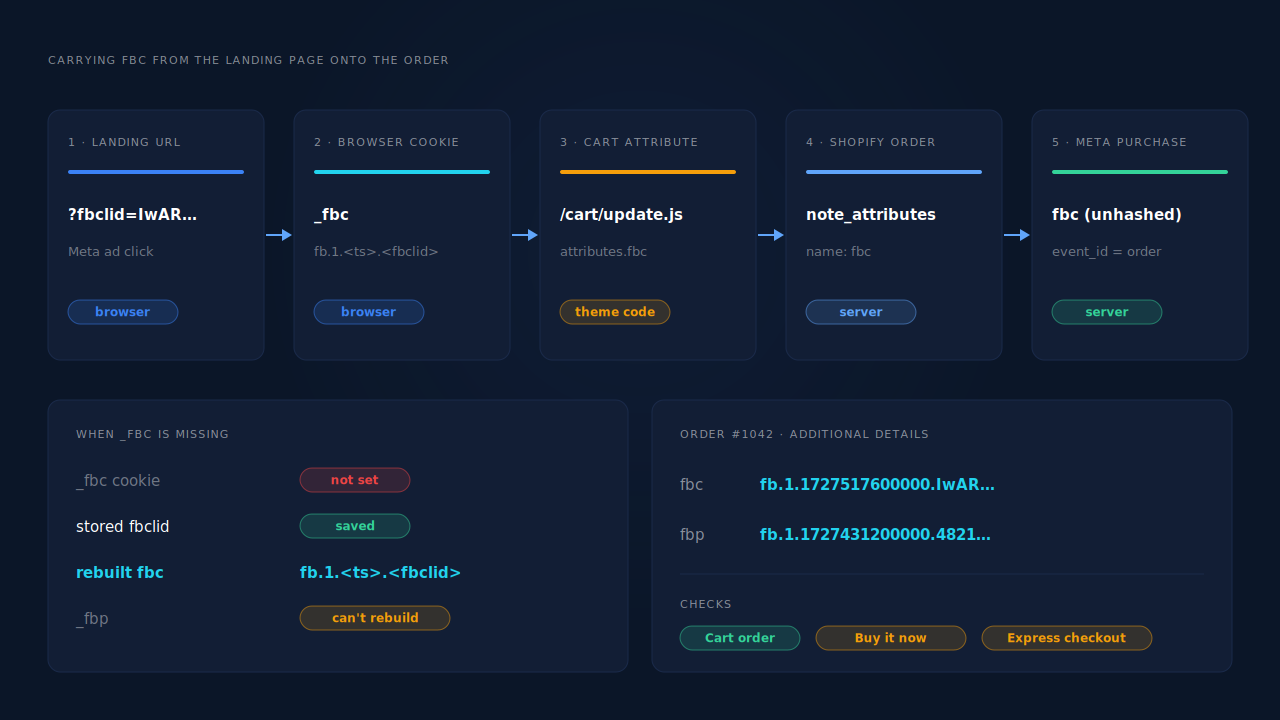
Two details matter. The fbclid is stored at landing because the cart usually gets created pages later, when the parameter is long gone from the URL. And the script runs on every page, so the attribute stays current if the cookie appears after the first page view.
Test it before you trust it. Click a test link with ?fbclid=test123, add to cart, place a test order, and check Additional details on the order. Then test a “Buy it now” or express checkout order separately, because those flows can skip the cart page your script updated.
How do you map fbc into the Purchase your Zap sends?
Read the fbc entry out of the order’s note attributes and put it in the event’s fbc field, unhashed. Zapier tends to present note_attributes as parallel lists of names and values. A Formatter or Code step that returns the value whose name is fbc (and the same for fbp) turns them into single fields you can map.
Then check the rest of the Purchase:
- Use the order ID as
event_id. It keeps retries from counting twice on your side. - Hash email and phone, never
fbcorfbp. Meta expects SHA-256 on customer details and the raw value on the two cookies. - Send
client_ip_addressandclient_user_agentif you have them. The order’sbrowser_ipandclient_detailsare the closest Shopify gets. - Send it while the event is fresh. Meta rejects Purchase events whose
event_timeis more than seven days old, which matters for cash-on-delivery orders that get marked paid later. See the 7-day event time window in Meta CAPI.
If the Meta action in your Zap doesn’t expose an fbc field, send the event with a Webhooks by Zapier POST to the Conversions API endpoint instead. The payload is plain JSON.
One more trap. If Shopify’s Facebook & Instagram app still sends its own browser Purchase, Meta receives two purchases per order with two different event IDs and counts both. Keep one source for Purchase. The pillar on fixing Meta CAPI tracking on Shopify covers choosing it.
What if the _fbc cookie was never set?
Rebuild it from the fbclid, if you kept one. The script above does exactly that: when there’s no _fbc cookie but a stored fbclid, it builds fb.1.<timestamp>.<fbclid>. That’s legitimate because Meta documents the format and the fbclid came from the real click. Rebuilding a lost click ID from the landing URL goes further into timestamps and edge cases.
Two things can’t be rebuilt:
fbpwithout the cookie. No URL carries it. If Meta’s base code never ran, that value doesn’t exist. Keep the base code on the store.- A click that never carried
fbclid. Buyers who came back by typing your URL, from an email, or through a link that stripped the parameter have no click ID to send. Hashed email and phone still let Meta match the person. They just can’t point to one ad click.
Some orders also have landing_site filled in with the first URL of the visit. If that URL still includes fbclid, a Code step can pull it out as a last resort. Don’t rely on it for every order.
How does PartialLeads get fbc onto Shopify orders sent to Meta?
It captures the click ID in the browser and sends the Purchase from the order, so there’s no cookie-scraping step in between. The PartialLeads Customer Events pixel records fbclid, _fbc and _fbp at landing and through checkout. When Shopify marks the order paid, the server-side Purchase to the Conversions API carries them.
The mechanism, step by step:
- Capture at landing. The pixel reads
fbclidfrom the landing URL and the_fbcand_fbpcookies when they exist. - Rebuild only what’s rebuildable. If
fbclidwas on the URL but_fbcis missing or malformed, PartialLeads rebuilds it in Meta’sfb.1.<ts>.<fbclid>format. It doesn’t invent_fbp, so keep Meta’s base code on the store. - Join the order to the click. The order is matched to the landing session by the visitor ID first, then email, then phone, then IP. A buyer who clicked on Monday and paid on Thursday keeps Monday’s click.
- Send once, from the paid order. Purchase fires from the Shopify order webhook when
financial_statusis paid, with the full order total (tax and shipping included, after discounts), hashed email and phone, and a deterministicevent_id. A redelivered webhook can’t send it twice.
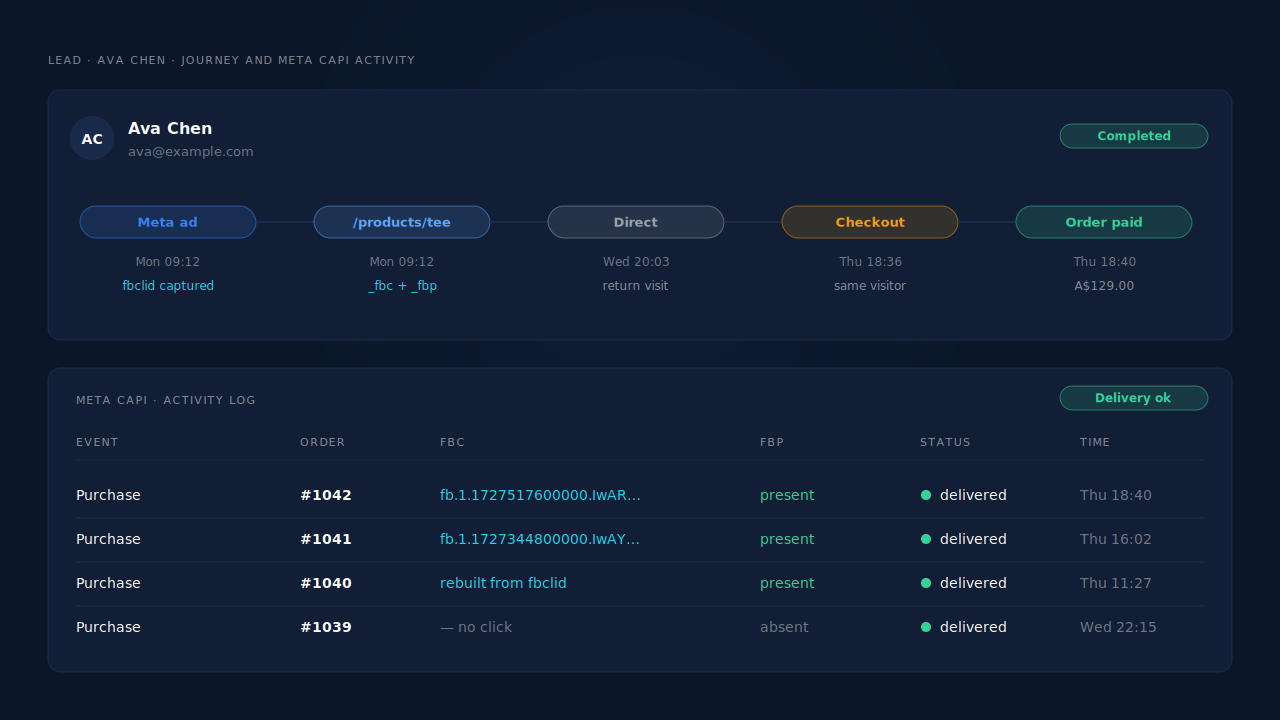
Where you see it working. The Journey timeline on the buyer’s lead shows the landing visit with fbclid captured and the order it led to. The Meta CAPI page lists each Purchase sent with its delivery status. The Leads list API column shows which conversion APIs that buyer was sent to.
The honest constraints. Every paid order produces a Purchase carrying every identifier that was captured. Unpaid, pending and cancelled orders are not sent. Whether Meta then credits an ad depends on Meta’s own matching: a buyer with no fbclid on their visit, or one Meta can’t resolve, may still go uncredited. PartialLeads controls delivery; Meta controls matching. Each order is recorded once, so a post-purchase upsell added to the same order doesn’t update the value. And PartialLeads doesn’t deduplicate against another app’s browser pixel. If you switch, turn off your Zap and the Facebook & Instagram app’s Purchase so Meta hears about each order from one place.
| What breaks | The mechanism | Where you see it in the dashboard |
|---|---|---|
| Shopify order data has no fbc for the Zap to send | Customer Events pixel captures fbclid, _fbc and _fbp at landing and through checkout | Journey timeline: landing visit with fbclid |
| _fbc cookie missing when the click did happen | _fbc rebuilt in Meta’s format from the landing URL’s fbclid | Meta CAPI page: Purchase delivered |
| Order placed days after the click, in a new session | Order matched to the click session by visitor ID, email, phone, then IP | Journey timeline: order joined to the ad-click visit |
| Purchase reaches Meta without the click trail | Server-side Purchase from the paid-order webhook carries the captured identifiers | Meta CAPI page and the Leads list API column |
| Zap and app both send Purchase | One deterministic event_id per paid order; switch other senders off | Meta CAPI page: one Purchase per order |
Tell us what's broken. We'll fix your tracking — free.
Describe the tracking/attribution problem you're stuck on and we'll map it to a fix: server-side conversions to Meta, Google, TikTok and Pinterest, plus first-party tracking that survives Safari. No code required.
Sources
- https://developers.facebook.com/docs/marketing-api/conversions-api/parameters/fbp-and-fbc
- https://developers.facebook.com/docs/marketing-api/conversions-api/parameters/customer-information-parameters
- https://developers.facebook.com/docs/marketing-api/conversions-api/parameters/server-event
- https://developers.facebook.com/docs/marketing-api/conversions-api/deduplicate-pixel-and-server-events
- https://registry.npmjs.org/@shopify/web-pixels-extension/-/web-pixels-extension-2.18.0.tgz
- https://registry.npmjs.org/@shopify/shopify-api/-/shopify-api-11.14.1.tgz
- https://raw.githubusercontent.com/Shopify/theme-scripts/master/packages/theme-cart/README.md