Attribution does not survive an automation platform. Zapier and Make move records — a name, an email, a phone — not cookies, click IDs or sessions, because those live in a browser the lead already left. So you rejoin it on the other side: match the incoming record back to the session by a normalised email or phone.
Most stacks get this wrong in the same place: the automation gets treated as the lead source when it is only the transport. Separate those two and the fix stops being a plugin hunt.
Why does a lead that arrives through Zapier or Make have no source?
Because the automation runs on a server, minutes after the browser closed. It receives a payload from one app and posts it to another. Nothing in that transaction has access to the visitor’s cookies, the landing URL, or the referrer — the three places marketing evidence actually lives.
So the record lands in your CRM complete on the human details and empty on everything else. Name, email, phone: present. Campaign, click ID, landing page: gone. Your CRM then does the only thing it can with a blank source field and files the lead under Direct or Unknown.
This is the same failure that makes ad conversions show as Direct in a store report, arriving one layer further out. Direct is not a channel here either. It is the label a system uses when no evidence reached it.
The tell is the shape of the gap. If your form leads carry campaign data and your automated leads never do, nothing is broken in your ad account. The evidence is being dropped at a specific hop, and you can name it.
What does an automation platform actually carry between two apps?
Exactly the fields you mapped, and nothing else. A Zap or a Scenario is a field-mapping exercise: a trigger produces a record with a set of keys, you drag some of those keys into an action, and the rest are discarded silently.
Two things follow, and both cost attribution.
First, nobody maps the boring fields. Whoever built the automation was solving for a salesperson who asked for name, email and phone. A utm_campaign field nobody had a use for that afternoon does not get dragged across, and its absence produces no error.
Second, most triggers never had the fields. A form tool that posts to your automation platform sends what its own form collected. If the marketing parameters were never written into hidden fields on that form, there is nothing in the payload to map. You cannot forward data the source app never held.
There is also a timing property worth knowing. Many triggers poll rather than push, so the record can arrive minutes after the person acted, and retries can deliver the same record more than once. Neither is a bug, but both change how you have to match and deduplicate on the receiving end. Check your own platform’s documentation for its polling interval and retry behaviour rather than assuming.
Where does the attribution have to come from instead?
From the browser session, captured on your own site, before the automation ever runs. This is the inversion that fixes it: stop expecting the record to explain itself, and hold the explanation somewhere else, keyed by something the record definitely contains.
Your own site is where the evidence exists in the first place. The landing URL carries the campaign parameters and the click identifier — gclid, fbclid, msclkid, ttclid, epik, depending on the platform. The referrer names the source when the parameters are missing. A first-party visitor identifier ties one browser’s visits together over time. All of that is recordable at the moment it exists, with no automation involved. If those identifiers are unfamiliar, the differences between gclid, fbclid and UTM parameters are worth ten minutes.
Then the automated record arrives later carrying an email. The email is the join key. The session holds the attribution. The join is the entire mechanism, and it works regardless of how many apps the record passed through on the way, because it never depended on the hop preserving anything.
The corollary: if the person never touched a page you instrument, there is nothing to rejoin them to. Attribution for an automated lead is a function of what you captured upstream, not of how clever the receiving end is.
How do you normalise a lead so the match actually lands?
Before you compare two identifiers, make them comparable. Most “our match rate is terrible” investigations end at a normalisation bug rather than a tracking failure, because the same person is written down two different ways in two different systems.
The rules that carry the load:
- Email: lowercase and trim.
Ava.Chen@Example.comandava.chen@example.comare the same mailbox and different strings. - Gmail dots and plus-addressing. Gmail ignores dots and treats everything after a
+as a label, soava.chen+webinar@gmail.comandavachen@gmail.comreach the same person. Apply that rule only where it applies — it is not universal across providers. - Phone: E.164, digits only.
(02) 9555 0100,02 9555 0100and+61295550100are one number. Without a country code you need a default, and the visitor’s geo is a reasonable source for one. - Whitespace everywhere. Automation platforms concatenate fields and leave trailing spaces behind constantly.
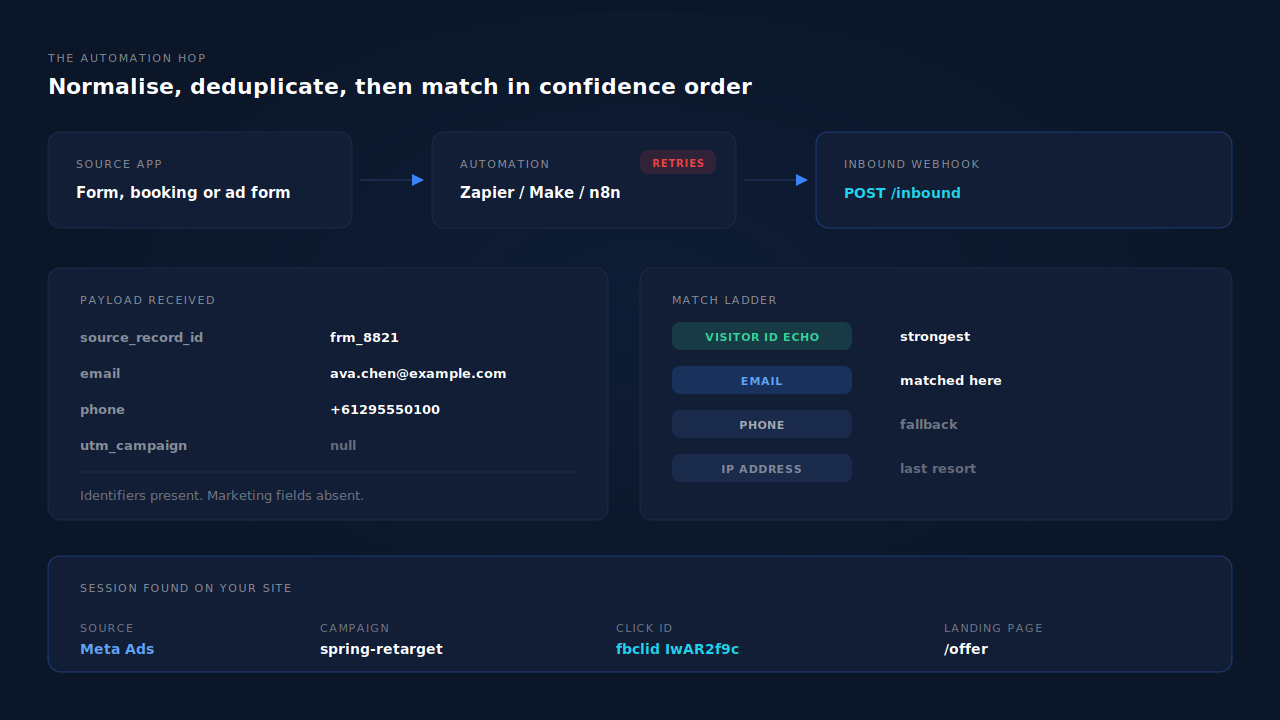
Then match in confidence order rather than on whatever matches first. A visitor identifier you passed through the workflow yourself is the strongest possible join, because it is an echo of something you issued. A normalised email is next. A phone number after that. An IP address is a weak, last-resort signal — shared networks and carrier-grade NAT make it a coincidence generator — and should never outrank an identifier the person typed. This ordering is the core idea in visitor identity resolution, and it applies whether the record came from a form, a booking tool or a Zap.
How do you build the Zap or Scenario so nothing is lost?
Five steps, in this order. None of them requires a developer, and the first two are where the value is.
- Instrument your own pages first. Record the landing URL, the referrer, the campaign parameters and the click identifier against a durable visitor identifier, as sessions happen. This is the data the rest of the workflow will join back to, so it has to exist before any lead does.
- Collect an identifier the automation will carry. Email is the practical one; phone is a strong second and worth asking for where the offer justifies it. A lead whose payload contains neither cannot be matched by anyone, and that is a form design decision rather than a tracking one.
- Pass hidden fields where the source app supports them. Most form and booking tools accept prefilled query parameters or hidden fields. Where they do, push your visitor identifier and campaign values through them — a visitor-id echo turns a probabilistic match into an exact one. Where they do not, skip it; the email join still works.
- Post to one inbound endpoint, not five. Have the Zap or Scenario make a single webhook call with the whole record to one place that normalises and stores it. Fanning the same lead into four destinations from the automation platform multiplies the number of places your field mapping can silently drift.
- Send a stable idempotency key. Include the source system’s own record ID in the payload. When the automation retries — and it will — the receiving end can recognise the second delivery as the same lead rather than creating a duplicate.
The payload shape that survives all of this is unremarkable, which is the point:
{
  "source_record_id": "frm_8821",
  "email": "ava.chen@example.com",
  "phone": "+61295550100",
  "visitor_id": "pl_9f2c41ab",
  "occurred_at": "2026-09-12T09:14:02Z"
}
Five fields. Everything else — campaign, channel, landing page, device, the whole journey — is looked up on the receiving side from the session those identifiers point at. That is why the payload does not need to grow every time marketing adds a parameter.
What goes wrong in an automation workflow, and how do you spot it?
Four failure patterns cover most of it, and each has a distinct signature in the data.
Duplicates from retries. The same lead appears two or three times, seconds apart, identical in every field. Automation platforms retry on timeouts and on non-2xx responses, and a slow endpoint produces duplicates rather than losses. Signature: identical records, near-identical timestamps. Fix: an idempotency key, deduplicated at the receiver.
Silent field drops after an edit. Someone adds a question to the source form, the field indexes shift, and a mapping that used to point at the email now points at something else. Signature: a sudden cliff in matched leads starting on a specific date, with total lead volume unchanged. Fix: check what changed in the source app that day, not in the ad account.
Out-of-order arrival. A polling trigger delivers the lead minutes or hours after the session ended, sometimes after a later event from the same person. Signature: leads that match nothing on arrival but would match fine an hour later. Fix: keep unmatched records instead of discarding them, and re-run the match when a new identifier appears.
Identity split across two addresses. The person filled one form with a work address and another with a personal one, and the automation created two leads. Signature: inflated lead counts with a suspiciously low value per lead. Fix: a phone number or a visitor identifier tying the two together — which is exactly the kind of join an identity graph is for, and is not something a Zap can do on its own.
What makes these expensive is that all four present as “attribution is broken” when they are four different bugs at four different hops.
How does PartialLeads track leads that arrive through Zapier or Make?
By owning both ends of the hop. The tag records the session on your site; the inbound pipeline rejoins whatever the automation posts back to it.
On the capture side, one script tag records email and phone as they are typed, not on submit, so a visitor who starts a form and leaves still produces a partial lead with an identifier attached. Attribution is recorded on the same session: campaign parameters from the URL with a document.referrer fallback, plus the click identifiers each platform uses. The visitor identifier behind it, pl_vid, sits in localStorage with a first-party cookie backup that the server sets rather than the script, so Safari’s cap on script-written cookies does not expire it after a week. Emails are lowercased and trimmed; phone numbers are normalised to E.164 with a country-code fallback from the session’s geo.
On the receiving side, a record posted by Zapier, Make, n8n or anything else that can send a webhook runs through one inbound pipeline: normalise the identity, deduplicate idempotently, then match to a session in confidence order — visitor-id echo first, then email, then phone, then IP. Records that match nothing still land and stay recoverable once an identifier turns up, and there is a manual re-match for the ones that need a human. A six-tier resolver then unions that person’s sessions, so a lead posted by an automation on Thursday joins the ad click from the previous Saturday instead of starting a stranger.
What you get out of it is the journey on the lead itself. The Leads list renders each touch as a badge — source, then the form start, then the Partial or Completed status, then the conversion — so a row reads as a sentence without opening anything. From there the lead can be qualified against your ideal-customer persona, and the conversion can be sent back to the ad platform through the Conversions API, with a deterministic event ID so a redelivered webhook cannot double-count.
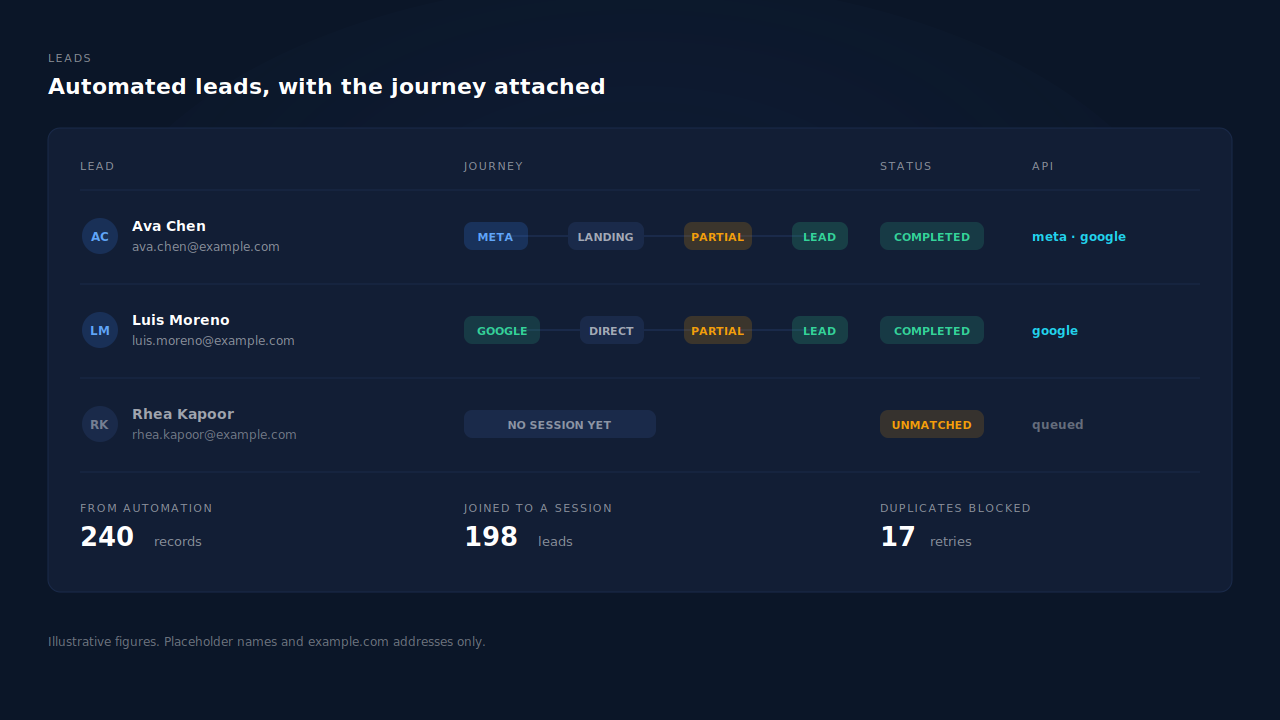
Two honest constraints. PartialLeads does not build your Zap for you and does not read data out of the apps upstream of it — you point the automation at a webhook, and what it sends is what can be matched. And if the person never visited an instrumented page, there is no session to join, so the lead lands correctly identified and honestly sourceless. We control the join; we cannot invent evidence that was never collected. The same boundary applies to leads from a Facebook Instant Form, where the person may never reach your site at all.
| What breaks | The mechanism | Where you see it in the dashboard |
|---|---|---|
| Automated lead arrives with no source | Session attribution captured on your own pages, rejoined by normalised email or phone | Lead detail, source and UTM columns |
| The same person written two ways | Email lowercased and trimmed, phone normalised to E.164 before any comparison | Leads list, unique contacts |
| Retries create duplicate leads | Idempotent deduplication on the inbound pipeline | Leads list, single row per record |
| Lead arrives after the session ended | Unmatched records retained and recoverable when an identifier appears | Purchases and leads, unmatched then matched |
| One person looks like several visitors | Six-tier identity cluster unioning sessions by visitor id, email, phone, IP, fingerprint and click id | Journey ribbon on the Leads list |
| Conversion never gets back to the ad platform | Server-side dispatch with a deterministic event ID | CAPI activity log, API column per lead |
Recover the leads you're already earning
Tell us what you're trying to track or fix. We'll show you which visitors your forms miss — and how PartialLeads recovers and qualifies them.