Connect the assistant to your own account with a read-only key, then ask in the shape of a report request: name the period, name the metric, name the segment. An assistant that can read your leads, sources, pages and revenue answers the questions nobody built a filter for. One that cannot is guessing from general marketing knowledge — and it will sound identical.
That last sentence is the whole problem. The answers look the same either way: fluent, structured, confident. The difference is whether a number came out of your database or out of a language model’s sense of what such a number usually looks like.
What can an AI assistant actually read about your leads?
Whatever you connect it to, and nothing else. Given a read-only connection to your attribution data, an assistant can query the same records your dashboard queries — individual leads and their journeys, traffic sources, pages and matched revenue — and answer questions about them in prose. Without that connection it has no access to your account at all.
So there are two completely different products wearing the same interface.
A disconnected assistant asked “why did my cost per lead rise in August?” produces a tidy list of causes: seasonality, auction pressure, creative fatigue, a landing page change. Every item is plausible. None of it was looked up. It is a well-written guess about a business the model has never seen.
A connected assistant answers the same question with “most of the increase came from one campaign, where cost per lead went from $31 to $88 while its lead volume halved” — and can list the leads it counted.
The habit that protects you takes four words: say where that came from. If the assistant can name the records it read and roughly how many there were, you are talking to your data. If it restates the claim in different words, you are talking to its training. Both are useful — general advice is fine when you want general advice — but you should always know which one you just got.
Which questions belong in a chat instead of a dashboard?
The ones nobody built a control for. A report answers the question its designer anticipated; a chat answers the question you have right now. Three shapes are consistently better in conversation, and one is consistently worse.
The cross-report join. “Which of my landing pages produce leads that scored as a strong match against my ideal customer?” lives half in the pages report and half in the individual lead records. No single screen carries both columns, and building one for a question you will ask twice a year is not a good use of anyone’s week. A connected assistant walks both sets and returns the overlap. Same shape as knowing which channel to scale — the decision needs two reports read against each other, not one report read harder.
The one-off slice. “Leads from Meta in the last 14 days, in Victoria, who typed a phone number but never submitted.” You would never build that filter, and you would never build the forty others like it. In chat it costs one sentence.
The journey narrative. “Walk me through what this buyer did before they purchased.” The journey is already on the screen as a row of badges; what the chat adds is the prose version you can paste into a sales handover without the recipient needing to learn how to read the ribbon.
And the counter-rule, which matters more than all three: standing numbers stay in reports. If you check it every Monday, it belongs on a screen. A saved report is reproducible, auditable and identical for everyone who opens it. A chat answer is none of those things — ask the same question next week and the phrasing drifts, the window shifts, and nobody can tell whether the business changed or the question did.
How do you phrase a question so the answer is trustworthy?
Write it like a report spec, not a chat message. Four elements, every time: the period with explicit dates, the metric with its denominator, the segment you want it split by, and an instruction to show the counts underneath. Precision in the question is most of the difference between a number you can act on and a number that merely sounds right.
Weak:    How are my Meta ads doing?

Better:  For 1-31 August, in my account timezone, list every
         traffic source with visitors, leads and attributed
         revenue under the last-touch model. Show the purchase
         count behind each revenue figure.
The weak version is not a bad question — it is four questions, and the assistant has to guess which one you meant, over which window, under which model. It will guess. The guess will not be labelled.
Three habits worth building on top of that:
Ask for the denominator with every rate. “Meta converts at 6%” is unreadable until you know it is 6% of 4,000 visitors and not 6% of 33. Requesting the counts alongside the percentages costs nothing and kills most bad conclusions on sight.
Ask the same question two ways. “Revenue by source” and “sources ranked by revenue, with purchase counts” should produce the same ranking. When they do not, the disagreement is the finding — usually an ambiguous metric or a different window, and you have just caught it for free.
Ask what it excluded. Unmatched purchases, internal traffic, refunded orders and test events all get dropped or kept by some rule. The rule matters more than the total.
What does an AI assistant get wrong about attribution data?
Four things, all predictable, all recoverable once you know them: the ambiguous metric, the unnamed attribution model, the timezone and currency, and the confident summary of a tiny sample.
“Leads” is three different numbers. People who typed an email and left, people who submitted, and people who passed a quality bar are three populations, and a well-run stack tracks all three. Ask for “leads” without saying which and you get one of them, formatted as if it were the only one. Say partial leads, submitted leads, or qualified leads — the word you choose can move the answer by a factor of two.
An attribution question rarely has one answer. First touch, last touch and a resolved model will each credit the same purchase to a different channel, and each is defensible. An assistant asked “which channel drove the most revenue” has to pick one, and the answer arrives without a footnote saying so. Name the model in the question, or ask for all of them — the gap between models is the real finding, which is the same discipline that makes reading an attribution report honestly possible in the first place.
Days and money are not universal. A “Tuesday” total depends on which timezone drew the boundary, and a blended revenue figure depends on which rate converted the currencies and when. Neither assumption announces itself in prose. If your revenue arrives in more than one currency, the caveats around attribution across multiple currencies apply to every figure the assistant hands you, not just the ones on the dashboard.
It will rank ten sources on four purchases. Language models are not squeamish about sample size unless you ask them to be. A ranking built on single-digit conversions is noise with an ordering, and it reads exactly like a ranking built on thousands. This is why the counts matter more than the percentages.
There is a fifth failure that no phrasing fixes: the summary can be entirely right about the rows and entirely wrong about the cause. The assistant sees that Meta’s cost per lead doubled. It cannot see that you changed the offer on the 12th. Causal claims stay yours.
Can an AI assistant change anything in your account?
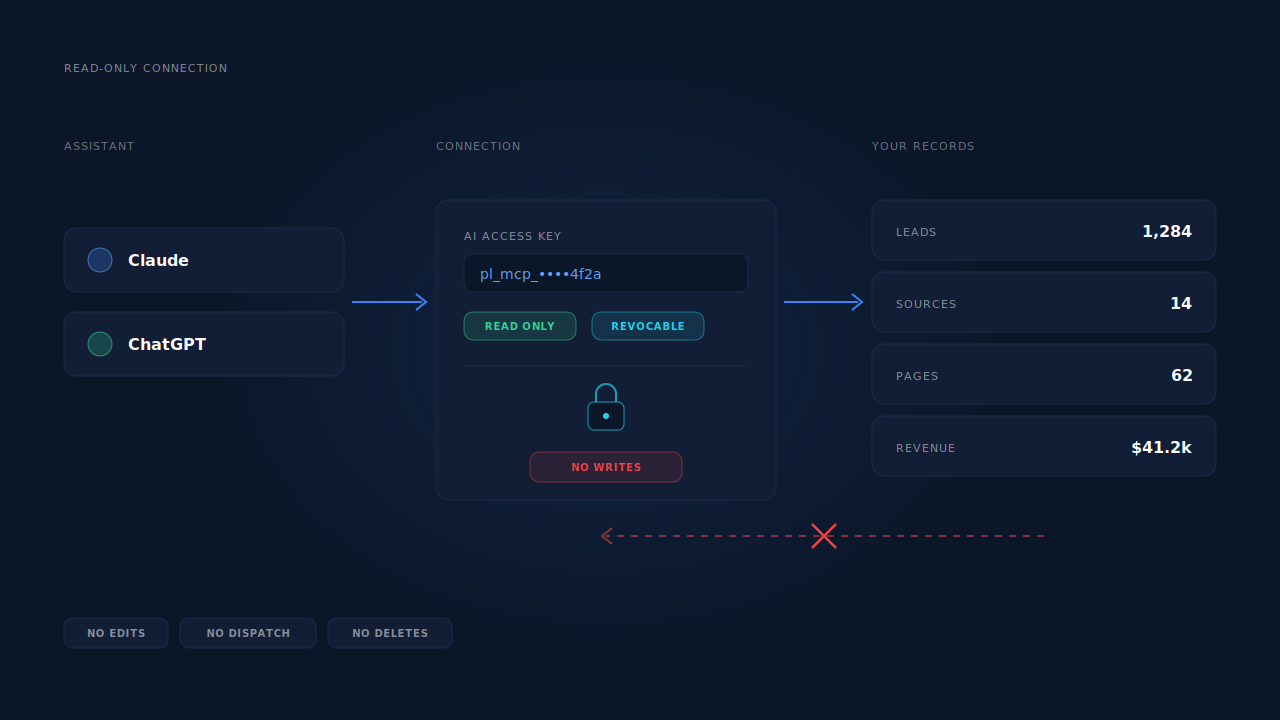
Not if the connection is read-only, and it should be. A read-only key lets an assistant query records and nothing else — it cannot edit a lead, fire a conversion, change a setting or delete anything. If the tool you are connecting asks for write access to answer questions, that is a reason to ask why.
The second question is the one people skip: lead records contain names, email addresses and phone numbers. Connecting an assistant means those records are readable by whichever assistant you connected, under whatever terms that vendor operates. Treat the key like a data export — decide who holds it, which tool it points at, and whether that arrangement satisfies the same rules you applied when you plugged the same data into your CRM. Being able to revoke a key in one click is what makes that decision reversible.
What can’t an AI assistant answer, however well you ask?
Anything that is not in the data. Ad spend you have not synced, creative-level detail the platform never passed through, the reason a customer bought, and anything at all about next month. An assistant over your attribution data is a fast, tireless analyst with no memory of what you shipped last Tuesday.
It also cannot settle which attribution model is correct. It can show you that first touch credits your paid social and last touch credits your brand search, and it can quantify the gap — but choosing which one runs your budget is a judgement about how your business acquires customers, and that judgement is not in any table.
One thing it can see, though, is traffic sent by assistants like itself. AI tools now refer real visitors who arrive with no click ID and no UTM, which is its own attribution problem — covered in tracking conversions from ChatGPT.
How does PartialLeads answer questions about your leads?
PartialLeads exposes a read-only MCP endpoint, so an assistant like Claude or ChatGPT can query your own account: leads, traffic sources, pages and revenue. You create a key under Settings → AI Access and point the assistant at it; the connection can only read, and you can revoke the key at any time. The step-by-step is in connecting Claude and ChatGPT to your PartialLeads data — this article is about what to do once it is connected.
What makes the answers usable is that every one of them maps to a screen you can open:
- Individual leads with their journeys. The leads list carries the journey as a row of badges — each touch, its channel, whether the session was stitched in by visitor ID, email, phone or click ID — alongside Partial or Completed status, revenue, and which conversion APIs that lead was dispatched to. When the assistant describes a journey, the ribbon is the picture of the same record.
- Three attribution models at once. The attribution report computes first touch, last touch and PartialLeads Resolved side by side, with recovered attribution itemised by mechanism. Ask for “all three models” and there is a screen that shows the same disagreement.
- Revenue that nets refunds. Matched purchases land in the purchases ledger, with refunds written as their own rows so they subtract from attributed revenue rather than being quietly ignored.
- Lead quality, not just lead count. Each lead is scored against your ideal-customer persona with a verdict and confidence, so “how many good leads” is a question with an actual field behind it rather than an opinion.
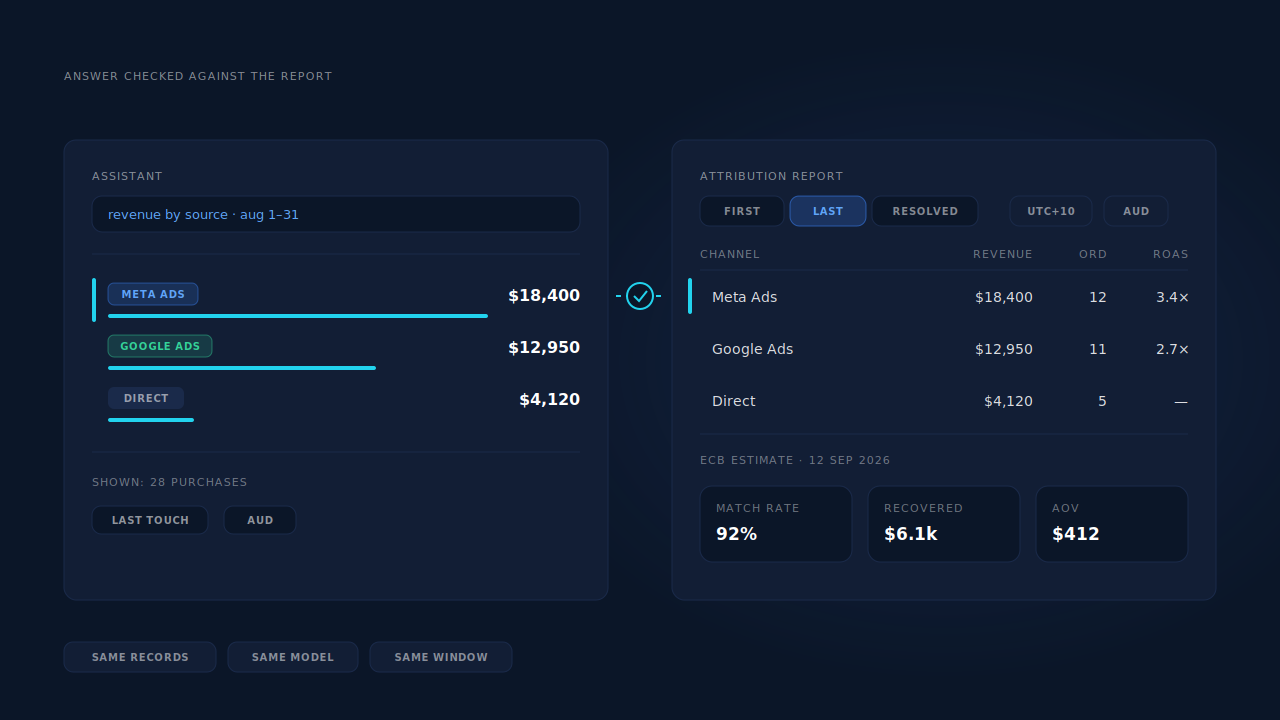
The honest constraints, because they shape how much weight an answer can carry. The connection is read-only by design — the assistant reports, it does not act, and nothing it says changes a lead, a dispatch or a setting. Access is plan-gated rather than on by default. And every answer inherits the caveats of the underlying data: the display model is last-non-direct over a 28-day decay window, multi-currency figures are estimates converted at a dated rate, and conversion metrics can still read as warming up while they compute. An assistant will not mention any of that unless you ask, which is exactly why the standing numbers belong on a report and the exploration belongs in the chat.
| What breaks | The mechanism | Where you see it in the dashboard |
|---|---|---|
| The question has no report behind it | Read-only MCP connection over leads, sources, pages and revenue | Settings → AI Access |
| “Leads” means three different populations | Partial and Completed status on every lead record | Leads list, status column |
| The answer silently picks an attribution model | First touch, last touch and PartialLeads Resolved computed side by side | Attribution report, model comparison |
| A number arrives with nothing to check it against | Every answer maps to a record set with its own surface | Journey ribbon, purchases ledger |
| Days and money don’t line up | Display timezone and currency selected per report, conversion rate dated | Timezone and currency chips |
| Volume hides quality | Two-step enrichment scores each lead against your ideal-customer persona | Customer Match card, priority inbox |