An Instant Form lead never touches your website, so your own tracking has no record of it. There is no session, no cookie, no click ID — the form opened inside the Facebook or Instagram app and closed there. The campaign data for that lead lives in Meta’s lead record, which carries the ad, ad set, campaign and form identifiers alongside the answers. You get it by pulling the lead out of Meta, not by instrumenting your site harder.
A Meta Instant Form — the native lead form inside a Facebook or Instagram lead ad, still widely called a Facebook Lead Form — is the one lead source where your tag is structurally blind. Everywhere else, a broken source label means something failed. Here, nothing did.
Why don’t Instant Form leads show up in your tracking at all?
Because there is nothing to track. Your tag runs on pages you own, and an Instant Form is a Meta-hosted surface: the ad, the form, the prefilled fields and the submit all happen inside Meta’s app. No page of yours loads, so no script of yours runs, so no session, visitor ID or UTM parameter is ever created for that person.
This trips people up because every other tracking problem has a fix on your side of the wire: missing UTMs get auto-tagging, a lost fbclid gets captured at the landing URL, an iframe that kills your referrer gets the parameters relayed in.
None of those apply, because there is no landing page in the flow at all. A visitor can see your ad, open the form, submit their details and become a lead without ever loading a URL you control.
So the first thing to stop doing is auditing your tag. A lead that never touched your site is not evidence that your tracking is broken.
Where does the campaign data for an Instant Form lead actually live?
In the lead record Meta holds. When someone submits an Instant Form, Meta stores a lead object containing the answers to your form fields plus the identifiers for the ad, ad set, campaign and form that produced it, the time it was created, and whether it came from a paid ad or an organic post.
That is genuinely better than what a website form gives you. A web form gives you a click ID you then have to resolve back to a campaign; Meta’s lead record names the campaign directly. No attribution modelling, no window to argue about. The ad that produced the lead is a field.
The bad news is where it lives. That record sits in Meta’s system, and your CRM and reporting have no idea it exists until you move it. Three things go wrong in practice:
- Nobody moves the identifiers. A CSV export or a quick Zapier automation carries the name, email and phone — the fields a salesperson asked for — and drops the campaign fields. The lead arrives with no source, which is the symptom people misread as a tracking failure.
- Nobody moves the leads at all, at first. Leads pile up in Meta while the team is still choosing a CRM, and Meta does not keep them forever. Retention is limited, so a webhook you never built is data you cannot go back and collect. Check the current window in Meta’s documentation before assuming last quarter’s leads are still retrievable.
- The identifiers arrive as raw IDs.
campaign_idis a long number, not a campaign name — store only the ID and every report needs a lookup against Ads Manager.
Why can’t you capture a partial lead from an Instant Form?
Because you do not own the form. Partial lead capture works by reading fields on your own page as the visitor types, then flushing what was typed before the tab goes away. Inside an Instant Form there is no page of yours and no script of yours — Meta shows you submitted leads, and people who opened the form and backed out are not reported to advertisers as leads.
It cuts both ways. Meta’s form is prefilled from the user’s profile, which is why it converts well. Abandonment inside an Instant Form is genuinely lower than on a typical web form, so the pool you are missing is smaller than it would be on your own page.
But you have no visibility into it, no email or phone from anyone who bailed, and no way to follow up — a fixed cost of using a form you do not control. If recovering form-starters matters more than the lift of a prefilled form, run a landing page alongside it and compare cost per qualified lead.
How do you get Instant Form leads out of Meta and into your own systems?
Three routes exist, in increasing order of effort and reliability. All three are Meta features.
- Manual CSV export. Download the leads from Meta’s interface and import them wherever you need them. Fine for a one-off audit, useless as a process: retrospective, manual, and a snapshot rather than a feed.
- A CRM integration configured on your Page. Meta maintains direct integrations with a long list of CRMs, set up on the Page rather than in your ad account. Leads flow automatically. The limit is what each integration maps — many pass the contact fields and not the campaign identifiers.
- The leadgen webhook. Subscribe your app and you get a notification the moment a lead is submitted, carrying a lead ID; you then fetch the full record with a page-scoped token that has lead-retrieval permission. This is the only route that reliably gets every field, in real time, under your control.
Most teams should land on route 3 with an automation platform doing the plumbing — Zapier, Make or n8n can receive the webhook and POST the record onward without you running a server.
Whichever route you pick, the rule is the same: map the campaign fields explicitly, and store the names alongside the IDs. Take them even though nobody has asked yet. Someone will ask in a month, and by then the leads with missing fields are unrecoverable.
How do you connect an Instant Form lead to the rest of your data?
By the email and phone number. Those are the only identifiers shared between a lead that happened inside Meta and a person who browses your site, and they are stable in a way cookies are not. Normalise both before matching: lowercase and trim the email, convert the phone to E.164 with the country code.
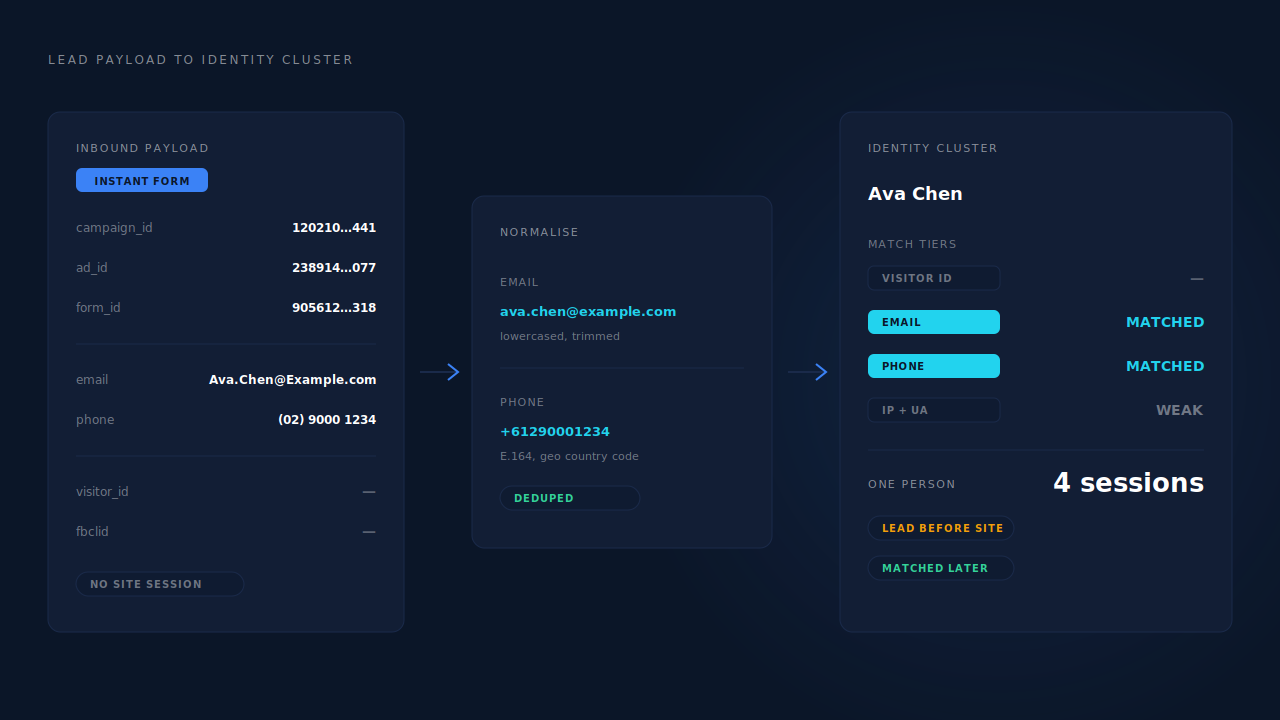
Two cases come out of that join, and they are very different.
The person also visits your site. More common than people expect — they submit the form on their phone in the feed, then look you up properly later, or they were already a visitor before they saw the ad. Now you have two records of one person, and joining them gives you what the Meta lead record cannot: which pages they read, whether they came back, whether they bought. Identity resolution is the mechanism that collapses those sessions and the inbound lead into one person, matching on normalised email, phone and the durable visitor ID of their browser.
The person never visits your site. Then there is nothing to join, and you should not pretend otherwise. That lead’s channel comes from Meta’s lead record and stays there — a single-touch lead with a known campaign and no journey, which is a perfectly honest thing for a report to say.
Both cases are fine. A report that silently mixes them into one number is not, because the two have completely different reliability. When you read an attribution report, the Instant Form cohort is the one where platform-reported source is the better signal, not the worse one.
What should you send back to Meta for an Instant Form lead?
Send the downstream outcome as a conversion — the booked call, the qualified lead, the payment — not the lead itself. Instant Form leads carry a lower intent bar because the form is prefilled and submitting takes two taps, and the only way to fix that is to change what Meta optimises toward.
Meta already counted your Instant Form lead. It happened on Meta’s surface; it is in your reporting as an on-platform lead result. If you now fire a Lead conversion back for that same person, the same human being appears in two different result columns and your cost per lead becomes a number you cannot reconcile with anything.
The event Meta cannot see is what happened next. Did that lead answer the phone? Book the call? Show up? Pay? All of it happens in your CRM, your calendar and your payment processor, and none of it reaches the algorithm unless you send it. The Conversions API is how you send it: a server-side event, keyed to the person by hashed email and phone, for the step that actually indicates value.
Then optimise the campaign toward that event rather than toward form submissions. That is the difference between an algorithm that learns “find people who tap submit” and one that learns “find people who sign.”
Two constraints. Meta clamps event times to a limited recent window, so an outcome landing weeks after the lead still delivers but with a compressed timestamp — build reporting around the lead’s date, not the event’s. And dispatch is not matching: you control whether the event is sent, Meta controls whether it resolves to a person and a click. A clean, fully-identified event maximises the second half. It does not guarantee it, and no vendor can.
How does PartialLeads track leads from a Facebook Instant Form?
It receives the lead through a connected integration or the universal inbound webhook, normalises the email and phone, and tries to match it to a known person — then keeps trying as new activity arrives. The inbound record is deduplicated idempotently, so the same lead redelivered by your automation cannot create a second row.
The match runs in tiers — visitor ID echo, then email, then phone, then IP. An Instant Form lead has no visitor ID, so email and phone do the work.
What matters most is what happens when the match fails. An Instant Form lead from someone who has never been to your site matches nothing, and it still lands. It sits as a real lead with its own record and becomes matched later, automatically, when that person shows up and the identity cluster pulls the two together. A manual re-match covers the cases you want to fix by hand. A lead arriving before its session is the normal case for this source, not an error state.
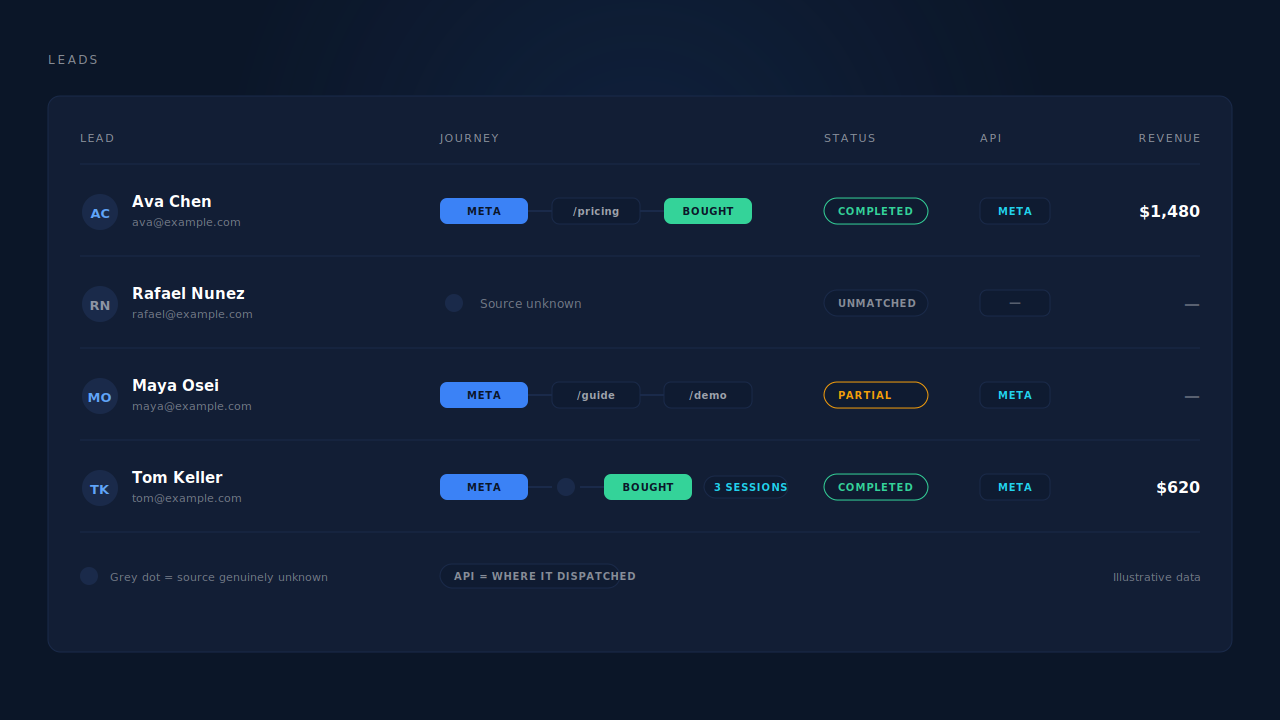
Once the person is resolved, the six-tier identity cluster treats their Instant Form submission and their browsing as one timeline. The Leads list shows it at list resolution — the Journey column renders one badge per touch, with a grey dot where the source is genuinely unknown rather than inventing a channel, a session count for multi-touch people, and a Status of Partial or Completed. The API column shows which conversion APIs that specific lead was dispatched to, which is the audit surface for the send-the-outcome-back step above.
The quality problem gets handled before sales sees the lead. Two-step AI enrichment researches the email domain and the person, then scores them against your written ideal-customer persona, returning a verdict — strong match, possible match, unlikely match or insufficient data — with a confidence score and its reasoning. Strong matches surface in a priority inbox above the table. For a source that produces volume at a low intent bar, scoring leads against your ideal customer is the difference between a useful feed and a list nobody works.
Conversion sends run on a send-mode ladder with rule-based conditions — field, match type, pattern, combined with AND or OR — so you can send only qualified leads to Meta instead of feeding every submission back into the algorithm. Every send carries a deterministic event ID with a uniqueness constraint behind it, so a retry cannot double-fire.
The honest limits: PartialLeads does not run your Instant Form, cannot see who abandoned one, and does not subscribe to Meta’s leadgen webhook for you — you route the lead in, with the campaign fields mapped. And a lead who never visits your site keeps Meta’s lead record as its only source of truth for channel. What PartialLeads adds is everything on your side of that line.
| What breaks | The mechanism | Where you see it in the dashboard |
|---|---|---|
| The lead never touched your site, so no session, cookie or click ID exists | Inbound record normalised on email and phone, then matched in tiers: visitor ID echo, email, phone, IP | Leads list — the lead appears with its contact fields and a Partial or Completed status |
| The lead arrives before that person has ever browsed your site, so nothing matches | Unmatched records still land and stay recoverable; the identity cluster pulls them together when the session arrives, plus a manual re-match | Lead record flipping from unmatched to a resolved person, with its sessions attached |
| One human being looks like a Meta lead and an anonymous visitor | Six-tier identity cluster unions sessions by visitor ID, email, phone, IP and user agent, device fingerprint and click ID | Customer Journey timeline; Journey column on the Leads list with a session count |
| The source label is invented or silently wrong for leads with no journey | Grey dot for genuinely unknown source instead of a fabricated channel badge | Journey ribbon — no brand glyph where there is no signal |
| Sales works every lead because the low intent bar produces volume | Two-step AI enrichment scored against your ideal-customer persona, with verdict, confidence and reasons | Customer Match card and the strong-match priority inbox |
| The algorithm optimises for form taps instead of outcomes | Server-side conversion dispatch for the downstream event, with rule-based send conditions and a deterministic event ID plus uniqueness constraint | API column per lead; CAPI activity log |
| A retried webhook or a redelivered lead double-counts | Idempotent inbound dedup, and unique deterministic event IDs on dispatch | One row per lead; one send per event in the activity log |
Tell us what's broken. We'll fix your tracking — free.
Describe the tracking/attribution problem you're stuck on and we'll map it to a fix: server-side conversions to Meta, Google, TikTok and Pinterest, plus first-party tracking that survives Safari. No code required.
Sources
https://developers.facebook.com/docs/marketing-api/guides/lead-ads/ https://developers.facebook.com/docs/graph-api/webhooks/getting-started/ https://developers.facebook.com/docs/marketing-api/conversions-api/ https://developers.facebook.com/docs/marketing-api/conversions-api/deduplicate-pixel-and-server-events/