To track a multilingual WooCommerce store in one ad account, send every language to one pixel ID and one server-side purchase feed, and keep a shopper who switches language as one person. Language subdirectories (/de/, /fr/) share one origin, so tracking mostly holds. A domain or subdomain per language doesn’t: the ad click stays on the first domain.
That last part is the one that costs money. A shopper clicks your Meta ad on example.com, switches the language to German, and checks out on example.de. The browser treats those as two unrelated sites. Your pixel sees two visitors, the purchase has no click attached, and Ads Manager undercounts the campaign that actually sold.
Why does a multilingual WooCommerce store split its tracking?
Because the language setup decides what the browser shares. WPML and Polylang both run one WordPress install and one WooCommerce store, but they can put each language on its own URL pattern. Every tracking tag stores its visitor ID, click ID and cookies per site, so when the language moves to a different host, the tracking data doesn’t follow.
Polylang’s own readme puts the choice plainly: the language “is either set by the language code in URL, or you can use a different sub-domain or domain per language.” WPML’s language URL settings offer the same kinds of choice.
The rule underneath is the browser’s same-origin policy. Two URLs share an origin only when the protocol, host and port match, and per MDN, “each origin gets its own separate storage, and JavaScript in one origin cannot read from or write to the storage belonging to another origin.” Cookies are a little looser: a cookie set with a Domain attribute is available on that domain and its subdomains, but never on a different domain.
The order side is the part that doesn’t split. It’s still one WooCommerce store with one order list, whatever domain the checkout ran on.
Does it matter whether you use subdirectories, subdomains or separate domains?
Yes, it decides how much breaks. Subdirectories keep one origin, so a shopper switching from English to German keeps the same cookies, storage and click ID. Subdomains share cookies only when a tag deliberately sets them on the parent domain. Separate domains share nothing, so every language switch starts a new visitor.
| Language setup | Example | What carries over when a shopper switches language |
|---|---|---|
| Subdirectory | example.com/de/ |
Everything: same origin, same storage, same cookies |
| Subdomain | de.example.com |
Only cookies a tag sets on example.com; browser storage does not |
| Separate domain | example.de |
Nothing: new storage, new cookies, new visitor |
If you’re choosing a setup, subdirectories are the easy option. If you already run a domain per country, you don’t need to migrate. You need to repair the hop between domains.
The subdomain case has its own quirks, covered in detail in tracking leads when your form is on a subdomain. The rest of this article focuses on separate domains, where the split is total.
Why does a shopper who switches language lose their ad click?
Because the click ID lives in the landing URL and in cookies written on the landing domain. The Meta ad appends fbclid to example.com, and Meta’s pixel stores it there as the _fbc cookie. When the shopper clicks the language switcher to example.de, the link carries no fbclid and the new domain can’t read the old cookie.
On example.de the Meta pixel starts from zero. It sets a fresh _fbp browser ID and has no _fbc at all. The purchase fires with no click attached, so Meta has to match it on whatever customer data came with the event, if any. In WooCommerce’s own order attribution, the same order often shows the language switch as its source, or Direct.
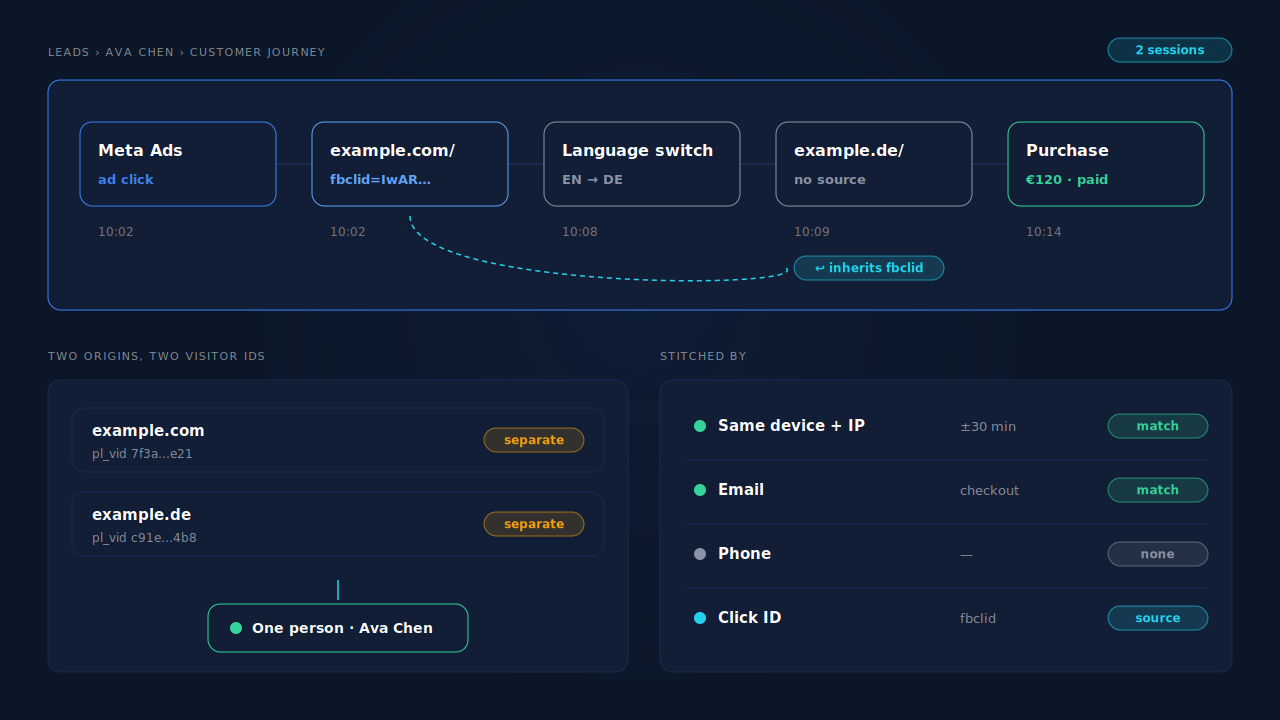
Google has the same problem: the second domain’s Google tag never sees the gclid. Google offers cross-domain link decoration for its own tag, but that only helps Google, not Meta, TikTok or Pinterest.
The campaigns that bring international buyers end up looking like they sell nothing, and the ad algorithm learns from a smaller, skewed set of purchases.
Why does the Meta pixel fire differently on each language?
Usually because the pixel was set up per language by accident. A translation plugin can treat a settings field as a translatable string, a header snippet can be pasted into one language’s template only, or each language runs a different tracking plugin setting. The result is a different pixel ID, a missing pixel, or duplicate events on some languages.
Three quick checks catch most of it:
- Open one product page per language and view the source. Every language should load the same pixel ID, once. If one language shows a different ID or none, fix the setting, not the ads.
- Check whether the pixel ID is translatable. If your tracking plugin’s settings appear in the translation plugin’s string list, remove the pixel ID from translation so every language reads the same value.
- Use Test Events in Events Manager on each domain. Browse and add to cart on every language and confirm the events land in the same dataset.
Also verify each domain in Meta Business Manager. Meta verifies the effective top-level domain plus one (for example example.de), so subdomains ride on the parent, but every country domain needs its own verification.
How do you keep one ad account’s tracking consistent across languages?
Treat every language as the same store: one pixel ID, one purchase source, and a language switcher that carries the click with it. Then send purchases server-side, because the order list is shared even when the browser data isn’t. That combination fixes most of the split without changing your language setup.
Carry the click across the switch. Decorate language-switcher links that leave the current domain with the click IDs and UTMs from the landing URL. This is your own code, not a plugin feature. Adjust the selector to match your switcher’s markup:
// Carry ad click IDs and UTMs onto language-switcher links that leave this domain.
(function () {
  var KEYS = ['fbclid', 'gclid', 'gbraid', 'wbraid', 'msclkid', 'ttclid',
              'utm_source', 'utm_medium', 'utm_campaign', 'utm_content', 'utm_term'];
  var saved = {};
  try { saved = JSON.parse(sessionStorage.getItem('landing_params') || '{}'); } catch (e) {}
  var here = new URLSearchParams(location.search);
  KEYS.forEach(function (k) { if (here.get(k)) saved[k] = here.get(k); });
  try { sessionStorage.setItem('landing_params', JSON.stringify(saved)); } catch (e) {}

  // Replace '.language-switcher a' with your switcher's link selector.
  document.querySelectorAll('.language-switcher a').forEach(function (a) {
    var url = new URL(a.href, location.href);
    if (url.hostname === location.hostname) return; // same domain: nothing to carry
    Object.keys(saved).forEach(function (k) {
      if (!url.searchParams.has(k)) url.searchParams.set(k, saved[k]);
    });
    a.href = url.toString();
  });
})();
When the shopper lands on example.de?fbclid=…, Meta’s pixel there writes its own _fbc from the URL, and the purchase carries the click again. The difference between gclid, fbclid and UTM parameters matters here: each platform only reads its own.
Send the purchase from the order, not the thank-you page. A server-side purchase through the Conversions API comes from the order itself, so a blocked or confused pixel on one language doesn’t lose the sale. Keep one source per event: if Meta for WooCommerce and another plugin both send Purchase, turn one off.
Where decoration falls short. It only works when the shopper uses your switcher. Someone who types the other domain, returns from a bookmark, or comes back on their phone arrives with nothing. That’s a stitching problem, not a link problem.
How does PartialLeads track every language as one store?
It runs one tag across every language domain and stitches the sessions into one person, so a switch from example.com to example.de stays one journey. The purchase comes from the WooCommerce order webhook, is matched back to that person, and goes to the ad platforms with the click that started it.
One plugin, every language. WPML and Polylang serve every language from the same WordPress install, so the PartialLeads WooCommerce plugin covers every language’s pages and every order. Add each language domain to Authorized Domains so their sessions land in the same account. The purchase is webhook-owned, so nothing depends on the thank-you page loading on either domain.
Two domains, one person. Each domain still mints its own visitor ID, because browsers keep storage separate per origin. The PartialLeads identity cluster joins them anyway, on email, phone, same device and IP inside a time window, device fingerprint, or a shared click ID. A session on example.de from the same device and IP within 30 minutes of the example.com ad session inherits that session’s UTMs and click IDs. How visitor identity resolution works walks through all six tiers.
The order finds the ad. A paid order is matched to its session by visitor ID first, then email, then phone, then IP. The match writes a first-touch and a last-touch row, and a Purchase goes server-side to Meta, Pinterest, TikTok, and as a row in the Google Sheet your Google Ads account imports. Where the journey carries an fbclid, Meta gets _fbc rebuilt from it.
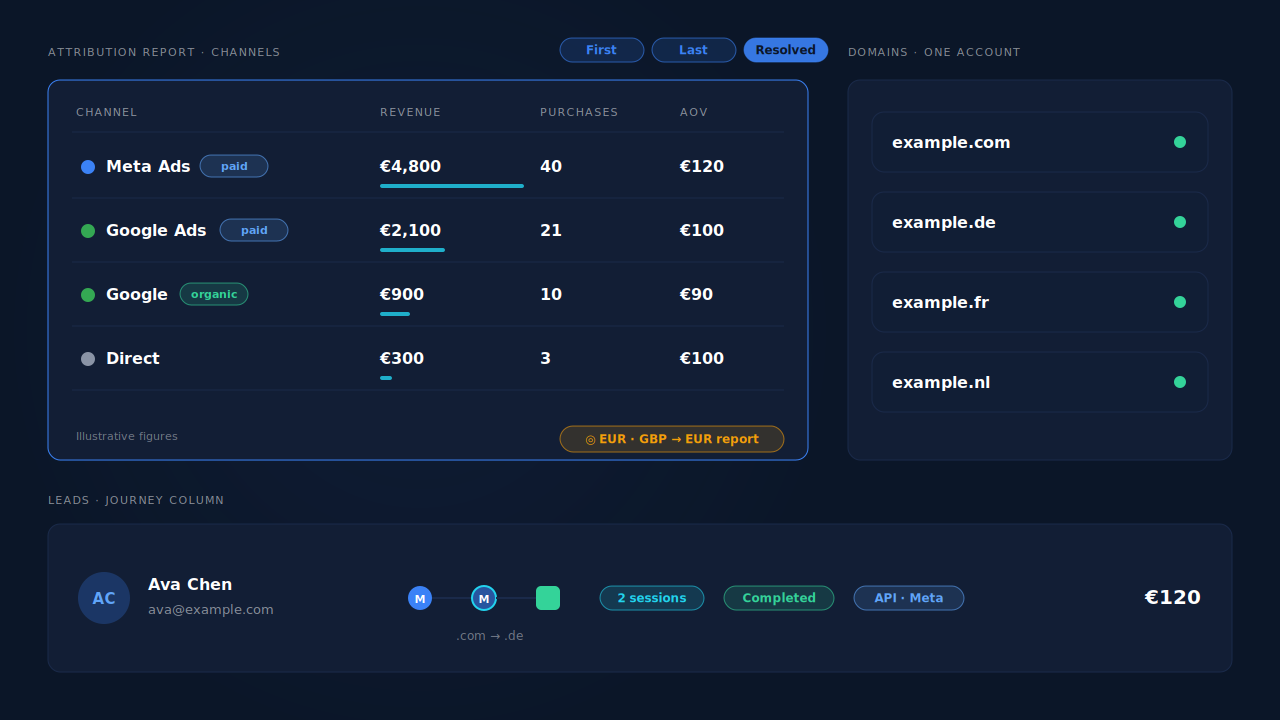
Where you see it working. The Leads list’s Journey column shows the Meta touch on one domain and the purchase on the other, with a session count and a marker for how the sessions were stitched. The Attribution report’s Channels table credits Meta Ads in the resolved view instead of Direct. If languages sell in different currencies, the report’s currency selector puts them on one scale, as in reporting attribution across multiple currencies. The attribution report guide covers reading first touch, last touch and resolved side by side.
The honest constraints.
- Only paid orders are sent.
processingandcompletedorders go out;pending,on-hold,failedandcancelleddon’t. The value is the full order total, including tax and shipping, after discounts. - Stitching needs a signal. A shopper who switches domain and device with no email, phone or click ID in common can’t be joined. We control dispatch; the platform controls matching.
_fbpisn’t invented. PartialLeads rebuilds_fbcfromfbclid, but each domain’s_fbpcomes from the Meta pixel on that domain. Keep the base pixel running on every language.- One source per event. PartialLeads doesn’t deduplicate against Meta for WooCommerce, PixelYourSite or another plugin’s browser Purchase.
- Tracking only. This covers events and attribution, not translated product IDs in a catalog feed.
| What breaks | The mechanism | Where you see it in the dashboard |
|---|---|---|
| Ad click stranded on the landing domain | Sessions on every language domain stitched into one person; same-visit sessions inherit UTMs and click IDs | Leads list, Journey column |
Checkout domain has no fbclid |
Order matched by visitor ID, email, phone or IP; _fbc rebuilt from the original fbclid |
Purchases ledger, CAPI activity log |
| Pixel missing or different on one language | Purchase sent from the paid-order webhook, not the thank-you page | Purchases ledger |
| International sales read as Direct | First-touch, last-touch and resolved models side by side | Attribution report, Channels table |
| Languages sell in different currencies | Revenue normalised to one report currency | Attribution report currency selector |
Tell us what's broken. We'll fix your tracking — free.
Describe the tracking/attribution problem you're stuck on and we'll map it to a fix: server-side conversions to Meta, Google, TikTok and Pinterest, plus first-party tracking that survives Safari. No code required.
Sources
- https://raw.githubusercontent.com/polylang/polylang/master/readme.txt
- https://developer.mozilla.org/en-US/docs/Web/Security/Defenses/Same-origin_policy
- https://developer.mozilla.org/en-US/docs/Web/HTTP/Guides/Cookies
- https://developers.facebook.com/docs/sharing/domain-verification
- https://developers.facebook.com/docs/marketing-api/conversions-api/parameters/fbp-and-fbc