You track Meta conversions on a Shopify Hydrogen storefront by treating the storefront and the checkout as two halves of one journey. The ad click lands on your Hydrogen site. The order is placed on Shopify’s hosted checkout, on a different domain. Capture the click on the first half, send the Purchase server-side from the paid order, and join the two.
Most broken Hydrogen setups do one half well and skip the join. The Meta Pixel fires PageView and AddToCart on the storefront, the order arrives with no click attached, and Ads Manager under-reports purchases from the campaigns that actually drove them.
Why does Meta attribution break on a Hydrogen storefront?
Because the visit is split across two sites that don’t share storage. Your Hydrogen app runs on your own domain. Checkout runs on Shopify’s checkout domain. Cookies, localStorage and the URL parameters your storefront saw on landing stay behind when the shopper clicks Checkout, so the order is created by a session that never saw the fbclid.
On a standard Online Store theme, Shopify runs the storefront and the checkout as one product, and its own apps carry context between them. Hydrogen splits that. The storefront is your React app, and the checkout is still Shopify’s. Hydrogen’s type definitions describe the checkoutDomain setting simply as “The production shop checkout domain url.” That is a separate address from the one your ad points at.
The two-domain problem itself is covered in attributing Shopify orders across two domains. Hydrogen is the version of it that every headless store gets by default.
Doesn’t Hydrogen’s analytics handle this?
Not for Meta. Hydrogen ships an analytics provider that publishes storefront events to Shopify. Its event list is page_viewed, product_viewed, collection_viewed, cart_viewed, search_viewed, cart_updated, product_added_to_cart, product_removed_from_cart and custom events. There is no checkout or purchase event in that list, because checkout doesn’t run in your app.
You can subscribe to those events and forward them to Meta yourself. That covers the top of the funnel. It does nothing for the Purchase.
Does consent change what fires?
Yes. Hydrogen’s provider decides whether a visitor can be tracked through a canTrack function that, per its type definitions, “Defaults to Customer Privacy API’s window.Shopify.customerPrivacy.analyticsProcessingAllowed().” If your consent banner says no, Hydrogen’s events don’t publish. Any Meta tag you wire to them inherits the same gate.
What happens to the Purchase event on Hydrogen?
It fires in the wrong place, or not at all. The thank-you page lives on Shopify’s checkout, not in your Hydrogen app, so any Pixel code in your React routes never sees the order. Unless something on the checkout side sends the Purchase, Meta gets ViewContent and AddToCart from your storefront and nothing after.
There are three common outcomes:
- No Purchase at all. The storefront Pixel works, nobody configured checkout, and Ads Manager shows add-to-carts with no sales.
- A Purchase with no click. A checkout-side pixel or Shopify’s Facebook & Instagram channel sends the Purchase, but from a session that started on the checkout domain, without the storefront’s
fbclidor_fbp. Meta records the sale and struggles to tie it to the ad. - Two Purchases. The Facebook & Instagram channel sends one, a custom setup sends another, and the event ids don’t match. Meta counts the sale twice.
The fix for all three is the same structure: one owner for the Purchase, sent from the order itself, carrying the identifiers the storefront captured.
How do you capture the Meta click on a Hydrogen storefront?
Read the fbclid and UTMs from the landing URL on the first page load and store them against the visitor. The fbclid only appears on the URL the ad sent the shopper to. Hydrogen navigates client-side after that, so a script that reads the query string on the second route gets nothing.
Three things to get right:
- Keep the Meta Pixel base code on the storefront. It sets the
_fbpbrowser cookie and, when it sees anfbclid, the_fbccookie. Meta documents_fbcasfb.1.followed by a creation timestamp and thefbclid. Server events match better when they carry both values. - Allow the tag in your Content Security Policy. Hydrogen ships a
createContentSecurityPolicyhelper. A tracking script that isn’t on the allow-list for scripts and outbound requests is blocked silently, and you’ll find out in Events Manager days later. - Store the click somewhere the order can reach. On its own, nothing on the storefront travels to checkout. The next section is about building that bridge.
How do you join the storefront session to the Shopify order?
Pick a bridge that survives the domain hop. You have three: pass an identifier into checkout yourself, match on the buyer’s email or phone, or match on the same device inside the same visit. Cookies are not one of them. The storefront’s cookies don’t exist on the checkout domain, so whatever joins the two halves has to travel with the order or be rebuilt from it.
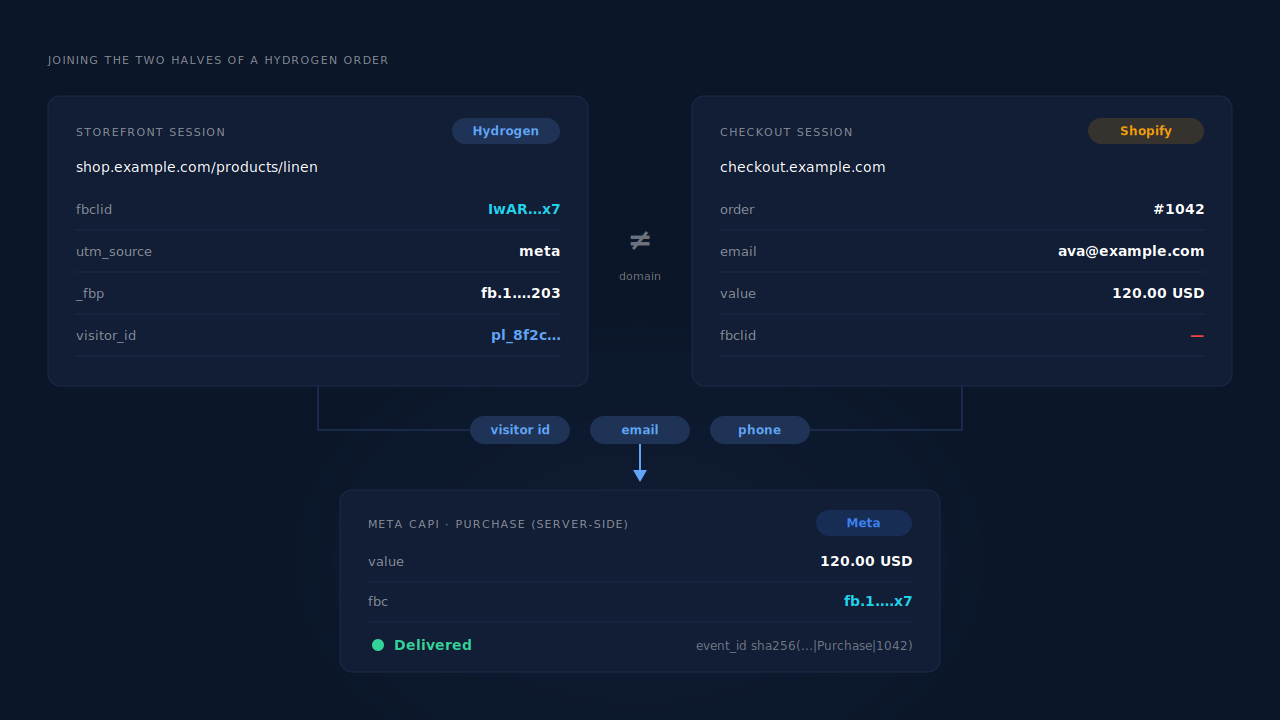
Pass it through the cart. Hydrogen’s cart handler exposes updateAttributes, built on Shopify’s cart attributes. Write your visitor id, and the fbclid if you have one, as cart attributes before checkout. They ride along onto the order, where your server can read them from the order payload. This is the strongest DIY bridge, and it breaks if a buy-now link skips the cart or another app overwrites the attributes.
Match on email or phone. The order always carries the buyer’s email, and usually a phone. If your storefront captured either earlier, through a newsletter form, an account login or a back-in-stock request, you can find the session that holds the click. This is how returning shoppers on a new device get joined.
Match on the same visit. Same IP address and browser user agent, minutes apart, is a weaker signal. It is useful as a fallback for guest checkouts where nothing else connects.
The landing-page version of this problem is in why attribution breaks between your landing page and Shopify checkout. The bridges are the same.
How do you send the Purchase to Meta from a Hydrogen store?
Send it from the order record, server-side, through the Conversions API. Shopify’s order webhooks deliver every order to a URL you own whether or not any browser script ran. Your server reads the order, looks up the joined storefront session, and posts a Purchase with the click identifiers attached.
What a good Purchase event carries:
event_name: Purchase, with anevent_timeclose to when the order was paid.valueandcurrencyfrom the order.- Hashed
emandphfrom the order’s email and phone. fbcandfbpfrom the storefront session, not from checkout.client_ip_addressandclient_user_agentfrom the storefront session.- An
event_idthat is the same on every retry, such as a hash of pixel id, event name and order id.
That last field matters if anything else also sends the Purchase. The rules are in what event_id to use for Meta deduplication. The webhook pattern itself is walked through in firing Shopify purchase events server-side without an app.
Only send paid orders. A pending or cancelled order that reaches Meta as a Purchase inflates results and trains the algorithm on sales that never happened.
How does PartialLeads track Meta conversions on Hydrogen?
PartialLeads runs a tag on each half of the journey and joins them on its side. The PartialLeads tag goes on the Hydrogen storefront and captures the landing URL’s fbclid, UTMs, fbp/fbc, landing page and referrer with the visitor’s session. The PartialLeads Customer Events pixel runs on Shopify’s checkout. Both sit under your Authorized Domains, so the two sessions land in one account.
Purchases come from Shopify’s order webhooks, so they never depend on the thank-you page. Every paid order is matched to a session: first by visitor id, then email, then phone, then IP. Those are matched by confidence, and matching is maximised, not guaranteed. The identity cluster also unions sessions across IP plus user agent, a device fingerprint and a shared click id. That’s how a storefront session and a checkout session become one person.
The matched Purchase goes to Meta through the Conversions API with the storefront’s click attached. _fbc is rebuilt from the captured fbclid when the cookie is missing. The value is the full order total, including tax and shipping, after discounts. Every matched order also gets first-touch and last-touch attribution rows.
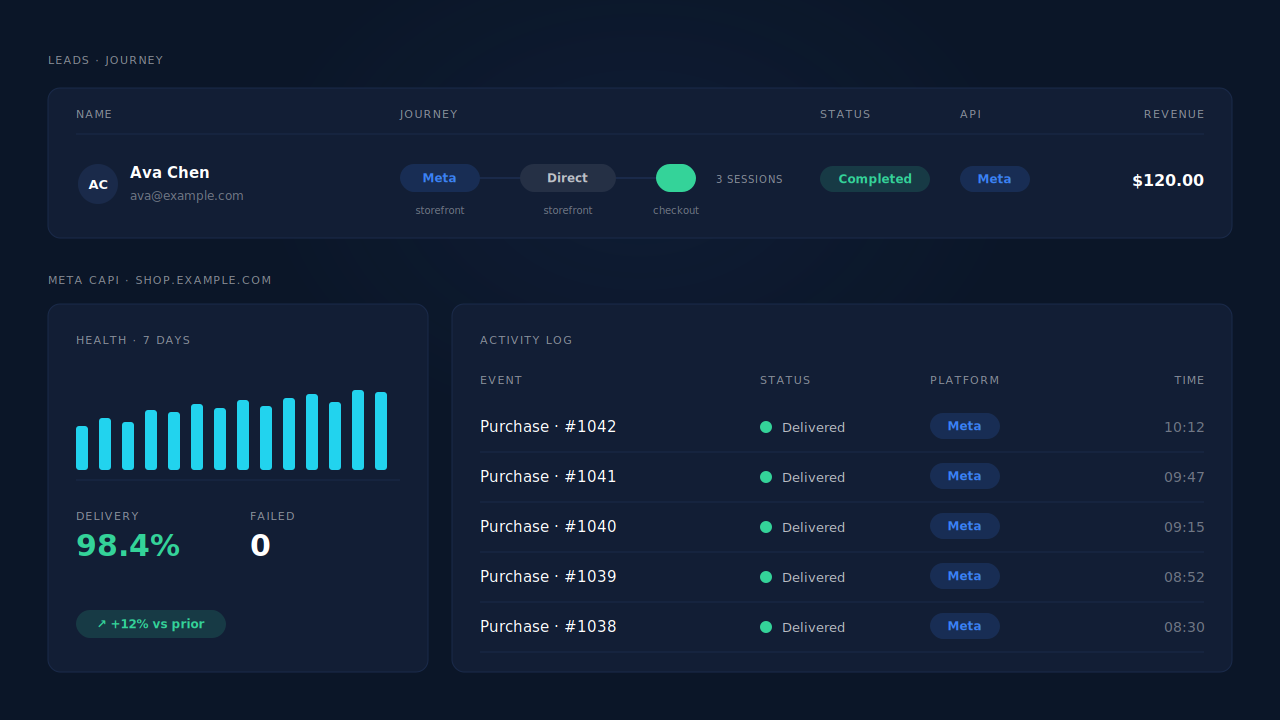
Where you check it. In the Leads list, the Journey ribbon reads left to right: the Meta touch on the storefront, the checkout session, then the green conversion badge with revenue. The journey timeline on the lead shows each session’s landing URL. The API column confirms that this lead’s Purchase went to Meta. The Meta CAPI page shows the health strip and the activity log of delivered events.
Four honest constraints:
Keep the Meta Pixel on the storefront. PartialLeads rebuilds _fbc from the fbclid, but it can’t create _fbp from nothing. Without the browser cookie, server events match less well.
Run one source per Purchase. PartialLeads uses its own event ids and never sends the same conversion twice, but it doesn’t deduplicate against Shopify’s Facebook & Instagram channel or another app. If that channel also sends Purchase, turn one of them off.
Only paid orders are sent. An order is recorded once, so a later edit to it doesn’t re-send the event.
Some orders won’t match. A guest who left no email on the storefront, came back days later on another network and paid will land unmatched. It stays in the Purchases ledger and can be re-matched if identity arrives later. All of this sits under the wider guide to fixing Shopify tracking, attribution and catalog.
| What breaks | The mechanism | Where you see it in the dashboard |
|---|---|---|
| fbclid stays on the Hydrogen storefront | Tag captures click ids and UTMs at landing | Journey timeline, first touch |
| Checkout runs on a different domain | Customer Events pixel on checkout; sessions joined by visitor id, email, phone, IP | Journey ribbon: storefront → checkout |
| No Purchase reaches Meta | Paid orders sent server-side from order webhooks | Meta CAPI activity log |
| Purchase arrives with no click | fbc from the storefront session, rebuilt from fbclid if missing |
API column on the lead |
| Sale counted twice | PartialLeads’ own event ids; keep one source per event | Meta CAPI activity log |
Tell us what's broken. We'll fix your tracking — free.
Describe the tracking/attribution problem you're stuck on and we'll map it to a fix: server-side conversions to Meta, Google, TikTok and Pinterest, plus first-party tracking that survives Safari. No code required.
Sources
- https://registry.npmjs.org/@shopify/hydrogen/-/hydrogen-2026.4.7.tgz
- https://developers.facebook.com/docs/marketing-api/conversions-api/parameters/fbp-and-fbc
- https://developers.facebook.com/docs/marketing-api/conversions-api/parameters/server-event
- https://developers.facebook.com/docs/marketing-api/conversions-api/deduplicate-pixel-and-server-events