You fire them from the order record. Shopify’s orders/create webhook POSTs every new order to a URL you control, and your server converts that payload into a server-side conversion event. No app, no theme edit, no thank-you page.
The send is the easy part. Attaching the ad identifiers the order payload does not contain is the hard part, and the reason most people install an app anyway.
Why do browser-fired Shopify purchase events go missing?
Because the browser has to survive the whole checkout to fire them, and often it does not. A Purchase event living on the order-status page fires only if that page loads, in that browser, with scripts allowed, before the shopper closes the tab.
Four things routinely break that chain:
- Payment-gateway redirects. The shopper leaves for a bank, a wallet or a 3-D Secure challenge and comes back — or does not. Money moves either way; the reporting page may never render.
- Ad and tracking blockers. A blocked script does not fire, does not error, does not tell you.
- Closed tabs. Shoppers close the window the second payment confirms.
- The Shopify sandbox itself. Custom pixels run in a sandboxed context with limited access to the page, which is why they routinely send an empty user agent and regenerate visitor identifiers mid-journey.
None of these are configuration errors. They are properties of reporting a conversion from a browser you do not control, and no pixel tuning fixes them. That is the argument for the Conversions API, and it lands harder on Shopify because the checkout is hosted by Shopify, not by you.
What does an order webhook give you that the browser doesn’t?
Certainty about the sale. The orders/create webhook fires from Shopify’s servers when the order row is written, so it does not care about tabs, blockers, redirects or the sandbox. If the order exists in your admin, the webhook fired.
That is a different quality of signal. A pixel answers “did a browser reach the confirmation page?” A webhook answers “is there an order?” Only the second matches what you want to report.
It also arrives with the parts that are hard to get right in a browser: the total in the store’s own currency, the line items, the email and phone as the store recorded them, and the order ID you need as a stable key for deduplication and refunds. What it does not arrive with is any memory of how that buyer got to your store.
Do you actually need a Shopify app to do this?
No. A webhook subscription and an HTTPS endpoint are enough. Register the orders/create topic against a URL you own from the store admin’s notification settings, and Shopify POSTs the order JSON there for every new order.
An app buys three things: a hosted service that already receives and verifies webhooks; OAuth and scopes instead of a manual webhook and a shared secret, which matters when you distribute to other people’s stores; and a merchant-facing settings screen.
For a single store sending its own purchases to its own ad accounts, none of that is load-bearing. What you cannot skip is verifying the request really came from Shopify — sign every webhook against your shared secret and reject anything that fails, per Shopify’s webhook documentation.
What does the minimum server-side purchase path look like?
Five steps, and only one is the API call: verify the signature, acknowledge immediately and process asynchronously, build the payload, attach the buyer’s ad identifiers, then send and log. Never make Shopify wait on an ad platform — a slow handler becomes a failed delivery. Stripped to its skeleton, the receiver is unremarkable.
// POST /webhooks/shopify/orders-create
app.post("/webhooks/shopify/orders-create", rawBody, async (req, res) => {
  // Shopify signs every webhook; the header name and the HMAC
  // recipe are in Shopify's webhook docs. Reject on mismatch.
  if (!verifyShopifySignature(req)) return res.sendStatus(401);
  res.sendStatus(200);                 // ack first, work later

  const order = JSON.parse(req.rawBody);

  await enqueue({
    event_name: "Purchase",
    event_time: Math.floor(Date.parse(order.created_at) / 1000),
    order_id: order.id,                // stable key: dedup + refunds
    value: Number(order.total_price),  // major units, not cents
    currency: order.currency,
    email: order.email,
    phone: order.phone,
  });
});
The hashing rules are not guesswork: Meta expects email lowercased and trimmed before SHA-256 and phone in E.164 digits, while the browser cookies, IP address and user agent go unhashed (Meta for Developers, customer information parameters). Get one wrong and the platform still accepts your event — it just matches nobody, the worst failure mode there is, because it looks like success.
Where do the ad identifiers come from, if the order payload has none?
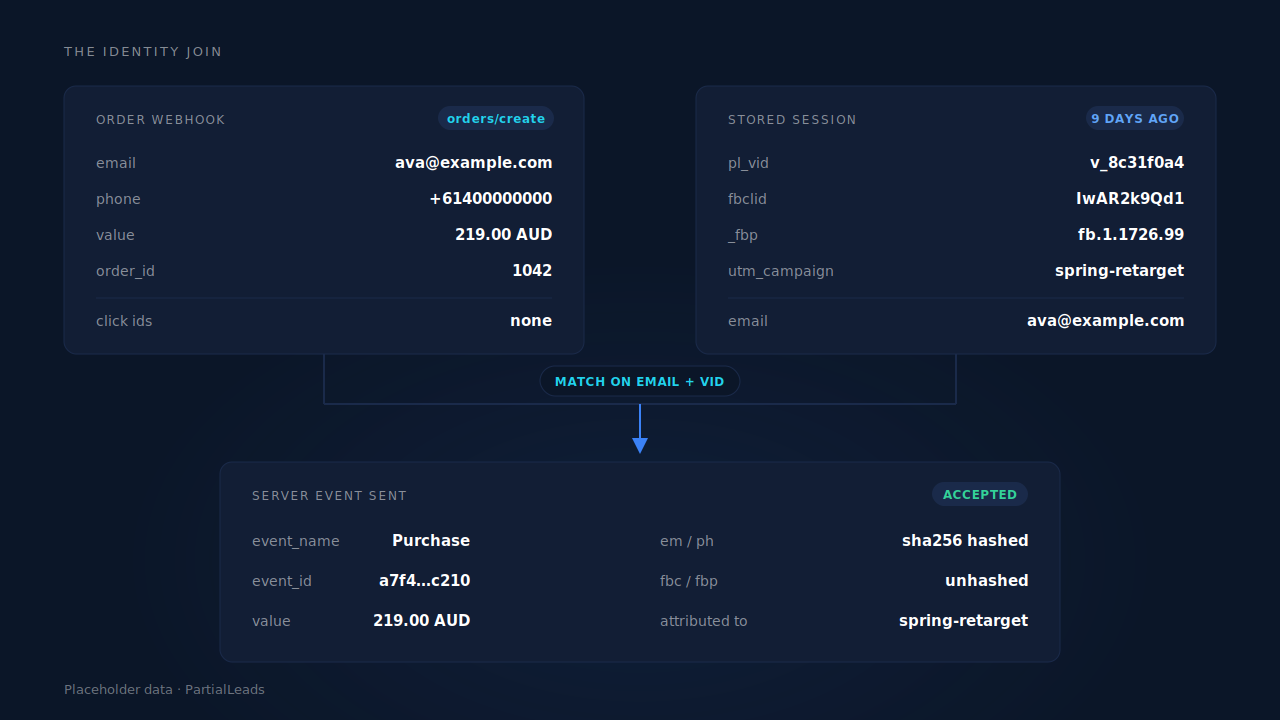
From a session your own tag recorded before checkout, joined to the order after it. The order webhook knows the buyer’s email, phone and total. It has never heard of fbclid, _fbp, _fbc, gclid or the landing page — those existed in a browser, on your storefront, possibly days earlier.
This is where most home-built implementations quietly settle for anonymous server events. Closing the gap takes three pieces.
Capture. A first-party script reads click IDs and UTMs off the landing URL, reads the cookies the base pixels set, and posts them to an endpoint you own, keyed to a durable visitor ID.
Storage. Those identifiers live in a record on your server, not in a cookie the checkout hop, an ITP cap or the sandbox’s identifier regeneration can throw away.
The join. When the order arrives, you match it back to that record — email as the workhorse, phone as the fallback, visitor ID as the strongest match when storefront and checkout carried one.
That join is the work. It is how visitor identity resolution works in every server-side stack worth having, and it separates a Purchase event the platform can tie to an ad click from one it files under unknown. Skip it and you get delivery without attribution — events arriving reliably, matching nobody — which is exactly where attributing ecommerce revenue to the ad click succeeds or fails.
How do you stop the webhook and the pixel from double-counting?
With a deterministic event ID shared by both paths. Meta deduplicates a browser Pixel event against a server event when they carry the same event name and event_id — so the two must agree on that value without coordinating.
Deterministic is the load-bearing word. Derive the ID from stable inputs — the pixel, the event name and the order ID — and the same order produces the same ID forever, from either path, on the first send and on the fifth retry. Generate a random UUID at send time instead and every retry becomes a new conversion. That matters here because webhook delivery is at-least-once by design: a redelivered orders/create, a catch-up worker replaying a backlog, or a manual resend all have to land on an ID that already exists. Choosing the right event ID for Meta deduplication is a five-minute decision you live with for years.
What else breaks when you roll this yourself?
Four things, in roughly the order teams discover them.
- Refunds.
orders/createnever tells you an order was reversed, so attributed revenue only goes up and channels with high return rates flatter themselves. - Data hygiene. Test and draft orders are orders, and will fire. Currency must travel with the value.
- Silent auth failures. Tokens expire, nothing errors, conversions stop — you notice a fortnight later.
- The Shopify-specific ones. Empty user agents, regenerated visitor IDs and a native integration double-firing against your custom setup are their own category, worth reading if you are fixing Meta CAPI tracking on Shopify rather than building fresh.
None is hard individually. Together they are a small piece of infrastructure with an on-call requirement — the honest trade-off against buying one.
How does PartialLeads fire Shopify purchase events server-side?
Through Shopify’s own webhook and Customer Events pixel, with the identity join in between — the architecture above, operated rather than built.
Every inbound purchase runs one pipeline: normalise the identity, deduplicate it, match it to a session, flip the lead to Completed with revenue attached, write a first-touch and a last-touch attribution row, and fan the conversion out to Meta, Pinterest, TikTok and Google Ads. Matching is tiered by confidence — a visitor ID echoed back from the storefront, then email, then phone, then IP — and orders matching nothing still land as unmatched, recoverable when identity arrives later.
The parts that address the failure list above:
- A conversion cannot double-count. The event ID is a SHA-256 of the pixel, event name and record ID, with dedup tables keyed unique on configuration plus event ID. A redelivered webhook cannot fire twice.
- Failures are classified, not retried blindly. Auth failures flip the integration to “reconnect needed”; transient failures retry next cycle; permanent payload failures do not. Even an HTTP 200 carrying a semantic failure is caught.
- The visitor ID survives what usually breaks it. The first-party cookie is set by the server, not by script, so Safari’s cap on script-written cookies does not apply and sessions stitch across the checkout hop even when the sandbox regenerates its identifier.
- Refunds net against revenue, arriving as their own rows in the same pipeline, and the upper-funnel Shopify pixel events fan out server-side too.
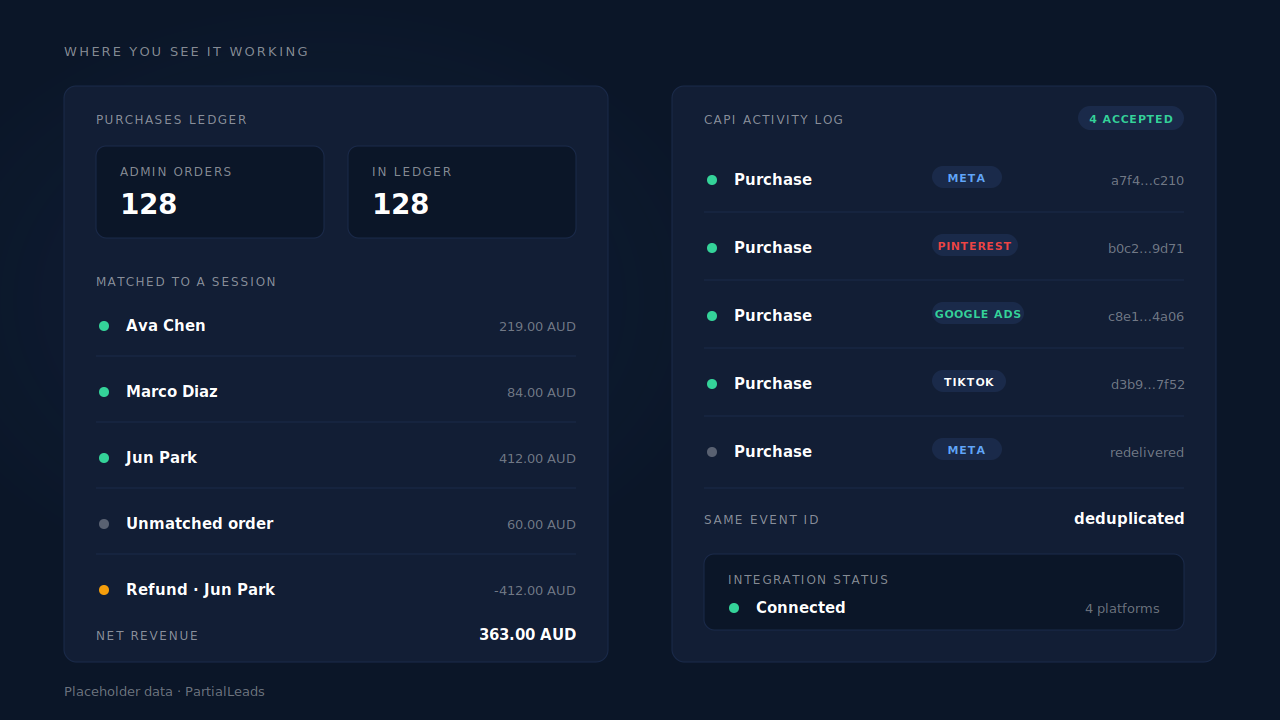
You verify it in two places. The Purchases ledger shows every order that arrived and whether it matched a session — the reconciliation that matters is that your Shopify admin’s order count equals the ledger’s. The CAPI activity log shows every dispatch with its event name, platform, status and API response, which is where a dead token surfaces the same day.
The honest split: dispatch completeness is in your control and matching is not. Because purchases fire from the order record, every order in your admin produces a conversion event, and you can check that by comparing two counts. Whether the platform ties that event to a person and an ad click depends on the identifiers you collected and on its own graph — consent, opt-outs, people it cannot resolve.
One constraint, plainly: keep your client-side base pixels installed. Server-side dispatch replaces the browser as the delivery path, not as the place platform cookies get set. A _fbc value can be rebuilt from an fbclid in the landing URL; a _fbp cookie that was never set cannot be invented.
| What breaks | The mechanism | Where you see it in the dashboard |
|---|---|---|
| Purchase events lost to redirects, blockers, closed tabs | Purchase fired from the orders/create record, not the confirmation page |
Purchases ledger — every admin order present |
| The order payload carries no click ID or platform cookie | Storefront capture of click IDs and cookies, joined to the order by visitor ID, email or phone | Journey timeline, Attribution report |
| A redelivered webhook or retry counted twice | Deterministic SHA-256 event_id, dedup tables unique per config and event ID |
CAPI activity log — no duplicate row |
| Refunds leaving attributed revenue inflated | Refund rows in the same pipeline, netted against paid revenue | Purchases ledger, net revenue |
| An expired token stopping conversions silently | Retry taxonomy: auth failures flag reconnect-needed, transient retry, permanent do not | CAPI activity log, integration status |
| Sessions broken at the checkout hop | Server-set first-party cookie, tiered stitching | Journey ribbon, Leads list |
Tell us what's broken. We'll fix your tracking — free.
Describe the tracking/attribution problem you're stuck on and we'll map it to a fix: server-side conversions to Meta, Google, TikTok and Pinterest, plus first-party tracking that survives Safari. No code required.
Sources
- Meta for Developers — Conversions API: https://developers.facebook.com/docs/marketing-api/conversions-api
- Meta for Developers — Customer information parameters: https://developers.facebook.com/docs/marketing-api/conversions-api/parameters/customer-information-parameters
- Meta for Developers — Deduplicate Pixel and server events: https://developers.facebook.com/docs/marketing-api/conversions-api/deduplicate-pixel-and-server-events