You run four conversion APIs from one tag by separating collection from delivery. The tag’s job is to observe the conversion once and capture every identifier the visitor’s browser can see. A server’s job is to translate that one record into four platform-specific payloads and send each to its own endpoint.
Four APIs, one capture. The platforms never touch your page.
That inversion is the whole answer, and almost every problem people hit with multi-platform server-side tracking comes from skipping it.
Why does every ad platform want its own conversion API?
Because the browser stopped being a reliable place to report conversions, and each platform solved that independently. The Conversions API pattern — a server-to-server endpoint that accepts hashed customer data and a click ID — now exists at Meta, Google, TikTok, Pinterest and Microsoft, with different names and near-identical shapes.
They are not interoperable and they were never going to be. Each platform has its own event vocabulary, its own hashing expectations, its own click ID, its own authentication, and its own rules about what a valid payload looks like. Meta wants em and ph and a _fbc value in fb.1.<ts>.<fbclid> format. Pinterest wants an epik. Google Ads wants a gclid and a conversion action name that already exists in the account.
So the platforms converged on the same architecture and diverged on every detail of it. That is the actual job: not four integrations, but one integration with four serialisers.
What breaks when you install four conversion APIs separately?
Four things, and they compound. Each platform’s setup guide assumes it is the only one you are following, so following all four produces a stack nobody designed.
Hashing drifts between implementations. Email needs lowercasing and trimming before SHA-256, phone needs E.164 digits, and the browser-set cookies and IP address must go unhashed. Implement that four times and one of them will be wrong. It fails silently — the platform accepts the event and matches nobody.
Event timing diverges. One integration fires on the thank-you page, one on a webhook, one on a nightly upload. Now the same conversion has three different timestamps and your platform reports disagree with each other before they even disagree with your CRM.
Failures become invisible. A token expires on a platform you check monthly. Nothing errors on your site. Conversions just stop, and you find out when the campaign’s cost per acquisition drifts.
Page weight and consent surface multiply. Four base pixels, four script loads, four vendors in your consent banner, four things to break when one of them ships a bad build.
The single-tag architecture does not eliminate platform-specific work. It eliminates duplicated platform-specific work, which is where the bugs live.
What does one tag, four APIs actually mean?
It means three layers with clean boundaries: capture, record, dispatch.
Capture happens once, in the browser. One script reads the landing URL for click IDs and UTMs, reads the platform cookies the base tags set, watches the form, and posts what it sees to your own first-party endpoint. It does not know or care how many ad platforms you run.
Record happens on your server. The captured session becomes a durable row — identifiers, source, timestamps, and later the lead or the order that resulted. This is the part that makes the architecture worth building: you now own a conversion record that exists independently of any ad platform, and adding a fifth platform later is a new serialiser against data you already have.
Dispatch is per-platform and deliberately dumb. Read the record, build that platform’s payload, send it, log the response, retry the transient failures.
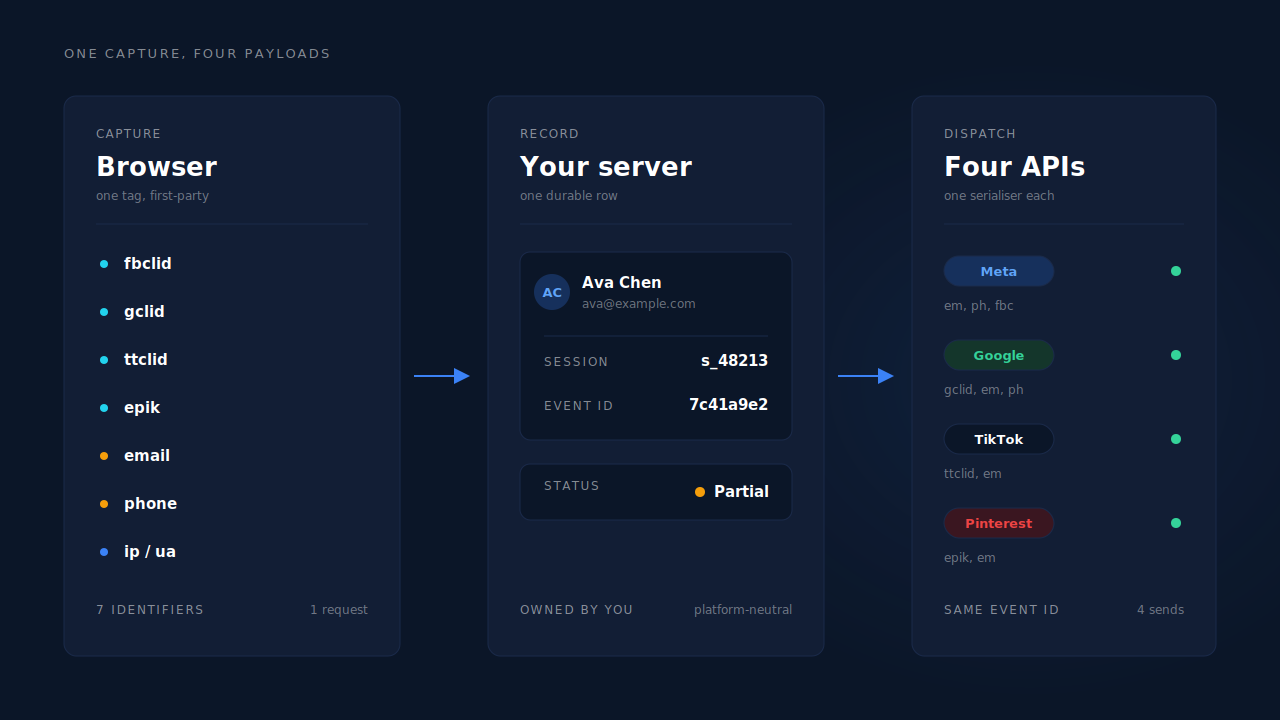
The boundary that matters is between record and dispatch. If platform-specific logic leaks upward into capture, you are back to four integrations wearing a trench coat.
Which identifiers does each platform need from the same event?
All four want the same two things — who the person is, and which ad click brought them — but they name them differently and weight them differently.
| Platform | Click ID on the landing URL | Browser cookie it expects | Strongest customer identifier |
|---|---|---|---|
| Meta | fbclid |
_fbp, _fbc |
hashed email, then hashed phone |
| Google Ads | gclid, gbraid, wbraid |
— | hashed email, then hashed phone |
| TikTok | ttclid |
_ttp |
hashed email, then hashed phone |
epik |
_epik |
hashed email, then hashed phone |
Two practical consequences fall out of that table.
First, each platform stamps its own click ID on the landing URL, and the URL is the only place some of them ever appear. If your capture reads the landing URL and stores every recognised parameter, you have all four for free. If it reads only the one you cared about that quarter, the others are gone and unrecoverable.
Second, the customer identifiers are shared. The same hashed email and E.164 phone go to all four, which is why collecting them once is worth so much. This is also where event match quality is decided — not in your pixel configuration but in your form. Email alone structurally caps match quality in the mid range; email plus phone, plus the browser cookie and IP and user agent, is the full high-weight set.
How do you stop four platforms from double-counting one conversion?
With a deterministic event ID, and by understanding that double-counting happens within a platform, not between them.
Each platform deduplicates its own browser pixel against its own server events. It cannot see the other three, so Meta counting a conversion and TikTok counting the same conversion is not double-counting — it is two platforms each claiming credit, which is a reporting question, not a plumbing one.
The plumbing question is narrower: when a Meta base pixel fires Lead in the browser and your server also sends Lead for the same person, Meta must recognise them as one event. It does that by matching a deterministic event ID and the event name across both paths.
Deterministic is the load-bearing word. A random UUID generated at dispatch time gives a retried send a new ID, and a retry with a new ID is a second conversion. Derive the ID from stable inputs — the configuration, the event name and the record’s own identifier — and the same conversion produces the same ID forever, no matter how many times the sender wakes up.
The same principle handles the ugly cases: a redelivered webhook, a worker that catches up after an outage, a manual resend from a dashboard. All of them land on an ID that already exists.
Do you need server-side Google Tag Manager for this?
No, though it is one valid way to build it. Server-side GTM gives you a container that receives events and forwards them to platform templates — the same collect-once, translate-at-the-edge shape, with a tag manager as the translation layer.
What it costs you is a hosting bill, a container to maintain, and a template per platform that you are responsible for keeping current when a platform changes its spec. The question of whether you need Stape and server-side GTM comes down to whether you want to operate that infrastructure or consume it. Neither answer is wrong; only pretending there is no infrastructure is.
The architecture is the same either way. Capture once, store a record you own, serialise per platform, dedupe with a stable ID.
Which events should each platform get?
Not the same list, and this is where teams over-send.
For lead generation, the useful ladder is short: a lead event when a form is completed, a booking or schedule event when a meeting is set, and a purchase event when money moves. Sending page views server-side adds volume and no signal.
For ecommerce, the deeper funnel earns its place — view content, add to cart, initiate checkout, add payment info, purchase — because the optimisation algorithms genuinely use the upper-funnel events to find buyers.
Per-platform naming matters too. Meta and TikTok have standard event names; Pinterest works from a fixed event vocabulary; Google Ads matches against conversion actions you create in the account first, which is why importing lead conversions into Google Ads fails so often on a name mismatch rather than on the data.
How does PartialLeads run four conversion APIs from one tag?
One tag — a single script, roughly 10KB gzipped, no tag manager required — captures fields as they are typed, reads the click IDs and UTMs off the landing URL with a referrer fallback, and posts to a first-party endpoint. Everything after that is server-side.
The dispatch layer covers Meta Conversions API, Pinterest Conversions API, TikTok Events API and Google Ads offline conversions, with Microsoft Advertising’s Conversions API as a fifth in the same family. All five read the same captured record.
The mechanics that make the fan-out safe are shared, not reimplemented per platform:
- One hashing builder per platform. Email lowercased and trimmed, phone normalised to E.164 with a country-code fallback from session geo, city and region and postcode whitespace-stripped — and
_fbp,_fbc, IP and user agent sent unhashed, as every spec requires. - Deterministic
event_idderived by SHA-256 over the configuration, the event name and the record ID, with dedup tables keyed unique per configuration and event ID. A redelivered webhook physically cannot double-fire. - A retry taxonomy instead of blind retries. Authentication failures flip the configuration to “reconnect needed” so a dead token surfaces; transient failures retry on the next worker cycle; permanent payload failures do not retry. Even an HTTP 200 carrying a semantic failure is caught.
- Five dispatch sites — hot path, catch-up worker, real-time conversion, ecommerce fan-out and inbound purchase — so no signal path silently drops a conversion on the floor.
- Condition-based sending on Meta and Microsoft, where a send mode and rule combinator decide which captured leads qualify, with a live preview that answers “this rule would have matched N of M capture-ready leads in the last 7 days” using the same matcher the dispatch uses.
_fbc is reconstructed from a URL fbclid when the cookie is missing or malformed. _fbp is not — it needs the cookie, which means keeping your client-side base tags installed. Server-side dispatch replaces the browser as the delivery mechanism, not as the place platform cookies are set.
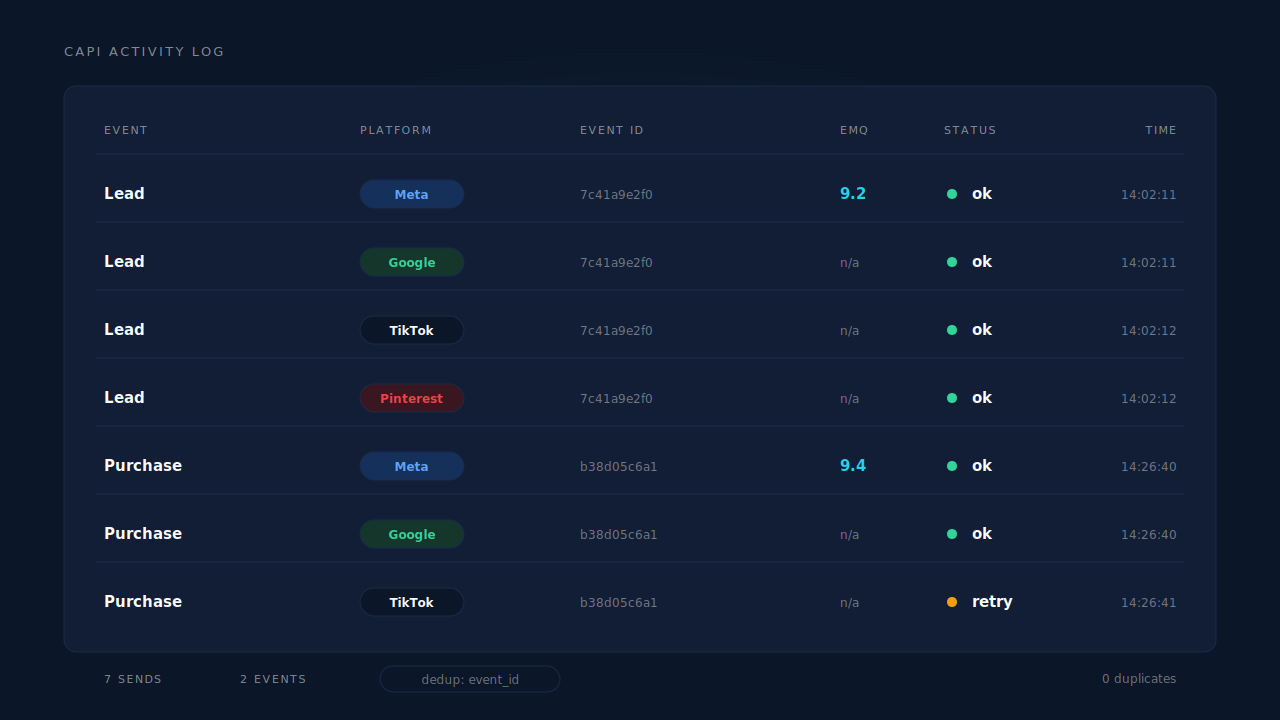
You see it working in two places. The CAPI activity log lists every send with its event name, platform, status and response — the place a failing token becomes visible the same day. And the Leads list carries an API column showing which conversion APIs that specific lead was dispatched to, which turns “is the fan-out running?” from an act of faith into a per-person audit.
The honest line on what that buys you: dispatch completeness is in your control and matching is not. Every order and qualifying lead in the system produces an event on every configured platform, and you can reconcile that yourself. Whether a platform then ties the event to a user and a click depends on the identifiers you collected and on the platform’s own graph — consent, opt-outs, unresolvable people. With email and phone as required form fields, customers consistently land at Meta event match quality of 9 or higher; with email only, the ceiling sits lower for structural reasons, not configuration ones. That condition travels with the number every time.
| What breaks | The mechanism | Where you see it in the dashboard |
|---|---|---|
| Four hashing implementations, one of them wrong | One canonical hashing builder per platform, shared normalisation for email, phone and geo | CAPI activity log — accepted sends with match parameters present |
| A retry or redelivered webhook counted twice | Deterministic SHA-256 event_id plus dedup tables unique per configuration and event ID |
CAPI activity log — the duplicate never appears |
| A dead token nobody notices for weeks | Retry taxonomy: auth failures flip the configuration to reconnect-needed, transient failures retry, permanent ones do not | Integration status on the configuration, failed rows in the activity log |
| Click IDs lost because only one was captured | Landing-URL capture of fbclid, gclid/gbraid/wbraid, ttclid and epik on the same session |
Session attribution on the lead, UTM and source columns |
| No way to tell whether a lead was actually sent | Per-lead dispatch record across every configured platform | Leads list, API column |
Tell us what's broken. We'll fix your tracking — free.
Describe the tracking/attribution problem you're stuck on and we'll map it to a fix: server-side conversions to Meta, Google, TikTok and Pinterest, plus first-party tracking that survives Safari. No code required.
Sources
- Meta for Developers — Conversions API: https://developers.facebook.com/docs/marketing-api/conversions-api
- Meta for Developers — Conversions API customer information parameters: https://developers.facebook.com/docs/marketing-api/conversions-api/parameters/customer-information-parameters
- Meta for Developers — Deduplicate Pixel and server events: https://developers.facebook.com/docs/marketing-api/conversions-api/deduplicate-pixel-and-server-events