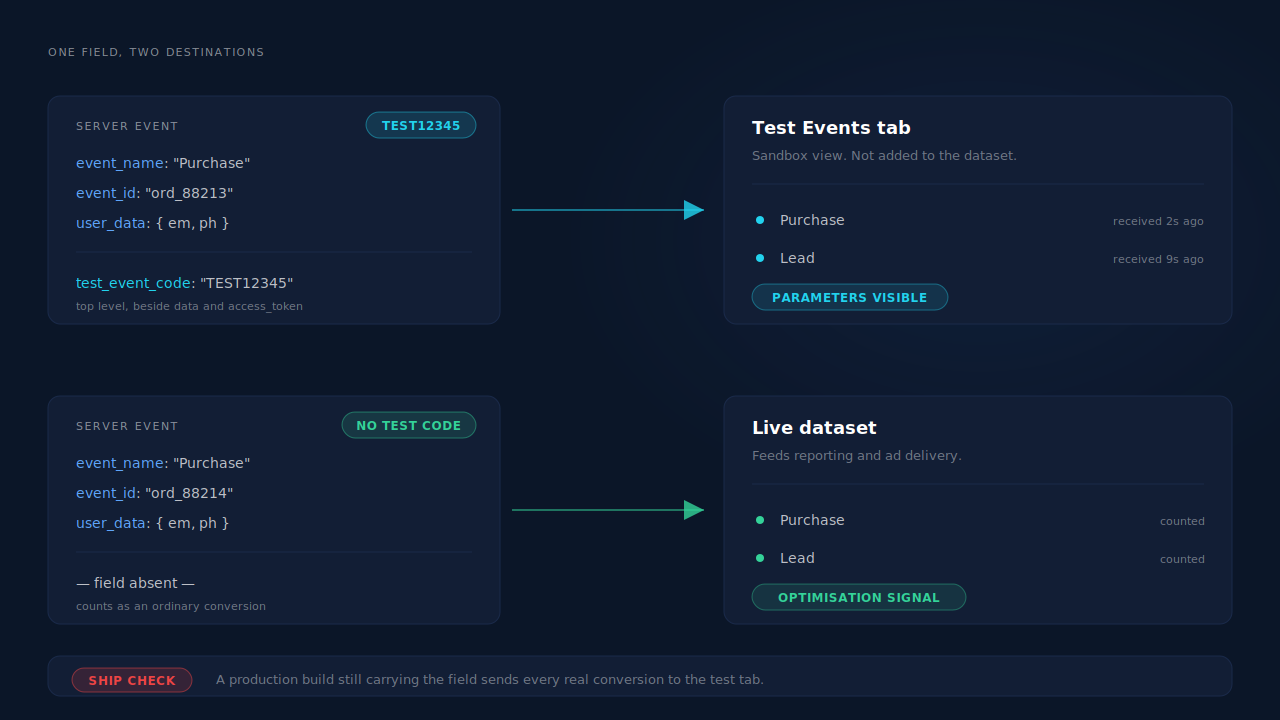
You test Meta’s Conversions API safely by attaching a test_event_code to the payload. An event carrying that field routes to the Test Events tab in Events Manager instead of your live dataset, so you can fire the same Purchase twenty times and add nothing to the numbers your campaigns optimise on.
That one field covers most of the problem. The rest of this article is the part it doesn’t cover — and the mistake that costs the most, which is leaving the field in when you ship.
What actually gets polluted when you test a conversion event?
Four separate things, and they belong to four different owners. People assume “polluting live data” means one thing, then protect one of the four.
Meta’s dataset. A fake Purchase teaches the delivery algorithm that someone matching that profile converted. One test event is noise. A morning of debugging with a live dataset is a signal, and it’s a wrong one. This is the expensive kind of contamination because you cannot see it happening — there’s no red row, just slightly worse delivery for a while.
Your CRM. Most people test a conversion by filling in their own form. That writes a real lead record, which routes to sales, which calls your developer. Multiply by a week of QA and your lead counts are wrong in the direction that flatters you.
Your own reporting. A test purchase with a value attached lands in attributed revenue, gets matched to a session, and shows up in the campaign rollup. Two weeks later nobody remembers which of the four $1.00 orders was real.
Your delivery metrics. If your tooling counts a test send as a send, your delivery rate, your sparkline and any trial or volume quota all move. That’s the quietest one: the number you’d use to detect a real problem is the number your testing just moved.
The first two are the ones that actually cost money. The last two cost you the ability to trust your own dashboard, which eventually costs money too.
How does test_event_code keep test events out of your live dataset?
It routes the event somewhere else. In Events Manager, open your dataset and go to the Test Events tab — it displays a code that looks like TEST12345. Attach that code to a server event as a top-level test_event_code field, alongside data and access_token, not inside user_data. Fire the event, and it appears in that tab within seconds instead of being added to the dataset the Conversions API feeds.
{
  "data": [
    {
      "event_name": "Lead",
      "event_time": 1757731200,
      "action_source": "website",
      "event_id": "lead_9f2a4c1e",
      "user_data": {
        "em": "e3b0c44298fc1c149afbf4c8996fb924...",
        "ph": "a665a45920422f9d417e4867efdc4fb8..."
      }
    }
  ],
  "test_event_code": "TEST12345"
}
Two practical notes. The code is per-dataset and it rotates — if you saved one in a script three months ago, it probably isn’t valid now, and an expired code doesn’t fail loudly. And the routing is all-or-nothing per request: every event in that data array goes to the test tab, so you cannot mix one real event and one test event in the same batch.
Then the rule that actually breaks people. Strip the code before deploying. A production build still carrying test_event_code sends every genuine conversion into the Test Events tab, where it is not added to your dataset at all. The symptom is a server that reports 200 on every send and a dataset that reports zero conversions for a month — and because both halves look healthy from where you’re standing, it’s usually a media buyer who finds it, not a developer.
What does the Test Events view prove, and what does it not?
It proves the transport. Credentials are valid, the endpoint accepts your payload shape, the event name is one Meta recognises, and — the useful part — it shows you which parameters actually arrived.
That last one is why the tab is worth opening even when you’re confident. You look at the received event and check whether ph is there at all. If you believe you’re sending a hashed phone number and the view shows no phone parameter, you’ve found a normalisation bug that no status code would have revealed, because a 200 only means the request parsed.
What it does not prove is match quality. The identity you send in a test is usually fabricated — a placeholder email, a hash of nothing in particular — so nothing about it tells you whether your real events resolve to real people. Event Match Quality is a dataset-level score computed over a rolling window of real traffic; don’t expect the event you just fired to move it, and don’t read its absence as a failure.
It also doesn’t prove the path you actually care about. Test Events confirms that a payload reaches Meta. Whether the payload your production code builds for a real lead carries the same parameters is a separate question, and one a synthetic test is structurally unable to answer. Confirming your CAPI is working end to end is a different exercise that starts after the transport test passes.
How do you test deduplication without double-counting a real purchase?
Send both halves with the same test code. Deduplication is judged on the pair — a browser event and a server event sharing an event_name and an event_id — so testing it requires firing both, which is exactly the scenario that risks a double-counted conversion in production.
With a test code attached to the server half, the pair lands in the Test Events tab and a correctly deduplicated pair shows as one event with both sources attributed, rather than two entries. If you see two, your identifiers disagree: usually the browser is generating a random ID while the server uses an order ID, or one side sends Purchase and the other sends purchase. Case matters.
Two caveats worth knowing before you trust the result. The browser half only carries the test code if your Pixel implementation puts it there too — if only the server half is coded as a test, you’re comparing a test event against a live one and the result means nothing. And a dedup test that passes in the test tab is evidence, not proof: the production failure modes are usually about which ID gets generated under real conditions, which is a design question covered in what the event_id should be and a diagnostic one covered in deduplication failing in production.
Should you use a separate test dataset instead?
For anything automated, yes. A test code is right for a human checking a change; a second dataset is right when the sending happens without a person watching — CI runs, a staging environment that mirrors production, load tests, or a contractor’s sandbox.
The reasoning is about failure modes, not features. A test_event_code protects you only as long as every send path remembers to attach it, and automated suites are exactly where one path forgets. A dataset that no campaign optimises on is protected structurally: nothing routed there can damage anything, regardless of what your code does.
The trade-off is honest. A second dataset means a second pixel ID in your configuration, and any environment-variable mistake sends real traffic to the sandbox — the same class of bug as a stray test code, pointed the other way. It also means your test path and your production path differ in configuration, so it can pass while production fails. Use both: dataset separation for machines, test codes for humans, and one deliberate end-to-end check against the live dataset before you call an integration done.
What do you do about test events that already reached your live dataset?
Plan as though you cannot take them back. Whether any deletion path exists depends on your dataset and on Meta’s current tooling, so check Meta’s own documentation rather than assuming — but build your testing habits on the assumption that an event sent is an event kept.
Which makes three habits worth having in advance:
Send zero or no value on test purchases. A Purchase with no value still exercises every part of the path you’re testing. A Purchase with value: 4999 contaminates ROAS reporting on both sides for as long as the window runs.
Keep a note of the window. Write down the date range and the dataset you were testing in. When a media buyer asks why Tuesday looks strange, a one-line note ends the investigation in a minute instead of an afternoon.
Watch delivery rather than counts. A handful of stray events mostly resolves itself as real volume accumulates. What deserves attention is the algorithm: if a campaign was in learning and you fed it a batch of fake conversions, judge it on cost per real result over the following week, not on the conversion count in the dashboard.
The one thing not to do is send a compensating batch of negative or corrective events. There’s no reversal semantics in a conversion event — you’d be adding contamination on top of contamination.
How do you test with a real lead instead of a fabricated one?
Re-send an event for a lead you already captured. It’s the only test that exercises the real payload builder: real email, real phone in its real format, the actual click ID and cookies that were on that session, and the same normalisation and hashing code your production sends use.
A synthetic test answers “can we reach Meta?” A replayed real lead answers “does the payload we build for an actual person carry what it should?” — which is the question that determines whether your events match. You want both, and you want the second one attached to a test code so the replay doesn’t count twice.
How does PartialLeads keep test sends out of your live numbers?
By treating a test as a test at every surface that counts something. Testing breaks reporting when a tool has one code path for “send” and no concept of a send that shouldn’t be tallied.
A dashboard test send with test_event_code passthrough. Fire a synthetic event at Meta from the Meta CAPI configuration and watch it arrive in Meta’s own Test Events tab. The code is passed through to Meta unchanged — the routing decision is Meta’s, exactly as it would be from your own server.
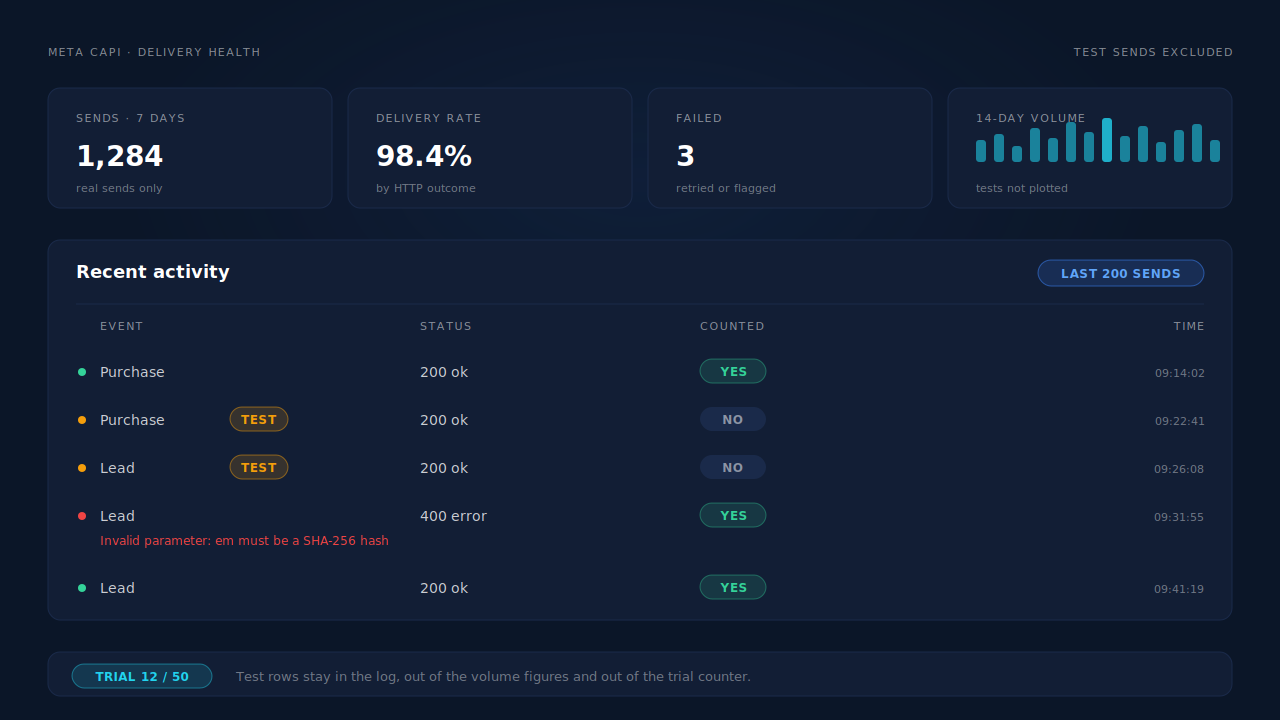
Test sends excluded from the health strip. The Meta CAPI page carries a seven-day strip: sends, a per-day sparkline, delivery rate as a whole percent, and a failed count from real HTTP failures. Test sends are excluded from those volume figures, so a morning of testing doesn’t flatter your delivery rate. When no real sends exist yet, the rate reads as empty rather than as a misleading zero.
Test sends don’t consume trial quota and don’t write a deduplication ledger row. A test isn’t a real send, so it isn’t counted as one, and it can’t collide with the deterministic event_id a real event will later use.
A per-event activity log that shows the payload, not a summary. Each dispatch attempt is retained with its event name, HTTP status, any error text from Meta verbatim, and the full request and response bodies — so you can open one event and see precisely which match parameters it carried. The access token is redacted before anything is written.
Deterministic event_id and unique dedup tables. Event IDs are derived from the configuration, event name and record rather than generated randomly, and the dedup tables are keyed uniquely — so a retried or redelivered event physically cannot double-fire, which is the failure that testing usually causes and rarely surfaces.
Honest boundaries. The per-lead API icon on the leads list means a dispatch was attempted, not that Meta accepted it — the activity log’s status code is the authoritative answer for any specific lead. Event timestamps are clamped to Meta’s seven-day window, which prevents that particular rejection but doesn’t resurrect the original timestamp. And nothing here removes an event once Meta has it: the protection is routing and exclusion, not deletion.
| What breaks | The mechanism | Where you see it in the dashboard |
|---|---|---|
| Test conversions land in the live dataset | Dashboard test send with test_event_code passed through to Meta |
Meta CAPI config, confirmed in Meta’s Test Events tab |
| A morning of testing flatters your delivery rate | Test sends excluded from the seven-day volume figures | Health strip: sends, sparkline, delivery rate, failures |
| Testing burns send quota | Test sends don’t consume trial quota | Trial counter on the Meta CAPI page |
| A retried test double-fires the real event | Deterministic event_id plus uniquely keyed dedup tables |
CAPI activity log |
| You can’t tell what the payload actually carried | Full request and response bodies retained, token redacted | Activity log entry per dispatch |
| A rejection is invisible in a server log | Per-event status and Meta’s own error text | Activity log status dots: ok, queued, failed |
| Late events rejected on timestamp | event_time clamped to Meta’s seven-day boundary |
Activity log timestamps |
If you’re running the browser Pixel alongside server events — which you should be, for reasons covered in running the Pixel and CAPI together — test both halves under the same code, or the dedup result you get back is meaningless.
Tell us what's broken. We'll fix your tracking — free.
Describe the tracking/attribution problem you're stuck on and we'll map it to a fix: server-side conversions to Meta, Google, TikTok and Pinterest, plus first-party tracking that survives Safari. No code required.
Sources
- https://developers.facebook.com/docs/marketing-api/conversions-api/using-the-api
- https://developers.facebook.com/docs/marketing-api/conversions-api/payload-helper
- https://developers.facebook.com/docs/marketing-api/conversions-api/deduplicate-pixel-and-server-events
- https://developers.facebook.com/docs/marketing-api/conversions-api/parameters/server-event