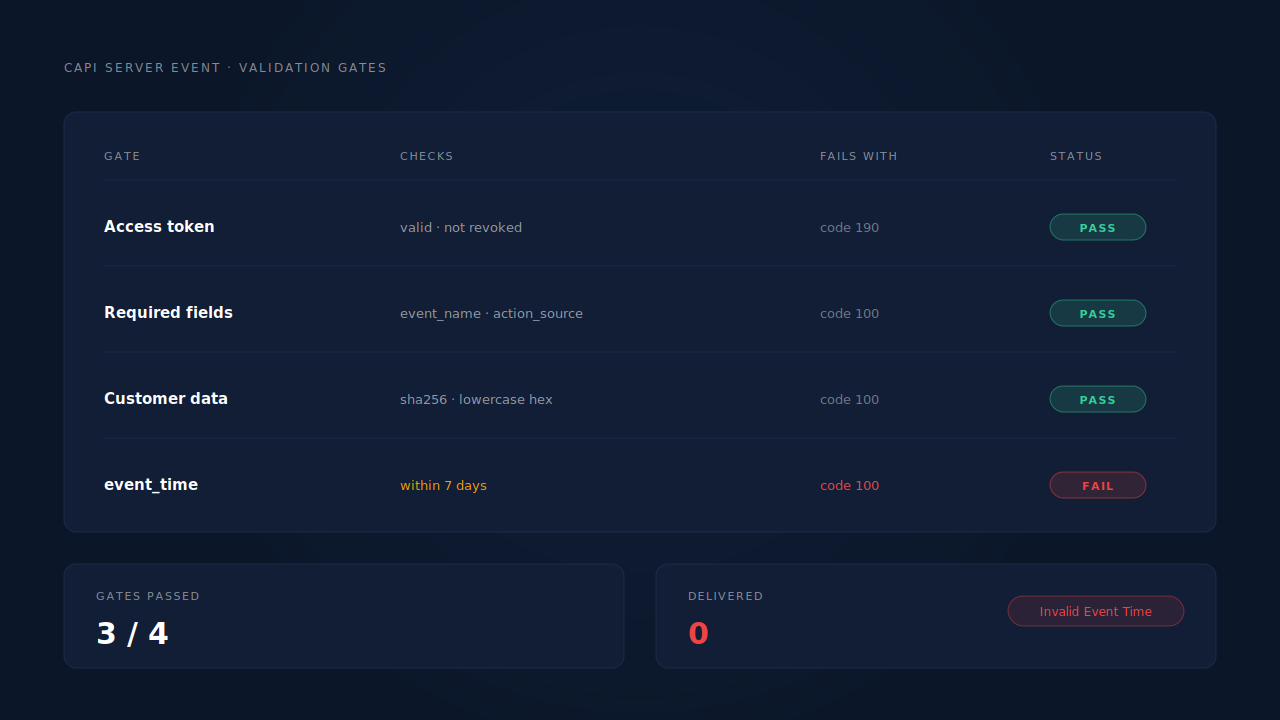
Meta rejects Conversions API events for four reasons: an invalid or expired access token, a payload that fails schema validation, customer data hashed or formatted the wrong way, and an event_time outside Meta’s seven-day window. The error body names the cause. Most teams never read it, because the rejection lands on a server nobody is watching.
That is the real problem with server-side tracking. A broken browser Pixel is loud. A broken server event fails into a log file, and the only symptom a marketer sees is a conversion count that runs low, month after month.
What does Meta actually mean by a “rejected” CAPI event?
Three different failures get called “rejected,” and they happen at different layers. Meta can refuse the whole HTTP request. It can accept the request and drop one event inside it. Or it can store the event and fail to match it to a person — not a rejection at all, but identical in your reports.
| What you see | What actually happened | Where to look |
|---|---|---|
HTTP 4xx with an error object |
The request never got parsed into events | Your own dispatch logs |
| HTTP 200, but the event isn’t in Events Manager | The event was received and dropped, or routed to Test Events | Events Manager → Diagnostics |
| Event appears, conversions don’t | Accepted and stored, but unmatched | Events Manager → match quality |
Separating these three is the whole diagnostic. Fixing hashing when your token is dead wastes a week, and the third row gets misdiagnosed constantly — a stored-but-unmatched event is an Event Match Quality problem wearing a delivery problem’s clothes.
Why does Meta reject the whole request?
Because something is wrong before any event inside it is considered: the credentials, the destination, or the JSON itself. These fail with an HTTP 4xx and an error object, and nothing in the batch is recorded — including the nineteen good events that shared the call.
The access token is invalid or expired. Graph API error code 190. System user tokens get rotated, and a personal token dies when its owner’s password changes.
The dataset ID is wrong, or the token can’t write to it. Error 200 for permissions, 803 for an object the token can’t resolve — usually an agency sending to a client’s dataset after the asset assignment was removed.
Required fields are missing. event_name, event_time and action_source are mandatory on every server event, and event_source_url is required when action_source is website. A user_data object with no usable identifier fails too — Meta needs something to match on.
Types are wrong. value must be a number, not "$129.00". currency must be a three-letter ISO 4217 code. event_time must be a Unix timestamp in seconds — sending milliseconds is the most common version of this, and it lands you outside the seven-day window by about fifty thousand years.
Why do events vanish after Meta returns HTTP 200?
Because a 200 means the request parsed — not that the event survived. Meta’s response counts what arrived, not what it kept.
A malformed optional field gets stripped. A phone number that fails normalisation is removed while the event goes through. The conversion still counts; match quality drops, and nothing in your logs said so.
It was a test event. An event carrying test_event_code routes to the Test Events tab, never your live dataset. Leaving that parameter in a production build sends zero conversions for a month.
It deduplicated against a Pixel event. Working as designed, but indistinguishable from a drop. For the opposite problem — the same sale counted twice — the Meta CAPI deduplication debug guide walks that diagnostic separately.
Limited Data Use changed what the event is worth. data_processing_options controls how Meta handles traffic from US states with consumer-privacy laws. Set it wrong, or leave it off when your business has Limited Data Use enabled, and those events can be accepted and then not used.
How do you read a Meta CAPI error and find the field that broke it?
Read the whole error object, not the message string. The key that names your broken field is usually the one people skip.
{
  "error": {
    "message": "(#100) Invalid parameter",
    "type": "OAuthException",
    "code": 100,
    "error_user_title": "Invalid Event Time",
    "error_user_msg": "event_time must be within the last 7 days.",
    "fbtrace_id": "AbCdEf123456"
  }
}
code gives the class of failure: 190 is authentication, 200 is permissions, 100 is a bad parameter, 4 and 17 are rate limits, 2 is a temporary Meta-side error worth retrying. error_user_title and error_user_msg are written for a human and usually name the exact parameter. fbtrace_id is what Meta support asks for, so log it on every failure.
Three tools make this faster: the Payload Helper validates a payload before you send anything real, the Test Events tab shows events arriving live when you attach a test_event_code, and the Diagnostics tab reports issues across your dataset over time — the only one that catches a field silently dropped for weeks. Confirming the whole path end to end is a different exercise: how to know if your Meta CAPI is working covers it.
Which hashing and formatting mistakes cause rejections?
Meta expects customer-data parameters normalised first, then hashed with SHA-256 and sent as lowercase hex. Normalisation is not decoration — an unnormalised value hashes to a different string than the one in Meta’s graph, so it matches nothing even when the event is accepted. Note which rows are never hashed; that distinction causes more damage than anything else here.
| Parameter | Normalise to | Hashed? |
|---|---|---|
em (email) |
lowercase, trimmed | Yes |
ph (phone) |
digits only, country code included, no +, no spaces or dashes |
Yes |
fn / ln (name) |
lowercase, no punctuation | Yes |
ct (city) |
lowercase, no spaces or punctuation | Yes |
st (state) |
two-letter lowercase code | Yes |
zp (zip) |
lowercase, no spaces; first five digits in the US | Yes |
country |
two-letter lowercase ISO 3166-1 alpha-2 | Yes |
client_ip_address, client_user_agent, fbp, fbc |
exactly as observed | Never |
Four mistakes account for most of the damage:
Hashing the things that must stay plaintext. fbp, fbc, IP and user agent are sent raw. Hashing them is a silent match-quality killer, because the event is still accepted.
Double hashing. A library hashes on the way in, your dispatch code hashes again on the way out. A SHA-256 of a SHA-256 is structurally unmatchable.
Phone numbers with formatting left in. +61 400 123 456 and 0400123456 both hash to something Meta has never seen. It needs 61400123456. A national-format leading zero is the commonest cause of a phone parameter that does nothing.
A user agent that isn’t real. Sandboxed environments can hand you an empty or synthetic string — Shopify’s Customer Events pixel sends an empty user agent is the best-documented case.
None of these four throw an HTTP error. They surface as a low EMQ score, which is why “Meta is rejecting my events” and “my match quality is bad” are so often the same bug from two angles.
Why does the seven-day event_time window break your backfill?
Because event_time can be at most seven days before the moment you send the event. That has a specific shape for lead generation: the conversion you most want to send — a deal closed three weeks after the form fill — is exactly the one outside the window.
Two things follow. Don’t drop late conversions, clamp them: an event with event_time floored at the seven-day boundary still delivers, still carries the identifiers, and still gives the algorithm something to learn from. And never let a backfill set event_time to “now” instead. That passes validation, and teaches Meta that four hundred people converted on a Tuesday afternoon — corrupting attribution windows and optimisation at once.
Why did rejections start when nothing changed?
Because the things that expire are not in your codebase. An integration that ran clean for eight months and broke on a Thursday almost always broke on credentials: a system user token rotated, a personal token invalidated by a password change, a business asset reassigned so the token lost write access, or an API version passing its deprecation date.
Rate limiting is the one that looks like a code problem and isn’t. Codes 4, 17 and 613 mean slow down — the fix is a backoff, not a payload change. Three classes, three responses: auth failures need a human, transient failures need a retry, permanent payload failures need a fix. Retrying all three identically is how a dead token generates a hundred thousand pointless requests a day.
How does PartialLeads stop CAPI events from being rejected?
Every outbound event goes through one canonical payload builder per platform, so hashing and normalisation happen in exactly one place. That is a deliberate response to the failure above: an early version of the product had phone normalisation on only one of five dispatch paths — precisely how a field that “works” starts failing on the paths nobody tested.
Normalisation is automatic. Email lowercased and trimmed; phone rendered E.164 with a country-code fallback from the session’s geo across roughly fifty countries; city, region and postcode whitespace-stripped. fbp, fbc, IP and user agent go unhashed per spec. _fbc is reconstructed from a fbclid in the landing URL when the cookie is missing.
event_time is clamped, not dropped. Late conversions deliver with a timestamp floored at Meta’s seven-day boundary, plus a future-skew guard at the other end. Nothing is restamped to “now.”
Failures are classified, not retried blindly. Auth failures flip the integration to “reconnect needed”; transient failures retry on the next worker cycle; permanent payload failures don’t retry at all. An HTTP 200 carrying a semantic failure is caught rather than counted as success. data_processing_options is sent for CCPA and LGPD traffic, and a deterministic event_id with dedup tables keyed UNIQUE(config, event_id) means a redelivered webhook cannot double-fire.
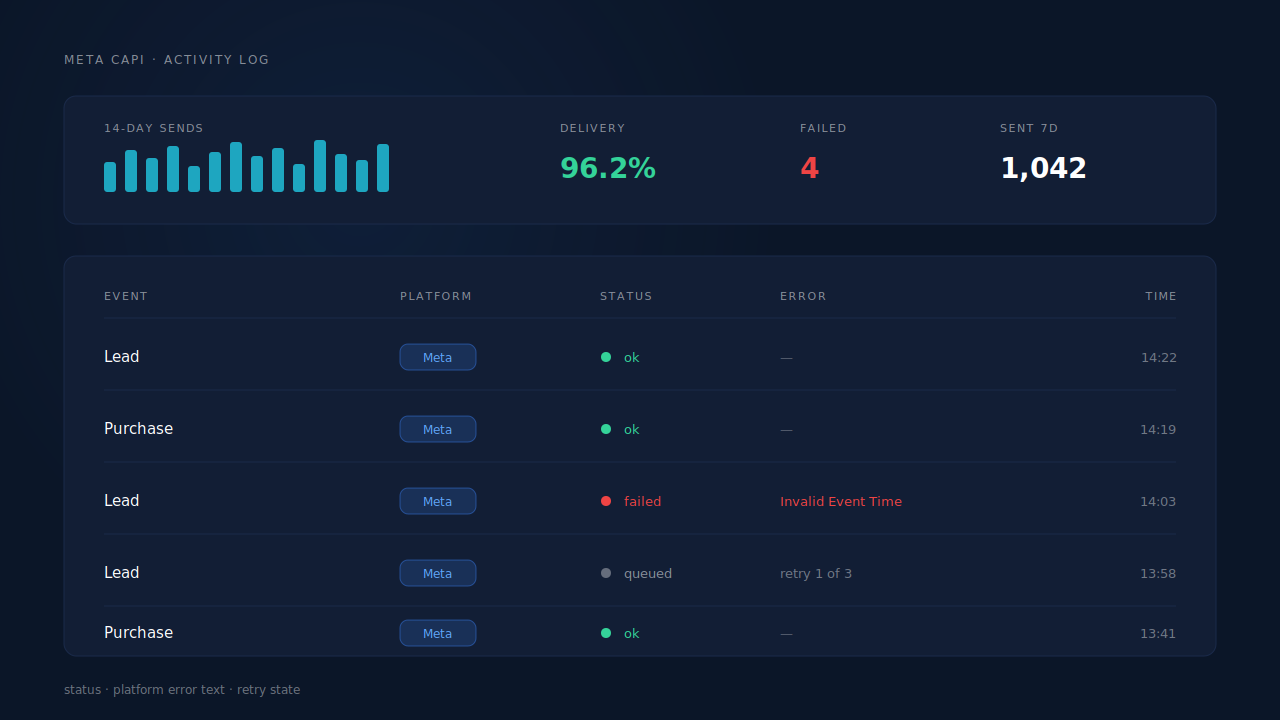
The CAPI activity log is where you see it. Each row carries the event name, the platform, a status dot — ok, queued, failed — and, on a failure, the platform’s own error text, not a paraphrase. Above it, the health strip shows delivery rate, a rolling sparkline, and the failed count. A rejection stops being an invisible line in a log file and becomes a red row with Meta’s error_user_msg next to it.
Three honest constraints.
Dispatch is controllable; matching is not. Every order and captured lead produces a dispatched event, verifiable by reconciling your records against sends. Whether Meta ties that event to a person depends on the identifiers you collected and on Meta’s own graph.
The base tag still matters. PartialLeads reconstructs _fbc from fbclid, but it does not synthesise _fbp from nothing. Remove your client-side base tag and your server events become anonymous server events.
A revoked token needs a human. The product flags the integration for reconnection; it cannot re-authorise itself against your Business Manager.
| What breaks | The mechanism | Where you see it in the dashboard |
|---|---|---|
| Expired or revoked access token | Auth failures classified separately, config flagged “reconnect needed” | CAPI config status, activity log error text |
| Wrongly hashed or unnormalised PII | One canonical payload builder per platform; E.164 phone with geo fallback | CAPI activity log, EMQ in Events Manager |
fbp / fbc / IP / UA hashed by mistake |
Non-hashed parameters sent exactly as observed | CAPI activity log |
Missing _fbc when the cookie was blocked |
Reconstructed from the URL fbclid in Meta’s format |
Session click-id fields |
| Late conversions outside the 7-day window | event_time clamped to the boundary, never restamped |
CAPI activity log timestamps |
| Transient errors and rate limits | Retry taxonomy: transient retried, permanent not, auth flagged | Health strip delivery rate |
Tell us what's broken. We'll fix your tracking — free.
Describe the tracking/attribution problem you're stuck on and we'll map it to a fix: server-side conversions to Meta, Google, TikTok and Pinterest, plus first-party tracking that survives Safari. No code required.
Sources
https://developers.facebook.com/docs/marketing-api/conversions-api/using-the-api https://developers.facebook.com/docs/marketing-api/conversions-api/parameters/server-event https://developers.facebook.com/docs/marketing-api/conversions-api/parameters/customer-information-parameters https://developers.facebook.com/docs/marketing-api/conversions-api/payload-helper https://developers.facebook.com/docs/marketing-api/conversions-api/deduplicate-pixel-and-server-events https://developers.facebook.com/docs/graph-api/guides/error-handling https://developers.facebook.com/docs/marketing-api/data-processing-options