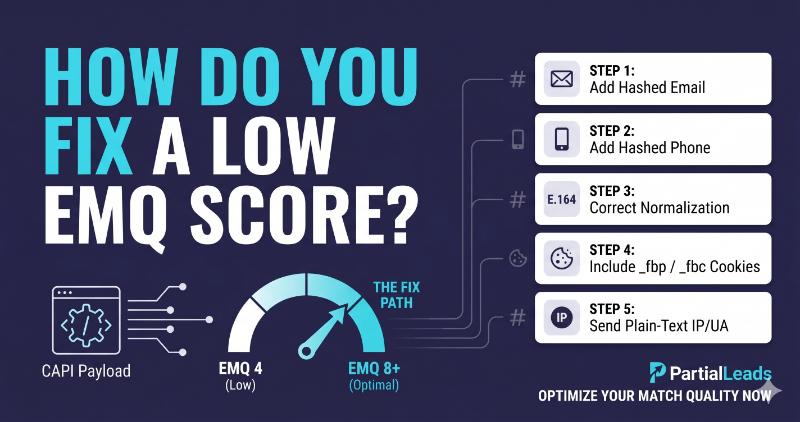
This article walks through the five most common causes of low EMQ in order of frequency, the exact diagnostic step to confirm each cause, and the fix. The full checklist is short enough to work through in a single afternoon.
What does a low EMQ score actually mean?
A low EMQ score means Meta can’t reliably match your conversion events to real Meta users. The events arrive, Meta accepts them, and they appear in Events Manager — but the matching layer can’t tie them to a Facebook or Instagram account with confidence. The downstream consequence is that the events are less useful for ad optimization, audience-building, and reported attribution.
EMQ is calculated from two underlying components: match-key quality (how many high-value parameters you sent per event) and event-level match rate (what percentage of recent events Meta successfully matched). Match-key quality is the lever you can move directly. Adding hashed email to events that didn’t have it raises the score; adding the _fbp cookie raises it more; correctly normalizing the values before hashing raises it again.
A score below 5 means Meta is treating the majority of your conversions as unmatchable. A score between 5 and 7 means it’s matching them partially — optimization works but performance is noisy. A score of 8 or higher is where ad performance and EMQ stop being correlated; the algorithm has enough signal.
The fix path is direct: figure out which parameters you’re missing or mis-formatting, send them correctly, wait for the 48-hour refresh, verify the new score, repeat if needed.
What’s the target EMQ score, and what does each tier do for ad performance?
Meta exposes four EMQ tiers in Events Manager, each with a different practical impact on ad performance:
| EMQ score | Tier | What it means for ad performance |
|---|---|---|
| 8.0 – 10.0 | Great | Events match reliably; algorithm sees full signal; cost per result lands at the account’s natural floor |
| 6.0 – 7.9 | Good | Most events match; some optimization signal lost; cost per result modestly elevated |
| 4.0 – 5.9 | OK | Half-strength signal; campaigns run but scaling is noisy |
| 0 – 3.9 | Poor | Events arrive but aren’t usable for optimization; ad performance is roughly equivalent to no CAPI at all |
The target operators consistently aim for is 8.0 or higher, with 9+ being the practical ceiling for accounts with full PII capture. The difference between a 5 and an 8 typically shows up in real campaign performance within 7–14 days of the fix — usually as lower cost per result and more stable scaling. The difference between an 8 and a 9 is smaller in raw cost-per-result terms but compounds over weeks as Meta’s algorithm trains on a richer signal.
The implication: don’t stop at 7. The marginal effort to go from 7 to 9 is small (add _fbp, normalize values correctly, send IP and user-agent) and the marginal performance lift is real.
Why is my EMQ score low? (Five causes ranked by frequency)
The diagnostic tree, in descending order of how often each shows up in production accounts.
Cause 1: Missing hashed email (~50% of low-EMQ cases)
Hashed email (em) is the single highest-weight match parameter Meta uses. An EMQ score stuck below 5 almost always means em isn’t being sent — either because the form doesn’t capture email, the capture happens after the CAPI event fires, or the email is sitting in the request but not being read into the payload.
Diagnostic: Open a recent CAPI event in Test Events. Check the user_data object. Is the em field present and populated with a SHA-256 hash (64-character hex string)? If em is missing or empty, this is the cause.
Fix: Capture email as early as possible in the form flow — first field if possible. Pass it server-side to the CAPI integration. Hash it with SHA-256 after lowercasing and trimming whitespace. The field accepts an array of hashes, so you can send multiple emails if you have them.
Cause 2: Missing hashed phone (~20% of low-EMQ cases)
Hashed phone (ph) is the second-highest-weight parameter. Adding it on top of em typically lifts EMQ from the 6–7 range into 8+. If your form collects phone but EMQ is stuck around 6, the phone probably isn’t being passed.
Diagnostic: Check Test Events for user_data.ph. If your form has a phone field and the event is missing ph, the field isn’t being forwarded to CAPI.
Fix: Read the phone number from the form, normalize to E.164 format (+14155551234 — no spaces, parentheses, or dashes), hash with SHA-256, send as the ph parameter. The E.164 normalization is critical — phone numbers with formatting characters (+1 (415) 555-1234) hash to different values and don’t match Meta’s records.
Cause 3: Incorrect hashing format (~15% of low-EMQ cases)
Even when the parameters are present, mis-hashed values silently fail. Meta accepts the hash, the event appears in Events Manager, but the matching layer can’t resolve the user because the hash doesn’t match what’s in Meta’s records.
The four most common hashing mistakes:
| Field | Mistake | Correct format |
|---|---|---|
em |
Email hashed without lowercasing first | sha256(email.lower().strip()) |
ph |
Phone hashed with formatting characters | sha256(re.sub(r'[^\d]', '', phone)) (E.164 digits only) |
fn, ln |
Name hashed with title case or whitespace | sha256(name.lower().strip()) |
db |
Date of birth in MM/DD/YYYY instead of YYYYMMDD | sha256("19850315") |
Diagnostic: Hash a known test email on your own (e.g., test@example.com → 973dfe463ec85785f5f95af5ba3906eedb2d931c24e69824a89ea65dba4e813b). Compare to what your CAPI payload sends for the same email. If they don’t match, the hashing pipeline is wrong.
Fix: Apply the normalization listed in the table before hashing. Most language SDK examples in Meta’s documentation show this; if you wrote the hashing yourself, double-check each field’s rules.
Cause 4: Missing _fbp or _fbc cookies (~10% of low-EMQ cases)
The _fbp (Facebook browser ID) and _fbc (Facebook click ID) cookies are medium-weight match parameters. Their absence doesn’t tank EMQ on its own, but combined with thin PII it can drop the score by a tier. The most common cause: the Meta Pixel was never installed (so _fbp was never set), or the user arrived via a path that didn’t set _fbc.
Diagnostic: Check Test Events for user_data.fbp and user_data.fbc. The fbp value should always be present on web events and start with fb.1.. The fbc value should be present when the visitor arrived from a Meta ad (URL contained fbclid).
Fix: Read the _fbp cookie from the request on the server and pass it as the fbp parameter. When fbclid is in the URL, wrap it in Meta’s _fbc format (fb.1.<creation_time_ms>.<fbclid>) and pass as fbc. If you don’t have a Meta Pixel running (CAPI-only setup), generate _fbp synthetically on first visit using the same fb.1.<creation_time_ms>.<random_number> format. Both values must be sent unhashed — Meta explicitly rejects hashed fbp and fbc.
Cause 5: Hashing parameters that should not be hashed (~5% of low-EMQ cases)
Meta requires client_ip_address, client_user_agent, fbp, and fbc to be sent as plain text — not hashed. Hashing them silently fails the matching pipeline because Meta can’t reverse the hash to compare against the user agent string or IP it observed.
Diagnostic: Check Test Events for user_data.client_ip_address and user_data.client_user_agent. Are they plain readable values (192.168.1.1, Mozilla/5.0 ...)? Or are they 64-character hex strings? If they’re hex, they’ve been mistakenly hashed.
Fix: Send IP and user-agent as plain strings from the server’s request object. Do the same for fbp and fbc. The general rule: hash anything in the PII set (em, ph, fn, ln, db, ge, ct, st, zp, country, external_id); send everything else unhashed.
How do I verify my hashing is correct in Test Events?
Meta’s Test Events tool inside Events Manager is the fastest way to verify your hashing pipeline. The production EMQ score refreshes every ~48 hours, which is too slow to iterate on; Test Events shows the payload within seconds.
The verification steps:
- Open Events Manager → Data Sources → your Pixel → Test Events tab.
- Enter your test browser’s URL. Meta appends a
?test_event_code=parameter. Visit the conversion page through that URL. - Trigger a real conversion. Submit the form, fire the lead, or complete the test purchase.
- Click into the Server event that appears in the feed. Expand the
user_dataobject. - Verify each parameter:
emis a 64-character lowercase hex string (SHA-256)phis a 64-character lowercase hex string (the E.164 phone hashed)fn,lnare 64-character lowercase hex stringsfbpstarts withfb.1.(not hashed)fbcstarts withfb.1.(not hashed)client_ip_addressis a readable IP address (not hashed)client_user_agentis a readable browser UA string (not hashed) The Test Events tool also shows the “Match Rate” indicator next to each parameter — green = matched against Meta’s records, yellow = partial match, red = no match. Red onemafter the event arrives usually means the hashing format is wrong, not that the email itself is invalid.
Why does adding parameters sometimes lower my EMQ?
A common misconception: more parameters = higher EMQ. The reality is more correctly-formatted parameters = higher EMQ. Adding a parameter with bad values can drag the match-key-quality component down because Meta’s matching engine attempts to use it and fails.
The two most common ways adding parameters lowers EMQ:
- Sending a typo’d email or test data. A CAPI event with
emset to a hash oftest@test.comadds a parameter that can’t match a real user, which suppresses the match rate for that event. Filter out test traffic before it hits the production CAPI endpoint. - Hashing fields that shouldn’t be hashed. Adding
client_ip_addressto your payload helps EMQ — but only if it’s plain text. Sending it hashed not only doesn’t help, it actively confuses the matching engine and can lower the score. The fix is to add parameters incrementally and verify each one in Test Events before adding the next. If EMQ drops after a change, revert and inspect the payload for the new parameter’s format.
How long after a fix does the EMQ score update?
EMQ in Events Manager updates approximately every 48 hours and is computed from a rolling 7-day window of events. A configuration change takes effect on the next 48-hour refresh and continues to improve over the following week as older (lower-quality) events age out of the window.
The implication: don’t iterate on production EMQ daily. Use the Test Events tool to validate changes within seconds, then wait at least 48 hours before declaring the change a success or failure on the live score. If the Test Events payload looks correct but the production score hasn’t moved after 7 days, the change probably isn’t reaching production — check whether the fix shipped, whether bot traffic is flooding the same Pixel with low-quality events, or whether the Pixel ID in Test Events matches the production one.
A clean fix typically takes the score from its current level to its new ceiling inside one EMQ refresh cycle (48 hours) and stabilizes over the following 5–7 days.
How does PartialLeads consistently deliver EMQ 9+?
The five fixes above are all configuration details that have to be implemented correctly and stay correct across deploys, code refactors, and tag-manager migrations. PartialLeads removes all five from the customer’s responsibility by capturing every match parameter Meta uses for EMQ, hashing them correctly, and sending them on every CAPI event.
The structural mechanisms that drive EMQ 9+:
- Captures email, phone, and name as the visitor types. Before the form is submitted, the tag has already captured the high-weight match parameters and queued them for the CAPI payload. Forms that abandon mid-completion still produce CAPI events with full PII — partial leads carry the same match quality as completed submissions.
- Server-side SHA-256 hashing with correct normalization. Email is lowercased and trimmed before hashing. Phone is normalized to E.164 digits-only format before hashing. Name fields are lowercased and trimmed. The hashing pipeline produces the exact strings Meta’s records compare against; the silent format-mismatch failure mode is structurally impossible.
- Synthetic
_fbpcookie on first visit. When a visitor lands without_fbp(because the Pixel was blocked or was never installed), the tag generates one in Meta’s required format and writes it as a first-party cookie. Every CAPI event includes thefbpparameter regardless of Pixel state. fbclid→_fbcwrapping. When a visitor arrives from a Meta ad, the tag capturesfbclidfrom the URL and wraps it infb.1.<creation_time_ms>.<fbclid>format. Every CAPI event from that session includes the correctly-formattedfbcparameter.- Plain-text
client_ip_addressandclient_user_agent. Both values are read from the server request and sent unhashed, per Meta’s spec. The “accidentally hashed IP” failure mode doesn’t occur. external_idfor stable identity across events. A persistent identifier (a hashed user ID or session ID) is included on every event from the same visitor, giving Meta a stable handle for de-anonymizing repeat conversions. The result is a CAPI payload that arrives with the full match-parameter set on every event:em,ph,fn,ln,fbp,fbc,client_ip_address,client_user_agent,external_id. This is the configuration Meta needs to land EMQ in the 9–10 range, and accounts running the managed integration consistently report scores in that band within the first 48-hour EMQ refresh cycle after install.
For accounts migrating from a Pixel-only setup or a minimally-configured CAPI integration (EMQ stuck at 3–5), the lift to EMQ 9+ typically takes one refresh cycle. The downstream impact on ad performance — lower cost per result, more stable scaling, accurate reporting — shows up over the following 7–14 days as Meta’s algorithm trains on the richer signal.
Tell us what's broken. We'll fix your tracking — free.
Describe the tracking/attribution problem you're stuck on and we'll map it to a fix: server-side conversions to Meta, Google, TikTok and Pinterest, plus first-party tracking that survives Safari. No code required.
Sources
- Meta Business Help — About Event Match Quality: https://www.facebook.com/business/help/765081237991954
- Meta for Developers — Customer information parameters: https://developers.facebook.com/docs/marketing-api/conversions-api/parameters/customer-information-parameters
- Meta for Developers — Conversions API best practices: https://developers.facebook.com/docs/marketing-api/conversions-api/best-practices
- Meta for Developers — fbp and fbc parameters: https://developers.facebook.com/documentation/ads-commerce/conversions-api/parameters/fbp-and-fbc
- Meta for Developers — Test Events tool: https://developers.facebook.com/docs/marketing-api/conversions-api/payload-helper
- CustomerLabs — Improving Event Match Quality: https://www.customerlabs.com/blog/improve-your-event-match-quality-from-ok-to-great/