Turning on Shop Pay Installments breaks Meta tracking because installment buyers can finish on a Shop Pay page at shop.app instead of your storefront. Your Meta pixel does not run there. The browser Purchase often never fires, and the return visit loses the ad click. The order still lands in your Shopify admin, so send Purchase from the order, not the browser.
The symptom is specific. Nothing changed in your ads or your theme; you flipped one payment setting. From that day, Shopify keeps recording paid orders while Meta Events Manager reports fewer purchases, and ROAS sags for no reason you can see in Ads Manager.
The money is real. The tracking just stopped following the buyer at the moment they chose to pay over time.
What changes in checkout when you turn on Shop Pay Installments?
A buyer who picks installments has to apply for the plan and accept its terms before the order completes. Merchants who hit this problem report that the buyer is taken to a Shop Pay page on shop.app to do that, then sent back. That step happens on a domain you do not control, and your storefront pixel is not running on it.
The storefront visit. The buyer arrives from your Meta ad with an fbclid in the URL. Your pixel sets its cookies and records the page view and add to cart. Everything is fine so far.
The switch to shop.app. The buyer chooses Shop Pay Installments. They sign in or verify with a code, see the plan, and accept it. For those minutes they are on Shop Pay’s pages, not yours.
The decision. An installment plan is a credit decision. It can be approved, declined, or take longer than a card payment. On a phone it can pause while the buyer finds a text code.
The finish. The browser Purchase needs the buyer to reach the final confirmation step with your pixel running. A buyer who closes the tab after approval, or whose confirmation happens somewhere your pixel is not loaded, leaves a paid order with no browser event.
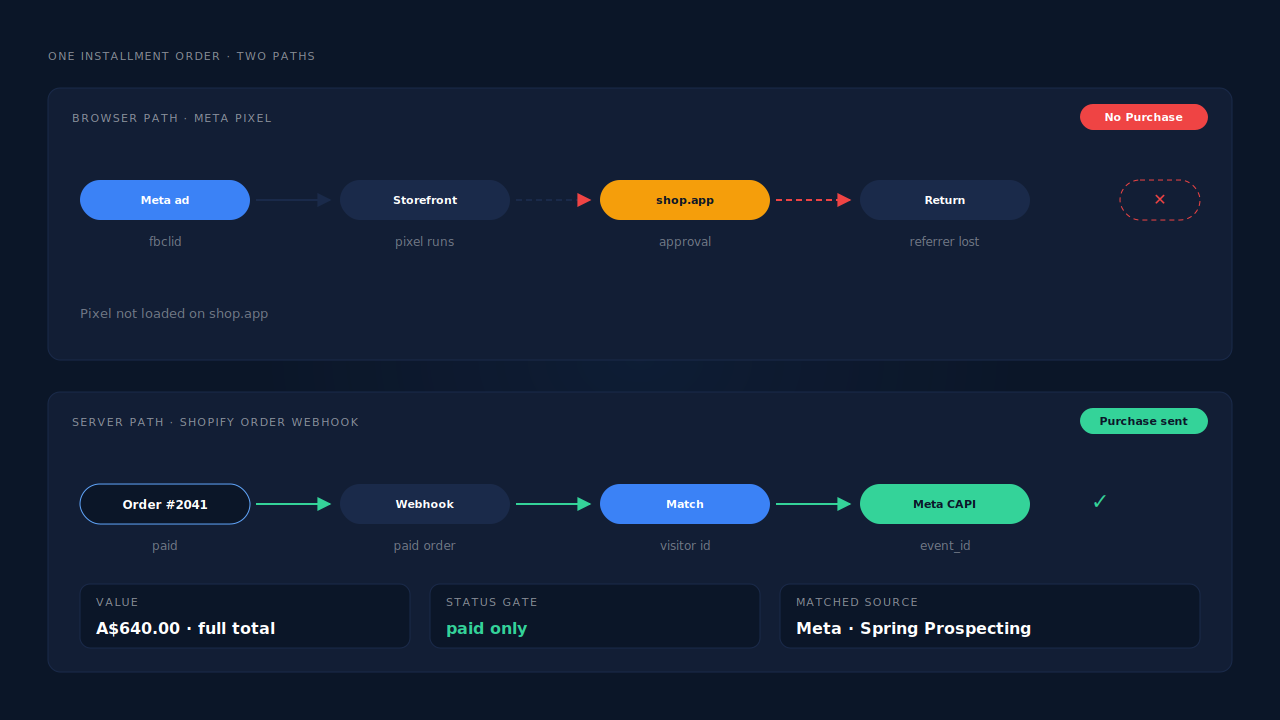
Whatever the browser did, an approved and paid installment order still becomes an order in your Shopify admin. That is the signal to build on.
Why do only installment orders go missing from Meta?
Because card and regular Shop Pay payments can finish inside your checkout, where your pixel still runs, while installment buyers can take the detour to shop.app. So the drop is partial, not total. Meta keeps receiving some purchases, which hides the problem. The missing share tracks how many buyers choose to pay over time.
That is why this looks different from conversions dropping to zero after Shopify’s thank-you page upgrade. There, every purchase event vanished on one date because a script location went away. Here, one payment option leaks, and it leaks in proportion to how popular that option is with your buyers.
It can also skew revenue. If your installment buyers spend more than average, the orders Meta loses are some of your most valuable, and the algorithm optimises toward the cheaper baskets it can still see.
Why do installment orders show as Direct or as a shop.app referral?
Because the visit that finishes the order is not the visit that carried the ad click. The buyer left your store for shop.app and came back. The returning visit carries shop.app as its referrer, or no usable referrer, so reports that credit the converting session file the sale under a referral or Direct, even though a Meta ad started it.
The click still exists. It sits on the storefront visit before the installment hop, along with the UTMs and the fbclid. This is the same family of problem as ad conversions that show as Direct: the evidence is on an earlier session. Shopify’s own reports can show a related symptom, where orders from Meta ads read “session from an unknown source.”
A referral exclusion for shop.app tidies your analytics referral report. It does not create a Meta Purchase that never fired.
How do you prove Shop Pay Installments caused the drop?
Compare Meta purchases with paid Shopify orders for the weeks before and after the day you enabled installments, then split the orders after that date by payment method. If the gap opened on that day and the missing orders are mostly installment orders, you have found it. Then place one real installment order to see which step drops.
Work through it in this order:
- Find the switch-on date. Check when installments were enabled in your payment settings. Note the date.
- Line up the time zones. Put Shopify and Events Manager on the same time zone, or day edges will blur the comparison.
- Compare daily counts either side. Paid orders in Shopify against Purchase events in Meta, two weeks before and two weeks after. A stable gap before and a wider gap after is the signature.
- Split orders by payment method. Shopify’s order filters and export show how each order was paid. Separate installment orders from the rest.
- Match against Meta. If your pixel sends the order id with Purchase, look up installment orders one by one. If not, compare counts per group.
- Place one real installment order. Use Meta’s Test Events tool with a test code so the test Purchase stays out of live data. Complete the approval, then close the window instead of waiting for the return, and see whether any Purchase arrives.
Does a second pixel or a thank-you page script fix it?
No. Any fix that runs in the buyer’s browser still needs that browser to come back from shop.app and load your code. Another pixel, a checkout script or a referral exclusion helps with some reports, but every installment buyer who does not make it back still produces no purchase event. The order record is the one signal every paid installment order produces.
Before you add anything, check what already sends Purchase. Shopify’s Facebook & Instagram app, a custom pixel and a server-side tool can each send the same order. Meta deduplicates a browser event and a server event only when both carry the same event name and the same event_id. Two tools with their own ids double-count every order that fires in both places.
Why is the Shopify order webhook the right place to send Purchase?
Because a completed installment purchase ends as an order in your Shopify admin, and Shopify notifies subscribed apps through order webhooks whichever payment method was used. A Purchase sent from that webhook exists for every paid installment order, whether or not the buyer’s browser ever returned from shop.app. It also carries the order’s payment status.
The send goes to Meta through the Conversions API. Sending is the easy half. Attribution is the hard half: the webhook knows the buyer’s email and the order total, not which ad they clicked. You have to join the order back to the storefront visit before shop.app.
Two details are specific to installments. First, send the full order total, not the first installment. The buyer pays the provider over time, but your store sold the whole order, and that is the revenue the ad produced. Second, send only paid orders. A declined application should never reach Meta as a sale, and an order that is still pending should wait. If a paid status arrives days later, it still has to land inside Meta’s 7-day event-time window.
How does PartialLeads track Shop Pay Installments orders?
PartialLeads sends Purchase from Shopify’s order webhooks, not from any browser page, so an installment order is sent the same way as a card order: once Shopify marks it paid. The PartialLeads pixel records the visitor on your storefront before the shop.app hop, and the order is matched back to that ad session by visitor id echo, then email, then phone.
Every paid order is sent. PartialLeads listens for Shopify’s order webhooks and sends a server-side Purchase when the order’s financial_status is paid. Unpaid, pending and cancelled orders are not sent, so a declined installment application never becomes a Meta purchase. The value is the full order total (Shopify’s total_price), including tax and shipping, after discounts. An order is recorded once; later edits do not re-send it. event_time is clamped into Meta’s 7-day window rather than sent with a timestamp Meta would reject.
The order is matched to the visit before shop.app. The PartialLeads pixel records the visitor from the first page view, with the UTMs and click ids that arrived, such as fbclid. When the installment order comes in, PartialLeads matches it in tiers: the echoed visitor id first, then email, then phone, then IP. The shop.app return visit never takes the credit.
The journey is stitched. Visitor identity resolution unions one person’s sessions, so a buyer who clicked a Meta ad on Friday, came back on Sunday and paid in installments is one person with one journey. Where the click carried an fbclid but the _fbc cookie is missing, PartialLeads rebuilds _fbc from it.
Nothing is double-sent by PartialLeads. Each Purchase carries a deterministic event_id, so retries and redelivered webhooks cannot create a second send.
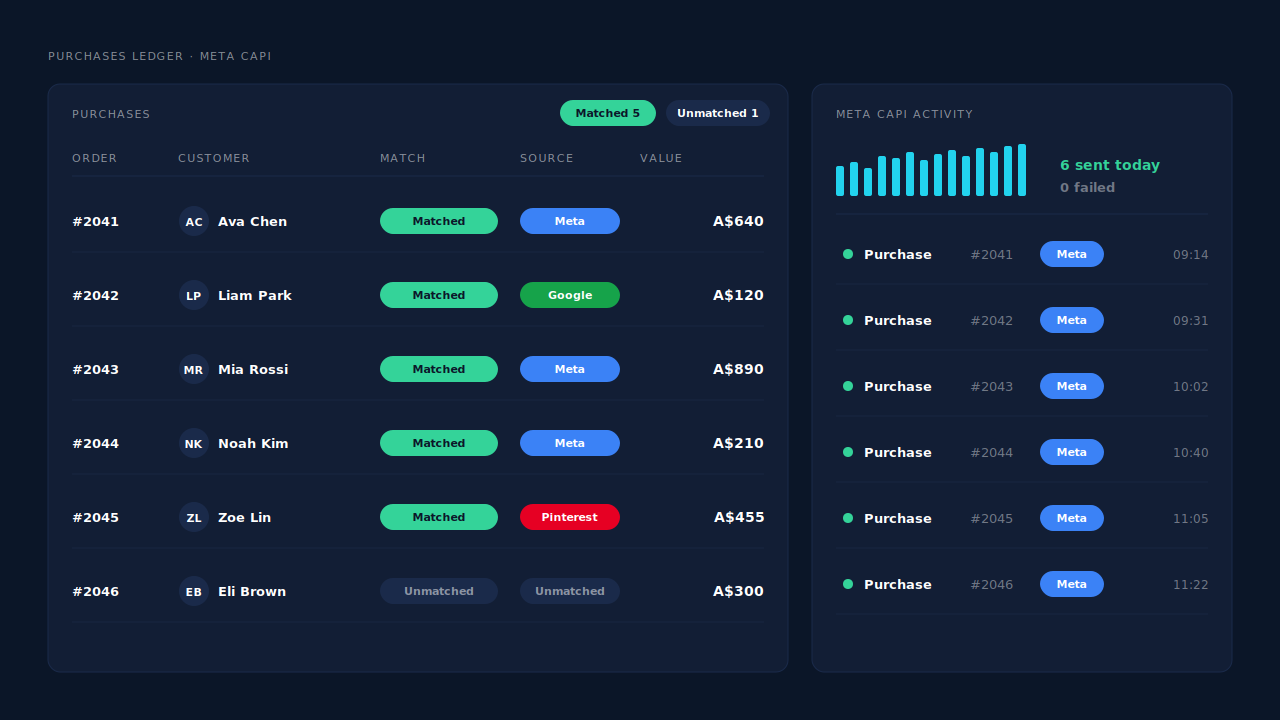
Where you see it working. The Purchases ledger lists every paid order PartialLeads recorded, installment orders included, with the source each matched to or an unmatched flag. The CAPI activity log on the Meta CAPI page shows each Purchase sent to Meta with its delivery status. The Attribution report credits matched installment orders to the campaign behind the storefront visit instead of Direct.
The honest constraints. Delivery is the half PartialLeads controls: every paid order is sent. Matching is maximised, not guaranteed. If the visitor id did not come back with the order and the buyer’s email and phone were never seen on your storefront, the order reaches Meta without a click attached. PartialLeads’ event ids are its own, so it does not deduplicate against Shopify’s Facebook & Instagram app or another pixel that sends Purchase. Keep one source per event. Keep the Meta base pixel on your storefront too, because server events lean on the _fbp cookie it sets. The wider cleanup lives in how to fix Shopify tracking, attribution and catalog.
| What breaks | The mechanism | Where you see it in the dashboard |
|---|---|---|
| No browser Purchase after the shop.app approval | Purchase sent from Shopify’s paid-order webhook, not the browser | CAPI activity log on the Meta CAPI page |
| Installment orders credited to Direct or shop.app | Storefront visitor id from before the hop echoed back and matched to the ad session | Purchases ledger with source, Attribution report |
| Visitor id missing on the order | Fallback match on email, then phone, then IP; sessions joined by identity resolution | Journey ribbon on the Leads list, matched/unmatched flag |
| Declined or pending applications counted as sales | Only orders with financial_status paid are sent |
Purchases ledger, no send in the CAPI activity log |
| Value arrives as one installment | Full order total sent, tax and shipping included | Purchases ledger value vs Events Manager value |
| Shopify app and server both send Purchase | Not deduplicated across tools — keep one source | Events Manager, browser vs server counts |
Tell us what's broken. We'll fix your tracking — free.
Describe the tracking/attribution problem you're stuck on and we'll map it to a fix: server-side conversions to Meta, Google, TikTok and Pinterest, plus first-party tracking that survives Safari. No code required.
Sources
- https://developers.facebook.com/docs/marketing-api/conversions-api
- https://developers.facebook.com/docs/marketing-api/conversions-api/deduplicate-pixel-and-server-events
- https://developers.facebook.com/docs/marketing-api/conversions-api/parameters/customer-information-parameters
- https://developers.facebook.com/docs/marketing-api/conversions-api/parameters/fbp-and-fbc
- https://developers.facebook.com/docs/marketing-api/conversions-api/parameters/server-event
- https://developers.facebook.com/docs/marketing-api/conversions-api/using-the-api