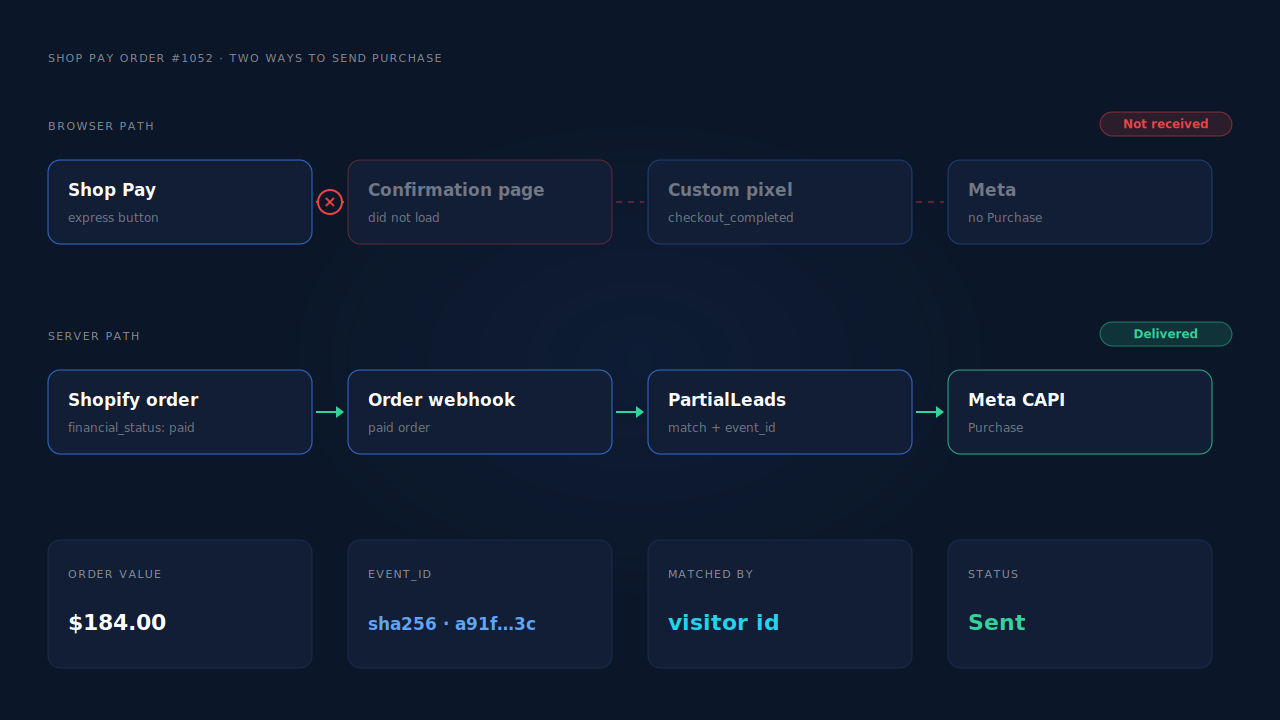
Your Shopify custom pixel misses Shop Pay orders because checkout_completed is a browser event, and a Shop Pay checkout does not always end on a page where your pixel runs to completion. The order is real and paid; only the browser signal is missing. The durable fix is to send Purchase from the order record on the server.
The symptom is specific: card checkouts show up in Events Manager, while Shop Pay checkouts produce a paid order in the admin and nothing in Meta.
So the problem is not your pixel id, ad account or dataset. One path through checkout reaches your code and one does not, or reaches it in a state your code does not expect.
Why does checkout_completed fire for card checkouts but not Shop Pay?
A custom pixel only knows about a purchase if the buyer’s browser loads the confirmation step, the pixel loads inside it, and your handler runs without error. Shop Pay adds more ways for any of those three to fail: buyers enter from express buttons that skip earlier steps, confirm on their phone, and leave faster.
Here are the failure modes worth checking, most common first.
Your code depends on an earlier event. Many custom pixels store something during checkout_started or payment_info_submitted — a value, an email, a flag — and read it back in the checkout_completed handler. A Shop Pay express button on a product page or cart can take the buyer through a shorter path. If the earlier event never ran in that session, the variable is empty, the handler throws, and nothing is sent. This is a code bug, not a Shopify bug, and it is the first thing to rule out.
Your code assumes a data shape. Handlers that read deep into the event payload — the first transaction, a gateway name, a shipping line — can break when a wallet payment fills those fields differently. One unguarded property access inside the handler is enough to kill the whole send.
The confirmation page never renders in that browser. Shop Pay can ask the buyer to verify with a code sent to their phone. Buyers switch apps, confirm, and sometimes close the tab before the confirmation page finishes loading. The order is created on Shopify’s servers regardless. The browser event depends on a page the buyer may never see.
The event moved. Post-purchase upsell apps change where the purchase event can fire. If the upsell appears for some payment methods and not others, your pixel may behave differently by method.
Consent blocked the pixel. Custom pixels follow the store’s customer privacy settings, so a buyer who declined tracking is invisible to them. That hits every payment method, but can look like a Shop Pay gap if Shop Pay buyers skew toward one region.
How do you confirm Shop Pay is the gap?
Compare paid orders by payment method against the Purchase events Meta received for the same days. If card orders line up with Meta and Shop Pay orders do not, you have found the gap. Then reproduce it once with a real Shop Pay order while watching your pixel’s output, so you know which failure mode it is.
Work through it in this order:
- Pick three or four days. Align both tools to the same time zone first, or the edges of your window will lie.
- Split your orders by payment method. Export paid orders from the Shopify admin with the payment gateway column, then count card orders and Shop Pay orders separately.
- Match them against Meta. In Events Manager, list the Purchase events for those days and their order ids. If your pixel sends the order id in custom data, look each one up. Card ids present and Shop Pay ids missing is the confirmation.
- Run one real Shop Pay order. Use a cheap product and a discount code. Test through the express button on a product page, not only through the regular checkout, because that is the path most likely to skip steps.
- Watch the handler. Wrap your
checkout_completedhandler in a try/catch that logs the error and the payload keys. Use Meta’s Test Events tab with a test code so you can see whether a Purchase arrives without polluting live data. - Check where the buyer landed. Did the confirmation page load in the same tab, and did an upsell offer appear first?
A handler that threw is a code fix. A handler that never ran is a delivery problem no browser code fully solves.
Can you fix it inside the custom pixel?
Partly. You can make the handler stop depending on earlier events, guard every optional field, and send the order id as event_id. That fixes the code bugs. It cannot fix buyers who never load the confirmation page, because no browser code runs on a page that never opens.
The defensive version of a custom pixel handler looks like this:
// Subscribe at the top level, not inside another event's callback.
analytics.subscribe('checkout_completed', (event) => {
  try {
    const checkout = event.data?.checkout;
    const orderId = checkout?.order?.id;
    if (!orderId) return;           // nothing to deduplicate on — skip

    const value = checkout?.totalPrice?.amount;
    const currency = checkout?.currencyCode;

    // Send Purchase with the order id as the event id,
    // so a server-side Purchase for the same order deduplicates.
    sendPurchase({ eventId: String(orderId), value, currency });
  } catch (err) {
    console.warn('checkout_completed handler failed', err);
  }
});
Treat field names in that snippet as a pattern, not a reference: confirm each against Shopify’s Web Pixels documentation for your store’s API version before shipping it. sendPurchase stands in for however your pixel forwards the event.
Even a perfect handler leaves a hole: some Shop Pay buyers never give the browser the chance.
Why is the order webhook the reliable place to send Purchase?
Because Shopify creates the order on its own servers whatever payment method the buyer used, and it notifies subscribed apps with an order webhook. A Purchase sent from that webhook exists for every paid order, Shop Pay or card, whether or not any confirmation page loaded. The browser stops being a single point of failure.
The server-side send goes through Meta’s Conversions API. Two things make it work well:
Matching. Meta ties a server event to a person through the identifiers you send: hashed email and phone from the order, the _fbp and _fbc browser cookie values, IP address and user agent. Shop Pay orders carry the buyer’s email, and usually a phone number, so the high-weight identifiers are present. The cookie values must be captured earlier in the visit and joined to the order — the hard part. Why attribution breaks between your landing page and Shopify checkout covers that join.
Deduplication. If you keep the browser Purchase for card orders and add a server Purchase for every order, Meta sees two events for most sales. It deduplicates them when both carry the same event name and the same event_id. Build that id from the order, not a random value; what event id to use for Meta deduplication lays out the rules. The simpler option is to let one source own Purchase and turn the other off. Firing Shopify purchase events server-side without an app walks through building it yourself.
What does a missing Shop Pay purchase actually cost?
Two things: reporting and optimisation. Your ad reports understate revenue by every Shop Pay order that went missing, so return on ad spend looks worse than it is. And Meta’s delivery system learns from the purchases it receives, so it never learns from the buyers who chose the fastest checkout.
Reporting you can reconcile against your admin. Optimisation is worse because it is invisible. Buyers who pay with a saved wallet in a few taps are often the ones who did not hesitate. Those are buyers you want Meta to find more of, and they are the ones missing from its training data.
How does PartialLeads send Shop Pay orders to Meta?
PartialLeads sends Purchase from Shopify’s order webhooks, not from the confirmation page, so a Shop Pay order is sent the same way as a card order: once it is paid. Whether the browser fired checkout_completed does not matter. The order is then matched back to the ad session that started it.
Every paid order is sent. PartialLeads listens for Shopify’s order webhooks and sends a server-side Purchase when the order’s financial_status is paid. Unpaid, pending and cancelled orders are not sent. The value is the full order total, including tax and shipping, after discounts, in the order’s currency. An order is recorded once; later edits to it do not re-send the event.
The order is matched to the visit. The PartialLeads pixel records the visitor from the first page view. When an order arrives, PartialLeads matches it to a session in tiers: the visitor id echoed back with the order first, then email, then phone, then IP. The identity resolution behind it stitches a person’s sessions together, so a buyer who clicked a Meta ad on Monday and paid with Shop Pay on Wednesday can still be tied to the click. Where the ad click carried an fbclid but the _fbc cookie is missing, PartialLeads rebuilds _fbc from it.
Nothing is double-sent by PartialLeads. Each Purchase carries a deterministic event_id built from the pixel id, the event name and the record id, and retries or redelivered webhooks cannot produce a second send.
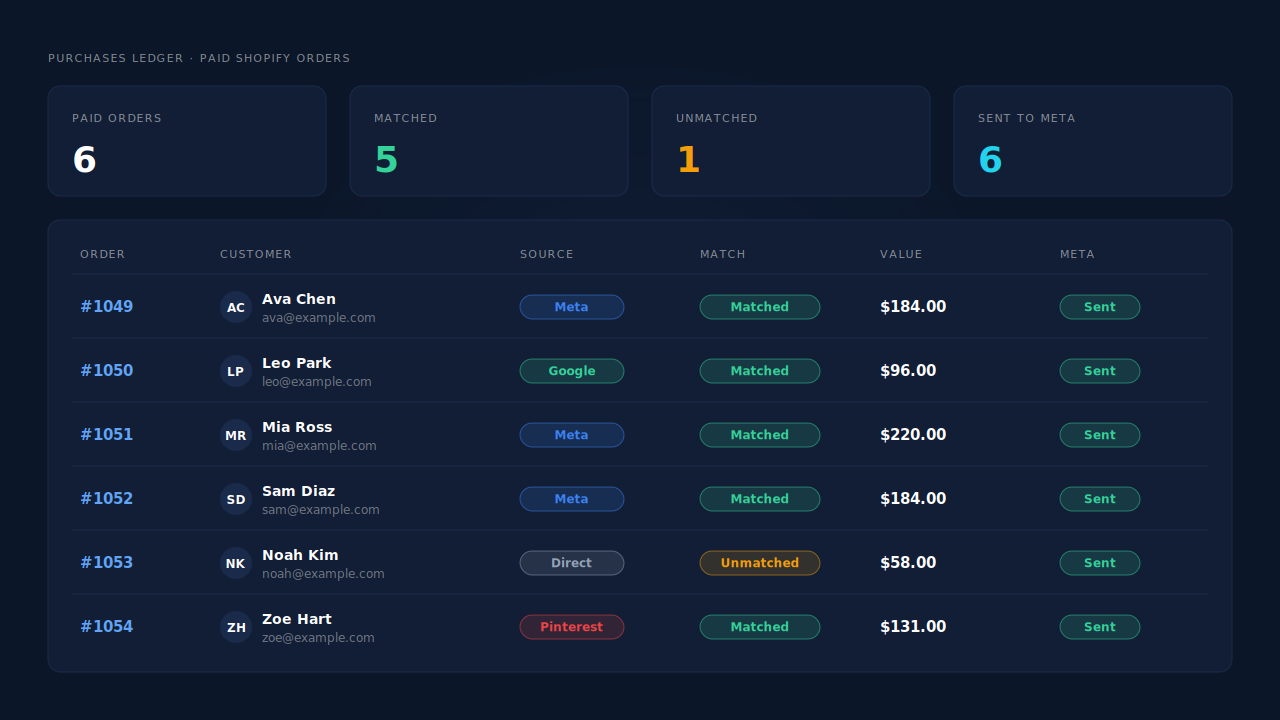
Where you see it working. The Purchases ledger lists every paid order PartialLeads recorded, matched or unmatched to a session. The CAPI activity log shows each Purchase sent to Meta with its delivery status. In the Leads list, the API column shows which conversion APIs each buyer was sent to, and the journey ribbon shows the visits that led to the sale.
The honest constraints. Delivery is the half PartialLeads controls: every paid order is sent. Matching is maximised, not guaranteed; an order with no captured visitor id and an email Meta cannot resolve reaches Meta without a click to tie it to. PartialLeads’ event ids are its own, so it does not deduplicate against your custom pixel or Shopify’s Facebook & Instagram app. If your custom pixel keeps sending Purchase for card orders, switch that off and let one source own Purchase. Keep the Meta base pixel on the store, because server events rely on the _fbp cookie it sets. The wider cleanup lives in how to fix Shopify tracking, attribution and catalog.
| What breaks | The mechanism | Where you see it in the dashboard |
|---|---|---|
| Shop Pay buyer never loads the confirmation page | Purchase sent from Shopify’s paid-order webhook, not the browser | CAPI activity log, one Purchase per paid order |
| Express checkout skips steps your handler relies on | No browser Purchase to break; the order record is the trigger | Purchases ledger, Shop Pay order numbers present |
| Server Purchase has no ad click attached | Session match by visitor id, then email, phone and IP; _fbc rebuilt from fbclid |
Purchases ledger matched/unmatched, journey ribbon |
| Retries or redelivered webhooks double-count | Deterministic event_id per record; each order recorded once |
CAPI activity log, Purchases ledger |
| Custom pixel and server both send Purchase | Not deduplicated across tools — keep one source | Events Manager, browser vs server counts |
Tell us what's broken. We'll fix your tracking — free.
Describe the tracking/attribution problem you're stuck on and we'll map it to a fix: server-side conversions to Meta, Google, TikTok and Pinterest, plus first-party tracking that survives Safari. No code required.
Sources
- https://developers.facebook.com/docs/marketing-api/conversions-api
- https://developers.facebook.com/docs/marketing-api/conversions-api/deduplicate-pixel-and-server-events
- https://developers.facebook.com/docs/marketing-api/conversions-api/parameters/customer-information-parameters
- https://developers.facebook.com/docs/marketing-api/conversions-api/parameters/fbp-and-fbc
- https://developers.facebook.com/docs/marketing-api/conversions-api/using-the-api