Your custom Buy Now button doesn’t fire InitiateCheckout because the event is attached to a step the button skips. Most Shopify setups send InitiateCheckout when the shopper views the cart or clicks the cart’s Checkout button. Buy Now jumps from the product page straight into checkout, so that trigger never runs. AddToCart may still log, and Purchase still arrives, but the middle of your funnel goes blank.
Nothing is wrong with your pixel ID or your ad account. The event is simply listening in the wrong place.
What does a Buy Now button actually do differently?
A Buy Now button skips the cart. It either adds the item and redirects to checkout in one step, or it builds a checkout link directly for that variant. The shopper never sees the cart page and never clicks the cart’s Checkout button, which is exactly where most InitiateCheckout triggers live.
Compare the two paths for the same shopper, Ava, who clicks a Meta ad for a $60 jacket:
- Cart path: product page → Add to cart → cart page → Checkout button → checkout → order.
- Buy Now path: product page → Buy Now → checkout → order.
Every event you fire on the cart page, or on a click inside the cart drawer, exists only on the first path. If your theme developer built a custom Buy Now button, it usually does its own add-and-redirect in JavaScript, and nobody added tracking to that handler.
This also explains the odd pattern people report: AddToCart fires (because the custom button does add the item) but InitiateCheckout never does (because the cart is never shown).
Why do so many Shopify setups tie InitiateCheckout to the cart?
Because for years the only place a merchant could run their own code was the storefront theme, and the last storefront moment before checkout is the cart. Checkout itself was locked down. So guides, apps and agencies wired InitiateCheckout to the cart’s Checkout button click, and it worked, as long as every buyer went through the cart.
Shopify’s move to checkout extensibility and customer events changed where tracking is supposed to live, but plenty of themes still carry the old click-based trigger. If your tracking was moved during the thank-you page upgrade, the Purchase event may have been rebuilt properly while InitiateCheckout was left on the cart button.
There are three common ways it goes wrong:
- Click trigger on the cart Checkout button. A theme script or a Google Tag Manager (GTM) trigger listens for clicks on the cart’s button. Buy Now never touches it.
- Cart page view trigger. InitiateCheckout fires when the cart page loads. Buy Now never loads it.
- A custom pixel subscribed to the wrong event. Someone subscribed to
cart_viewedorproduct_added_to_cartand labelled it InitiateCheckout. It fires for cart buyers and for AddToCart, never for the checkout step itself.
How do you confirm the Buy Now button is the cause?
Run one test order through each path and compare what reaches the ad platform. It takes about five minutes and settles the question without touching code.
- Open Meta Events Manager and go to Test Events for your dataset (Meta’s name for the pixel plus its server events).
- In a private window, add a product to the cart the normal way and go to checkout. Watch for AddToCart and InitiateCheckout.
- Open a new private window, go to a product page and click Buy Now. Watch the same panel.
- If InitiateCheckout shows on step 2 but not step 3, the event is tied to the cart.
Then check where the event is defined. Look in your theme code for fbq('track', 'InitiateCheckout', in GTM for a trigger on the cart button, and in Settings → Customer events in the Shopify admin for any custom pixel. Whichever one sends InitiateCheckout is the one to move.
One caveat: express wallet buttons (Shop Pay, Apple Pay, Google Pay) on the product page can open their own payment sheet rather than the normal checkout page. Test each wallet you offer separately rather than assuming it behaves like Buy Now.
Where should InitiateCheckout fire instead?
InitiateCheckout should fire from Shopify’s checkout_started customer event, not from anything in the storefront theme. checkout_started is a standard event that Shopify emits inside checkout itself, so it runs when checkout begins whether the shopper came from the cart, a Buy Now button, or a checkout link in an email.
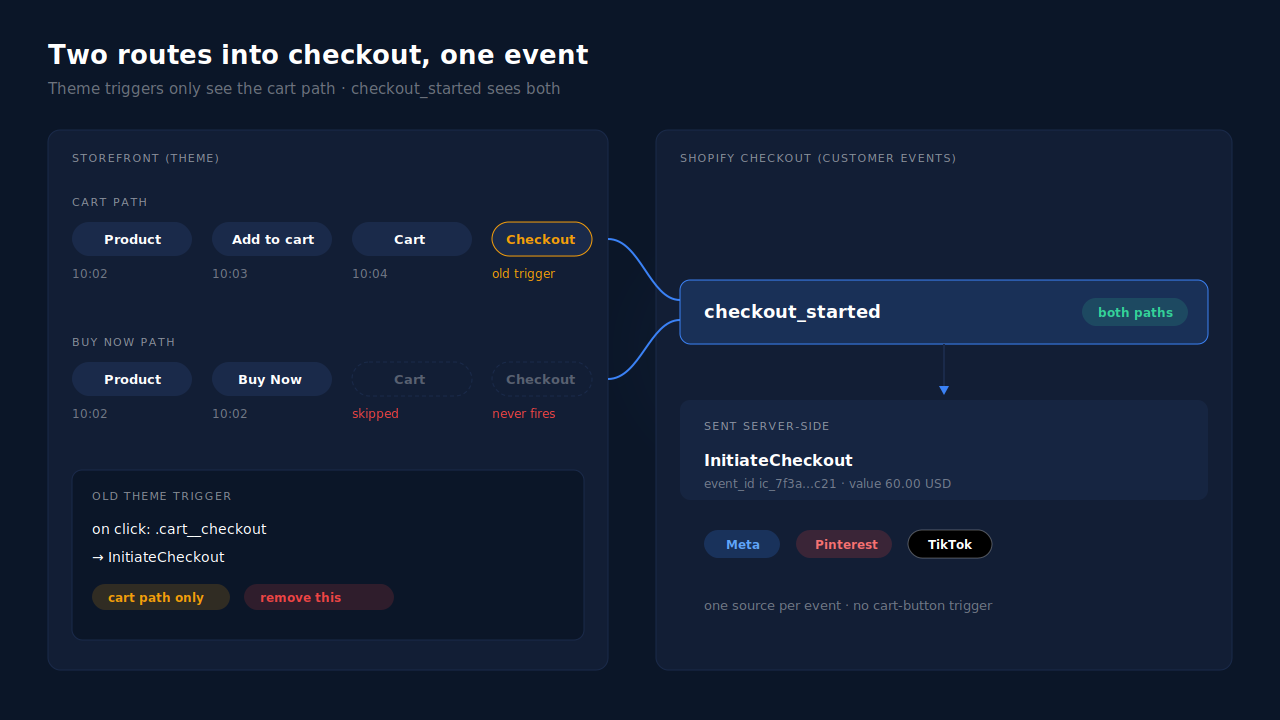
The principle is the same one that fixes purchase tracking: attach each event to the step it describes, not to a button that usually comes before it. “The shopper started checkout” is only true once they are in checkout.
A minimal custom pixel looks like this. It runs in Shopify’s customer-events sandbox, so the Meta base code has to be loaded inside the same pixel above it:
// Shopify admin → Settings → Customer events → Add custom pixel
// (Meta base code with fbq('init', '<PIXEL_ID>') loaded above this)
analytics.subscribe("checkout_started", (event) => {
  const checkout = event.data.checkout;
  fbq("track", "InitiateCheckout", {
    value: checkout.totalPrice?.amount,
    currency: checkout.currencyCode,
    content_ids: checkout.lineItems.map((li) => li.variant?.id),
    content_type: "product",
    num_items: checkout.lineItems.length,
  }, {
    // Reuse this same id if you also send the event server-side
    eventID: "ic_" + event.id,
  });
});
Then delete the old cart-button trigger. If you leave it in place, cart buyers will send InitiateCheckout twice: once from the click and once from checkout.
What happens if you fix it with both a pixel and a server event?
You get double counting unless both copies share an event ID. Meta de-duplicates a browser event and a server event only when they carry the same event_name and the same event_id. Two InitiateCheckout events from two tools with different IDs are two checkouts as far as Meta knows.
This bites stores that run Shopify’s Facebook & Instagram app, a custom pixel, and a server-side tool at the same time. Each one can send InitiateCheckout with its own IDs. If Events Manager shows InitiateCheckout above AddToCart, suspect this before anything else, and use a Meta CAPI deduplication checklist to find the second sender.
The rule that avoids it: one source per event. Pick the tool that sends InitiateCheckout and switch that event off everywhere else.
Does a missing InitiateCheckout actually hurt your ads?
Yes, in two ways, though not the way people fear. It does not lose purchases. It does distort the funnel data the ad platform learns from and the reports you make decisions with.
First, optimization. If you run campaigns optimized for InitiateCheckout, or you build retargeting audiences from people who started checkout, every Buy Now shopper is invisible to both. Your best-intent shoppers, the ones who skipped the cart because they had already decided, are the ones missing from the audience.
Second, diagnosis. A funnel report that shows 400 AddToCart events and 90 InitiateCheckout events reads like a cart-page problem. If a third of your buyers use Buy Now, a chunk of that drop is a measurement gap, not a UX problem. You could spend a sprint redesigning a cart that was fine. If you care about tying abandoned checkouts to a traffic source, the checkout-start event has to exist for every path in first.
How does PartialLeads fire InitiateCheckout for Buy Now shoppers?
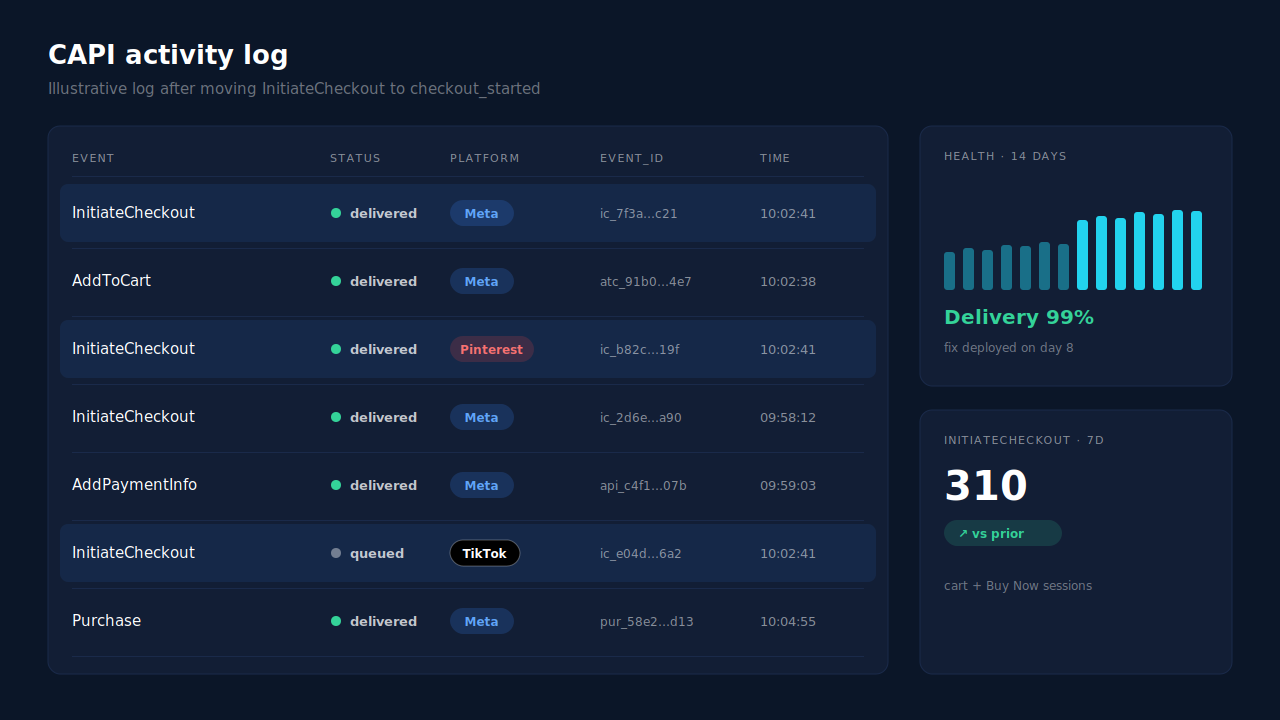
PartialLeads installs on Shopify as a Customer Events pixel, so it listens to Shopify’s own checkout events instead of the theme. It picks up checkout_started inside checkout, whichever button got the shopper there, and sends InitiateCheckout server-side through the Conversions API to Meta, and to Pinterest and TikTok when those are connected.
It is part of a wider ecommerce fan-out: ViewContent, AddToCart, Search, InitiateCheckout and AddPaymentInfo go out from the same pixel path, not just Purchase. So the ad platform sees the whole funnel for Buy Now shoppers, not a funnel with a hole in the middle. For Pinterest specifically, see how checkout events are sent server-side to Pinterest.
Three mechanics make it safe to switch on:
- Deterministic event IDs. Each event’s ID is built from the pixel, the event name and the record, so a retry can never send the same InitiateCheckout twice from PartialLeads.
- Variant ids in
content_ids. Ecommerce events send the variant id (falling back to the product id), the same id the catalog feed uses, so events and feed line up. - Purchases don’t depend on the browser. The Purchase itself comes from Shopify’s order webhook, so every paid order produces a conversion even when a browser event is lost.
The honest limits. PartialLeads uses its own event IDs and does not de-duplicate against another app’s browser pixel. If Shopify’s Facebook & Instagram app or a custom pixel already sends InitiateCheckout, switch that one off so there is one source per event. Matching each event to a person still depends on the identifiers captured and on the platform’s own graph, so matching is maximized, never guaranteed. And we don’t send InitiateCheckout to Google Ads: Google receives purchase conversions as rows in a Google Sheet you import on a schedule.
Where you check it: the visitor’s Journey timeline shows the checkout step with no cart view before it, which is what a Buy Now shopper looks like. The Meta CAPI page’s activity log lists each InitiateCheckout with its delivery status, and Meta’s Events Manager shows the same events arriving server-side. For the rest of the Shopify stack, start from the Shopify tracking, attribution and catalog guide.
| What breaks | The mechanism | Where you see it in the dashboard |
|---|---|---|
| InitiateCheckout wired to the cart, so Buy Now shoppers never send it | Customer Events pixel listens to checkout_started inside checkout, for every path in |
Journey timeline: checkout step with no cart view before it |
| Browser event lost to a blocker or closed tab | InitiateCheckout forwarded server-side to Meta, Pinterest and TikTok | Meta CAPI activity log, Events Manager |
| Retries or redelivery double-counting checkouts | Deterministic event_id with unique dedup per config | Meta CAPI activity log (one row per event) |
| Two tools each sending InitiateCheckout | Not solved by any tool: keep one source per event | Events Manager event counts vs AddToCart |
| Funnel reports blaming the cart for a tracking gap | Full ecommerce fan-out: ViewContent, AddToCart, InitiateCheckout, AddPaymentInfo, Purchase | Meta CAPI page, Purchases ledger |
Tell us what's broken. We'll fix your tracking — free.
Describe the tracking/attribution problem you're stuck on and we'll map it to a fix: server-side conversions to Meta, Google, TikTok and Pinterest, plus first-party tracking that survives Safari. No code required.
Sources
- https://developers.facebook.com/docs/meta-pixel/reference
- https://developers.facebook.com/docs/marketing-api/conversions-api
- https://developers.facebook.com/docs/marketing-api/conversions-api/deduplicate-pixel-and-server-events