You track an abandoned checkout back to its traffic source by attaching the source to the person, not to the checkout. The checkout record your store writes carries a cart and an email — no UTMs, no click ID, no referrer. Resolve that email back to the visitor session that first landed on your site, and the source is already stored there.
Every store owner meets this the same way. You open the abandoned checkout list, see forty rows with a real email address on each one, and realise there is no column that tells you where any of them came from. You know exactly who nearly bought. You have no idea which campaign to blame, or to credit.
Why does an abandoned checkout arrive with no traffic source?
Because the record is written by your store, not by your tracking. An abandoned checkout is created server-side the moment a shopper enters the checkout and leaves without paying. Its fields describe the cart and the customer — line items, email, totals, currency. None of them describe the visit that produced it. The click data lived in the browser and was never asked to travel.
Four mechanics stack up.
The checkout usually runs on a different origin. A hosted checkout lives on the platform’s domain or a checkout subdomain, not on the storefront domain where the ad click landed. First-party cookies scoped to your storefront do not follow it, and the only referrer the checkout sees is your own site — so by the platform’s own reckoning, every checkout in the world is internal traffic.
No browser is attached when the record is written. The abandoned checkout object is created and updated by the platform’s backend. Whatever your tag knew about UTMs and click IDs was known in a tab that may have been closed ten minutes earlier.
Checkout pixels run in a sandbox. Modern checkout pixel APIs hand you a structured event instead of DOM access, which is deliberate and good for security but means you cannot simply read the page. It is the same class of restriction behind Shopify’s pixel sending an empty user agent — the sandbox gives you the event, not the environment around it.
The ad platform only reports the total. Even when a checkout-start event does reach Meta or Google, what comes back is a count. Ads Manager will tell you a campaign produced eighty-one InitiateCheckout events. It will never tell you that one of them belonged to ava.chen@example.com, because per-person reporting is not something ad platforms return.
What does a source-blind abandoned checkout list cost you?
It costs you the diagnosis, not just the recovery email. An abandoned checkout is the single most qualified signal in your funnel — a real person, a real email, a real cart, one step from paying. Stripped of its source, it becomes a lead you can chase but cannot learn from.
Three specific costs.
Every recovery message is the same message. The shopper who arrived from a branded search and the shopper who arrived from a cold prospecting video get identical copy, identical timing and identical discount. The two abandoned for different reasons and respond to different offers.
You cannot separate a cart problem from a traffic problem. Take an illustration: two campaigns each produce a hundred checkout starts, and one closes far more of them than the other. If you only see the totals, both campaigns look like they are “working” — they generate carts. Only the per-checkout source tells you that one is buying visitors who intend to purchase and the other is buying window shoppers who fill a cart to see the shipping cost. Without that split you optimise toward whichever campaign is cheapest at generating carts, which is precisely the wrong target.
The optimiser gets a weak signal at the moment it matters most. A checkout-start event sent without identifiers is an anonymous server event. The platform counts it and struggles to attach it to a person, so the audience-building value of the strongest intent signal you own is mostly wasted. This is the same failure mode that makes finished purchases show up as Direct — the event survives, the identity does not.
Can’t you just carry UTMs into the checkout URL?
No, and it fails in a way that is worse than useless because it works in testing. Query parameters survive the single clean path you try by hand and break on the three paths your real customers take.
Redirects strip them. A cart-to-checkout hop, a currency or locale redirect, a payment-provider bounce and back — each one is an opportunity for parameters to be dropped, and hosted checkouts routinely rewrite their own URLs to canonical forms without extras.
Re-entry is the common case. A shopper adds to cart on a phone in the evening, comes back the next morning through a browser history entry, a saved cart email or a bookmark, and finishes — or does not finish — with a URL that never had a UTM on it. The visit that has the source and the visit that has the checkout are different visits.
And you do not control the checkout page on most platforms. Appending parameters you invented to a URL the platform generates is not a contract either side has agreed to.
What are your options without an attribution tool?
Four, honestly ranked, with what each one actually costs.
Write the source into a cart or order attribute. The strongest generic fix. When the cart is created, stash the current UTMs and click IDs in a cart attribute or order meta field so they ride along into the checkout record. The limits are real: it only captures what the browser knew at the moment the cart was created, a later visit with no UTM either overwrites it or leaves it blank, and a device switch loses it entirely. It also needs storefront code you are allowed to edit.
Join to your email platform by address. If the shopper is already a subscriber, your ESP can tell you which campaign they last engaged with. That is an email-channel answer, not an acquisition answer — it says nothing about the ad click that first brought them in, and it is silent for every shopper who is not yet on your list.
Read the store’s own source field. Most platforms record a landing site or referring source on the order. It is last-click, it is approximate, and it degrades to Direct exactly when cookies and referrers are unreliable — which is the situation you bought a solution for.
Send a server-side checkout event with identifiers. Firing a checkout-start event through the Conversions API with a hashed email and phone attached genuinely helps the platform’s optimiser, and it is worth doing. It does not give you a report. Platform-side events improve targeting; they do not hand you a row-level list of who abandoned and where they came from.
Should you match on the checkout or on the person?
On the person, always. The checkout is a document that exists for a few minutes and carries whatever the platform chose to put in it. The person is a durable entity you have been observing since their first visit, and the source is already attached to that entity — it was captured on the session where the ad click landed.
That reframe is the whole fix. Stop trying to smuggle a UTM through a checkout URL and start asking a different question: which visitor is this email? Once you can answer that, the source is not something you have to preserve through the checkout at all. You look it up.
Answering it means keeping a durable visitor identifier that survives Safari’s cookie caps and a device change, storing the ad click against that identifier the first time you see it, and knowing which sessions belong to the same human being. That is how visitor identity resolution works, and it is the same machinery needed to attribute ecommerce revenue to the ad that started it weeks after the click — an abandoned checkout is just that problem stopped one step early.
It also means catching the email earlier than the checkout does. A partial lead — the email a visitor types into a form field and never submits — makes the person identifiable before they ever reach a payment page, which is what turns an anonymous cart into a named one.
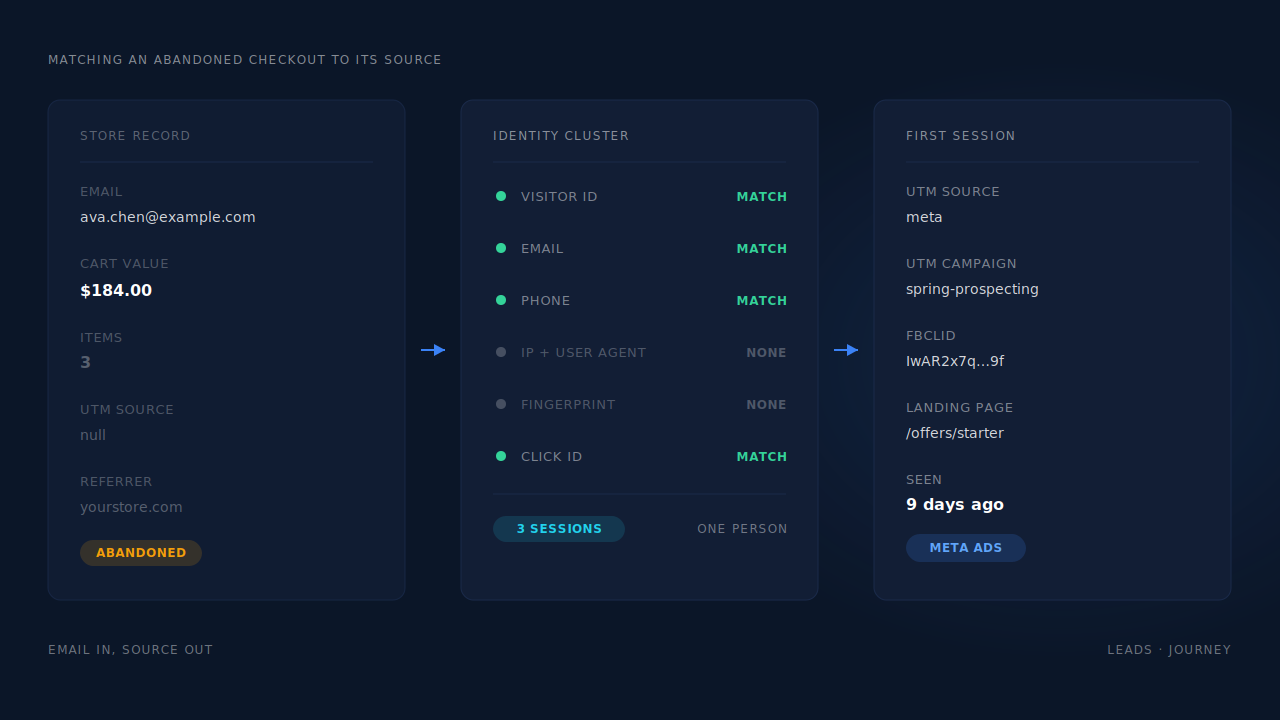
How does PartialLeads track an abandoned checkout back to its source?
It resolves the identity instead of chasing the URL. The tag stores a durable visitor ID in a server-set first-party cookie, which is the detail that matters here: because the cookie is set by the server rather than written by script, Safari’s seven-day cap on script-written cookies does not apply to it. The visitor who filled a cart on Monday is still the same known visitor on Thursday.
On the session where the ad click lands, the tag captures the UTMs, the referrer as a fallback, the landing page and the click IDs — fbclid, gclid, gbraid, wbraid, msclkid, ttclid, epik. That is the source record, and it is stored against the visitor, not against the cart.
When a checkout begins on a connected Shopify store, the checkout-start event is dispatched server-side as InitiateCheckout, alongside the rest of the ecommerce funnel — ViewContent, AddToCart, AddPaymentInfo. Each send carries a deterministic event ID and lands in a deduplication table keyed uniquely per config, so a retry or a redelivered webhook physically cannot double-count the same checkout.
The join itself runs through the identity cluster, which unions a person’s sessions across six tiers: visitor ID, normalised email, normalised phone, IP plus user agent, device fingerprint, and a shared click ID. Visit-sibling inheritance covers the awkward cases inside a single visit — including a phone that switches from wifi to cellular mid-checkout, where the IP changes but the Meta click cookie does not. So when the email attached to an abandoned checkout matches a person, every session that person ever had is in scope, and the first-touch and last-touch sources come with it.
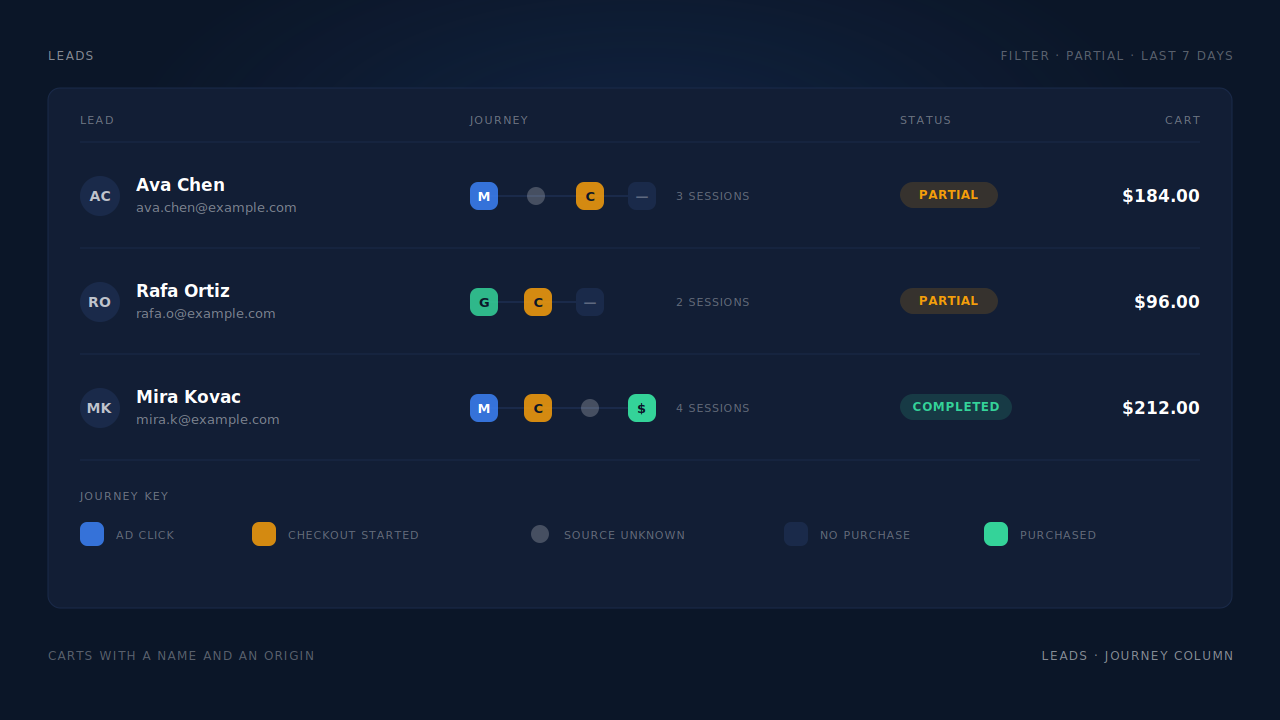
What you see is a named row rather than a number. The Leads list shows the person with a Partial badge, their email and phone, and a Journey column that renders each touch as a badge left to right — the brand glyph for the channel of each session, a grey dot where the source is genuinely unknown, and a green square if and when they convert. A row reads as a sentence: Meta ad click, returned direct, checkout started, no purchase. In the Attribution report, the Revenue by Match Quality donut splits revenue across partial-captured, submit-completed and unmatched, so the carts that do close can be traced back to the channel that filled them.
Three honest constraints, because this is not magic.
The person has to be identifiable somewhere. If a shopper’s only identifier is the email typed inside a hosted checkout on someone else’s domain, the join relies on the visitor ID carried through from your storefront. Capturing an email earlier — on a form, a discount pop-up, a quiz, a size finder — is what makes the match reliable rather than lucky.
PartialLeads does not send your recovery emails. It attaches the source, the journey and the captured contact details to the person, and hands that out through webhooks and exports. The sending stays in your ESP or your CRM.
Server-side events still want the client-side cookie. Match quality for Meta depends on _fbp and _fbc being captured in the browser. PartialLeads reconstructs _fbc from a fbclid in the URL when the cookie is missing, but it does not invent _fbp from nothing — keep your base pixel installed.
| What breaks | The mechanism | Where you see it in the dashboard |
|---|---|---|
| Abandoned checkout record has no UTM or click ID | Source captured on the landing session and stored against the visitor, not the cart | Leads list, UTM and Journey columns |
| Storefront cookie doesn’t survive to the checkout domain | Server-set first-party visitor ID, not subject to the 7-day script-cookie cap | Leads list, returning visitor stitched into one row |
| Cart filled on a phone, finished on a laptop | Six-tier identity cluster unions sessions by visitor ID, email, phone, IP+UA, fingerprint, click ID | Journey ribbon, multi-session touch count |
| Checkout start reaches the ad platform as an anonymous event | Server-side InitiateCheckout with hashed email and phone in the payload | CAPI activity log, per-lead API column |
| Same checkout counted twice after a retry | Deterministic event ID plus a unique deduplication table per config | CAPI activity log |
| Can’t tell which channel fills carts that close | First-touch and last-touch rows per matched purchase, split by match quality | Attribution report, Revenue by Match Quality |
Tell us what's broken. We'll fix your tracking — free.
Describe the tracking/attribution problem you're stuck on and we'll map it to a fix: server-side conversions to Meta, Google, TikTok and Pinterest, plus first-party tracking that survives Safari. No code required.
Sources
https://developers.facebook.com/docs/meta-pixel/reference https://developers.facebook.com/docs/marketing-api/conversions-api/parameters/customer-information-parameters https://developers.facebook.com/docs/marketing-api/conversions-api/deduplicate-pixel-and-server-events