Your ad conversions dropped to zero after Shopify’s thank-you page upgrade because the purchase event was fired by a script on that page, and the upgrade removed the place that script lived. Orders never depended on it, which is why they kept arriving. The conversion did, so it stopped. Nothing is wrong with your pixel ID, your ad account, or your campaigns.
This is one of the cleanest diagnoses in ecommerce tracking, because the symptom pair is so specific: order count normal, platform-reported purchases zero, starting on a date. Very few failures look like that.
What actually changed on Shopify’s thank-you page?
Shopify moved checkout, the thank-you page and the order-status page onto its checkout extensibility platform. In the old model, merchants could paste arbitrary JavaScript into an Additional Scripts box that ran on the order-status page after a successful order. That box is where a huge share of the world’s Shopify conversion tracking lived: Meta’s Purchase call, Google Ads conversion snippets, affiliate postbacks, hand-rolled fetch() calls to a warehouse.
On the new pages, arbitrary theme-level JavaScript no longer runs there. Third-party tracking is expected to go through Shopify’s Customer Events pixels instead, which run in a sandboxed environment and receive a defined event stream rather than raw page access. Shopify publishes the retirement dates on its own changelog and developer changelog — check those rather than trusting a date you read in a forum thread, because the deadlines moved more than once and differed for checkout versus the thank-you and order-status pages.
The practical effect for you is simple. Any tracking that was typed into that box is gone. It did not error. It was not disabled in your ad account. The page that used to execute it no longer executes it.
Why did orders keep coming while conversions went to zero?
Because an order is created by the checkout on Shopify’s servers, and a conversion event is created by a browser. Those are two independent systems, and only one of them ran your code.
The shopper’s payment is authorised, Shopify writes the order, your admin count goes up, your fulfilment queue fills, your revenue report is correct. None of that touches JavaScript. Meanwhile the event that tells Meta “this click became a sale” was a line of script on a page — and if that line does not execute, the platform has no way to know the sale happened.
Read that gap the right way and it is actually good news. You have not lost orders or money. You have lost reporting and optimisation signal, which is fixable retroactively for reporting and forward-only for optimisation. Your campaigns spent the last N days bidding without purchase feedback, which is the real cost.
How do you confirm it’s the thank-you page and not the ad account?
Four checks, in this order. Each one takes minutes and rules out a whole class of cause.
- Draw the line on a calendar. Export daily order counts from your admin and daily purchases from Ads Manager for 60 days. If orders are flat and platform purchases fall off a cliff on a single day, you are looking at a deployment, not a market shift. Note the date.
- Match the date to your store’s migration. Compare that date to when your store moved to checkout extensibility, or to the platform-wide retirement date for the surface you were using. A match is close to conclusive.
- Check whether the event fires at all. Place a real test order — a cheap product, a 100%-off discount code — and watch Meta’s Events Manager test-events view and your browser’s network tab on the thank-you page. If nothing fires, the script is gone. If it fires but is not attributed, you have a different, identifier-shaped problem instead.
- Look at what else was in that box. Additional Scripts usually held more than one tag. If your Google Ads conversions, affiliate tracking and a Klaviyo or warehouse call all went quiet on the same day, that confirms the box, not any single platform. Migrating them one at a time is part of the wider Shopify tracking, attribution and catalog fix.
If orders also dropped, stop here — that is a merchandising or checkout problem and none of this applies.
Where should the purchase event actually fire?
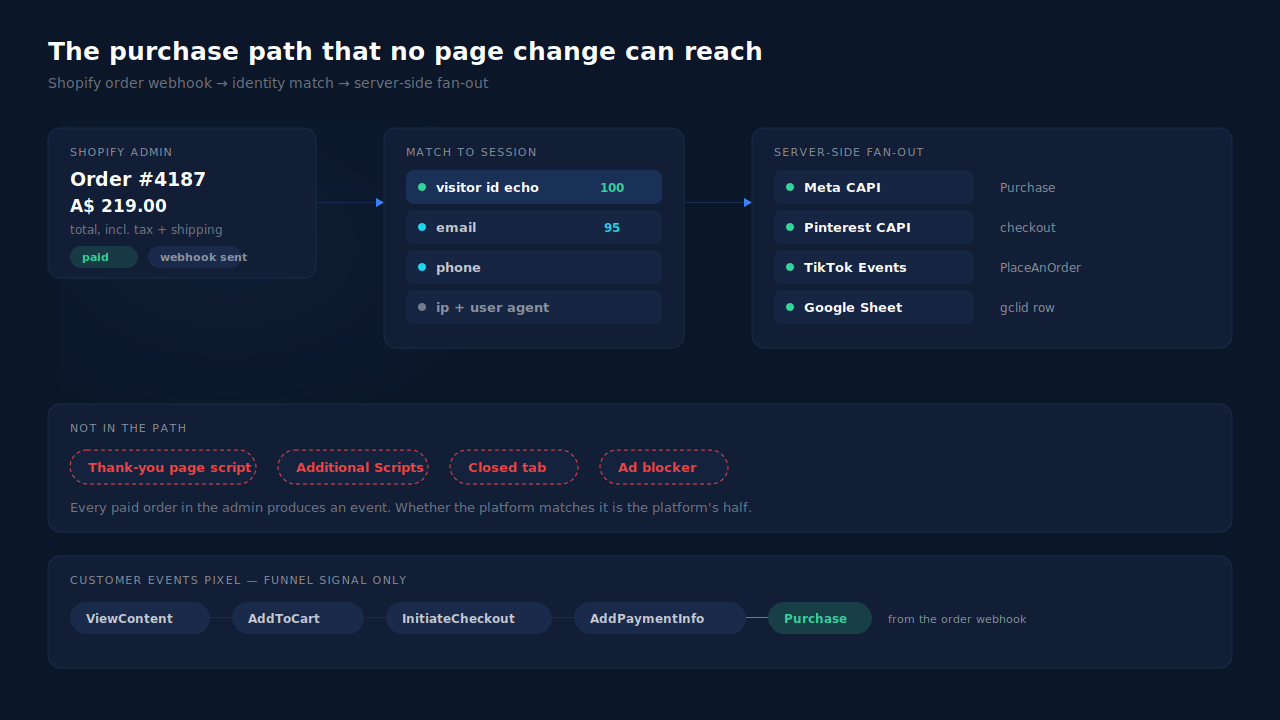
On the order, not on a page. This is the design principle worth taking away from the whole incident.
A thank-you page is the least reliable moment in the entire funnel to fire your most valuable event. The shopper may close the tab the instant payment succeeds. They may pay in an external app and never return. Their browser may block the request. The page may be replaced by your platform, which is exactly what happened here. Every one of those failure modes is invisible to you and silently costs a conversion.
The order record has none of those properties. It exists on the server, once, with a total, a currency and a customer. Firing from the order means the event’s existence depends on the sale, not on the shopper’s browser cooperating.
What are your options for fixing it?
Four, with honest limits.
Shopify’s own channel apps. The Facebook & Instagram app and Google & YouTube app send their own purchase events and survive the migration because Shopify maintains them. Fastest fix, and the right first move for many stores. Limits: you get the platform’s own event and its own attribution, with little control over payload or de-duplication against anything else you run.
A custom Customer Events pixel. Add a web pixel in Shopify admin that listens for checkout_completed and calls the platform from the sandbox. This is the direct replacement for the old script and it is the supported path. Limits: it is still a browser event, so blockers, closed tabs and certain payment flows will cost you some of them. The sandbox also does not give you a durable visitor identifier, which matters for attribution more than for counting.
Server-side through a container. Route events via a server-side tag container. Real control, real payload hygiene. Limits: cost and maintenance, and if your trigger is still a browser event you have moved the request but not removed the dependency.
The order webhook. Have Shopify POST each order to something that sends the conversion server-side through the Conversions API. This is the option the failure argues for, because it is the only one whose trigger is the order itself. There is a walkthrough of this path without adding an app if you want to build it yourself.
Whichever you pick: run one source per event. If the channel app and your custom pixel and a plugin all fire Purchase, you will replace zero conversions with triple-counted ones. Platforms only de-duplicate events that share an event ID and event name, and independent tools do not share IDs — which is the whole subject of why Meta stops de-duplicating.
Can you backfill the conversions you missed?
Partially, and less than you want. Meta clamps incoming event_time values to a seven-day window, so events older than that either fail or land with a shifted timestamp — see the 7-day event time window for what that does to your reporting. Google Ads offline imports allow a longer click-age window but enforce their own rules on conversion time versus click time.
Practically: backfill the last week where the platform will accept it, accept the gap before that, and annotate the date in whatever document your team uses to explain performance. Do not re-upload three months of orders and expect your historical charts to heal.
How does PartialLeads keep this from happening again?
By never making the purchase event depend on a page. The Shopify purchase in PartialLeads comes from the store’s order webhooks, server-side. A thank-you page change, a closed tab, a blocked request, a payment flow that returns the shopper somewhere unexpected — none of them sit in the path.
The mechanism, end to end. Shopify POSTs the order. Every paid order produces a conversion event: financial_status = paid is the gate, so pending, failed and cancelled orders are not sent, and a cash-on-delivery or bank-transfer order fires when you mark it paid. The recorded value is the full order total including tax and shipping, after discounts. The order is matched to a browsing session by a tiered join — the visitor ID echoed back from the storefront first, then email, then phone, then IP — and then fanned out to Meta, Pinterest, TikTok and the Google Ads sheet. Each order is recorded once; a later edit to the same order does not re-send it.
Alongside that, the Customer Events pixel supplies the upstream funnel — product views, add-to-cart, checkout started, payment info added — so the ad platform’s algorithm gets the whole sequence rather than a bare Purchase. Those two paths carry separate responsibilities on purpose: the pixel does funnel signal, the webhook owns money.
Two honest constraints. First, PartialLeads uses its own deterministic event IDs, so it cannot de-duplicate against another app’s or plugin’s browser pixel — if you keep Shopify’s Facebook & Instagram app firing Purchase, turn one of them off. Second, the split that matters: dispatch is controlled, matching is not. Every paid order in your admin produces an event, and you can reconcile admin order count against dispatched events to prove it. Whether the platform then ties that event to a person and a click depends on the identifiers present and on the platform’s own graph. Any vendor promising the second half is selling you something they do not own.
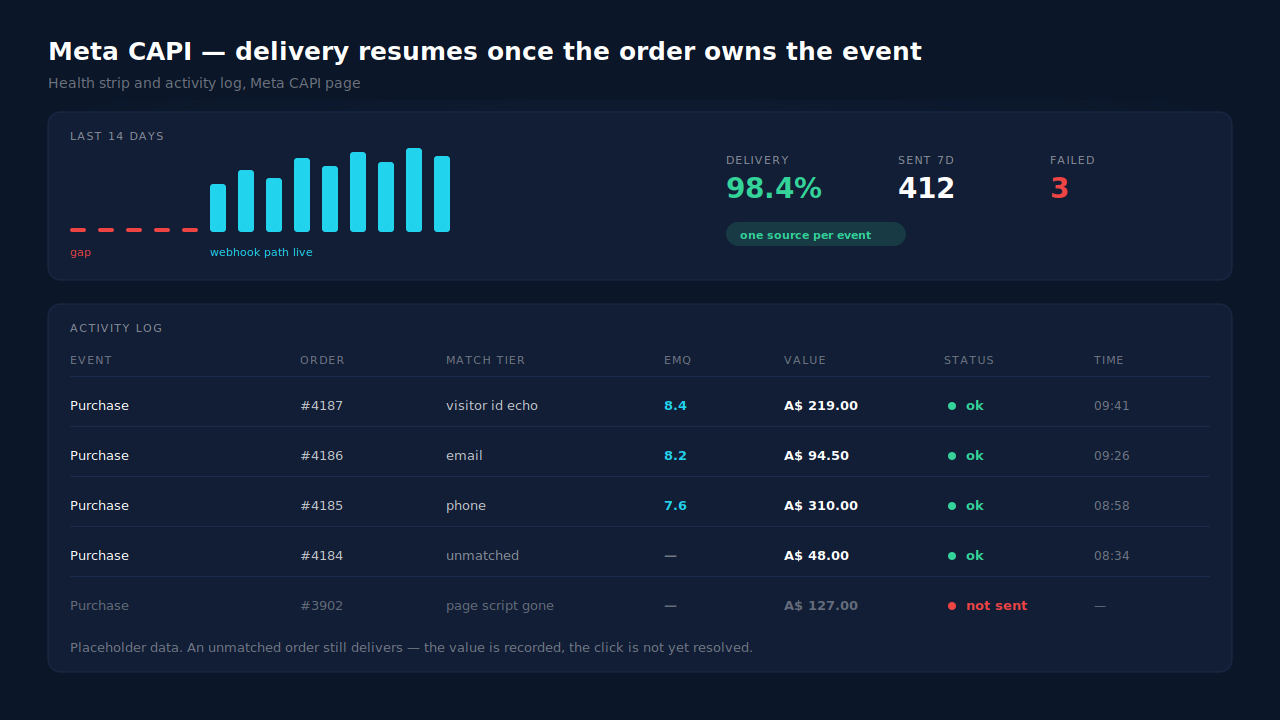
Where you watch it work: the Purchases ledger shows every order that arrived with its match tier and a matched-versus-unmatched split, so an event that did not resolve to a session is visible rather than absent. The Meta CAPI page shows the activity log and a 14-day delivery strip — that strip is where a migration gap and its recovery are legible at a glance. The Attribution report shows what the recovered purchases did to your channel table, which is the number your scale decisions actually run on.
| What breaks | The mechanism | Where you see it in the dashboard |
|---|---|---|
| Thank-you page stops running your script, so Purchase never fires | Purchases come from Shopify order webhooks, server-side — no page in the path | Purchases ledger: every paid order present with its match tier |
| Orders arrive but the platform never learns the sale happened | Every paid order fans out to Meta, Pinterest, TikTok and the Google Ads sheet | Meta CAPI page: activity log plus a 14-day delivery strip |
| Sale recorded but credited to Direct | Tiered match to the browsing session — visitor ID echo, then email, phone, IP | Attribution report, and the journey ribbon on the Leads list |
| Two tools both firing Purchase after the fix | Deterministic event IDs mean PartialLeads never double-sends its own events | Meta CAPI activity log: one row per order, per event |
The lesson generalises past Shopify. Any event that only exists because a specific page loaded a specific script is one platform release away from zero. Move your revenue events to the record, and page changes become cosmetic.
Tell us what's broken. We'll fix your tracking — free.
Describe the tracking/attribution problem you're stuck on and we'll map it to a fix: server-side conversions to Meta, Google, TikTok and Pinterest, plus first-party tracking that survives Safari. No code required.
Sources
https://developers.facebook.com/docs/marketing-api/conversions-api
https://developers.facebook.com/docs/marketing-api/conversions-api/parameters/server-event