When checkout_completed fires only on a customer’s first order in Safari, the order isn’t failing. The browser event is. A Shopify custom pixel reports a purchase only if the buyer’s browser loads the confirmation step and your handler runs to the end. Repeat Safari buyers give that chain more places to break. The paid order still lands in Shopify, so send Purchase from the order itself.
Merchants have reported the exact pattern on the Shopify Community: a new customer’s first checkout triggers the event, and every later checkout from the same Safari browser triggers nothing. Card, Shop Pay, new product, old product, it doesn’t matter. The customer is known, the order is paid, and Meta never hears about it.
That hurts more than it looks. Repeat buyers are often your best customers, and the campaigns that bring them back (retargeting, catalog ads, win-back offers) are exactly the ones that lose credit.
What stops checkout_completed from firing on a repeat order?
Shopify hasn’t published a single cause for this in anything we could check, so treat it as a list of suspects. The usual ones: your own code remembers the first purchase and skips later ones, known customers take a shorter checkout path your code doesn’t expect, or the confirmation page never runs your pixel to completion in Safari. The first is the most common and the easiest to fix.
A “sent once” flag that is keyed too broadly. Many custom pixels store a flag after sending Purchase so a page reload doesn’t send it twice. That’s sensible. The bug is the key. If the flag is saved as purchase_sent, or keyed on the customer rather than the order, the first order writes it and every later order in that browser reads it and quits. Safari keeps that storage around, so the returning customer is silenced for as long as it lasts.
A shorter path for known customers. A returning buyer often has saved details, is logged in, or is recognised by Shop Pay. They can skip steps a first-time buyer walks through. If your handler reads something stored during checkout_started or payment_info_submitted, and that step didn’t run this time, the variable is empty, the handler throws, and nothing is sent.
A confirmation page that never finishes loading. Returning customers check out fast and leave fast. A buyer who confirms and closes the tab, or whose confirmation page is restored from Safari’s cache instead of loaded fresh, may never give your pixel a chance to run.
A consent choice that stuck. Custom pixels follow the store’s customer privacy settings. A customer who declined tracking on a later visit stays invisible to the pixel from then on.
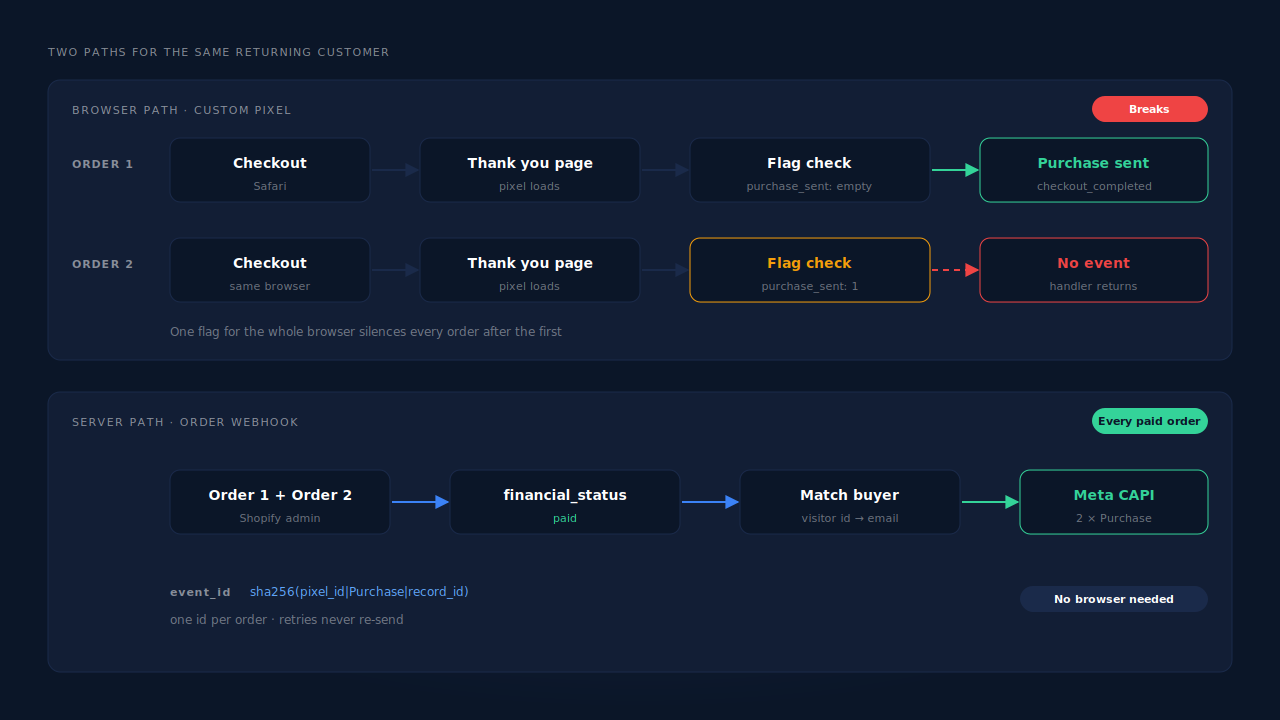
This is a different failure from conversions dropping to zero after Shopify’s thank-you page upgrade. That one kills every purchase on a date. This one kills a slice of purchases: repeat orders, mostly in one browser.
How do you confirm repeat Safari orders are the gap?
Compare paid Shopify orders with Meta Purchase events for the same days, then split the orders into first-time and returning customers. If first orders line up with Meta and repeat orders don’t, you’ve found the leak. Then place two real orders from one Safari browser with the same email and watch what your pixel does on the second.
Work through it in this order:
- Pick a week. Put Shopify and Meta Events Manager on the same time zone first, or the day edges will blur the comparison.
- Split by customer history. In the Shopify admin, a customer record shows how many orders they have placed. Separate orders from first-time customers and returning ones.
- Match against Meta. If your pixel sends the order id with Purchase, look up returning customers’ orders one by one. If not, compare counts per group.
- Place a first order in Safari. Use a cheap product and a discount code, and confirm the Purchase arrives. Use Meta’s Test Events tool with a test code so this stays out of live data.
- Place a second order from the same browser. Same email, same device. Watch the pixel’s console output and Test Events.
- Repeat in Chrome. If the second order fails in both browsers, it’s almost certainly your code. If it fails only in Safari, look at storage, page caching and consent.
A handler that threw or quit early is a code fix. A handler that never ran is a delivery problem no browser code fully solves.
How do you fix the “sent once” flag in your custom pixel?
Key the flag on the order, not on the customer or the browser. The flag’s job is to stop a reload of the same confirmation page from sending the same order twice, so the order id is the right key. A new order has a new id, so it passes the check and sends.
Here is the shape of the bug and the fix. It’s illustrative; adapt it to your own handler.
// Buggy: one flag for the whole browser. Order 1 sets it, order 2+ is silenced.
analytics.subscribe('checkout_completed', async (event) => {
  if (await browser.localStorage.getItem('purchase_sent')) return;
  sendPurchase(event);
  await browser.localStorage.setItem('purchase_sent', '1');
});

// Fixed: one flag per order. A reload of the same order is skipped; a new order sends.
analytics.subscribe('checkout_completed', async (event) => {
  const orderId = event.data?.checkout?.order?.id;
  if (!orderId) return;                       // log this case while you debug
  const key = 'purchase_sent_' + orderId;
  if (await browser.localStorage.getItem(key)) return;
  sendPurchase(event);
  await browser.localStorage.setItem(key, '1');
});
Guard every property read in the handler too. One unguarded read of a field a returning customer’s checkout fills differently is enough to throw before the send.
And send the order id to Meta as the event_id. Meta deduplicates a browser event and a server event only when both carry the same event name and the same event_id, so a stable per-order id is what lets you add a server-side send later without double-counting. If it still double-counts, walk through why Meta CAPI is not deduplicating.
Why is the order webhook a safer source of Purchase than the pixel?
Because every paid order, first or fifth, ends as an order in your Shopify admin, and Shopify notifies subscribed apps through order webhooks whichever browser the buyer used. A Purchase sent from that webhook doesn’t depend on Safari’s storage, a stored flag, a consent banner or a confirmation page. It exists for every paid order.
The send goes to Meta through the Conversions API, server to server. The full walk-through of that setup is in how to fire Shopify purchase events server-side without an app.
Sending is the easy half. Attribution is the hard half: the webhook knows the buyer’s email and the order total, not which ad or email brought them back this time. For a repeat buyer that is actually easier than it sounds, because you already know who they are. Their email arrived with their first order.
How does PartialLeads send repeat Safari orders to Meta?
PartialLeads sends Purchase from Shopify’s order webhooks, not from checkout_completed, so a repeat Safari order is sent the same way as a first one: once Shopify marks it paid. The PartialLeads pixel records the visit before checkout, and the order is matched back to it by visitor id echo, then email, then phone, then IP.
Every paid order is sent. PartialLeads listens for Shopify’s order webhooks and sends a server-side Purchase when the order’s financial_status is paid. Unpaid, pending and cancelled orders are not sent. The value is the full order total (Shopify’s total_price), including tax and shipping, after discounts. An order is recorded once; later edits don’t re-send it.
The repeat buyer is already known. Shopify’s Customer Events sandbox can regenerate visitor ids, and Safari clears storage, so the visitor id on a repeat order may not match the one from the first visit. When the id doesn’t match, the email or phone on the order usually will, because visitor identity resolution already tied it to that person’s earlier sessions. Returning customer, new session, same person.
The journey stays in one place. Both orders sit on one person’s journey, with the sessions that led to each. The Attribution report shows first-touch and last-touch side by side, so a repeat order can be read against the ad that first won the customer or the visit that brought them back.
Nothing is double-sent by PartialLeads. Each Purchase carries a deterministic event_id, so retries and redelivered webhooks can’t create a second send.
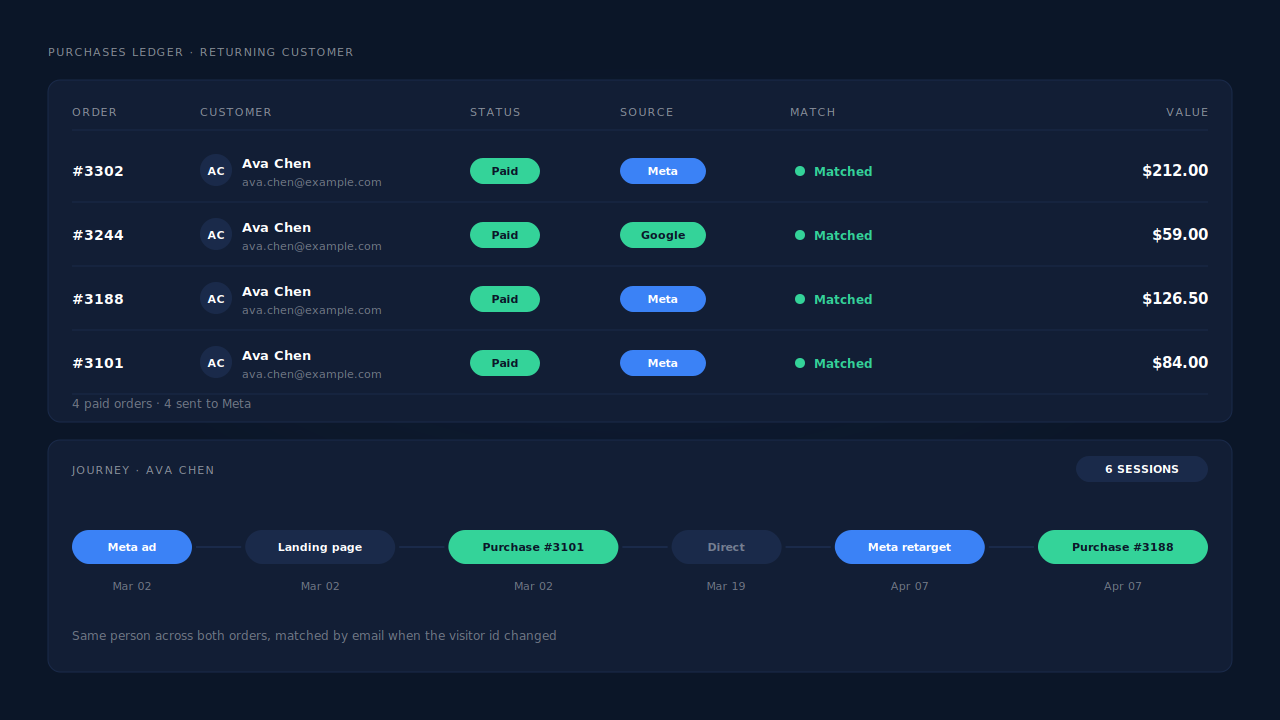
Where you see it working. The Purchases ledger lists every paid order PartialLeads recorded, repeat orders included, each with the source it matched to or an unmatched flag. The Journey timeline shows both orders on the same person. The CAPI activity log on the Meta CAPI page shows each Purchase sent to Meta with its delivery status.
The honest constraints. Delivery is the half PartialLeads controls: every paid order is sent. Matching is maximised, not guaranteed, and PartialLeads doesn’t make Safari’s storage last longer. New vs returning buyers are reported store-wide only, not per channel. PartialLeads’ event ids are its own, so it doesn’t deduplicate against your custom pixel or Shopify’s Facebook & Instagram app. Keep one source for Purchase. Keep the Meta base pixel on your storefront, because server events lean on the _fbp cookie it sets. The wider cleanup lives in how to fix Shopify tracking, attribution and catalog.
| What breaks | The mechanism | Where you see it in the dashboard |
|---|---|---|
| Repeat Safari orders fire no checkout_completed | Purchase sent from Shopify’s paid-order webhook, not the browser | CAPI activity log on the Meta CAPI page |
| Visitor id reset between orders | Order matched by visitor id, then email, phone, IP; sessions joined by identity resolution | Purchases ledger source, Journey timeline |
| Repeat revenue credited to nobody | First-touch and last-touch rows written for every matched order | Attribution report, first vs last touch |
| Unpaid or cancelled orders counted | Only orders with financial_status paid are sent |
Purchases ledger, no send in the CAPI activity log |
| Custom pixel and server both send Purchase | Not deduplicated across tools, so keep one source | Events Manager, browser vs server counts |
Tell us what's broken. We'll fix your tracking — free.
Describe the tracking/attribution problem you're stuck on and we'll map it to a fix: server-side conversions to Meta, Google, TikTok and Pinterest, plus first-party tracking that survives Safari. No code required.
Sources
- https://developers.facebook.com/docs/marketing-api/conversions-api
- https://developers.facebook.com/docs/marketing-api/conversions-api/deduplicate-pixel-and-server-events
- https://developers.facebook.com/docs/marketing-api/conversions-api/parameters/fbp-and-fbc
- https://developers.facebook.com/docs/marketing-api/conversions-api/using-the-api