Meta says your Shopify store sent no AddToCart events because none reached that dataset. Meta cannot see your cart; it only counts events that arrive. If ViewContent and Purchase show up but AddToCart does not, the sender you rely on is either not listening for add-to-cart on your store, or it is sending AddToCart somewhere else.
That distinction matters. The warning is not “your shoppers stopped adding to cart.” Your orders prove they didn’t. It is “the tracking between your cart and Meta has a hole in it,” and the hole sits in one specific place.
The good news: this is one of the more fixable Shopify tracking problems. It takes about half an hour to find the gap and one owner per event to close it.
What does Meta’s missing AddToCart warning actually mean?
Events Manager watches each standard event in your dataset and flags one that stops arriving or never arrived. When AddToCart has had zero events over the recent window, Meta tells you it wasn’t received. It is a statement about delivery, not about shopper behaviour, and it applies to browser and server events together.
AddToCart is a standard Meta event, the same family as ViewContent, InitiateCheckout and Purchase. Meta uses the full set to build audiences such as “added to cart but didn’t buy” and to give its delivery system signals between the product view and the sale.
When AddToCart is missing, three things break at once:
- Retargeting audiences shrink or empty. A cart-abandoner audience built on AddToCart has nobody to hold.
- Dynamic product ads lose their best signal. Showing someone the exact product they carted needs that product’s id on an AddToCart event.
- Funnel reports skip a step. You see views and purchases, with nothing in between to diagnose.
Why does Shopify send ViewContent and Purchase but not AddToCart?
Because product views and purchases happen on pages, and adding to cart often does not. A product page load or an order is easy for any pixel to see. An add-to-cart is an action, frequently handled by a cart drawer, an app or an express checkout button, and whichever tool sends your Meta events must be listening for that specific action.
Walk through the usual causes in this order.
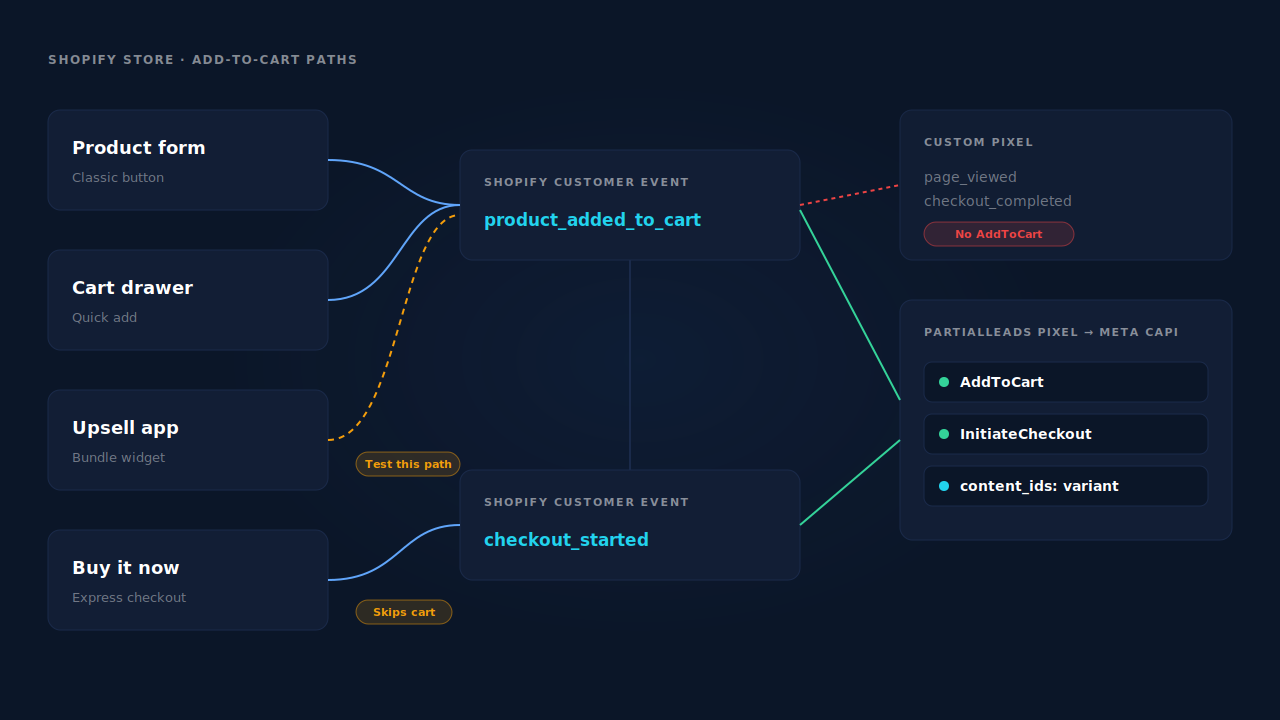
The sender only listens for page views and orders. A custom pixel added under Shopify’s Customer Events has to subscribe to each event it wants. Many copy-pasted snippets subscribe to page_viewed and checkout_completed and stop there. ViewContent and Purchase flow; AddToCart never does. Open the pixel’s code and look for product_added_to_cart. If it isn’t there, that is your answer.
Legacy code in the theme. Older Meta pixel code pasted into theme.liquid often fired AddToCart on a form submit on the product page. A theme update that swapped the classic add-to-cart form for a cart drawer or a quick-add button left that listener waiting for a submit that no longer happens.
An app adds to the cart its own way. Upsell widgets, bundle builders and “frequently bought together” apps add items through their own code. Whether your sender hears those adds depends on how the app does it and how the sender listens. Test each one separately.
Shoppers skip the cart. Express checkout buttons on the product page send shoppers straight to checkout. If a large share of your buyers use them, there is no add-to-cart action to report for those orders. You would still expect some AddToCart from shoppers who use the normal button, so this explains a low count, not a zero.
A headless or custom storefront. A storefront built outside a standard Online Store theme has to publish its own analytics events. If the build never publishes add-to-cart, no pixel downstream can report it.
AddToCart goes to a different dataset. Two installs, two pixel ids. The Facebook & Instagram app sends to one dataset while an old snippet sends AddToCart to another, and the warning is on the one you look at.
How do you find where AddToCart is being lost?
Reproduce an add-to-cart yourself and watch what arrives. Open Events Manager’s Test Events tab, add a product to the cart the way real shoppers do, and see whether AddToCart appears, from which connection method, and for which dataset. Then repeat for every add-to-cart path on your store.
- Confirm the dataset. Note the pixel or dataset id your ads optimise on. Check that the Facebook & Instagram app, any pixel app, and any custom pixel all point at that same id.
- Test the product page button. In Test Events, add a product the normal way. If AddToCart appears, your baseline works and the gap is in another path.
- Test the cart drawer, quick-add and upsell paths. Add from a collection page, a quick-view popup and any app widget. Each path that produces nothing is a path your sender cannot hear.
- Read your custom pixel’s subscriptions. In Shopify’s Customer Events settings, open each custom pixel and list the events it subscribes to. Look for
product_added_to_cartandcheckout_started. - Check for duplicates while you’re there. If AddToCart arrives twice for one click, from the app and from a snippet, you have the opposite problem. Debugging Meta CAPI deduplication covers what Meta needs to merge a browser and server copy.
Run the test with a test event code so it lands in Test Events and not your live data. Testing Meta CAPI without polluting live data walks through that setup.
How do you fix missing AddToCart events on Shopify without a new tool?
Give AddToCart one owner and make that owner listen for Shopify’s own add-to-cart event rather than a click on a specific button. Shopify’s customer events expose product_added_to_cart for standard carts, so a pixel subscribed to it hears the product form and compatible cart drawers alike, whatever button the theme draws.
Subscribe to the event, not the button. In your custom pixel, subscribe to product_added_to_cart and send Meta an AddToCart with the product id, the value and the currency. Do the same for checkout_started as InitiateCheckout while you’re in there.
Use the variant id as the content id. Meta matches content_ids to your catalog. If your catalog lists variants and your events send product ids, AddToCart arrives but matches nothing. Why dynamic product ads show zero catalog match covers that mismatch.
Remove the dead listener. Delete the old AddToCart code from theme.liquid once the new sender works, so a future theme change can’t revive it as a duplicate.
Pick one source per event. If the Facebook & Instagram app sends AddToCart and your custom pixel does too, switch one off. Two sources means two events for every click unless both share an event id.
Send it server-side as well. Browser AddToCart events disappear to ad blockers and closed tabs. A server copy through the Conversions API keeps the event arriving when the browser doesn’t cooperate. Shopify’s sandbox makes this fiddly: the user agent a custom pixel reads is often empty, as explained in why Shopify’s pixel sends an empty user agent.
Keep the Meta base pixel on the store throughout. It sets the _fbp cookie that server events rely on for matching.
How does PartialLeads send AddToCart from Shopify to Meta?
The PartialLeads Customer Events pixel subscribes to Shopify’s product_added_to_cart and checkout_started events, and PartialLeads sends AddToCart and InitiateCheckout to Meta server-side, with the variant id as the content id. The events come from Shopify’s own add-to-cart event, not from a button listener, so a theme change doesn’t silently switch them off.
Full funnel, not just Purchase. On the Shopify pixel path, PartialLeads sends ViewContent, AddToCart, Search, InitiateCheckout and AddPaymentInfo server-side. Purchase comes from Shopify’s order webhooks, once an order is paid. Meta’s delivery system gets every step between the view and the sale.
Variant ids that match your catalog. Ecommerce events send the variant id as content_ids, falling back to the product id. If you use the PartialLeads catalog feed, its g:id is the same variant id, so events and feed line up.
Sent once. Each event carries a deterministic event_id built from the pixel id, event name and record id, so a retry never sends a second copy. Auth failures flag the connection for reconnecting, and transient failures retry on the next cycle.
Hashing and click ids handled. Customer data is normalised and SHA-256 hashed before sending. When fbclid is on the landing URL but the _fbc cookie is missing, PartialLeads rebuilds _fbc from it. It does not create _fbp; that still needs the Meta base pixel on the store.
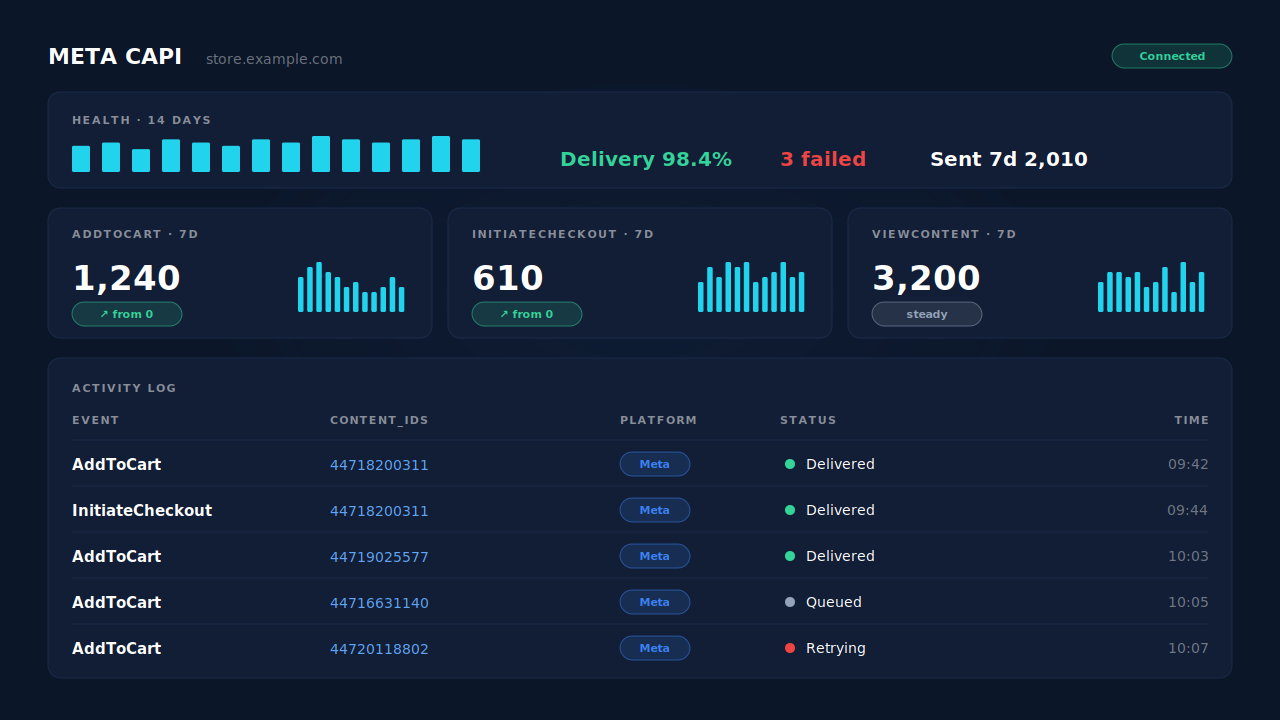
Where you see it working. The Meta CAPI page shows the AddToCart and InitiateCheckout events sent each day, with each delivery in the activity log. For any one shopper, the Journey timeline shows the add-to-cart and checkout steps between their landing visit and their order.
The honest constraints. PartialLeads hears the same Shopify event your own custom pixel would. If a headless build or an app never produces product_added_to_cart, there is nothing to send. Its event ids are its own, so it does not deduplicate against the Facebook & Instagram app or another pixel sending AddToCart: keep one source per event and switch the other off. And delivery is the half it controls. Whether Meta ties each AddToCart to a person depends on the identifiers captured and on Meta’s own matching. For the wider setup, see fixing Meta CAPI tracking on Shopify.
| What breaks | The mechanism | Where you see it in the dashboard |
|---|---|---|
| Custom pixel only sends page views and purchases | Customer Events pixel subscribes to product_added_to_cart and checkout_started |
Meta CAPI page, AddToCart and InitiateCheckout per day |
| Theme change kills a button-based AddToCart | Events come from Shopify’s add-to-cart event, not a click listener | Meta CAPI activity log |
| Browser AddToCart lost to blockers or closed tabs | AddToCart and InitiateCheckout sent server-side to Meta | Meta CAPI activity log, delivery status |
| AddToCart arrives but matches no catalog item | Variant id sent as content_ids, same id as the feed’s g:id |
CAPI payload, Product Catalog |
| Two sources send AddToCart for one click | Not deduplicated against other apps — keep one source per event | Events Manager senders vs the Meta CAPI page |
Tell us what's broken. We'll fix your tracking — free.
Describe the tracking/attribution problem you're stuck on and we'll map it to a fix: server-side conversions to Meta, Google, TikTok and Pinterest, plus first-party tracking that survives Safari. No code required.
Sources
- https://developers.facebook.com/docs/meta-pixel/reference
- https://developers.facebook.com/docs/marketing-api/conversions-api
- https://developers.facebook.com/docs/marketing-api/conversions-api/parameters/server-event
- https://developers.facebook.com/docs/marketing-api/conversions-api/parameters/custom-data
- https://developers.facebook.com/docs/marketing-api/conversions-api/using-the-api
- https://developers.facebook.com/docs/marketing-api/conversions-api/deduplicate-pixel-and-server-events
- https://developers.facebook.com/docs/marketing-api/conversions-api/parameters/fbp-and-fbc