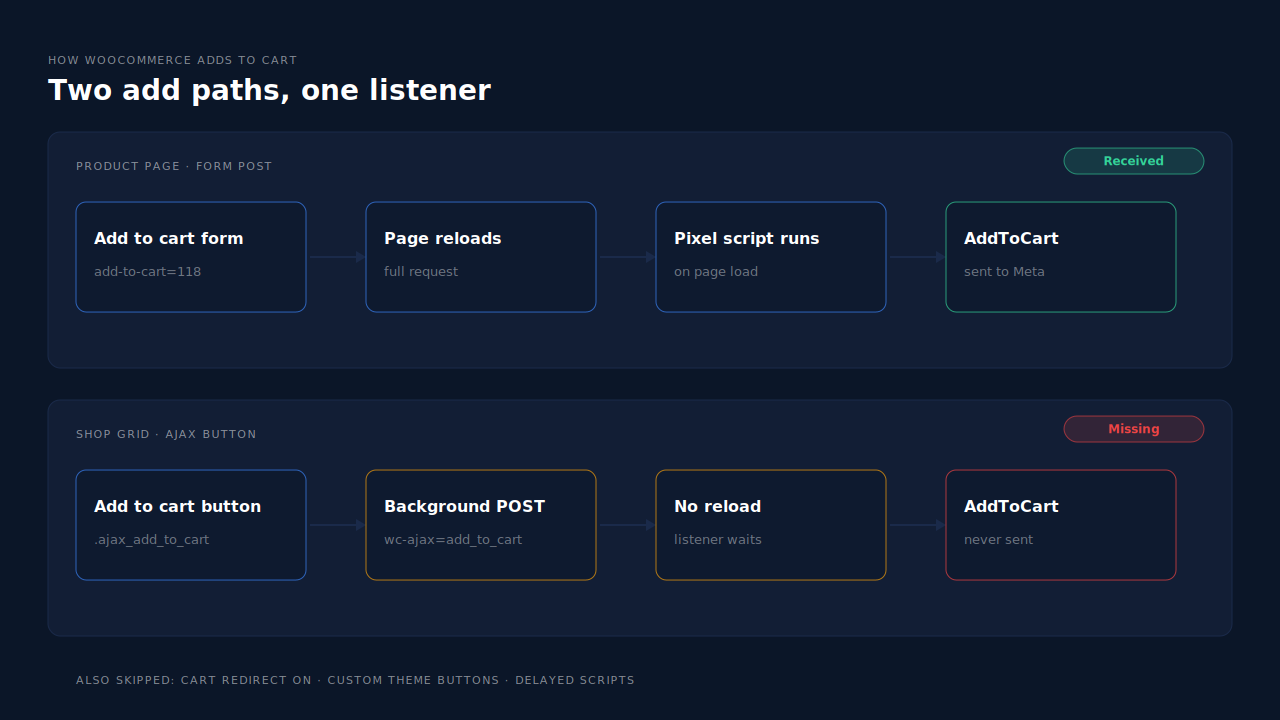
AddToCart doesn’t fire on WooCommerce shop pages because the shop and category grids add to cart with an AJAX request, not a page reload. Many pixel setups only fire AddToCart when the product page form submits, or on the next page load after an add. A grid add does neither, so the event never reaches Meta.
The symptom is easy to spot once you know it. Events Manager shows AddToCart from product pages. Your cart has items that were clearly added from the shop grid, the category pages or a “related products” row. Those adds never appear as events.
Your ads, your Meta Pixel ID and your store are fine. The tracking is listening in the wrong place. This guide covers how the grid button works, the four common reasons it slips past the pixel, how to prove which one you have, and how to fix it.
How does WooCommerce add to cart from a shop or category page?
On archive pages, WooCommerce turns the button for a simple, in-stock product into an AJAX button. Clicking it sends a background request to WooCommerce’s add_to_cart AJAX endpoint and updates the mini-cart without leaving the page. The product page uses a normal form that posts and reloads, which is why it behaves differently.
The behaviour comes from WooCommerce’s own front-end script, add-to-cart.js. When a shopper clicks a button with the ajax_add_to_cart class, the script stops the normal link, posts the product to the AJAX endpoint, and on success triggers a jQuery event called added_to_cart on the page body. That event is the hook most tracking code relies on.
Three conditions decide whether a grid button is the AJAX kind:
- The setting is on. WooCommerce → Settings → Products has a checkbox labelled “Enable AJAX add to cart buttons on archives”.
- The product is simple. In WooCommerce’s source, the simple product type declares support for
ajax_add_to_cart. A variable product shows “Select options” and sends the shopper to the product page instead. - The product is purchasable and in stock. Otherwise the button isn’t an add-to-cart button at all.
So “AddToCart is missing from the shop page” usually means “AddToCart is missing for simple products added from a grid”. Variable products were never added from the grid in the first place.
Why does the AJAX add to cart button skip the pixel?
Because the pixel is waiting for something the AJAX add never produces. Some setups fire AddToCart only when the product page form posts. Others queue the event on the server and print it on the next page the shopper loads. An AJAX add triggers neither: no form post, and often no next page before the shopper keeps browsing or leaves.
Four causes cover almost every case.
1. The tracking only knows the product page form. A classic add posts the page with an add-to-cart parameter and reloads. Code written for that path fires on the reload. The grid add happens in the background, so there’s nothing to react to.
2. “Redirect to the cart page after successful addition” is on. This is the sneaky one. WooCommerce’s add-to-cart.js checks that setting after a successful AJAX add and, if it’s on, sends the shopper straight to the cart. It returns before it triggers added_to_cart. Any tracking that listens for that event never hears it.
3. The theme or page builder made its own button. WooCommerce’s handler only acts on clicks on elements with the add_to_cart_button class, and it quietly returns if the button has no data-product_id. A custom grid button may send its own request, skip the event, or fire it without the button attached. WooCommerce’s own code warns that “Some themes and plugins manually trigger added_to_cart without passing a button element”, so a listener that reads the product from the button gets nothing.
4. A script-delay plugin holds back the pixel. Performance plugins that delay JavaScript until the first interaction can load the pixel’s listener after the shopper has already clicked. That first add is lost; later adds may work. The count drops by an amount that’s hard to explain.
There’s a fifth path worth knowing. Block-based product grids and the Cart block add through WooCommerce’s Store API rather than the AJAX endpoint. If your shop pages are built with blocks, read about the switch to Cart and Checkout blocks, because the fix is the same but the request is different.
How do you prove which cause you have?
Add one simple product from the shop grid with the browser’s network tab and Meta’s test events open side by side. If you see the AJAX request succeed and no AddToCart arrives, the tracking isn’t catching AJAX adds. The checks below then narrow it to the exact cause in about five minutes.
- Open Events Manager’s test events for your pixel and load your store in a private window, so only your own events show.
- Add a simple product from the shop grid. In the network tab, look for a POST to a URL containing
wc-ajax=add_to_cart. If it succeeds and no AddToCart appears in test events, your tracking misses AJAX adds. - Add the same product from its product page. If this one fires and step 2 didn’t, the gap is limited to grid adds.
- Check the cart-redirect checkbox. If “Redirect to the cart page after successful addition” is ticked, untick it on a staging copy and repeat step 2. If AddToCart appears, that was the cause.
- Check the button. Inspect the grid button. If it lacks
add_to_cart_buttonordata-product_id, your theme built its own. - Pause your script-delay plugin and repeat step 2 on the first click after page load.
The same routine works for any tracking change, and it’s the first step in knowing whether your Meta CAPI is working at all. Shopify stores have a similar-looking problem with a different cause, covered in why Meta says your Shopify store sent no AddToCart events.
Why does a missing shop-page AddToCart matter?
Because the grid is often where the most adds happen. Stores with simple products, low prices or quick reorders see a big share of carts filled straight from category pages. When those adds disappear, retargeting audiences shrink, campaigns optimising for AddToCart starve, and funnel reports show a fake drop between product views and purchases.
Three concrete costs:
- Smaller cart-abandoner audiences. “Added to cart, didn’t buy” only fills with product-page adds, so your warmest shoppers miss the retargeting ad.
- Weaker optimisation. Newer stores often optimise for AddToCart while purchases are too few. Losing grid adds cuts that signal at the source.
- Misleading reports. Cart rate looks low on exactly the pages that sell best, so teams fix the wrong thing.
Purchases are usually unaffected, which is why the gap can go unnoticed for months.
How do you fix AddToCart on WooCommerce shop pages?
Catch the AJAX add itself, not the page reload. Use a tracking plugin that listens for every WooCommerce add-to-cart path, untick the cart-redirect setting if your tracking depends on the jQuery event, and make custom theme buttons behave like WooCommerce’s own. Sending the event server-side removes the browser timing problem entirely.
Can you update or change the plugin?
Check your pixel plugin’s changelog and support forum for AJAX add to cart support on archive pages. Update it and repeat the test. If it still only fires on the product page, it’s the wrong tool for a grid-heavy store.
Should you turn off the cart redirect?
If your tracking relies on the added_to_cart event, yes, or accept that grid adds won’t be counted. The redirect skips the event by design. Turning it off keeps shoppers on the grid, which many stores prefer anyway.
What about a custom theme button?
Ask your developer to give the button WooCommerce’s classes and data-product_id, or to trigger added_to_cart with the button passed in after a successful add. Retest after every theme update.
How do you avoid double counting?
Pick one owner per event. If two tools both send AddToCart, Meta only merges a browser and a server event when the event name and event ID match, as explained in what event ID to use for Meta deduplication. Switch the event off in one tool rather than hoping the IDs line up.
Sending from a server also sidesteps script-delay plugins and blockers, which is why ad blockers break conversion tracking less when events leave from a server.
How does PartialLeads track AddToCart from WooCommerce shop pages?
The PartialLeads WooCommerce plugin catches all three ways WooCommerce adds to cart: the AJAX button on shop and category pages, the single-product form and the Blocks Store API. It forwards AddToCart server-side through the Conversions API to Meta, and to Pinterest and TikTok, so a grid add counts the same as a product-page add.
What gets sent. Each add becomes one AddToCart carrying the variant ID as the content ID, falling back to the product ID, so it lines up with your product catalog. View product and begin checkout go the same way. Google doesn’t receive these funnel events.
Purchase stays separate. Purchase comes from WooCommerce order webhooks for every paid order (processing or completed), with the full order total. Nothing fires on the thank-you page. The guide to tracking WooCommerce purchases server-side to Meta covers that half.
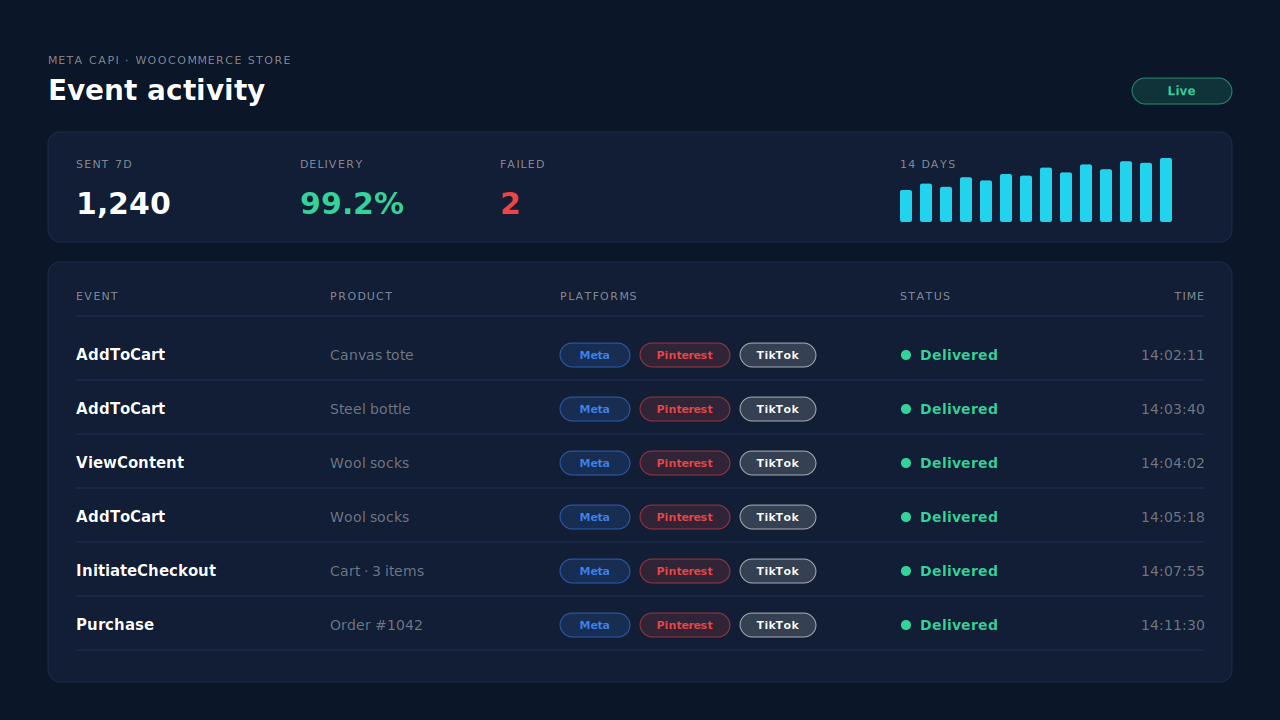
Where you see it working. The Meta CAPI page lists each server send by event name, status and time. Add a product from the shop grid and an AddToCart row appears there, the same as a product-page add.
The honest constraints. PartialLeads’ event IDs are its own. It never sends the same event twice, but it doesn’t deduplicate against another plugin’s browser pixel. If Meta for WooCommerce or PixelYourSite still fires AddToCart, switch that event off there. Keep the Meta base pixel on the site for the _fbp cookie, which PartialLeads can’t create from nothing. If your theme adds to cart in a way that bypasses WooCommerce entirely, run the network-tab test once after install. Sending the event is the half PartialLeads controls; matching it to a person is Meta’s.
| What breaks | The mechanism | Where you see it in the dashboard |
|---|---|---|
| Grid AJAX add never reloads the page | Plugin catches the AJAX add to cart button on shop and category pages | Meta CAPI page, AddToCart rows |
| Product page form only half the story | Single-product form adds caught the same way | Meta CAPI page, AddToCart rows |
| Block grids add through the Store API | Store API adds caught too | Meta CAPI page, AddToCart rows |
| Browser script delayed or blocked | AddToCart forwarded server-side to Meta, Pinterest and TikTok | CAPI activity log |
| Two tools send AddToCart | No cross-tool dedup, so keep one source per event | Meta CAPI page vs Events Manager sources |
Tell us what's broken. We'll fix your tracking — free.
Describe the tracking/attribution problem you're stuck on and we'll map it to a fix: server-side conversions to Meta, Google, TikTok and Pinterest, plus first-party tracking that survives Safari. No code required.
Sources
- https://github.com/woocommerce/woocommerce/blob/trunk/plugins/woocommerce/client/legacy/js/frontend/add-to-cart.js
- https://github.com/woocommerce/woocommerce/blob/trunk/plugins/woocommerce/includes/class-wc-ajax.php
- https://github.com/woocommerce/woocommerce/blob/trunk/plugins/woocommerce/includes/wc-template-functions.php
- https://github.com/woocommerce/woocommerce/blob/trunk/plugins/woocommerce/includes/class-wc-product-simple.php
- https://github.com/woocommerce/woocommerce/blob/trunk/plugins/woocommerce/includes/admin/settings/class-wc-settings-products.php
- https://developers.facebook.com/docs/meta-pixel/reference
- https://developers.facebook.com/docs/marketing-api/conversions-api/deduplicate-pixel-and-server-events