AddToCart and InitiateCheckout stop firing after a switch to WooCommerce Checkout Blocks because the blocks don’t use the old checkout plumbing. They’re built in React and talk to the store through the Store API, so the jQuery events and checkout template hooks many pixel plugins listened for often never happen. Purchases survive because they come from the order, not the funnel.
That’s why the symptom is so specific. Events Manager still shows Purchase. ViewContent on product pages may look fine. But AddToCart falls off a cliff on the day of the switch, and InitiateCheckout drops to zero or close to it.
Nothing is wrong with your ads, your Meta Pixel ID or your checkout. The plugin is waiting for signals the new checkout doesn’t send. This guide explains what changed, how to prove it on your own store in a few minutes, and the fixes, from quickest to most durable.
What changes when you switch to Cart and Checkout blocks?
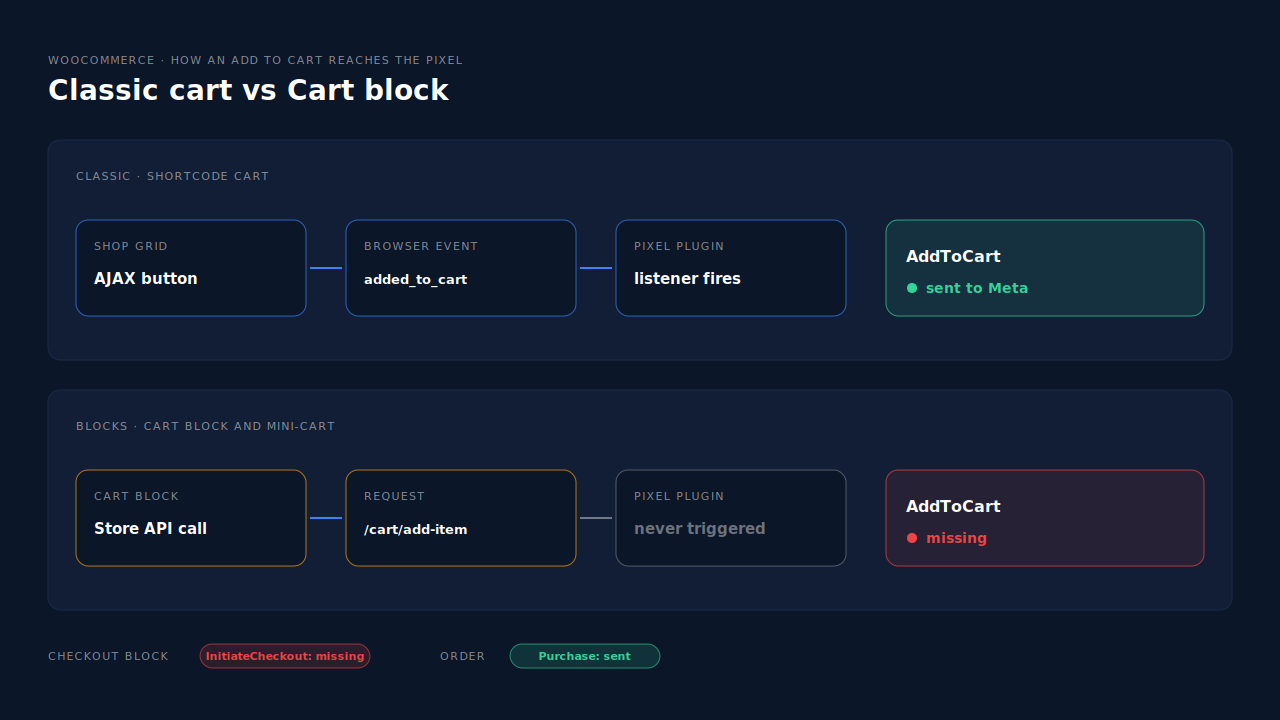
The cart and checkout stop being PHP templates rendered by the server and become React apps that call WooCommerce’s Store API. Adding to cart, updating quantities and loading checkout all happen through Store API requests, not through the old AJAX handlers, jQuery events and template hooks that shortcode checkout used.
WooCommerce’s own documentation describes the Store API as providing “public Rest API endpoints for the development of customer-facing cart, checkout, and product functionality.” Its cart reference lists the route block carts use to add a product: POST /cart/add-item under the base route /wc/store/v1/cart. For several items at once, it says to “use the batch endpoint: POST /wc/store/v1/batch”.
Compare that with the classic flow:
- Classic AJAX add to cart calls
?wc-ajax=add_to_cart, then WooCommerce triggers a jQuery event (added_to_cart) on the page that plugins can listen for. - Classic product form posts the page with an
add-to-cartparameter, and the page reloads. - Classic checkout renders a PHP template, with action hooks before and after the form that plugins attach to.
Block-based carts and checkouts can skip all three. Anything that depended on them has nothing to react to.
Why do Cart and Checkout blocks break pixel events?
Because many pixel plugins were written for the classic flow. They fire AddToCart when they see the added_to_cart jQuery event or the add-to-cart form reload, and fire InitiateCheckout from a hook in the checkout template. Block checkout makes a Store API request instead, so those listeners never run and nothing is sent to Meta.
This isn’t a hidden bug. WooCommerce contributors raised it in public. A GitHub issue opened on 27 November 2023, titled “Make checkout and cart block listen to the original jQuery event?”, asked what would replace the jQuery events that worked with the legacy cart and checkout. It was closed as not planned. The direction of travel is away from those events, not back to them.
The breakage usually looks like this:
- AddToCart from the Cart block or mini-cart — missing, because the Store API request doesn’t trigger the plugin’s listener.
- AddToCart from the product page — sometimes still works, if your theme’s product form is classic. That’s why the drop can look partial rather than total.
- InitiateCheckout — missing or only firing on some visits, because the template hook the plugin used doesn’t run inside the Checkout block.
- Purchase — still fine, because most plugins fire it on the order-received page or from the order itself.
How do you prove the blocks are the cause?
Watch one add to cart and one checkout load with your browser’s network tab and Meta’s test events tool open side by side. If the cart makes a Store API request and no AddToCart reaches Meta, the blocks are the cause. The whole test takes about five minutes.
- Confirm which checkout you’re running. Open your Checkout page in the WordPress editor. A Checkout block means block checkout. A
[woocommerce_checkout]shortcode means classic. - Open Events Manager’s test events. Connect your store in a fresh private window so only your own events show.
- Add a product from the cart or mini-cart. In the network tab, look for a request to
/wc/store/v1/cart/add-itemor/wc/store/v1/batch. If you see it and no AddToCart appears in test events, the plugin isn’t listening to the Store API. - Add a product from a product page. If this one fires and step 3 didn’t, the gap is limited to block-driven adds.
- Load the checkout page. No InitiateCheckout in test events means the plugin’s checkout hook isn’t running in the block.
As a last check, switch a staging copy back to the shortcode checkout. If InitiateCheckout returns immediately, you’ve found your cause. The same test events routine is how you know if your Meta CAPI is working after any tracking change.
Why does a blank funnel hurt if purchases still come through?
Because Meta’s delivery system learns from more than purchases. AddToCart and InitiateCheckout tell it which people are close to buying, which feeds optimisation, retargeting audiences and funnel reporting. Lose them and the cart and checkout abandoners disappear from those audiences, while your funnel reports read as a cliff between product views and purchases.
Three concrete costs:
- Retargeting shrinks. Audiences built on “added to cart but didn’t purchase” stop filling, so the people most likely to come back never see the ad.
- Optimisation loses signal. Campaigns optimised for AddToCart or InitiateCheckout, often used by newer stores that don’t yet have enough purchases, suddenly have almost nothing to optimise for.
- Funnel reporting lies. A sudden drop in cart rate looks like a merchandising problem, and teams go chasing a fix for a store that’s selling the same as before.
If you use the Conversions API through the same plugin, check it too. When the browser side never sees the add to cart, a plugin that mirrors browser events to the server usually has nothing to mirror.
How do you get AddToCart and InitiateCheckout back?
Use a tracking plugin that listens to the Store API and fires InitiateCheckout inside the Checkout block, or send those events server-side from something that already does. Reverting to shortcode checkout also works, but it gives up the blocks you switched for. Whichever you choose, keep one source per event so nothing counts twice.
Can you update the plugin?
Try this first. Check your pixel plugin’s changelog and support forum for Cart and Checkout block support, update it, and repeat the five-minute test. If the plugin has added block support since you last updated, the problem may disappear in one update.
Should you switch back to the shortcode checkout?
It’s a valid stopgap. Replacing the Checkout block with the shortcode brings the classic hooks back, so InitiateCheckout usually returns. The cost: you lose the block checkout’s layout and any payment or checkout extensions that only support blocks. Treat it as a bridge while you fix tracking properly, not the destination.
Should you write custom code?
Only if you have a developer who’ll maintain it. Custom code has to catch Store API adds from every entry point, the product page, the shop grid, the Cart block and the mini-cart, and survive WooCommerce updates. It’s easy to cover one entry point and miss the rest.
What about duplicates when two tools send AddToCart?
Pick one owner per event. If your old plugin still fires AddToCart from product pages and a new tool fires it too, Meta will count some additions twice unless both send the same event ID. Meta only merges a browser and server event when the event name and event ID match, as covered in what event ID to use for Meta deduplication. Switch off the old plugin’s version of the event rather than hoping they line up.
Server-side sends have a second benefit. They don’t depend on the shopper’s browser finishing a script, which is also why ad blockers break conversion tracking less when events leave from a server.
How does PartialLeads track AddToCart and InitiateCheckout on block checkout?
The PartialLeads WooCommerce plugin catches all three ways WooCommerce adds to cart, the classic AJAX button, the classic product form and the Blocks Store API, and fires begin checkout when the checkout page loads, classic or block. It forwards view product, add to cart and begin checkout server-side to Meta, Pinterest and TikTok.
What the plugin listens to. On block carts it watches the Store API itself: /wc/store/v1/cart/add-item and /wc/store/v1/batch. So a shopper who adds from the Cart block, a block mini-cart or a classic shop grid produces one AddToCart, and loading checkout produces one InitiateCheckout either way. The plugin declares compatibility with Cart and Checkout Blocks and with WooCommerce’s HPOS order storage.
Where the events go. Meta receives ViewContent, AddToCart and InitiateCheckout through the Conversions API. Pinterest and TikTok receive the matching events too, so the same fix covers Pinterest checkout events sent server-side. Google doesn’t: these funnel events aren’t sent to Google Ads.
Purchase stays separate. Purchase comes from WooCommerce order webhooks for every paid order, processing or completed, with the full order total. Nothing fires on the thank-you page. The guide to tracking WooCommerce purchases server-side to Meta covers that half.
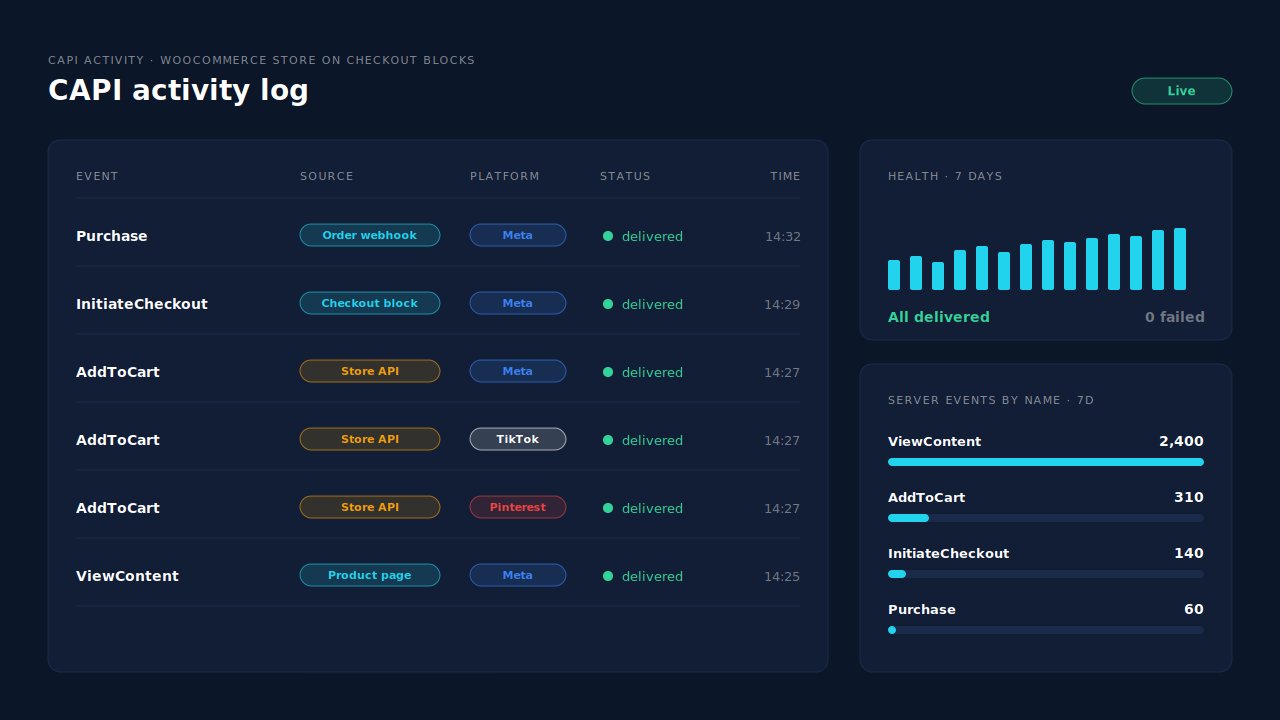
Where you see it working. The Meta CAPI page shows each server send by event name, status and time, so AddToCart and InitiateCheckout reappear as rows the day the plugin goes live. The lead’s journey timeline shows the visits that led to the order.
The honest constraints. PartialLeads’ event IDs are its own. It never sends the same event twice, but it doesn’t deduplicate against another plugin’s browser pixel. If Meta for WooCommerce or PixelYourSite still fires AddToCart, switch that event off there. Keep a Meta base pixel on the site for the _fbp cookie, which PartialLeads can’t create from nothing. Sending the event is the half PartialLeads controls; matching it to a person is Meta’s.
| What breaks | The mechanism | Where you see it in the dashboard |
|---|---|---|
| Cart block adds skip the jQuery event | Plugin listens to Store API add-item and batch requests | Meta CAPI page, AddToCart rows |
| Checkout block skips template hooks | Begin checkout fires on checkout page load, classic or block | Meta CAPI page, InitiateCheckout rows |
| Browser pixel blocked or cut short | Funnel events forwarded server-side to Meta, Pinterest and TikTok | CAPI activity log |
| Purchase tied to the thank-you page | Purchase sent from order webhooks for every paid order | Purchases ledger, CAPI activity log |
| Two tools send AddToCart | No cross-tool dedup, so keep one source per event | Meta CAPI page vs Events Manager sources |
Tell us what's broken. We'll fix your tracking — free.
Describe the tracking/attribution problem you're stuck on and we'll map it to a fix: server-side conversions to Meta, Google, TikTok and Pinterest, plus first-party tracking that survives Safari. No code required.
Sources
- https://github.com/woocommerce/woocommerce/issues/42058
- https://github.com/woocommerce/woocommerce/blob/trunk/plugins/woocommerce/src/StoreApi/README.md
- https://github.com/woocommerce/woocommerce/blob/trunk/docs/apis/store-api/resources-endpoints/cart.md
- https://developers.facebook.com/docs/meta-pixel/reference
- https://developers.facebook.com/docs/marketing-api/conversions-api/deduplicate-pixel-and-server-events
- https://developers.facebook.com/docs/marketing-api/conversions-api/using-the-api