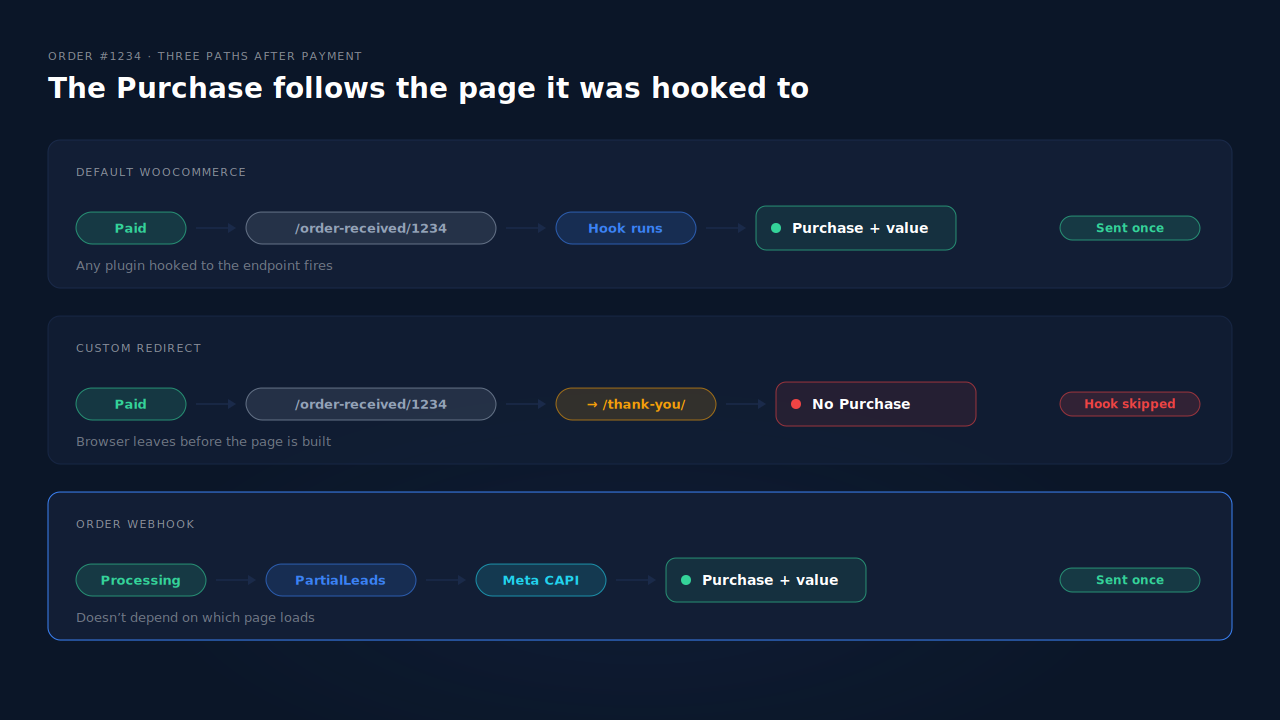
Usually, no. Most WooCommerce Meta Pixel setups fire Purchase when WooCommerce’s own order-received page renders. Send buyers to a custom thank-you page instead and that page may never render, so the Purchase never fires — or it fires on your new page without the order’s value. The sale is real. The event was tied to a page you replaced.
The support threads read the same way every time: “I redirect buyers to my own thank-you page, and since then Meta has no Purchase events.” Orders keep landing in WooCommerce. Events Manager goes quiet for Purchase while PageView and AddToCart carry on as normal.
Here’s why the redirect breaks it, how to confirm that’s what happened, and three fixes — ending with the one that doesn’t depend on any page at all.
Why does the Purchase stop when you redirect to your own page?
Because the Purchase is hooked to WooCommerce’s order-received endpoint, not to the order. Tracking plugins listen for that endpoint to render, then read the order it shows. A redirect sends the buyer somewhere else before or instead of that render, so the listener never runs and no Purchase is printed.
After payment, WooCommerce sends the buyer to a URL like this:
https://yourstore.com/checkout/order-received/1234/?key=wc_order_AbC123xYz
That page knows which order it’s showing, because the order number and order key are in the address. A plugin hooked to it can read the total, currency and items, and print a Purchase with the right value.
A custom thank-you page usually gets there in one of three ways, and each breaks tracking differently:
- Filtering the return URL. A snippet or plugin changes the URL the payment gateway sends buyers back to, using WooCommerce’s
woocommerce_get_checkout_order_received_urlfilter. The order-received endpoint is never visited, so anything hooked to it never runs. - Redirecting from the order-received page. Code on
template_redirectsees the order-received endpoint and bounces the buyer to/thank-you/. The browser leaves before the page is built, so the thank-you hooks don’t fire. - A page-builder or funnel thank-you step. A funnel plugin sends buyers to its own confirmation step. Whether your pixel plugin recognises that step as “the order is done” depends entirely on the two plugins agreeing. Often they don’t.
What if a Purchase still fires, but with no value?
That’s the fourth failure, and it’s quieter. Someone pastes a Meta Pixel Purchase call into the custom page’s header. It fires on every load of /thank-you/, but the page has no idea which order it’s showing, so value and currency are missing or hard-coded. Meta’s pixel reference lists value and currency as required for Purchase, so these events are incomplete at best and useless for ROAS. They also fire for anyone who opens /thank-you/ directly, bots included.
How do you confirm the custom page is the cause?
Place one test order with Events Manager’s test events view open, and watch where the buyer lands. If the browser ends on your custom URL and no Purchase arrives, the redirect skipped the hook. If a Purchase arrives with no value, a hand-pasted pixel is firing on the new page. Then compare a week of paid orders against Meta’s received Purchases.
- Watch the URL after payment. Place a small order. If the address bar flashes
/order-received/and then lands on/thank-you/, it’s a redirect from the endpoint. If it never shows/order-received/, the return URL was filtered. - Check Test Events. Open Test Events for your pixel — the same view used to check your Meta CAPI is working. No Purchase means the hook never ran. A Purchase with an empty or fixed value means a static pixel on the custom page.
- Check the date. In Events Manager, look at Purchase volume over time. A drop that starts on the day the thank-you page went live points straight at the redirect.
- Reconcile a week. Count Processing and Completed orders in WooCommerce → Orders for seven days. Compare that with the Purchases Events Manager received, not Ads Manager’s attributed conversions, which depend on attribution windows.
If orders and Purchases line up but attribution looks wrong, the redirect isn’t your problem. Attributing WooCommerce orders when the checkout is on another page covers the case where the session, not the event, is what goes missing.
How do you keep a custom thank-you page without losing the Purchase?
You have three options. Customise WooCommerce’s own order-received template instead of redirecting away from it. Or carry the order id and key to your custom page and fire a guarded Purchase there. Or, the durable one, send Purchase server-side when the order is paid, so the thank-you page is just a page.
Option 1: style the order-received page instead of replacing it
This is the least fragile browser fix. Override WooCommerce’s checkout/thankyou.php template in your child theme and design it however you like. The URL stays /order-received/…, the thank-you hooks still run, and every plugin that listens for them keeps working. You keep the branding and lose nothing.
Option 2: pass the order to the custom page and fire once
If the custom page has to be a separate page, send the order id and key along with the redirect, check them on arrival, and print Purchase only once per order. A minimal version for a theme or custom plugin:
// On /thank-you/?order_id=1234&key=wc_order_AbC123xYz
add_action( 'wp_footer', function () {
    if ( ! is_page( 'thank-you' ) || empty( $_GET['order_id'] ) || empty( $_GET['key'] ) ) {
        return;
    }
    $order = wc_get_order( absint( $_GET['order_id'] ) );
    $key   = sanitize_text_field( wp_unslash( $_GET['key'] ) );
    if ( ! $order || ! hash_equals( $order->get_order_key(), $key ) ) {
        return; // Wrong or guessed link: print nothing.
    }
    if ( ! $order->is_paid() || $order->get_meta( '_meta_purchase_sent' ) ) {
        return; // Unpaid, or already sent: a reload prints nothing.
    }
    $order->update_meta_data( '_meta_purchase_sent', time() );
    $order->save();
    // ...print fbq('track', 'Purchase', { value, currency }, { eventID })
    // using $order->get_total(), $order->get_currency() and the order number.
} );
The key check stops strangers from triggering Purchases by typing a URL. The paid check keeps bank-transfer orders out until they’re paid. The meta flag stops a reload from counting again — the same guard that stops a customer who reopens the order link from counting twice. Derive the eventID from the order number, as covered in what event id to use for Meta deduplication.
This is still a browser event. An ad blocker, a closed tab or a buyer who never comes back from the payment gateway means no Purchase.
Option 3: send the Purchase from the order, not the page
Fire Purchase server-side through the Conversions API when the order reaches Processing or Completed. The event is tied to the order record, so it doesn’t matter whether the buyer lands on order-received, a branded page, a funnel step or nowhere at all. The guide to tracking WooCommerce purchases server-side to Meta walks through the setup.
If you keep a browser Purchase alongside it, both must carry the same event name and event id so Meta can deduplicate them. Simpler still: keep one source for Purchase.
How does PartialLeads send the Purchase whatever thank-you page you use?
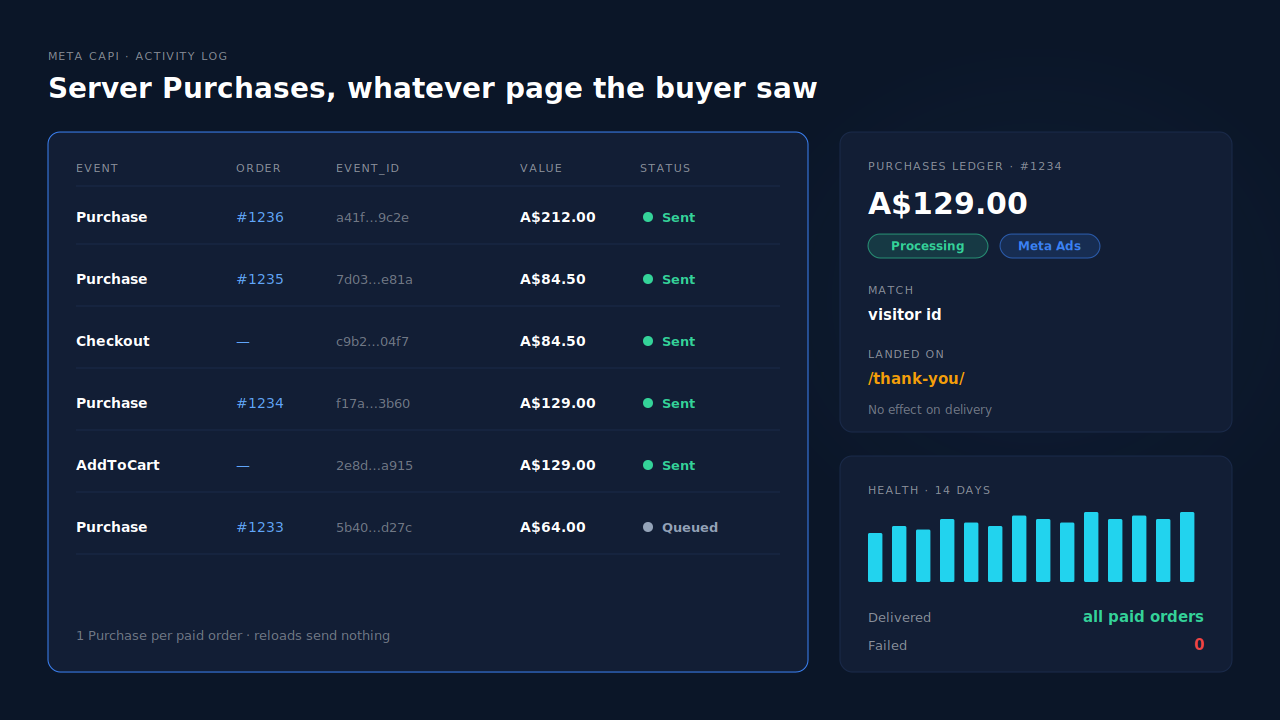
PartialLeads takes the WooCommerce Purchase from the order webhook, and its plugin fires nothing on any thank-you page. So redirecting buyers to a custom page, a funnel step or an external upsell can’t lose the Purchase. When the order is paid, it’s recorded once and sent server-side to Meta, TikTok and Pinterest.
Where each event comes from. The PartialLeads WooCommerce plugin forwards view product, add to cart and begin checkout from the browser, server-side, to Meta, Pinterest and TikTok. The Purchase is owned by WooCommerce’s order webhooks. When an order reaches Processing or Completed, PartialLeads records it once and sends it. Pending, on-hold, failed and cancelled orders are not sent. A bank-transfer or cash-on-delivery order is sent when it’s marked paid.
What the Purchase carries. The full order total, including tax and shipping after discounts, in the order’s currency, with hashed email and phone from the order. Each event has a deterministic event_id built from the pixel, the event name and the order record, so a redelivered webhook or a retry can’t send a second Purchase. The order is then matched back to the buyer’s session — by visitor id, then email, phone and IP — so the Purchase can carry the ad click that started it. Matching is maximised, not guaranteed.
Where you see it working. The Meta CAPI page lists each server Purchase with its status and time. The Purchases ledger lists every paid order with its value, source and match to a session, so its weekly count should line up with Processing plus Completed in WooCommerce. The Leads list’s API column shows which conversion APIs each buyer was sent to.
The honest constraints. PartialLeads uses its own event ids. It never double-sends, but it doesn’t deduplicate against another plugin’s browser pixel. If Meta for WooCommerce, PixelYourSite or a pasted snippet still fires Purchase on your thank-you page, switch that Purchase off and keep one source. An order is recorded once, so a post-purchase upsell added to the same order later isn’t re-sent. If an order is marked paid more than seven days after checkout, Meta’s 7-day event time window applies. And PartialLeads controls what’s sent; how Meta attributes it is Meta’s side.
| What breaks | The mechanism | Where you see it in the dashboard |
|---|---|---|
| Redirect skips the order-received page, no Purchase fires | Plugin fires nothing on any thank-you page; Purchase comes from the order webhook | Meta CAPI page, server Purchase per paid order |
| Pasted pixel on custom page sends Purchase with no value | Full order total and currency taken from the order record | Purchases ledger value per order |
Reloads or direct visits to /thank-you/ add Purchases |
Deterministic event_id per order, sent once | Meta CAPI activity log |
| Unpaid bank-transfer orders counted | Only Processing or Completed orders are sent | Purchases ledger status |
| Old plugin still fires its own Purchase | No cross-tool dedup — switch the other Purchase off | Leads-list API column vs Events Manager sources |
Tell us what's broken. We'll fix your tracking — free.
Describe the tracking/attribution problem you're stuck on and we'll map it to a fix: server-side conversions to Meta, Google, TikTok and Pinterest, plus first-party tracking that survives Safari. No code required.
Sources
- https://developers.facebook.com/docs/meta-pixel/reference
- https://developers.facebook.com/docs/marketing-api/conversions-api/deduplicate-pixel-and-server-events
- https://developers.facebook.com/docs/marketing-api/conversions-api/parameters/server-event
- https://developers.facebook.com/docs/marketing-api/conversions-api/parameters/custom-data