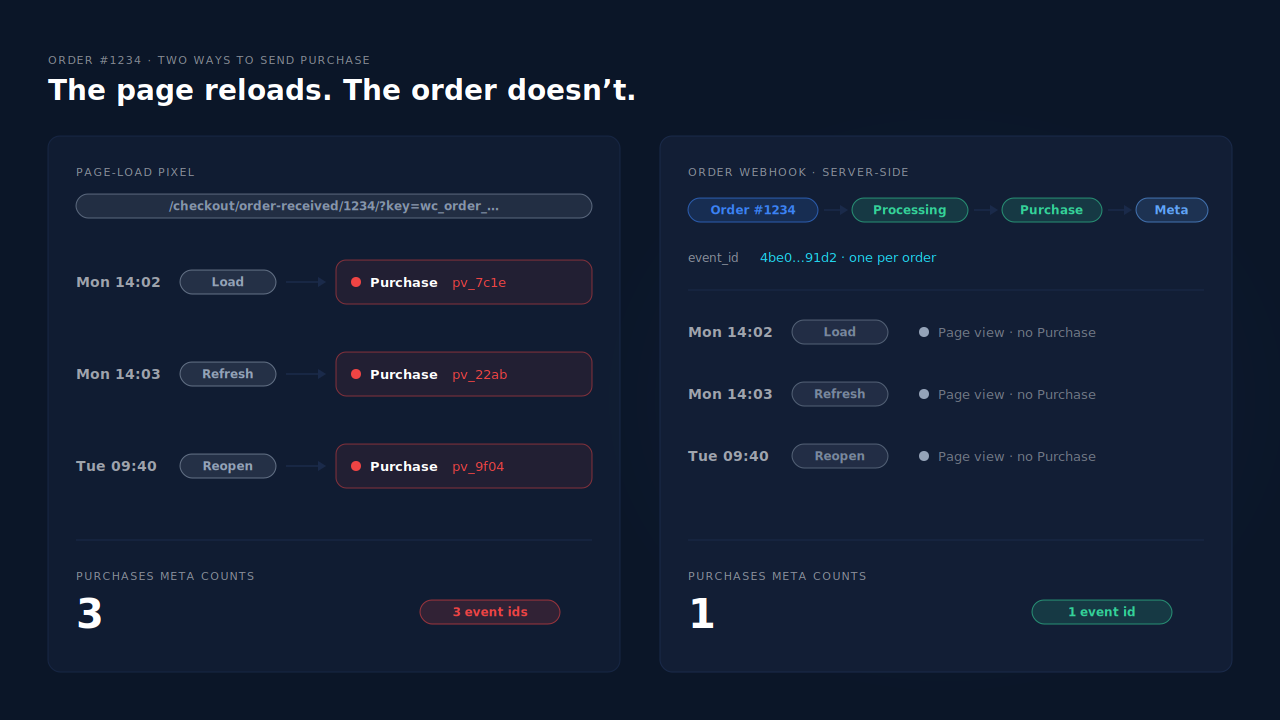
The Meta Purchase event fires again because it is attached to the WooCommerce order-received page, and that page can be opened as many times as the customer likes. Each visit renders the page, the pixel runs, and Meta receives a new Purchase for an order that was already counted. The order happened once; the page happened twice.
It shows up the way the support threads describe it: an order tracked on Monday, then a second Purchase for the same order on Tuesday, with no new sale in WooCommerce. The customer checked their order, and your pixel called it a purchase.
Here’s why WooCommerce’s thank-you page behaves like this, how to prove it’s the source, and how to make Purchase belong to the order instead of the page.
Why does reopening the thank-you page send another Purchase?
Because the order-received page has a permanent address, and a pixel on it can’t tell a first visit from a return visit. WooCommerce builds the URL from the order number and the order key, so the same link keeps working after checkout. Any tool that fires Purchase “when this page loads” fires again on every load.
The URL looks like this:
https://yourstore.com/checkout/order-received/1234/?key=wc_order_AbC123xYz
Nothing in that address expires when the Purchase is sent. So each of these is a new page load, a new script run and, for a page-load pixel, a new Purchase:
- Browser history and restored tabs. The customer taps the tab they left open, and the browser reloads it. Mobile browsers often reload tabs that sat in the background.
- The back button. The customer continues shopping, then goes back through their history and passes the order-received page again.
- Bookmarks and saved links. Some customers save the confirmation to check the order later.
- A refresh while waiting. The payment confirmation took a few seconds, so they hit reload.
- The order-pay step. On some gateways the customer passes through the order-pay page before landing on order-received. If a plugin treats both as “the checkout finished”, one order sends two Purchases in the same minute.
None of those is a new order. All of them look identical to a pixel that listens for the page.
Why is it worse on WooCommerce than on a hosted checkout?
Because the thank-you page is a page on your own site, so every plugin can hook into it. WooCommerce stores often run more than one tool that touches it: the official Meta integration, a pixel plugin like PixelYourSite, a tag manager container, sometimes a theme’s own tracking box. If one of them fires Purchase on each render, the page reload bug is live, whatever the others do.
Why doesn’t Meta treat the second Purchase as a duplicate?
Because Meta deduplicates by matching identifiers, not by guessing that two Purchases are “probably the same order”. Its documented deduplication pairs events that carry the same event name and the same event_id, and it is built for a browser copy and a server copy of one event sent close together. A reload a day later, often with a fresh id, looks like a separate sale.
Two things usually go wrong at once:
- The id changes on every load. Many page-load setups generate an event id per page view, or send none at all. Two different ids mean two purchases, no matter how similar the rest of the payload is.
- The second copy arrives much later. Even with a stable id, deduplication is designed around the browser and server copies of the same moment. Don’t rely on it to clean up a reopen from the next day.
The deeper fix is the id itself. It should come from the order, not the page view, so every copy of one order’s Purchase carries the same string. What event id to use for Meta deduplication covers how to build one, and the Meta CAPI deduplication debug guide walks through the browser-plus-server case step by step.
How do you confirm the thank-you page is causing the repeat?
Place one test order, open Events Manager’s test events view, and reload the order-received page. If a second Purchase arrives for the same order, the page is the source. Then compare a week of Meta’s received Purchases with the same week’s paid orders to see how big the leak is.
- Run the reload test. Open Test Events in Events Manager for your pixel — the same view used to check your Meta CAPI is working — place a small order, then refresh the order-received page twice. Count the Purchases that arrive. One is correct. Three means every load fires.
- Check the ids. Open each Purchase in the test view. If the
event_iddiffers between them, Meta will count all of them. If your setup sendsorder_idin the custom data, you’ll see the same order number on each. - Try the next-day version. Keep the order-received URL. Open it again tomorrow from the same browser. A Purchase that arrives then is the exact pattern from the support threads.
- Reconcile a week. Count Processing and Completed orders in WooCommerce → Orders for seven days. Compare with the Purchases Events Manager received for the same days. Use the received count, not Ads Manager’s attributed conversions, which depend on attribution windows.
- Find the plugin. Disable Purchase in one tracking tool at a time and repeat the reload test. The tool whose change stops the second Purchase is the one firing on the page.
If the numbers are over but the reload test is clean, look elsewhere. Unpaid orders counted at checkout are the other common cause of an over-count. And if your store uses redirect payments, the pattern in why Meta counts extra purchases per order when shoppers return from a payment redirect is the same bug arriving from a different direction.
How do you stop a reload from sending another Purchase?
Take Purchase off the page load. The durable fix is to send it server-side when the order is paid, with the order as the source of the event id, so the thank-you page can be opened any number of times without sending anything. If you must keep a browser Purchase for now, make it fire once per order, never once per view.
In rough order of how much they fix:
- Send Purchase from the order record. A server event fired when the order becomes Processing or Completed happens once per order. The guide to tracking WooCommerce purchases server-side to Meta walks through it, and it runs through the Conversions API.
- Use the order as the event id. Whatever sends Purchase, derive the
event_idfrom the order number. Every copy of one order then carries the same id. - Keep one source for Purchase. If the official Meta integration and a pixel plugin both send Purchase, turn one off. Two tools with two id schemes will each be counted.
- Guard any browser Purchase you keep. Record on the order that its Purchase has been sent, and skip the pixel when the flag is already there.
A minimal version of that guard, for a theme or custom plugin that prints its own Purchase:
// Print the browser Purchase only the first time order-received renders.
add_action( 'woocommerce_thankyou', function ( $order_id ) {
    $order = wc_get_order( $order_id );
    if ( ! $order || $order->get_meta( '_meta_purchase_sent' ) ) {
        return; // Already sent: a reopen prints nothing.
    }
    $order->update_meta_data( '_meta_purchase_sent', time() );
    $order->save();
    // ...print the fbq('track', 'Purchase', ...) call here,
    // with eventID set from the order number.
} );
The guard has a limit worth knowing. It marks the order when the page renders, not when Meta receives the event, so a blocked or crashed script loses that order’s Purchase for good. It also does nothing about orders whose buyer never reaches the thank-you page at all. That is why the server-side send is the real fix, and the guard is the stopgap.
How does PartialLeads send one Purchase per WooCommerce order?
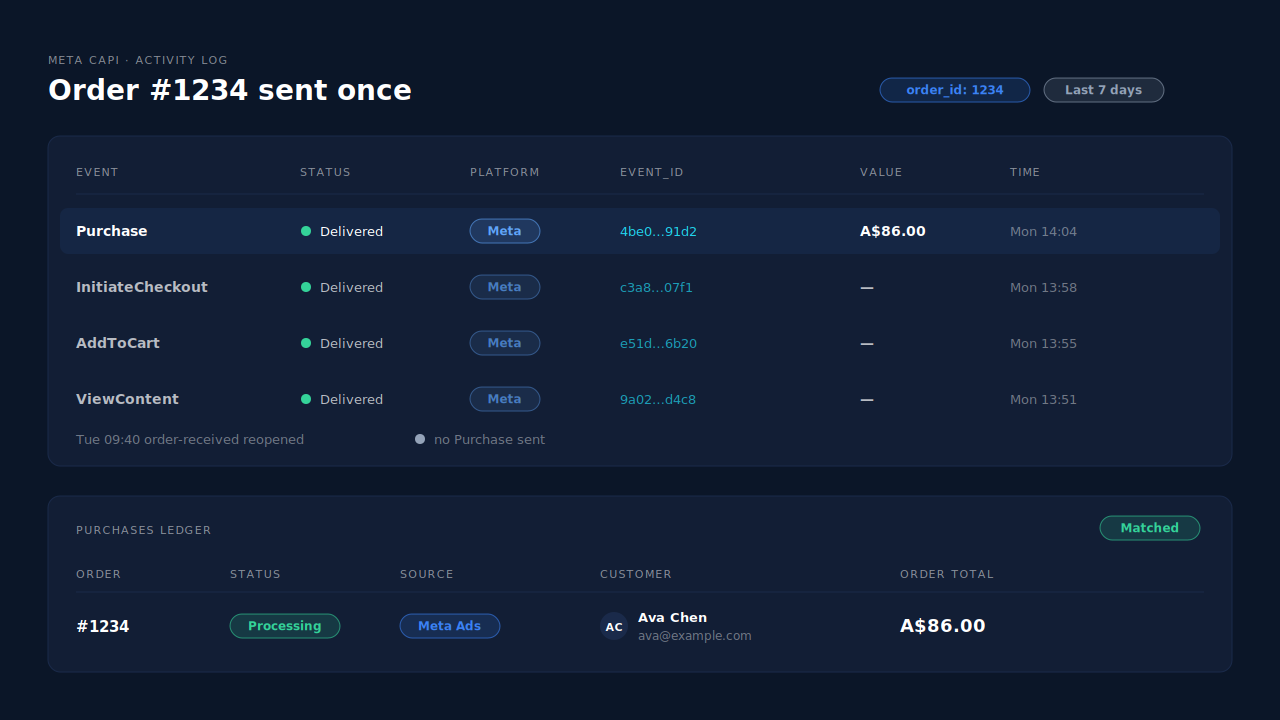
PartialLeads sends the Purchase from WooCommerce’s order webhook, once per paid order, and its WooCommerce plugin fires nothing on the thank-you page. Reopening the order-received link — tomorrow or next month — is just another page view. There is no Purchase attached to it, so there’s nothing to send again.
Where the Purchase comes from. The PartialLeads plugin forwards browse events — view product, add to cart and begin checkout — server-side to Meta, Pinterest and TikTok. The Purchase is owned by the order webhooks. When the order reaches Processing or Completed, the purchase is recorded once and sent. Pending, on-hold, failed and cancelled orders aren’t sent.
Why a repeat can’t happen on PartialLeads’ side. Each event has a deterministic event_id built from the pixel, the event name and the order record, and sends are stored against that id. A redelivered webhook, a retry after a timeout or a reloaded page can’t produce a second Purchase from PartialLeads for the same order. The Purchase carries the full order total, including tax and shipping after discounts, with hashed email and phone from the order.
Where you see it working. The Meta CAPI page shows each server Purchase with its status and time — one per order id. The Purchases ledger lists every paid order with its value, source and session match, so its weekly count should line up with Processing plus Completed in WooCommerce. The Leads list’s API column shows which conversion APIs each buyer was sent to.
The honest constraints. PartialLeads’ event ids are its own. It never double-sends, but it does not deduplicate against another plugin’s browser pixel. If Meta for WooCommerce or PixelYourSite still fires Purchase on the thank-you page, that plugin is the source of the repeat — switch its Purchase off and keep one source per event. An order is recorded once, so later edits to it aren’t re-sent. And PartialLeads controls what gets sent; how Meta attributes it is Meta’s half.
| What breaks | The mechanism | Where you see it in the dashboard |
|---|---|---|
| Reopened order-received page sends another Purchase | Plugin fires nothing on the thank-you page; Purchase comes from the order webhook | Meta CAPI page, one Purchase per order id |
| New event id on every page load | Deterministic event_id from the order record, stored once | Meta CAPI activity log |
| Redelivered webhook or retry | Sends stored against the event id, so a repeat can’t fire | Meta CAPI activity log |
| Unpaid orders counted too | Only Processing or Completed orders are sent | Purchases ledger |
| Another plugin still fires Purchase | No cross-tool dedup — switch the other plugin’s Purchase off | Leads-list API column vs Events Manager sources |
Tell us what's broken. We'll fix your tracking — free.
Describe the tracking/attribution problem you're stuck on and we'll map it to a fix: server-side conversions to Meta, Google, TikTok and Pinterest, plus first-party tracking that survives Safari. No code required.
Sources
- https://developers.facebook.com/docs/marketing-api/conversions-api/deduplicate-pixel-and-server-events
- https://developers.facebook.com/docs/marketing-api/conversions-api/parameters/server-event
- https://developers.facebook.com/docs/marketing-api/conversions-api/parameters/custom-data
- https://developers.facebook.com/docs/meta-pixel/reference