Meta counts extra purchases because your Purchase event is tied to a page load, not to an order. When a shopper pays through an external redirect and comes back, the order status page can load more than once. A browser pixel that fires on that page fires again each time, and Meta counts every copy it cannot match to another.
The order happened once. The page happened twice. Your pixel was listening to the page.
That gap matters more than it looks. Inflated purchase counts make ROAS look better than your bank balance, and the ad algorithm learns from the inflated version. Below: why the redirect causes it, how to prove it on your own store in ten minutes, and how to make Purchase fire once per order no matter how many times the page reloads.
Why does a payment redirect make the Purchase fire twice?
Because the shopper leaves your checkout to pay and then lands on your order status page again when they come back. A browser Purchase event that fires “when the confirmation page loads” has no idea it already fired. Each load is a fresh page, a fresh script run and a fresh Purchase sent to Meta.
Walk through a typical redirect payment. The shopper picks a bank link, a mobile wallet or an installment plan at checkout. They are sent to the provider’s page or app, approve the payment, and get redirected back to your store. Depending on the provider and the device, a few things can happen next:
- The return lands on the order status page, which fires the Purchase.
- The shopper is already sitting on a status page in another tab, and the return opens it a second time.
- A mobile wallet app hands control back to the browser, which reloads the page it had open.
- The shopper refreshes because the payment confirmation took a few seconds to arrive.
- Later, they open the “view your order” link in the confirmation email — the same page, loaded again.
Every one of those is a legitimate page view. None of them is a new order. But a Purchase fired on page load treats them identically.
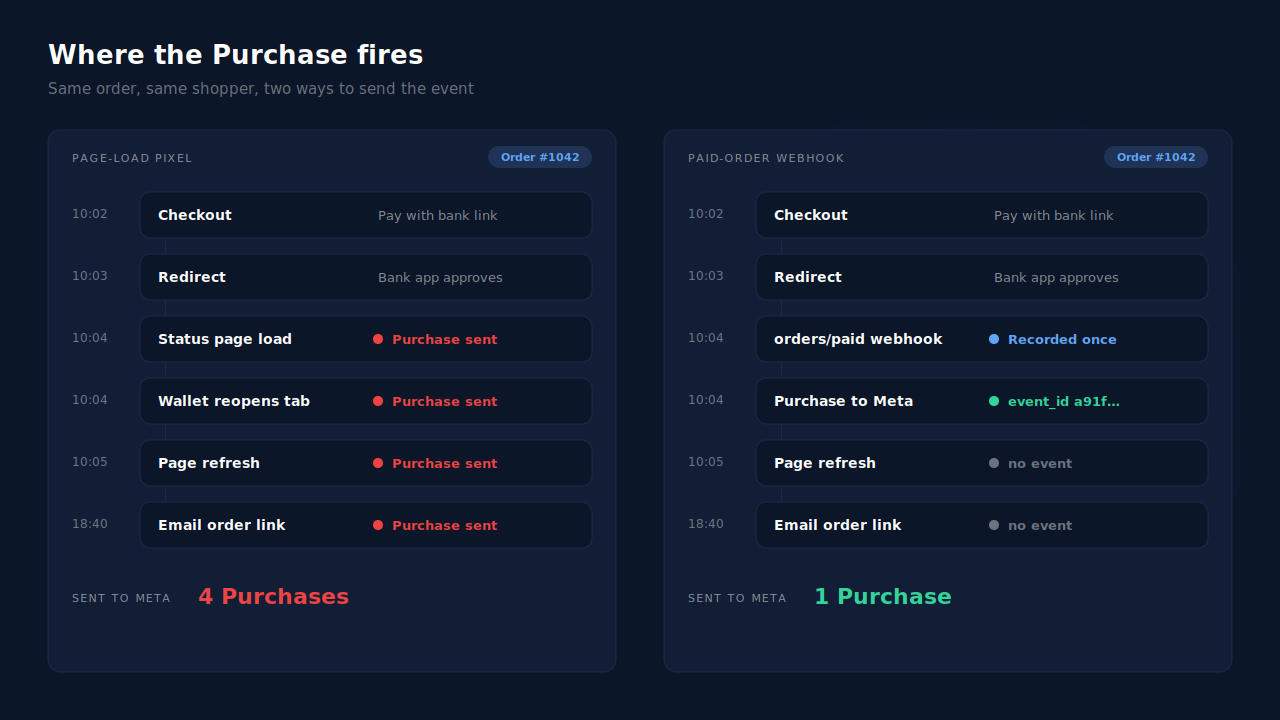
This is why the problem clusters on redirect payment methods. A card paid inline on the checkout page usually produces one clean load of the confirmation page. A payment that leaves your domain and comes back gives the page more chances to load.
Why doesn’t Meta deduplicate the second Purchase?
Because Meta deduplicates on a shared event id, and a page-load pixel usually sends either no event id or a new one every time. Meta’s documented deduplication pairs a browser event and a server event when both carry the same event name and the same event_id. Two browser Purchases with different ids look like two different sales.
Meta is not guessing whether two Purchases are “probably the same order”. It matches identifiers. If the identifier differs, both events count.
The same logic explains the second common setup: two tools sending Purchase for the same order. Shopify’s Facebook & Instagram app fires one, a pixel plugin or a server-side tool fires another, and unless the two systems agreed on the event id in advance, Meta receives two unrelated events. Our Meta CAPI deduplication debug guide walks that case end to end, and what event id to use for Meta deduplication covers how to build one that both sides can share.
How do you prove the extra purchases come from redirects?
Divide Meta’s Purchase count by your paid-order count for the same dates, then split it by payment method. If the ratio sits near 1.0 for card orders and well above it for redirect methods, the page-load pixel is your culprit. It takes one export and one Events Manager view.
- Pull paid orders for a fixed window — say the last 14 days — from your store admin, with the payment method on each order.
- Pull Purchase events for the same window from Events Manager, not Ads Manager. Ads Manager applies attribution windows; Events Manager shows what was actually received.
- Compute purchases per order. A ratio of 1.3 in this illustrative example means roughly three orders in ten were counted twice. Anything meaningfully above 1.0 is duplication, not a rounding issue.
- Place one test order with a redirect method and watch the Test Events tab while you do it. Pay, return to the store, refresh once and open the order link from the confirmation email. Count the Purchases that arrive.
- List every source of Purchase. Test Events shows whether each event arrived from the browser or the server; check every app and plugin with a Meta connection for its own Purchase. Two senders for one test order means you have a source problem on top of the reload problem.
Keep the time zones aligned between the two exports, or the edges of your window will skew the ratio. Why Meta shows more conversions than your CRM covers the other causes of an over-count — attribution windows and view-through among them — so you can rule them out before blaming the pixel.
How do you stop duplicate purchases without a new tool?
Make Purchase depend on the order, not the page. You have three options, in rising order of reliability: guard the browser event so it fires once per order, share one event id between browser and server so Meta can pair them, or move Purchase off the page entirely and send it from the order itself.
Guard the browser event. If your Purchase code runs on the order status page, have it remember which order ids it already sent — in the browser’s local storage, for example — and skip the send on any later load. This fixes refreshes in the same browser. It does not fix a return that opens in a different browser, such as a wallet app handing off to the system browser, because that browser has no memory of the first send.
Use the order to build the event id. If you send Purchase from both the browser and the server, give both the same event_id derived from the order. Meta can then pair the two into one. This is the correct setup when two senders are unavoidable, but it only works if every sender builds the id the same way.
Send Purchase from the order, not the page. Your store emits an event when an order is created and paid. A Purchase sent server-side from that event exists once per order by construction, because there is only one order. Page loads, refreshes and email clicks stop mattering. The mechanics for doing this on Shopify are in firing Shopify purchase events server-side without an app.
Then remove the second sender. Whatever you choose, one system owns Purchase. If Shopify’s Facebook & Instagram app is also sending Purchase from the browser, switch its Purchase off, or choose it as the owner and switch the other off. Keep the Meta base pixel itself on the site: it sets the _fbp cookie that server events rely on for matching, and removing it trades a duplicate problem for a match-quality problem.
Why does an inflated purchase count hurt more than your reporting?
Because Meta optimises toward the conversions it receives. An ad set that drives redirect-payment buyers gets credit for more purchases than it produced, so the delivery system spends more on the audiences and placements that happen to trigger reloads. Your ROAS inflates, and the bidding follows the inflation.
The damage is uneven, which is what makes it hard to spot. If your redirect methods are popular in one country — bank links and local wallets often are — campaigns targeting that market look stronger than campaigns targeting card-heavy markets. You scale the wrong one with confidence.
Value-based bidding makes it worse. A duplicated Purchase carries the order value twice, so the algorithm sees high-value buyers where there were ordinary ones.
How does PartialLeads send one Purchase per paid order?
By sending Purchase from the order webhook, never from a page load. When Shopify marks an order paid, PartialLeads records it once and sends one server-side Purchase through the Conversions API. A shopper returning from a redirect, refreshing or reopening the order link cannot create a second one.
The Purchase is order-driven. PartialLeads receives Shopify’s order webhooks and sends a Purchase only when the order is paid (financial_status = paid). Unpaid, pending and cancelled orders are not sent. A redirect payment that is still pending when the shopper returns sends nothing until the payment is confirmed.
An order is recorded once. Each purchase is deduplicated on the store, the source, the order id and the status phase, so a webhook that Shopify redelivers does not create a second record. Later edits to the same order do not re-send the event.
The event id is deterministic. Every Purchase carries an event_id built as a SHA-256 hash of the pixel id, the event name and the record id, and each send is stored against a unique key. A retry after a timeout reuses the same id, and a second dispatch of the same record is physically blocked.
The value is the order total. Purchase carries the full order total — tax and shipping included, after discounts — in the order’s currency, once.
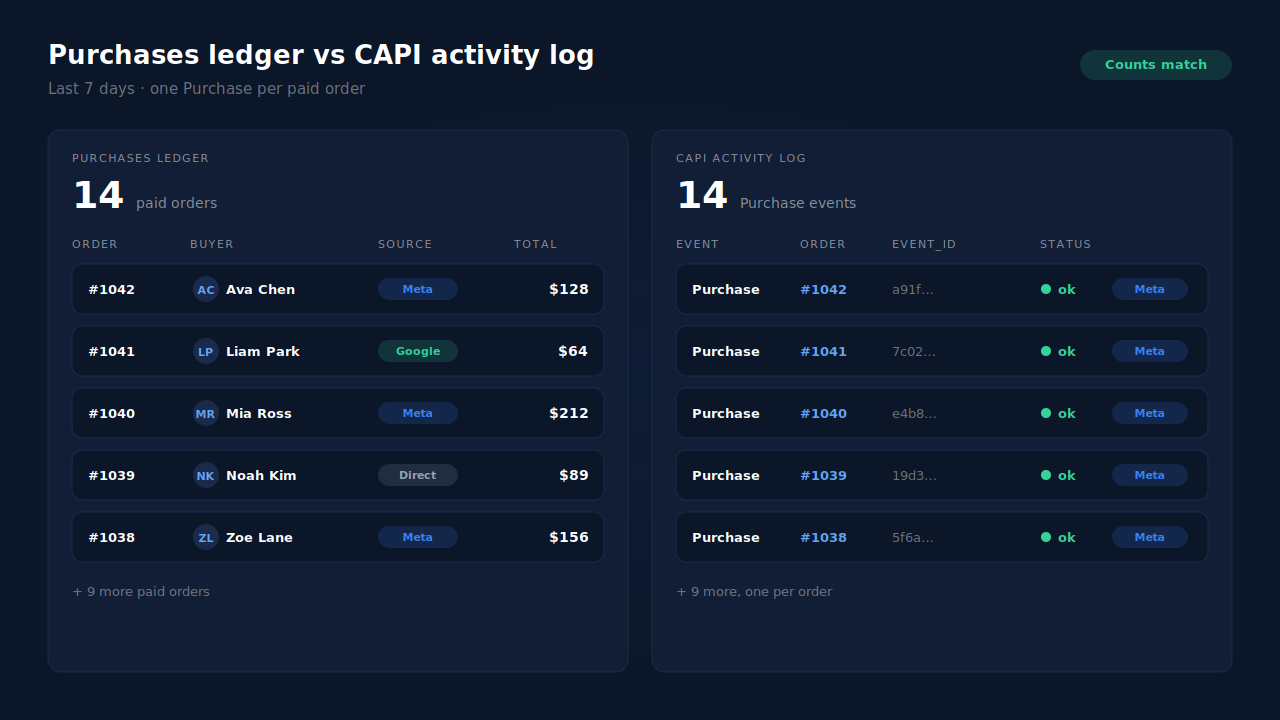
Where you see it working. The Purchases ledger lists every paid order PartialLeads recorded, matched or unmatched to a session. The CAPI activity log lists each Purchase sent to Meta with its status. Count both for the same dates and they should agree, one Purchase per paid order. In the Leads list, the API column shows which conversion APIs each buyer was sent to.
The honest constraints. PartialLeads’ event ids are its own. It never sends the same Purchase twice, but it does not deduplicate against another app’s browser pixel. If Shopify’s Facebook & Instagram app keeps firing its own Purchase, Meta will still count both — keep one source per event, as covered in fixing Meta CAPI tracking on Shopify. A redirect payment that takes more than seven days to confirm is still sent, but its event time is clamped to Meta’s 7-day window. And delivery is the half PartialLeads controls: every paid order is sent, while whether Meta ties that Purchase to an ad click depends on the identifiers captured and on Meta’s own matching.
| What breaks | The mechanism | Where you see it in the dashboard |
|---|---|---|
| Order status page reloads after a payment redirect | Purchase sent from the paid-order webhook, never on page load | CAPI activity log, one Purchase per order |
| Shopify redelivers the same order webhook | Purchase recorded once per store, order id and status phase | Purchases ledger, one row per order |
| A send times out and retries | Deterministic event_id plus a unique dedup key per config |
CAPI activity log status per event |
| Pending redirect payment never completes | Only paid orders are sent | Purchases ledger, paid orders only |
| Another app also fires a browser Purchase | Not deduplicated — keep one source per event | Compare Events Manager senders with the API column |
Tell us what's broken. We'll fix your tracking — free.
Describe the tracking/attribution problem you're stuck on and we'll map it to a fix: server-side conversions to Meta, Google, TikTok and Pinterest, plus first-party tracking that survives Safari. No code required.
Sources
- https://developers.facebook.com/docs/marketing-api/conversions-api
- https://developers.facebook.com/docs/marketing-api/conversions-api/deduplicate-pixel-and-server-events
- https://developers.facebook.com/docs/marketing-api/conversions-api/parameters/fbp-and-fbc
- https://developers.facebook.com/docs/meta-pixel/reference