When fake orders pollute your Shopify pixel data, cancel them, make them harder to place, and stop the thank-you page from being the thing that reports a sale to Meta. Send Purchase server-side only when Shopify marks an order paid. Unpaid fakes then never reach Meta. Fakes paid with stolen cards still do, so fraud checks and refunds stay your job.
A typical attack: a run of orders arrives in an afternoon: gibberish names, throwaway emails, the same address with small variations, cash on delivery every time. Nobody will ever pay for them.
The orders are annoying. The tracking damage is worse. Each one loaded a thank-you page, and each thank-you page told Meta that a purchase just happened.
Why do fake orders fire your Meta pixel at all?
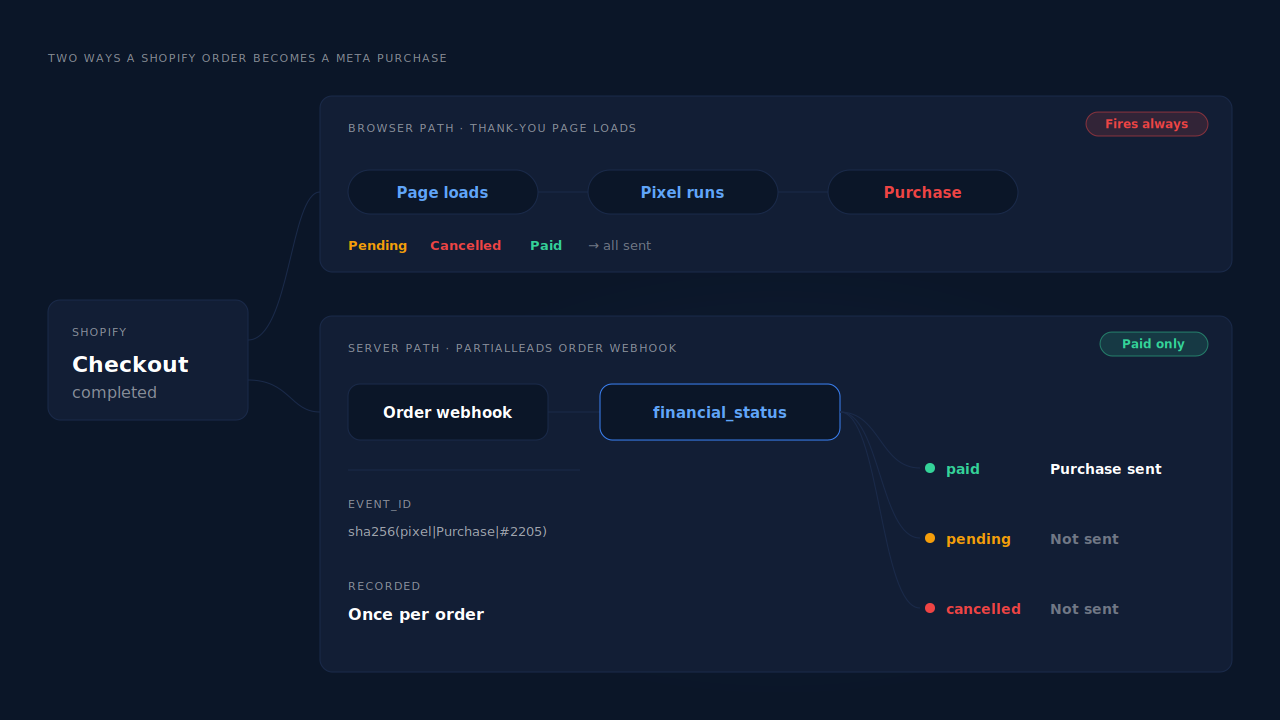
Because the browser pixel reports a Purchase when the checkout completes and the confirmation page loads, not when money arrives. With cash on delivery, bank transfer or any manual payment method, the checkout completes with the order still unpaid. A fake order placed that way looks identical to a real sale from the browser’s point of view.
The Meta Pixel (formerly Facebook Pixel) is a script in the shopper’s browser. It knows what page it is on and what the checkout just told it: an order number, a value, a currency. It does not know whether the payment will ever clear, because at that moment nobody does.
For card payments this rarely matters, because the card is authorised before the confirmation page appears. For manual payment methods it matters a lot. Shopify creates the order, shows the confirmation page, and records the payment as pending until you mark it paid.
That gap is exactly what fake-order attacks exploit. Whether it is a competitor trying to wreck your data, a bored prankster or a script testing your checkout, the cheapest fake order is one that completes checkout without paying. Every one of them fires Purchase in the browser.
What does fake order data do to your Meta campaigns?
It teaches Meta to find more people like the fakers. Meta’s delivery system optimises toward the people who complete your optimisation event. When a batch of fake orders reaches Meta as Purchase, the system treats them as buyers and learns from them. Reported return on ad spend rises while real revenue stays flat.
Optimisation. If a campaign optimises for Purchase, each fake becomes a training example. The damage scales with the ratio: a handful of fakes against hundreds of real sales is noise, but a batch of fakes against a small store’s weekly orders can dominate what the algorithm sees.
Value-based bidding. Fake orders often carry large carts, because the faker is not paying. If you optimise for purchase value, those inflated values tell Meta it found high spenders.
Reporting. Ads Manager shows the fake revenue as if it were real. The ad set that happened to receive the fakes looks like your best performer, and a budget decision made that week is a decision made on invented numbers.
Treat any Purchase Meta has already received as permanent. The practical fix is to stop new fakes from counting, not to clean up old ones, and to be careful about scaling anything based on the polluted window.
How do you confirm the orders are fake before you act?
Look for the patterns that real buyers never produce together. Fake orders tend to cluster in time, share an IP address or device, use disposable or nonsense emails, repeat one shipping address with small changes, choose a manual payment method, and never respond to a confirmation message. Two or three of those together is a strong signal.
Work through it like this:
- Line up the timestamps. Sort recent orders by time. Real orders spread out; a burst of near-identical orders within minutes rarely comes from real shoppers.
- Check the payment method and status. Filter for orders that are still unpaid. If the suspicious batch is all cash on delivery or bank transfer, it cost the attacker nothing.
- Read the order’s risk details. Shopify shows fraud-analysis indicators on each order page. They are designed around card fraud, so a clean result on an unpaid cash-on-delivery order proves little, but a flagged one confirms the pattern.
- Contact one customer. Call or email the number on one suspicious order. A real buyer answers. A fake one bounces, or reaches someone who never ordered anything.
- Compare with Events Manager. In Meta’s Events Manager, look at the Purchase count for the same dates. If it jumped by roughly the number of fakes, you know how much of the signal is polluted.
How do you stop fake orders from counting as purchases?
Cancel the fakes, make fake orders harder to place, and move Purchase off the thank-you page. The first two reduce the volume. The third is the one that fixes the data, because once Purchase is sent only for paid orders, an unpaid fake order can still reach your admin but can no longer reach Meta as a sale.
Cancel, never mark paid. Cancel the fake orders so they don’t hold inventory or trigger fulfilment. Never mark one paid to clear it out of your queue, because a paid status is what makes an order a sale in every downstream system.
Harden the checkout. Turn on whatever bot protection your checkout offers, and consider limiting the payment methods that let an order complete without paying. If cash on delivery is attracting the fakes, restricting it by region, order value or customer history removes the free attack.
Move Purchase to a paid-order trigger. This is the structural fix. Shopify fires order webhooks from its servers when an order is created and when it is paid. A Purchase sent through the Conversions API from the paid event only exists when money has actually arrived. Firing Shopify purchase events server-side covers the mechanics if you want to build it yourself.
Switch off the browser Purchase. A server-side Purchase does not help while the thank-you page is still sending its own. Keep one source per event: switch off the Purchase from whichever app or custom pixel sends it in the browser, and keep the Meta base code on the store, because it sets the _fbp cookie that server events rely on for matching.
Test without polluting. When you check the new setup, use Meta’s test event code so trial events go to Test Events instead of your live data. Testing Meta CAPI without polluting live data walks through it.
What about fake orders that are actually paid?
A fake order paid with a stolen card is, as far as Shopify knows, a paid order. It will be sent as a Purchase by any system that triggers on payment, because at the moment of payment nothing distinguishes it from a real sale. The fix is downstream: catch it with fraud checks, refund or cancel it, and net it out of your reporting.
That is the honest limit of a paid-only rule. It removes the free attack, the unpaid order, which is the easiest to run at volume. It cannot remove an attack where someone actually pays.
Two things keep the paid case contained. First, Shopify’s fraud analysis on the order page is built for exactly this kind of payment, so review flagged orders before fulfilling them. Second, refunds should reduce the revenue you report, so a refunded fake does not keep inflating your numbers. Why refunds inflate attributed revenue covers what happens when they don’t.
Real cash-on-delivery orders need one more thought. They are sent when you mark them paid, which can be days after the order. Meta’s Conversions API accepts events up to seven days old, so a real order marked paid late arrives with a clamped timestamp. The 7-day event-time window explains how that plays out.
How does PartialLeads keep fake orders out of your Meta data?
PartialLeads sends Purchase to Meta only from Shopify’s order webhooks, and only once Shopify marks the order’s financial_status as paid. Unpaid, pending and cancelled orders are never sent. The browser side never sends Purchase at all, so a fake cash-on-delivery order that loads the thank-you page produces no Purchase from PartialLeads.
Paid orders only. A fake order that never gets paid stays out of Meta, however many confirmation pages it loads. A real cash-on-delivery or bank-transfer order is sent when you mark it paid, within Meta’s 7-day event-time window.
Funnel steps stay funnel steps. The PartialLeads Customer Events pixel sends ViewContent, AddToCart, InitiateCheckout and AddPaymentInfo server-side. A faker clicking through checkout generates checkout events, never a Purchase.
Each order is recorded once. Purchases are deduplicated on the store, the source, the order id and the status phase. Every event carries a deterministic event_id, a SHA-256 hash of the pixel id, event name and record id, so a redelivered webhook or a retry cannot send a second Purchase.
Refunds net out of your reports. A refund gets its own row in the Purchases ledger and nets against revenue, so a paid fake that you refund stops inflating the revenue PartialLeads reports.
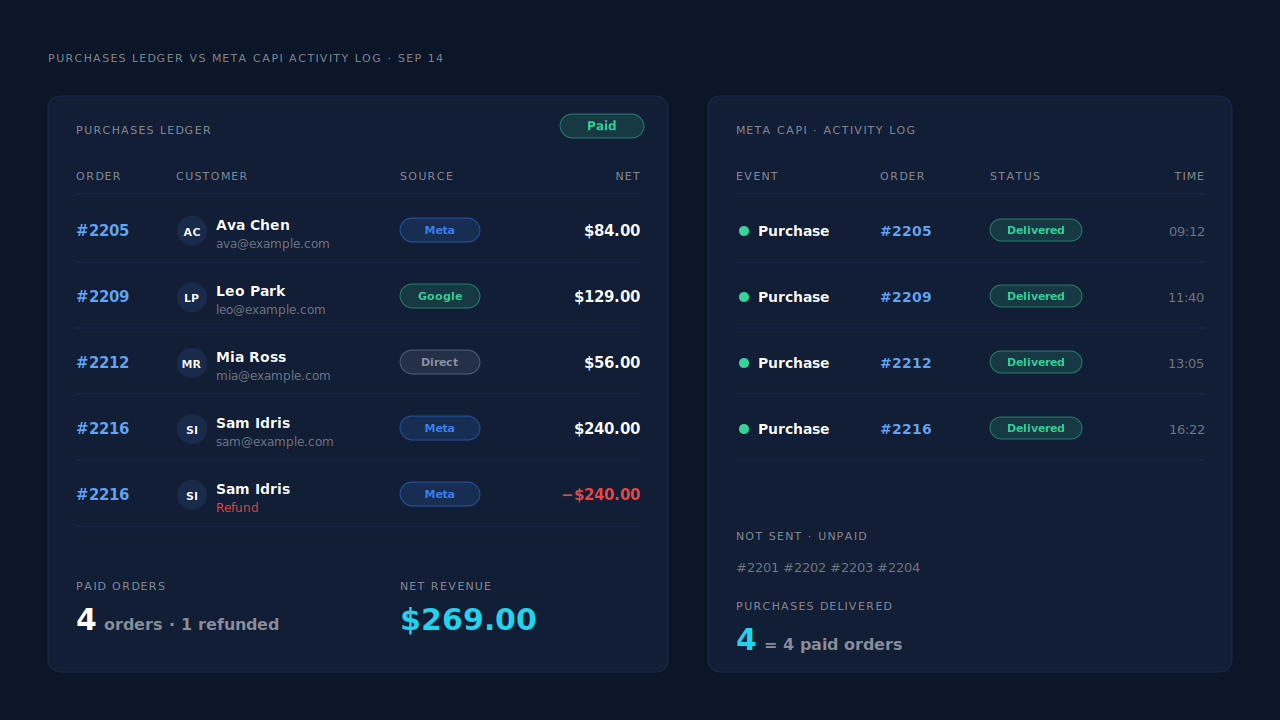
Where you see it working. The Purchases ledger lists the paid orders PartialLeads recorded. The CAPI activity log lists each Purchase sent to Meta with its delivery status. For the same dates, the paid orders in your Shopify admin, the ledger and the log agree, and the fake unpaid orders appear in none of the last two. In the Leads list, the API column shows which conversion APIs each buyer was sent to.
The honest constraints. PartialLeads does not detect fraud or tell a fake order from a real one. It applies one rule: paid or not. A fake paid with a stolen card is sent like any paid order, and while the refund nets it out of PartialLeads’ reports, Meta has already received that Purchase. An order is recorded once, so a later status change does not recall it. PartialLeads also does not remove or deduplicate a Purchase that another app’s browser pixel still sends from the thank-you page — switch that one off, as covered in fixing Meta CAPI tracking on Shopify. What it controls is delivery: every paid order is sent. Whether Meta ties that Purchase to an ad click depends on the identifiers captured and on Meta’s own matching.
| What breaks | The mechanism | Where you see it in the dashboard |
|---|---|---|
| Unpaid fake orders fire Purchase on the thank-you page | Purchase sent only from Shopify’s order webhook once financial_status is paid; nothing fires in the browser |
CAPI activity log, Purchase rows for paid orders only |
| Cancelled and pending orders reach Meta | Pending and cancelled orders are never sent | Purchases ledger, paid orders only |
| Fakers clicking through checkout look like buyers | Checkout steps sent as InitiateCheckout and AddPaymentInfo, not Purchase | CAPI activity log, event name per row |
| A paid fake later refunded keeps inflating revenue | Refund row nets against revenue in PartialLeads reports; Meta keeps the original event | Purchases ledger, refund row |
| Another app’s browser Purchase still fires | Not removed or deduplicated — switch that sender off | Events Manager senders vs the Purchases ledger |
Tell us what's broken. We'll fix your tracking — free.
Describe the tracking/attribution problem you're stuck on and we'll map it to a fix: server-side conversions to Meta, Google, TikTok and Pinterest, plus first-party tracking that survives Safari. No code required.
Sources
- https://developers.facebook.com/docs/marketing-api/conversions-api
- https://developers.facebook.com/docs/marketing-api/conversions-api/parameters/server-event
- https://developers.facebook.com/docs/marketing-api/conversions-api/parameters/custom-data
- https://developers.facebook.com/docs/marketing-api/conversions-api/using-the-api
- https://developers.facebook.com/docs/marketing-api/conversions-api/parameters/fbp-and-fbc
- https://developers.facebook.com/docs/meta-pixel/reference