Your Shopify pixel misses orders from GoKwik, Shopflo and similar checkouts because it listens to Shopify’s checkout, and a third-party checkout replaces it. The buyer pays somewhere your pixel is not running, so no checkout_completed event fires. The order still reaches Shopify. Send Purchase from that order on the server, then match it to the visit.
The symptom usually shows up the week you switch. Paid orders keep arriving in the Shopify admin, Events Manager goes quiet on Purchase, and Shopify’s own reports start crediting a growing share of sales to Direct or an unknown source.
Nothing is wrong with your pixel id, your dataset or your ad account. The buyer’s path changed, and your tracking still assumes the old one.
Why don’t Shopify’s pixels see purchases from a third-party checkout?
Shopify’s pixels (the Customer Events custom pixels and app pixels built on the Web Pixels API) receive checkout events from Shopify’s own checkout pages. A third-party checkout takes the buyer off that path: the cart hands over to the provider’s checkout, the buyer pays there, and the provider creates the order in Shopify. Shopify’s checkout never ran, so it never emitted checkout_completed.
It helps to separate the three things a purchase event needs:
A page where your code runs. Your storefront theme, and Shopify’s checkout, both load your pixels. A provider’s checkout is the provider’s page, whether it opens as a pop-up over your store or on its own address. Your Shopify pixel is not part of it unless the provider deliberately forwards events.
An event to listen for. checkout_started, payment_info_submitted and checkout_completed are Shopify checkout events. If Shopify’s checkout did not handle the payment, those events have nothing to describe. Storefront events such as page_viewed and product_added_to_cart still fire, which is why Add to Cart often looks healthy while Purchase drops to near zero.
A browser that stays long enough. Even when a provider fires its own purchase event, it fires from the buyer’s browser on the provider’s success page. Buyers who pay through a UPI app, a bank redirect or a wallet can leave before that page loads.
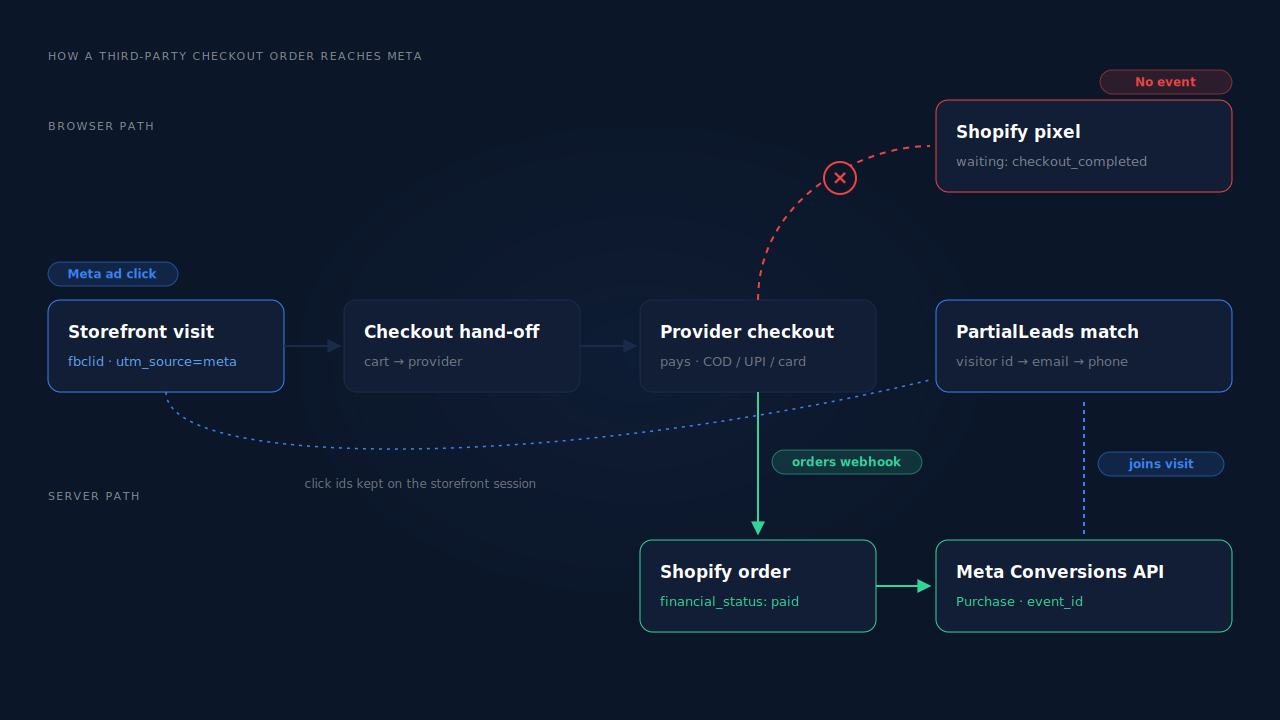
The order record is the only thing every one of these checkouts produces, because the order has to exist in Shopify for you to fulfil it.
Why does Shopify label third-party checkout sales as Direct?
Shopify attributes an order to the session that placed it, using what that session carried: the landing page, the referrer and the UTM parameters. When a third-party checkout creates the order, that storefront session is often not attached to it. With no landing page or referrer to read, the order reads as Direct or as an unknown source.
The ad click did happen. It sits on the storefront visit that ended when the buyer clicked the checkout button, while the order was written by a different system. That gap is the same one that makes ad conversions show as Direct elsewhere: the evidence is on an earlier session, not the converting one.
Some providers pass attribution fields to Shopify when they create the order, such as a note, tags or the original landing URL. Check what yours sends before assuming the data is gone. Even when it is present, Shopify’s reports may not read it the way they read a native checkout session.
How do you confirm the third-party checkout is the gap?
Compare paid orders in the Shopify admin against the Purchase events Meta received for the same days, split by checkout. If orders from the provider’s checkout are missing in Meta while any remaining Shopify-checkout orders are present, you have found it. Then place one real order through the provider while watching your pixel, so you know which layer fails.
Work through it in this order:
- Pick three or four days after the switch. Align both tools to the same time zone first, or the edges of your window will lie.
- Identify the provider’s orders. Most third-party checkouts mark their orders with a source name, a tag or an app attribution in the admin. Filter or export by it.
- Match them against Meta. In Events Manager, list the Purchase events for those days. If your pixel sends the order id, look each order up. Provider orders absent is the confirmation.
- Check Add to Cart for the same days. If storefront events still arrive at their usual volume, the pixel is installed and consenting buyers are tracked. Only the checkout step is dark.
- Place one real order. Use a cheap product and a discount code. Use Meta’s Test Events tab with a test code so the test Purchase does not pollute live data.
- Note the payment method. Repeat with a prepaid method and, if you offer it, cash on delivery. They behave differently downstream.
Can your checkout provider’s own pixel integration fix it?
Partly. Most third-party checkouts offer a setting where you paste your Meta pixel id, and some can also send server events. That restores a purchase signal from the provider’s checkout, but it is still a separate tool with its own event ids, and it only knows the checkout visit, not the ad click that started the journey on your storefront.
Before you turn it on, check three things.
Which event ids it sends. Meta deduplicates a browser event and a server event when both carry the same event name and the same event_id. If the provider sends Purchase from the browser and you add a server Purchase with a different id, Meta counts both. Keep one source per event.
Which identifiers it passes. Meta ties a server event to a person through hashed email and phone, the _fbp and _fbc cookie values, IP address and user agent. A checkout on a different address cannot read the cookies your storefront set, so ask whether the provider forwards them from your store.
When it fires for cash on delivery. A COD order is placed today and paid on delivery, sometimes days later. A provider that fires Purchase at order placement will report COD orders that are later refused or returned as revenue.
Why is the Shopify order webhook the reliable place to send Purchase?
Because every third-party checkout has to create the order in Shopify, and Shopify notifies subscribed apps through order webhooks whichever checkout took the payment. A Purchase sent from that webhook exists for every paid order, from any checkout, whether or not any browser page loaded. It also sees the order’s payment status, so it can wait until the order is paid.
The server-side send goes to Meta through the Conversions API, and firing Shopify purchase events server-side without an app walks through the build. The send is the easy part. The hard part is the one this checkout made harder: the order payload does not carry the ad click, so you have to join the order back to the storefront visit that did.
Cash on delivery adds a timing rule. Meta accepts server events only within a limited window after the event happened, so an order marked paid days after it was placed runs into Meta’s 7-day event-time window. Send COD Purchases when the order is marked paid, and mark delivered orders paid promptly.
How does PartialLeads track orders from a third-party checkout?
PartialLeads sends Purchase from Shopify’s order webhooks, not from any checkout page, so an order created by GoKwik, Shopflo or another provider is sent the same way as a native Shopify order: once it is paid. It then matches the order to the storefront session where the ad click landed.
Every paid order is sent. PartialLeads listens for Shopify’s order webhooks and sends a server-side Purchase when the order’s financial_status is paid. Unpaid, pending and cancelled orders are not sent, so a COD order is sent when it is marked paid, not when it is placed. The value is the full order total, including tax and shipping, after discounts. An order is recorded once; later edits to it do not re-send the event. Meta’s 7-day limit still applies: PartialLeads clamps event_time into Meta’s window rather than sending a timestamp Meta would reject.
The order is matched to the storefront visit. The PartialLeads pixel records the visitor on your storefront from the first page view, with the UTMs and click ids that arrived. When the order comes in, PartialLeads matches it to a session in tiers: the visitor id first, then email, then phone, then IP. A third-party checkout is exactly where the visitor id is most likely not to survive, so the email and phone on the order do the work. Phone numbers are normalised to E.164 before matching and hashing, with the country code filled from the session’s location when the buyer typed a local number.
The journey is stitched, not guessed. Visitor identity resolution unions a person’s sessions, so a buyer who clicked a Meta ad on Monday and paid through the provider’s checkout on Wednesday can still be tied to the click. Where the click carried an fbclid but the _fbc cookie is missing, PartialLeads rebuilds _fbc from it.
Nothing is double-sent by PartialLeads. Each Purchase carries a deterministic event_id, so retries and redelivered webhooks cannot produce a second send.
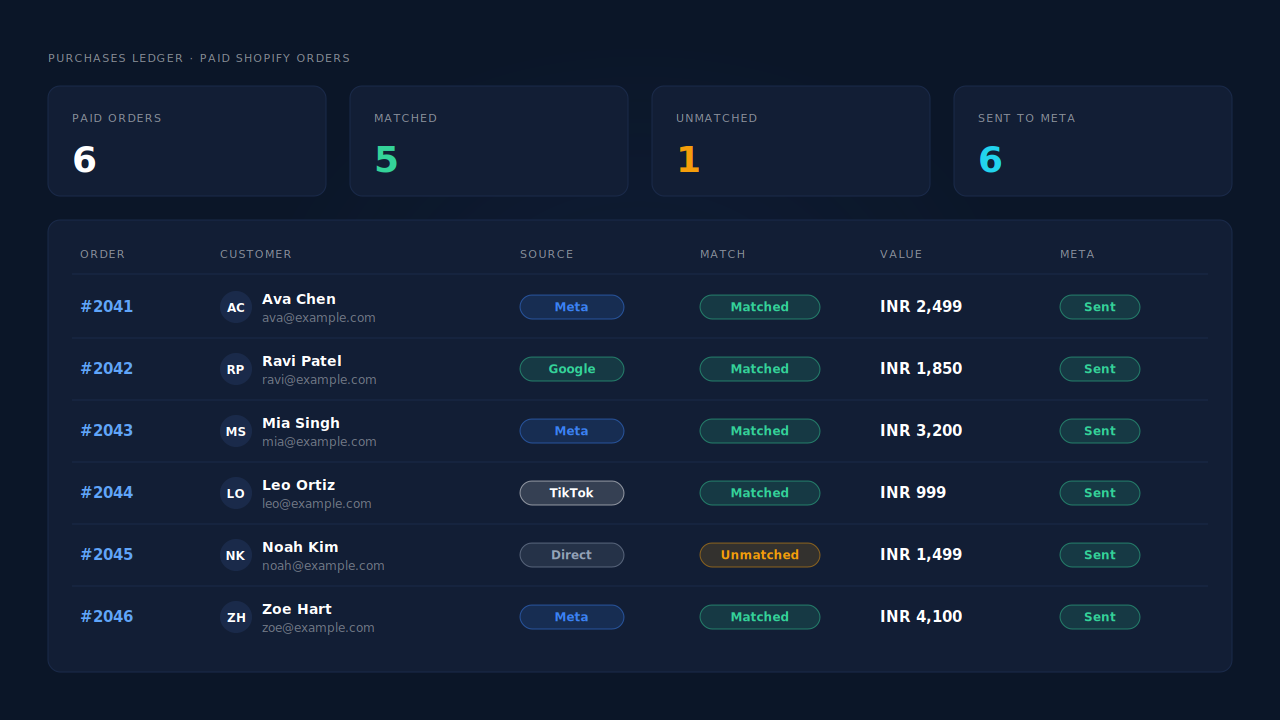
Where you see it working. The Purchases ledger lists every paid order PartialLeads recorded, matched or unmatched to a session, whichever checkout created it. The Attribution report credits matched orders to the channel and campaign behind the storefront visit instead of Direct. The CAPI activity log shows each Purchase sent to Meta with its delivery status.
The honest constraints. Delivery is the half PartialLeads controls: every paid order is sent. Matching is maximised, not guaranteed; an order with no surviving visitor id and an email or phone never seen on the storefront reaches Meta without a click attached. PartialLeads’ event ids are its own, so it does not deduplicate against your checkout provider’s pixel or Shopify’s Facebook & Instagram app. If the provider sends Purchase, switch that off and let one source own it. Keep the Meta base pixel on your storefront, because server events rely on the _fbp cookie it sets. The wider cleanup lives in how to fix Shopify tracking, attribution and catalog.
| What breaks | The mechanism | Where you see it in the dashboard |
|---|---|---|
Shopify pixel never sees checkout_completed |
Purchase sent from Shopify’s paid-order webhook, not a checkout page | CAPI activity log, one Purchase per paid order |
| Provider-created orders show as Direct | Order matched to the storefront session by visitor id, then email, phone and IP | Purchases ledger matched/unmatched, Attribution report |
| Visitor id lost at the checkout hand-off | Identity resolution joins sessions; E.164 phone matching; _fbc rebuilt from fbclid |
Journey ribbon on the Leads list |
| COD orders counted before they are paid | Only paid orders sent; event_time kept inside Meta’s window |
Purchases ledger, CAPI activity log |
| Provider pixel and server both send Purchase | Not deduplicated across tools — keep one source | Events Manager, browser vs server counts |
Tell us what's broken. We'll fix your tracking — free.
Describe the tracking/attribution problem you're stuck on and we'll map it to a fix: server-side conversions to Meta, Google, TikTok and Pinterest, plus first-party tracking that survives Safari. No code required.
Sources
- https://developers.facebook.com/docs/marketing-api/conversions-api
- https://developers.facebook.com/docs/marketing-api/conversions-api/deduplicate-pixel-and-server-events
- https://developers.facebook.com/docs/marketing-api/conversions-api/parameters/customer-information-parameters
- https://developers.facebook.com/docs/marketing-api/conversions-api/parameters/fbp-and-fbc
- https://developers.facebook.com/docs/marketing-api/conversions-api/parameters/server-event
- https://developers.facebook.com/docs/marketing-api/conversions-api/using-the-api