PayPal Express orders go untracked on Shopify because the buyer leaves your store to approve the payment on PayPal, then comes back. Browser tracking breaks on that round trip: the purchase event may never fire, and the return visit often loses the ad click. The order still reaches your Shopify admin, so send Purchase from the order, not the browser.
The pattern is easy to spot once you look for it. Card orders show up in Meta Events Manager. PayPal orders are in the admin, paid, with the right totals, and missing from Meta. When they do show up somewhere, Shopify’s reports credit them to Direct or to PayPal as a referrer.
Your pixel is installed correctly. The buyer’s path simply took a detour your tracking was never built to follow.
What happens to your tracking when a buyer pays with PayPal Express?
PayPal Express puts a PayPal button on your cart or checkout. The buyer clicks it, logs in on PayPal’s site or in a PayPal window, approves the payment, and is returned to Shopify to finish. Every tracking step that depends on the browser has to survive that hand-off, and several can fail without any error.
Here is the path, and where each piece can drop.
The click to PayPal. Buyers who press the PayPal button from the cart can skip Shopify’s contact and shipping steps, because PayPal hands back the address. Checkout events you rely on for your funnel, such as begin checkout or add payment info, may not fire the way they do for a card buyer.
The approval on PayPal. For those minutes the buyer is on PayPal, not on your store. Your Shopify pixel is not running there, and nothing you installed can see what happens.
The trip back. The buyer returns to Shopify from a PayPal address. To an analytics tool that starts sessions from referrers, that looks like a fresh visit that came from PayPal, not from your Meta ad.
The finish. The purchase event depends on the buyer’s browser reaching the final confirmation step and your pixel running there. A buyer who closes the tab, loses signal on mobile or blocks your pixel after the PayPal step leaves a paid order with no browser event.
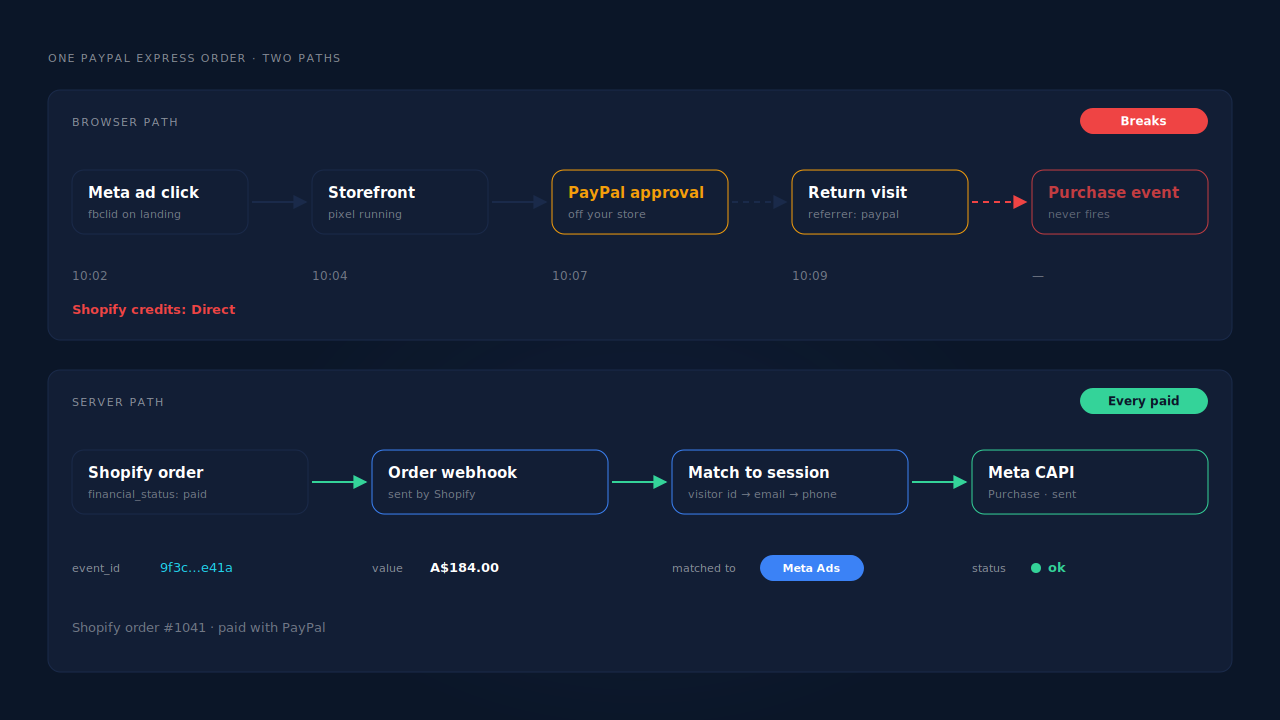
The one thing every PayPal Express payment produces, whatever the browser did, is a paid order in Shopify.
Why do PayPal orders show up as Direct or as a PayPal referral?
Because the session that finished the order is not the session that carried the ad click. The Meta or Google click landed on your storefront with its UTMs and click id. The buyer then left for PayPal and came back, and the returning visit carries PayPal as its referrer, or no usable referrer at all. Reports that credit the converting session see PayPal or Direct.
The ad click is not gone. It sits on the storefront visit before the PayPal hop. This is the same shape as ad conversions that show as Direct in general: the evidence lives on an earlier session, not the one that converted. It is also a close cousin of attribution breaking between your landing page and Shopify checkout, with an extra domain in the middle.
If you use an analytics tool that supports a referral exclusion list, adding PayPal there stops it from starting a new session on the return. That cleans up the referral report. It does not create a Meta purchase event that never fired.
How do you confirm PayPal Express is the gap?
Split your paid Shopify orders by payment method for a few recent days and compare each group against the Purchase events Meta received. If card orders appear in Meta and PayPal orders mostly do not, PayPal is the gap. Then place one real PayPal order yourself while watching the pixel, so you see exactly which step drops.
Work through it in this order:
- Pick three or four recent days. Put Shopify and Events Manager on the same time zone first, or the edges of the window will mislead you.
- Export paid orders with the payment gateway. Shopify’s order export and order filters show which gateway took each payment. Separate PayPal from everything else.
- Match each group against Meta. If your pixel sends the order id with Purchase, look orders up one by one. If not, compare daily counts per group.
- Check the funnel events. If add to cart arrives at its usual volume, the pixel is healthy on the storefront, and only the PayPal leg is dark.
- Place one real PayPal order. Use a cheap product and a discount code. Send it with a test code in Meta’s Test Events tool so the test Purchase stays out of live data.
- Try it twice. Once from the cart’s PayPal button and once by choosing PayPal as the payment method at checkout. The two paths can behave differently.
Does adding a second pixel or a PayPal fix solve it?
Not on its own. Adding another browser pixel, a thank-you page script or a referral exclusion still depends on the buyer’s browser completing the trip back from PayPal. Those fixes clean up some reports, but any order where the browser did not make it back still has no purchase event. The order record is the only signal every PayPal payment produces.
Before you add anything, check what already sends Purchase. Shopify’s Facebook & Instagram app, a custom pixel and a server-side tool can all send the same order. Meta deduplicates a browser event and a server event only when both carry the same event name and the same event_id. Two tools with their own ids will double-count every order that fires in both places.
Also check which identifiers reach Meta. Meta matches a server event to a person through hashed email and phone, the _fbp and _fbc cookie values, IP address and user agent. The PayPal buyer’s email and phone are on the order, which makes a server-side send from the order a strong match candidate even when the browser event is missing.
Why is the Shopify order webhook the reliable place to send Purchase?
Because a PayPal Express payment ends with a paid order in Shopify, and Shopify notifies subscribed apps through order webhooks no matter which gateway took the money. A Purchase sent from that webhook exists for every paid PayPal order, whether or not the buyer’s browser came back from PayPal. It also carries the payment status, so it can wait until the order is actually paid.
The send goes to Meta through the Conversions API. Sending is the easy half. The harder half is attribution: the order webhook does not know which ad the buyer clicked. You have to join the order back to the storefront visit that happened before the PayPal hop.
Timing matters too. Meta accepts server events only within a limited window after they happened, which is Meta’s 7-day event-time window. If your store authorises PayPal payments and captures them later, the order is not paid until you capture, so capture promptly.
How does PartialLeads track PayPal Express orders on Shopify?
PartialLeads sends Purchase from Shopify’s order webhooks, not from any browser page, so a PayPal Express order is sent the same way as a card order: once it is paid. The PartialLeads pixel records the visitor before the PayPal hop, and that visitor id is echoed back to match the order to the original ad session.
Every paid order is sent. PartialLeads listens for Shopify’s order webhooks and sends a server-side Purchase when the order’s financial_status is paid. Unpaid, pending and cancelled orders are not sent. The value is the full order total, including tax and shipping, after discounts. An order is recorded once; later edits to it do not re-send the event. PartialLeads clamps event_time into Meta’s 7-day window rather than sending a timestamp Meta would reject.
The order is matched to the visit before PayPal. The PartialLeads pixel records the visitor on your storefront from the first page view, with the UTMs and click ids that arrived, such as fbclid or gclid. When the PayPal order comes in, PartialLeads matches it in tiers: the visitor id echoed back with the order first, then email, then phone, then IP. The PayPal return visit never gets the credit, because the match reaches back to the session that carried the click.
The journey is stitched. Visitor identity resolution unions a person’s sessions, so a buyer who clicked a Meta ad on Monday, came back on Wednesday and paid with PayPal is still one person with one journey. Where the click carried an fbclid but the _fbc cookie is missing, PartialLeads rebuilds _fbc from it.
Nothing is double-sent by PartialLeads. Each Purchase carries a deterministic event_id, so retries and redelivered webhooks cannot produce a second send.
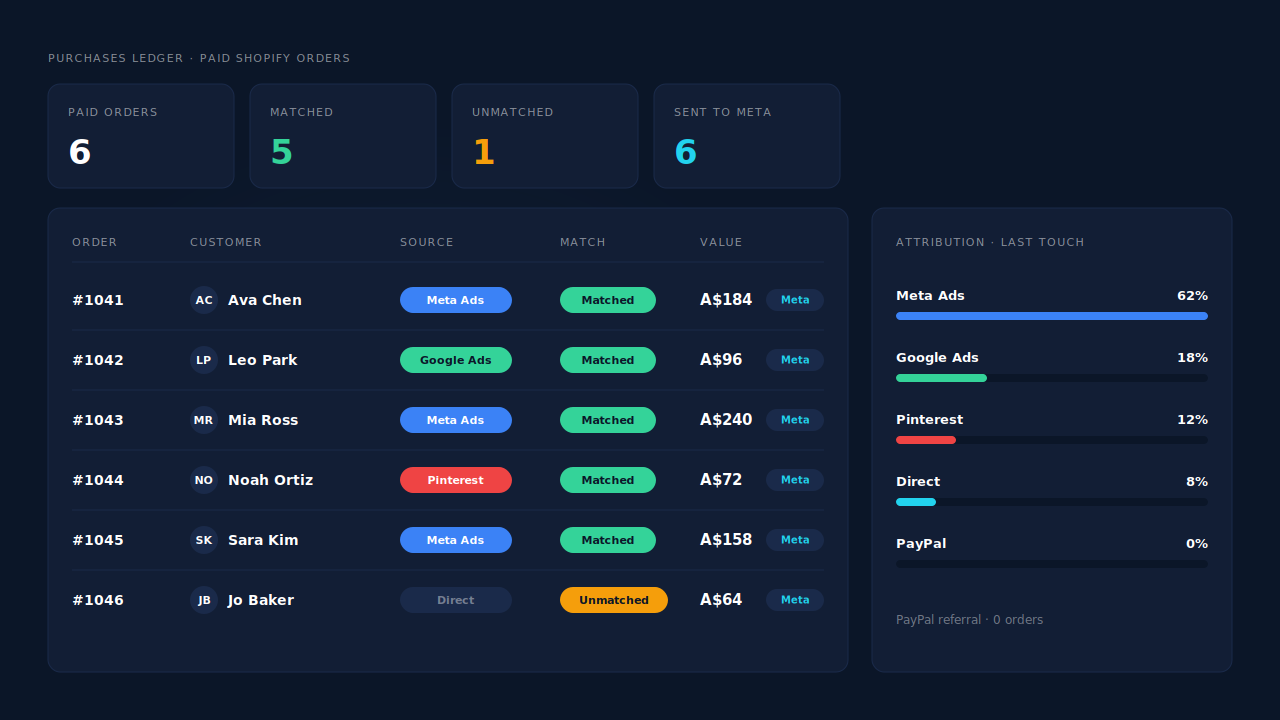
Where you see it working. The Purchases ledger lists every paid order PartialLeads recorded, PayPal included, with the source it matched to or an unmatched flag. The Attribution report credits matched PayPal orders to the channel and campaign behind the storefront visit instead of Direct or PayPal. The CAPI activity log shows each Purchase sent to Meta with its delivery status.
The honest constraints. Delivery is the half PartialLeads controls: every paid order is sent. Matching is maximised, not guaranteed; if the visitor id did not come back with the order and the PayPal email and phone were never seen on your storefront, the order reaches Meta without a click attached. PartialLeads’ event ids are its own, so it does not deduplicate against Shopify’s Facebook & Instagram app or another pixel sending Purchase. Keep one source per event. Keep the Meta base pixel on your storefront too, because server events rely on the _fbp cookie it sets. The wider cleanup lives in how to fix Shopify tracking, attribution and catalog.
| What breaks | The mechanism | Where you see it in the dashboard |
|---|---|---|
| No purchase event after the PayPal round trip | Purchase sent from Shopify’s paid-order webhook, not the browser | CAPI activity log, one Purchase per paid order |
| PayPal orders credited to Direct or PayPal | Visitor id from before the PayPal hop echoed back and matched to the ad session | Purchases ledger with source, Attribution report |
| Visitor id missing on the order | Fallback match on email, then phone, then IP; sessions joined by identity resolution | Journey ribbon on the Leads list, matched/unmatched flag |
| Authorised PayPal orders counted before capture | Only paid orders sent; event_time kept inside Meta’s window |
Purchases ledger, CAPI activity log |
| Shopify app and server both send Purchase | Not deduplicated across tools — keep one source | Events Manager, browser vs server counts |
Tell us what's broken. We'll fix your tracking — free.
Describe the tracking/attribution problem you're stuck on and we'll map it to a fix: server-side conversions to Meta, Google, TikTok and Pinterest, plus first-party tracking that survives Safari. No code required.
Sources
- https://developers.facebook.com/docs/marketing-api/conversions-api
- https://developers.facebook.com/docs/marketing-api/conversions-api/deduplicate-pixel-and-server-events
- https://developers.facebook.com/docs/marketing-api/conversions-api/parameters/customer-information-parameters
- https://developers.facebook.com/docs/marketing-api/conversions-api/parameters/fbp-and-fbc
- https://developers.facebook.com/docs/marketing-api/conversions-api/parameters/server-event
- https://developers.facebook.com/docs/marketing-api/conversions-api/using-the-api