Meta reports a purchase with no matching Shopify order because something other than a real order sent that Purchase event. Usually it is a Purchase wired to a button click or page view, your pixel running on another site, a test or deleted order, or a second app sending its own Purchase. Meta counts whatever arrives with the right name.
Meta does not check your Shopify admin. It has no idea whether an order exists. It receives an event called Purchase, with a value and a currency, and it counts it.
So the question is never “why did Meta invent a sale?” It is “who sent this, and from where?” That is answerable in about fifteen minutes, and the fix is structural: make the only thing that can send Purchase a paid order.
What sends a Purchase to Meta when there is no Shopify order?
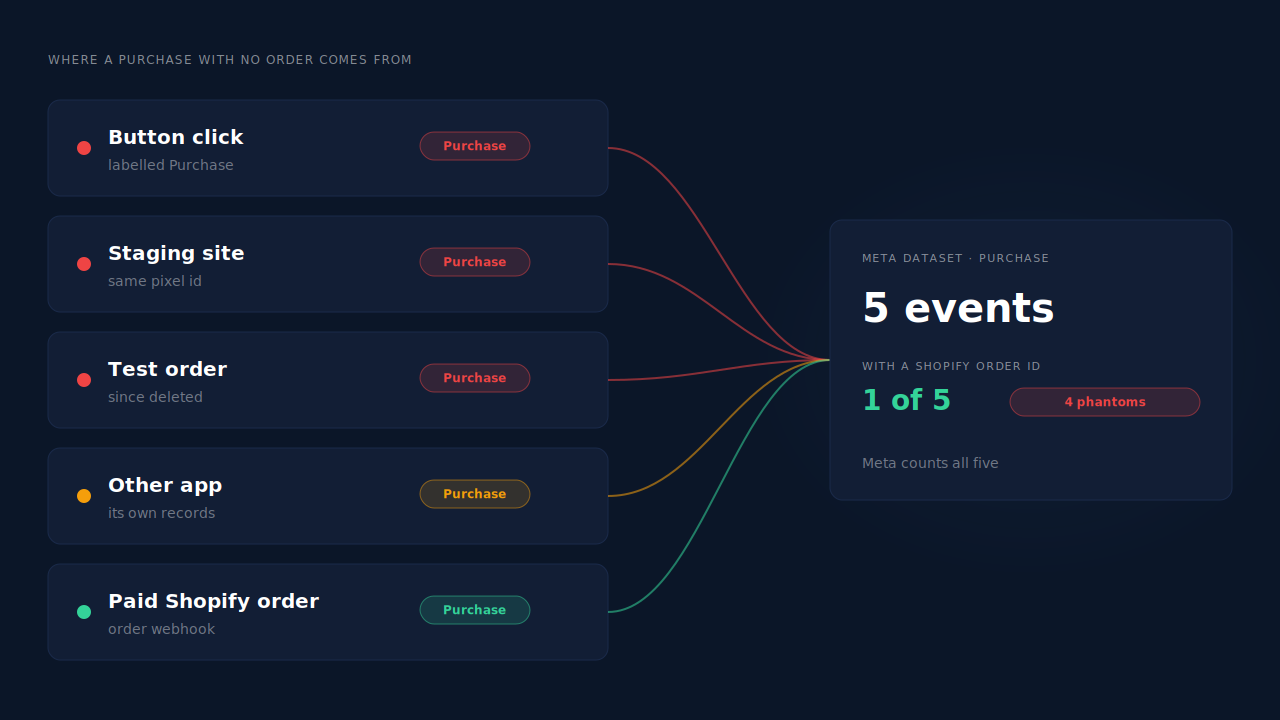
Any code or system holding your pixel id or dataset access can send an event named Purchase. In practice the phantom comes from one of five places: a click or page event mislabelled as Purchase, the pixel installed on a site that is not your store, a test or since-deleted order, another app or integration sending Purchase, or a reporting-date mismatch that only looks like a missing order.
A click or page event labelled Purchase. Someone set up a “Buy now” or “Checkout” button click as a Purchase, either in custom theme code or with Meta’s point-and-click event setup. The shopper clicks, Meta logs a sale, and the shopper never pays. A Purchase fired on a generic “thank you” page that is also reachable without buying does the same thing.
Your pixel on another site. The same pixel id sits on a staging or development copy of the store, an old landing-page builder, a second storefront, or a site that copied your theme code. Every Purchase fired there lands in your dataset.
A test or deleted order. Someone placed a test order to check tracking, the browser pixel fired Purchase, and the order was later deleted or archived out of view. The event stays in Meta; the order does not show in your default Shopify view.
Another sender. A subscription app, a post-purchase upsell tool, a CRM automation, a Zapier flow, or a second store sharing the same dataset can send Purchase from its own records. If that system’s “sale” is not a Shopify order — a renewal billed elsewhere, a manual invoice, an order in a different shop — you get a Purchase with nothing to match in this store.
A date mismatch. Ads Manager can report a conversion against the day of the click or impression rather than the day the order was placed. A purchase “on Tuesday” in Ads Manager can be Thursday’s order in Shopify. That is not a phantom, just two calendars. Why Meta shows more conversions than your CRM covers this reporting gap in depth.
How do you find which source sent the phantom Purchase?
Open the Purchase event in Events Manager, not Ads Manager, and look at where it came from. Events Manager shows whether each event arrived from the browser or the server and which URL or integration sent it. A browser Purchase from a domain you do not recognise, or from a URL that is not an order page, names the culprit.
Work through it in this order:
- Pick a window with a known gap. Choose two or three days where Meta’s Purchase count in Events Manager is higher than your paid Shopify orders. Align the time zone of both exports first, or the edges of the window will lie to you.
- Split by connection method. In the Purchase event’s details, see how many arrived from the browser and how many from the server. A spike on one side tells you which half to chase.
- Read the source URLs. For browser events, check the page URLs and domains reported. A staging domain, a landing-page builder or a product page means Purchase is firing where no order exists.
- Look for the order id. A well-formed Purchase carries an
order_idin its custom data. Take a handful of ids from Meta and search them in Shopify. No id at all, or ids that match nothing, point to a sender that is not building events from orders. - Search deleted and test orders. Include archived and cancelled orders in your Shopify search. A test order that was cleaned up afterward explains a single phantom perfectly.
- Reproduce it live. Open the Test Events tab and click through the store without buying: view a product, add to cart, press the checkout button, then leave. If a Purchase shows up, you found the mislabelled event. Testing Meta CAPI without polluting live data explains how to run this without adding noise to your real numbers.
One more check: list every app, plugin and automation that has a Meta connection. Each one is a potential sender, and the one you forgot about is usually the answer.
How do you stop phantom purchases without a new tool?
Remove every Purchase sender that is not a paid order. Delete click-based and page-based Purchase events, take the pixel off sites that are not your store, keep test orders out of the live dataset, and give Purchase exactly one owner. Then make that owner build the event from the order, with the order id attached.
Kill click and page Purchases. Remove any Purchase set up on a button click, form submit or generic page. Button clicks can still be tracked as InitiateCheckout or a custom event; they just cannot be called Purchase. Check both your theme code and any codeless events configured in Events Manager.
Clean up where the pixel lives. Remove the pixel code from staging stores, old landing pages and anything you have retired. If you find it on a domain you do not control, check the dataset’s settings for domain restrictions.
Test with a test code. When you need to check tracking, send events with a test event code so they route to Test Events instead of your live data, and use test orders sparingly on the live store.
Pick one owner for Purchase. If Shopify’s Facebook & Instagram app, a pixel app and a server-side tool all send Purchase, two of them have to stop. One owner, one event per order.
Build Purchase from the order. Shopify fires an order webhook when an order is created and when it is paid. A Purchase sent server-side from that event exists only when an order exists, and it can carry the Shopify order id so every event is traceable. Firing Shopify purchase events server-side without an app walks through the mechanics, and what event id to use for Meta deduplication covers building an id from the order so retries never double-count.
Keep the Meta base pixel itself on the store while you do this. It sets the _fbp cookie that server events rely on for matching. Removing it swaps a phantom-purchase problem for a match-quality problem.
Why does a phantom Purchase matter if it’s only one sale?
Because Meta optimises toward the purchases it receives, not toward your bank deposits. A click labelled Purchase teaches the delivery system that people who press a button are buyers. It then finds more button-pressers. One phantom is noise; a steady stream of them quietly retrains your campaigns toward the wrong people.
The reporting damage compounds the bidding damage. Reported return on ad spend rises while revenue stays flat, so the campaigns producing phantoms look like your best ones. With value-based bidding, each phantom also carries a value — often the cart value at the moment of the click — so the algorithm thinks it found high spenders.
It also poisons comparisons. If one ad set sends traffic to a landing page where the pixel misfires and another does not, the first wins every test on paper.
How does PartialLeads make every Purchase map to a Shopify order?
PartialLeads sends Purchase to Meta only from Shopify’s order webhooks, and only once an order is paid. A button click, a page view or a returning shopper cannot become a sale, because the browser side never sends Purchase at all. Every Purchase PartialLeads delivers through the Conversions API starts from a real Shopify order.
No order, no Purchase. PartialLeads listens to Shopify’s order webhooks and sends a Purchase only when the order’s financial_status is paid. Unpaid, pending and cancelled orders are not sent. The browser side never sends Purchase, so a thank-you page revisit, a checkout-button click or a staging copy of your theme cannot produce a Purchase from PartialLeads.
Funnel events stay funnel events. The PartialLeads Customer Events pixel captures browsing steps and sends ViewContent, AddToCart, InitiateCheckout and AddPaymentInfo server-side. A click on the checkout button is an InitiateCheckout, never a Purchase.
Each order is recorded once. Purchases are deduplicated on the store, the source, the order id and the status phase, so a redelivered webhook does not create a second record. Every Purchase carries a deterministic event_id — a SHA-256 hash of the pixel id, the event name and the record id — so retries cannot double-send.
The value is the real order total. Purchase carries the full order total, including tax and shipping, after discounts, in the order’s currency.
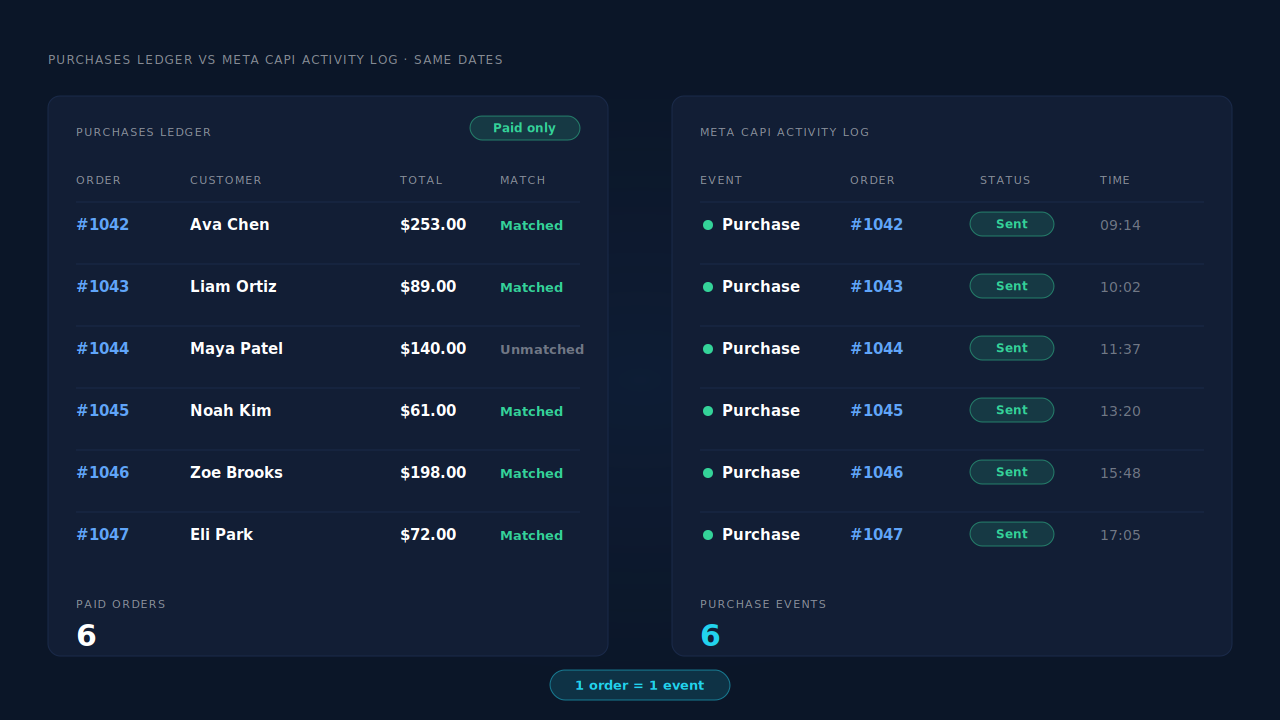
Where you see it working. The Purchases ledger lists every paid order PartialLeads recorded, matched or unmatched to a session. The CAPI activity log lists each Purchase sent to Meta with its delivery status. For the same dates the two agree, one Purchase per paid order, so any Purchase in Events Manager that has no row in your ledger came from somewhere else. In the Leads list, the API column shows which conversion APIs each buyer was sent to.
The honest constraints. PartialLeads controls only its own sends. It does not remove a Purchase that another app, a stray pixel or a click-based event is still sending — that sender has to be switched off, as covered in fixing Meta CAPI tracking on Shopify. Its event ids are its own, so it does not deduplicate against another app’s browser pixel either: keep one source per event. And delivery is the half it controls. Every paid order is sent; whether Meta ties that Purchase to an ad click depends on the identifiers captured and on Meta’s own matching.
| What breaks | The mechanism | Where you see it in the dashboard |
|---|---|---|
| A button click or page view is labelled Purchase | Purchase sent only from Shopify’s paid-order webhook; nothing fires in the browser | CAPI activity log, Purchase rows only for paid orders |
| Test, unpaid or cancelled orders reach Meta | Only orders with financial_status paid are sent |
Purchases ledger, paid orders only |
| Checkout clicks inflate sales | Checkout steps sent as InitiateCheckout and AddPaymentInfo, not Purchase | CAPI activity log, event name per row |
| Redelivered webhooks or retries double-count | Recorded once per store, order id and status phase; deterministic event_id |
Purchases ledger, one row per order |
| Another app or stray pixel still sends Purchase | Not removed or deduplicated — switch that sender off | Events Manager senders vs the Purchases ledger |
Tell us what's broken. We'll fix your tracking — free.
Describe the tracking/attribution problem you're stuck on and we'll map it to a fix: server-side conversions to Meta, Google, TikTok and Pinterest, plus first-party tracking that survives Safari. No code required.
Sources
- https://developers.facebook.com/docs/marketing-api/conversions-api
- https://developers.facebook.com/docs/marketing-api/conversions-api/parameters/server-event
- https://developers.facebook.com/docs/marketing-api/conversions-api/parameters/custom-data
- https://developers.facebook.com/docs/marketing-api/conversions-api/using-the-api
- https://developers.facebook.com/docs/marketing-api/conversions-api/parameters/fbp-and-fbc
- https://developers.facebook.com/docs/meta-pixel/reference