Usually because the two systems are counting different things, not because one of them is lying. Meta counts conversions it can attribute to an ad inside its attribution setting, and reports them against the day of the click. Your CRM counts records created, on the day they were created. Duplicates are real and worth fixing — but they are normally the smaller half of the gap.
The useful move is to separate the two halves before you change anything.
What are you actually comparing when you compare the two numbers?
Two populations, measured on two clocks, under two rules. Ads Manager reports events it received and could attribute to a click or impression from your ads, credited to the date of that click. Your CRM reports rows that exist in a database, credited to the date they were created. Neither definition is wrong; they are not the same question.
Four axes separate them:
Population. Meta counts only events it received; your CRM only records it created. A lead from a landing page that never posts to your CRM exists in one system and not the other — and so does a lead your sales team typed in by hand.
Date basis. Meta credits the conversion to the day of the click. Your CRM stamps it with the moment the record was written.
Window. The ad set’s attribution setting decides how long after a click or an impression a conversion still counts. Change the setting and Meta’s number changes without a single event changing.
Timezone. Ads Manager reports in the ad account’s timezone; your CRM reports in yours. A mismatch shifts every daily row.
None of that is deduplication. All of it happens before a single duplicate event enters the picture.
Why does Meta report a conversion on a day your CRM has nothing?
Because Meta reports conversions against the click date, not the conversion date. A visitor clicks your ad on Monday, thinks about it, comes back on Thursday and fills in the form. Your CRM records a lead on Thursday. Ads Manager adds a conversion to Monday — because that is the day you spent the money it is grading.
This one behaviour creates gaps that look alarming and mean nothing. Any day compared in isolation disagrees, in both directions. The last few days of any report are structurally incomplete on Meta’s side, because conversions are still arriving that will be credited backwards into days you have already exported. A week where you raised spend sharply looks over-reported; a week where you cut it looks under-reported.
The fix is procedural, not technical. Compare a period long enough to absorb the lag — a full month is a reasonable default — and end it far enough in the past that the attribution window has closed. Comparing yesterday against yesterday compares a finished number with an unfinished one.
How much of the gap is view-through credit?
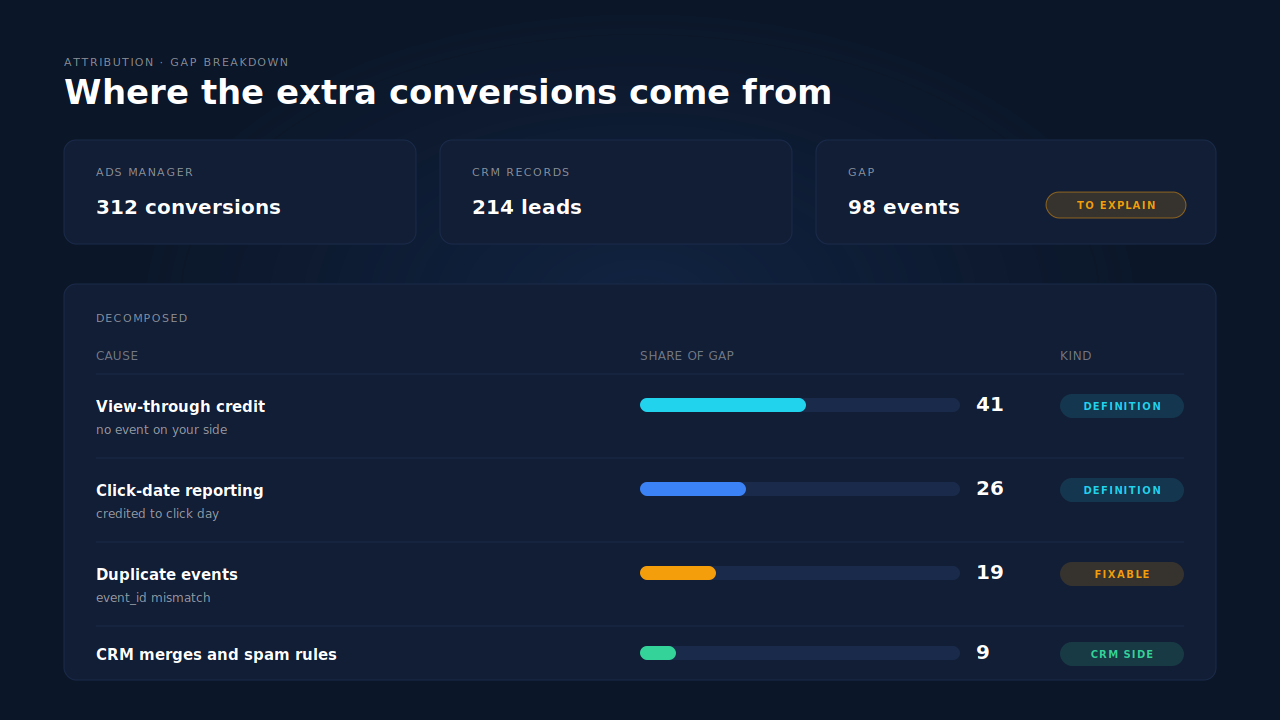
Potentially a large share, and none of it is duplication. Ad platforms can credit conversions to an impression that was served but never clicked. Your own systems never saw that impression, so they cannot count it — there is no event on your side to reconcile.
View-through credit concentrates where you would expect: broad targeting, retargeting, and upper-funnel video. A prospecting campaign with a generous view window contributes conversions your CRM will never attribute to Meta under any model, because from your site’s perspective the person arrived from search or typed the domain.
So split the two before you chase duplicates. Break your conversion column out by attribution setting in Ads Manager, then compare only the click-attributed number against your CRM. It is common for most of a supposed over-reporting problem to be sitting in the view column, where it is a reporting philosophy rather than a bug.
When is the gap a real duplicate?
When the same conversion reaches Meta twice and Meta does not recognise the two copies as one. Five causes account for nearly all of it:
The browser and server copies do not share an event ID. When you run the Conversions API alongside the browser pixel, Meta collapses the pair only when both copies carry the same event name and the same event ID. A randomly generated ID on each side means two events, every time. Which value the event_id should actually be is the part most implementations get wrong.
Two pixels are firing. A base pixel in the theme, a second through a tag manager, a third inside a platform app. Each fires its own copy with its own ID, and the conversion counts as many times as there are pixels.
The confirmation page re-fires. The event sits on a thank-you page that people refresh, bookmark, reach with the back button or open in two tabs. One human, several events.
A single-page app re-fires on navigation. Route changes trigger the tracking code again without a full page load, so someone browsing after converting keeps generating events.
A retried server call is not idempotent. A webhook redelivery, a queue retry, or a timeout that succeeded on the platform’s side but errored on yours each produce a second dispatch. Without a deterministic event ID, the retry is indistinguishable from a new sale.
One ratio identifies this whole class: if Meta’s event count divided by unique users sits well above one for a conversion that can only happen once per person, the extra copies are duplicates rather than definitions. A debug guide for deduplication walks the diagnosis in order.
What else inflates Meta’s count without being a duplicate?
Several things, and they are worth ruling out before you rebuild your tracking:
The event fires at the wrong step. A Lead event bound to a page view, a form focus, or the first field of a multi-step form counts intent, not leads. Meta is faithfully reporting what you asked it to count.
One person generates several qualifying actions. A multi-step form firing at each step, a quote tool someone runs three times, a lead who books a call and also downloads a guide. Your CRM merges these into one contact; Meta counted three events, correctly, because you sent three.
Your CRM is quietly deleting records. Deduplication on email, spam filtering, bot rules and merge-on-import all shrink the CRM side. If your CRM discards a third of what arrives, its count was never the denominator you thought it was.
Test events are in the numbers. Events sent while a test event code is active, or fired from a staging domain onto the production dataset, inflate volume without reaching your CRM.
One dataset, several properties. A pixel shared across your main site, a landing-page subdomain and a separate funnel tool sums conversions from all three. Your CRM may only receive one of them.
How do you reconcile the two numbers, step by step?
In this order, changing one variable at a time. Most teams fail at this because they start at step six.
- Fix the definition. One Meta event against one CRM object —
Leadagainst created contacts, orPurchaseagainst paid orders. Never compare a Meta event against a CRM stage with its own qualification rules attached. - Align the timezone. Put both reports on the same one, or accept that only weekly and monthly totals are comparable.
- Align the period. Take a full month that closed at least a week ago, so the attribution window has expired on Meta’s side.
- Split click from view. Compare only click-attributed conversions. The view column is not reconcilable by design.
- Check deduplication in Events Manager. The event’s diagnostics tell you whether browser and server copies are being collapsed or counted twice. This is the highest-value check on the list.
- Divide events by unique users. A ratio well above one on a once-per-person conversion is your duplicate signal.
- Compare what is left. Only now is the residual meaningful — and it will not be zero. An event Meta could not resolve to a person still appears in delivery numbers while going uncredited in attribution, which is why event match quality belongs inside this investigation rather than beside it.
A stable difference in Meta’s favour on a click-only comparison is the ordinary result for a healthy setup. Chasing it to zero means modelling a graph you cannot see.
How does PartialLeads keep Meta’s count reconcilable with yours?
By making the events it sends impossible to double-count, and by keeping one ledger that shows what was sent and what it matched.
Every dispatch carries a deterministic event ID — a SHA-256 of the pixel id, the event name and the record id — rather than a random value. The same conversion always produces the same ID, so a retry, a redelivered webhook or a catch-up worker picking up a stalled event all resolve to the event Meta already has. Behind that sits a dedup table keyed unique on the config and the event ID, so a second dispatch is physically refused before it leaves. Deduplication stops being a runtime hope and becomes a database constraint.
// Deterministic, not random: the same conversion always hashes to the same id.
const eventId = sha256(`${pixelId}|${eventName}|${recordId}`);
// Browser pixel and server event carry this identical value,
// which is what lets Meta collapse the pair into one conversion.
The retry taxonomy matters as much as the ID. Authentication failures flag the connection for reconnection instead of retrying into a wall; transient failures retry next cycle; permanent payload failures stop. And a response that returns HTTP 200 while quietly processing fewer events than it received is surfaced rather than logged as a success — the failure mode that makes a dashboard look green while conversions go missing.
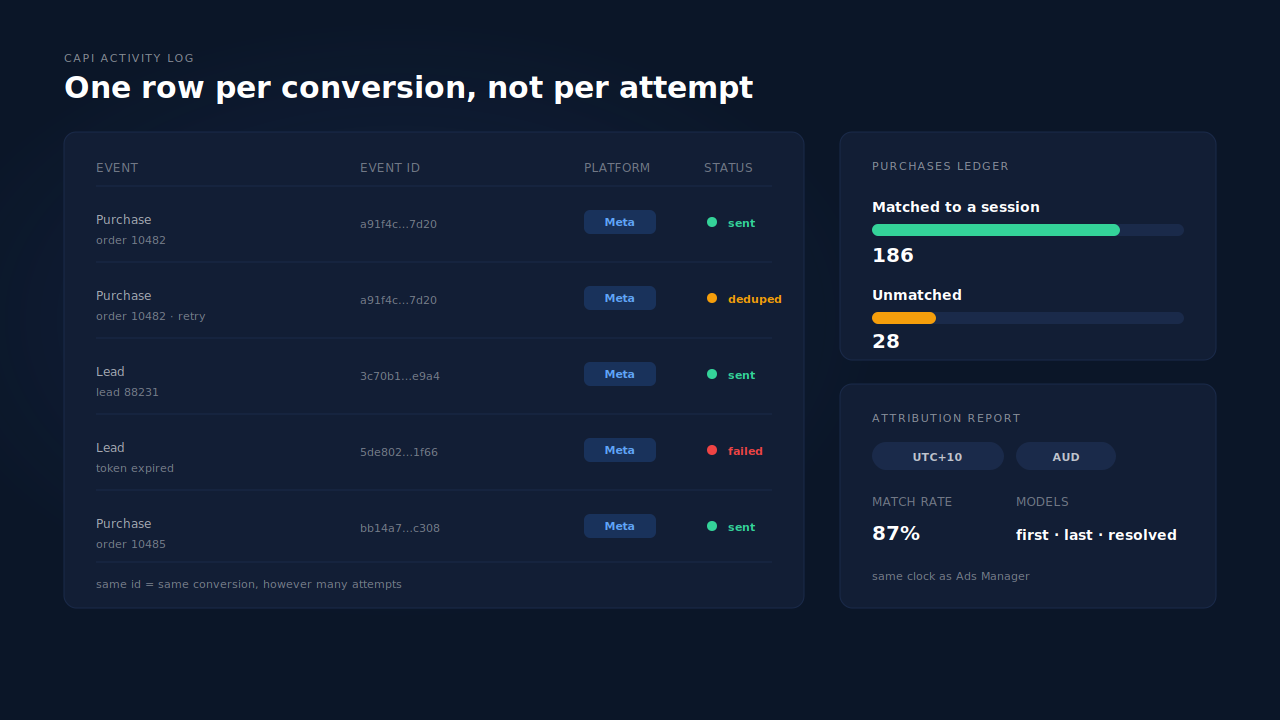
Where you see it: the CAPI activity log lists each event with its status and error text, so “sent” and “accepted” are separate columns rather than one assumption. The Leads list carries an API column per lead showing which conversion APIs that person was dispatched to — the per-record proof you need when someone asks why Meta has a conversion your CRM does not. The Purchases ledger separates matched from unmatched records, and the Attribution report puts first-touch, last-touch and PartialLeads-resolved models side by side with a match-rate KPI and timezone and currency selectors, so the comparison against Ads Manager happens on one clock. Its display model uses a 28-day decay window chosen to line up with Meta’s standard rather than fight it — the same reasoning behind reading an attribution report honestly.
Three honest constraints. PartialLeads cannot deduplicate a second pixel you installed through a tag manager — that copy never passes through the tag, and only a shared event ID can save it on Meta’s side. It cannot remove view-through credit from Meta’s report, because that conversion has no counterpart in your data. And it controls dispatch, not matching: whether Meta resolves an event to a person and a click depends on the identifiers on the event and on Meta’s own graph. Getting revenue attached to the right click at all is a separate job, covered in attributing ecommerce revenue to the ad click.
| What breaks | The mechanism | Where you see it in the dashboard |
|---|---|---|
| A retried send counts as a second conversion | Deterministic SHA-256 event ID per record | CAPI activity log, one row per conversion |
| A redelivered webhook double-fires | Dedup table keyed unique on config + event ID | Duplicate dispatch refused before send |
| A failed send is reported as a success | Retry taxonomy, including HTTP 200 with fewer events processed | Activity log status and error text |
| Nobody can tell what was sent for a given lead | Per-lead dispatch record | Leads list, API column |
| Revenue in the platform has no counterpart in your data | Purchase matched to a session, first and last touch rows written | Purchases ledger, matched vs unmatched |
| Two reports use two clocks | Timezone and currency selectors on the report | Attribution report header |
Tell us what's broken. We'll fix your tracking — free.
Describe the tracking/attribution problem you're stuck on and we'll map it to a fix: server-side conversions to Meta, Google, TikTok and Pinterest, plus first-party tracking that survives Safari. No code required.
Sources
https://developers.facebook.com/docs/marketing-api/conversions-api https://developers.facebook.com/docs/marketing-api/conversions-api/deduplicate-pixel-and-server-events https://developers.facebook.com/docs/marketing-api/conversions-api/best-practices https://developers.facebook.com/docs/marketing-api/conversions-api/parameters