Meta counts more purchases than your WooCommerce orders when more than one tool sends a Purchase for the same order. Meta merges duplicates only when two events share an event name and an event_id, and every plugin generates its own ids. Two senders means two Purchases per order. Find the extra sender, switch its Purchase off, and the counts line up.
The classic report on the WordPress support forums reads like this: “I placed 2 test orders and Events Manager shows 4 purchases.” That ratio, exactly two per order, is the fingerprint of two independent senders. Other causes exist, and they leave different patterns. We’ll cover how to tell them apart.
Why does Meta count one WooCommerce order twice?
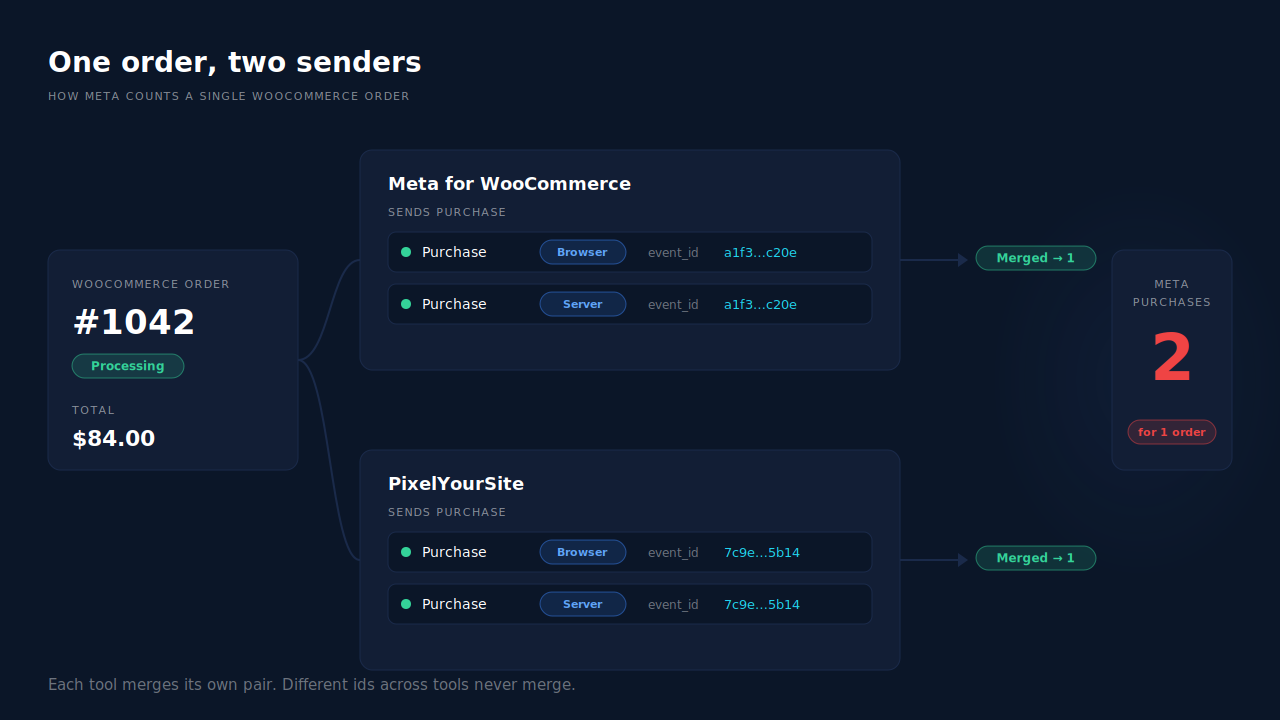
Because Meta has no idea what a WooCommerce order is. It sees events. When two events arrive with the same event name and the same event_id, Meta treats them as one conversion and keeps one. When the ids differ, they are two conversions. Two plugins firing Purchase for one order send two different ids, so Meta counts two.
Meta’s deduplication rules are specific. A browser Pixel event and a server Conversions API event are merged when they carry matching event_name and event_id and arrive within 48 hours of each other. Nothing else links them. Not the order number, not the value, not the customer’s email.
Here’s how that plays out with a common WooCommerce stack:
- Meta for WooCommerce fires Purchase in the browser and through the Conversions API, sharing one id between the two. Meta merges them into one purchase.
- PixelYourSite (or a GTM tag, or a pixel pasted into the theme) fires its own Purchase with its own id. Meta counts a second purchase.
- If that second tool also has server-side events enabled, it merges its own pair. Still two purchases in total, one per tool.
So two test orders become four. Each tool deduplicates itself correctly. They just can’t deduplicate against each other, because neither knows the other’s id.
How does Meta for WooCommerce avoid duplicating itself?
In its current source code, Meta for WooCommerce stores one event_id on the order (in the _meta_event_id order meta field) and reuses it for both the browser Pixel and the server event, so the pair merges. It also marks the order as tracked, separately for browser and server, and sets a 45-minute guard so parallel processes can’t fire the same Purchase twice. It’s the pattern behind picking a good event_id: one stable id per order, shared by both channels. None of that protects you from a second plugin.
What else makes Meta’s purchase count drift above real orders?
The other common causes are page reloads, unpaid orders and reporting differences. Each leaves a different pattern. Two senders give a clean 2× on every order, including test orders. Reloads and payment redirects give random extras on some orders. Unpaid orders give extras that match orders later cancelled. Attribution differences show up in Ads Manager, not in Events Manager’s raw counts.
- The shopper lands on the thank-you page more than once. A pixel that fires on page load fires again when a shopper returns from a payment redirect or reopens the page. Plugins with a per-order guard don’t; pasted snippets and many GTM tags do.
- Unpaid orders are counted. Meta for WooCommerce treats
pendingandon-holdas valid purchase states alongsideprocessingandcompleted. Orders that are never paid still send a Purchase, which is why Meta counts unpaid or cancelled WooCommerce orders as purchases. - You’re comparing different reports. Ads Manager counts attributed purchases on the ad’s timeline, not orders on the order date. That gap is why Meta shows more conversions than your CRM and isn’t a duplicate at all.
Rule out the second sender first. It’s the most common cause, and the only one that doubles every order.
How do you find the second Purchase source on a WooCommerce store?
Place one test order and count what reaches Meta. Open Events Manager’s Test Events tool, then check the order-received page with the Meta Pixel Helper browser extension. More than one browser Purchase, or a browser and a server Purchase that don’t merge, means two senders. Then list every place a Purchase could come from and switch them off one at a time.
Work through the usual suspects:
- Plugins. In WordPress → Plugins, look for more than one of: Meta for WooCommerce (formerly Facebook for WooCommerce), PixelYourSite, Pixel Manager for WooCommerce, or any “conversion tracking” plugin with a Meta setting. Page builders and theme bundles sometimes include a pixel field too.
- Google Tag Manager. Open your container and search for tags that load the Meta Pixel or call
fbq('track', 'Purchase'). A GTM Purchase tag plus a plugin is a two-sender setup. - Hard-coded snippets. View the source of your order-received page and search for
Purchase. A snippet in the theme’s header, footer or a code-snippets plugin counts as a sender. - Server-side tools. A server container (Stape or your own server-side GTM), a hosting-level Conversions API feature, or a separate CAPI app each send their own server Purchase with their own id.
- Test. Disable the suspect, place another order, and confirm Test Events shows one Purchase, or one merged browser-and-server pair.
When you remove a tool, keep Meta’s base pixel on the site through whichever tool stays. The base code sets the _fbp browser cookie, and server events match better when they carry it.
Can you make two plugins deduplicate each other?
Only if both send the same event_id for the same order, and off-the-shelf plugins don’t coordinate that. Each generates its own id, and none reads another plugin’s. You’d need custom code to force a shared id. The reliable fix is to keep one source per event: one tool owns Purchase, and every other tool has its Purchase switched off.
That doesn’t mean one tool for everything. It’s fine to run one plugin for browse events and another for Purchase, as long as no event name is sent by both. Write down which tool owns ViewContent, AddToCart, InitiateCheckout and Purchase. Two owners for any one event means that event double counts.
A useful check once you’ve settled on an owner: over a full week, Events Manager’s Purchase count should sit close to your paid orders (Processing plus Completed) for the same days. It won’t match exactly, since time zones and late payments shift a few orders, but it shouldn’t run at twice your volume.
How does PartialLeads keep Meta’s purchase count equal to your paid orders?
PartialLeads sends exactly one server-side Purchase to Meta per paid WooCommerce order, with an event_id built from the order itself, so retries and redelivered webhooks can never add a second one. Nothing fires on the thank-you page. The PartialLeads side is one sender by design. Your job is making sure it’s the only Purchase sender.
Where the Purchase comes from. The Purchase is owned by WooCommerce’s order webhooks, not a page load. PartialLeads sends it when an order reaches Processing or Completed; pending, on-hold, failed and cancelled orders are not sent. Reloading the order-received page, or returning from a payment redirect, sends nothing.
Why it can’t double-send. Each event_id is deterministic: a SHA-256 hash of the pixel id, the event name and the order record. The dispatch table is unique on that id, so a webhook WooCommerce delivers twice, or a retry after a network error, can’t produce a second Purchase. The value is the full order total including tax and shipping, after discounts, recorded once.
What else it sends. The PartialLeads WooCommerce plugin forwards view product, add to cart and begin checkout server-side to Meta, Pinterest and TikTok. The same paid order goes as a Purchase to each connected platform, and as a row in the Google Sheet you import into Google Ads.
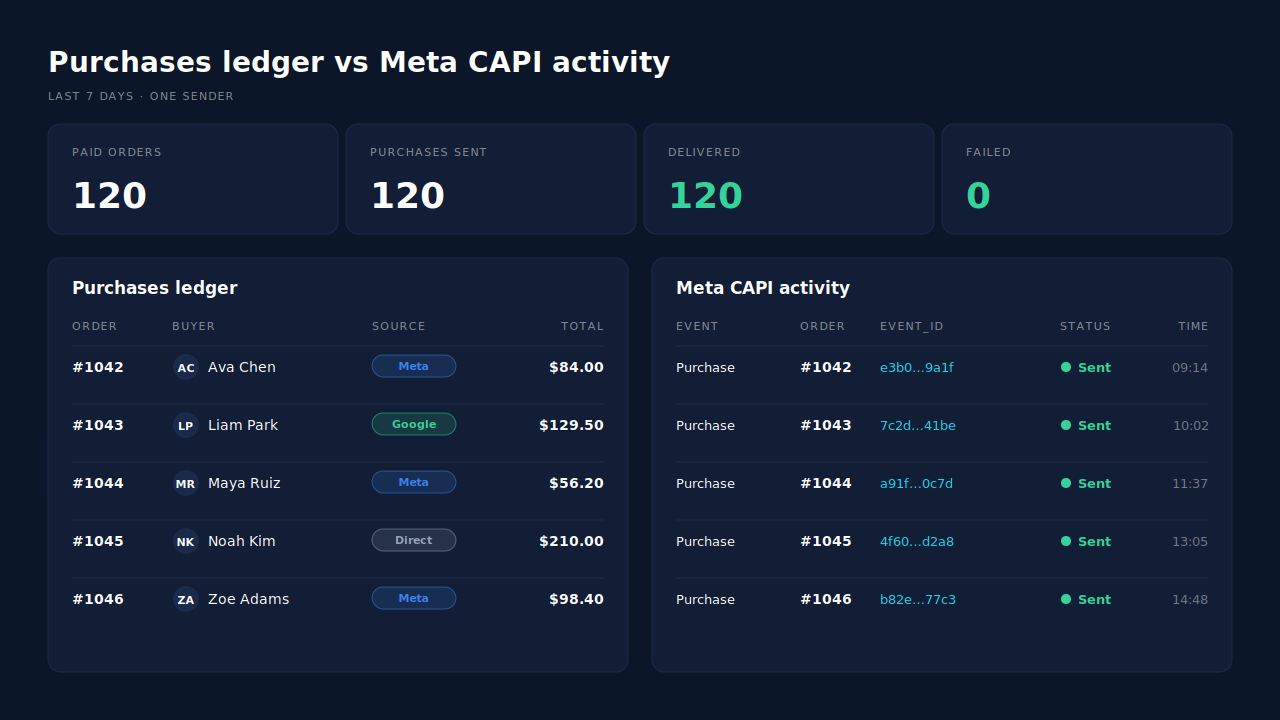
Where you see it working. The Purchases ledger lists every paid order with its value and matched source; its count for a week should equal your Processing plus Completed orders. The Meta CAPI activity log shows each Purchase sent, with its status, so you can compare it line by line against Events Manager. On the Leads list, the API column shows which conversion APIs each buyer was sent to. If Events Manager shows more Purchases than the activity log, the extras came from somewhere else.
The honest constraints. PartialLeads’ event ids are its own. It never double-sends, but it does not deduplicate against another plugin’s Purchase: if Meta for WooCommerce or PixelYourSite still sends Purchase, Meta counts both. Switch their Purchase off, or the pixel plugin entirely, while keeping Meta’s base pixel for the _fbp cookie. A paid order edited later isn’t re-sent. WooCommerce Subscriptions renewals are recorded but not sent. PartialLeads controls what’s sent; how Meta matches and attributes it is Meta’s half. The full setup is in the guide to tracking WooCommerce purchases server-side to Meta.
| What breaks | The mechanism | Where you see it in the dashboard |
|---|---|---|
| Two plugins each send Purchase | One server-side Purchase per paid order; switch the other tool’s Purchase off | Meta CAPI activity log vs Events Manager |
| Webhook redelivered or retried | Deterministic event_id, unique per order in the dispatch table | Meta CAPI activity log |
| Thank-you page reload or payment redirect | Purchase comes from order webhooks, not a page load | Purchases ledger |
| Unpaid orders counted | Sent only at Processing or Completed | Purchases ledger count vs paid orders |
| Unsure which tool sent a Purchase | Per-lead record of every API a buyer was sent to | Leads list, API column |
Tell us what's broken. We'll fix your tracking — free.
Describe the tracking/attribution problem you're stuck on and we'll map it to a fix: server-side conversions to Meta, Google, TikTok and Pinterest, plus first-party tracking that survives Safari. No code required.
Sources
- https://raw.githubusercontent.com/facebook/facebook-for-woocommerce/main/facebook-commerce-events-tracker.php
- https://developers.facebook.com/docs/marketing-api/conversions-api/deduplicate-pixel-and-server-events
- https://developers.facebook.com/docs/marketing-api/conversions-api/parameters/server-event