Meta counts unpaid and cancelled WooCommerce orders as purchases because the Purchase event is tied to the order being created, or to the thank-you page loading, not to the payment clearing. WooCommerce creates the order before the money is confirmed. So a pending, on-hold or failed order that is cancelled an hour later has already told Meta “someone bought.”
The gap only runs one way: Meta reports more purchases than your processor settled. Filter WooCommerce → Orders by date and the extras are there: Pending payment, Failed, Cancelled. Real orders, no money.
It inflates your reported ROAS, and it teaches Meta’s delivery system that people who abandon at payment are your buyers. Here’s why it happens, how to confirm it, and how to send a Purchase only for paid orders.
Why does Meta count orders you were never paid for?
Because most setups fire Purchase on an event that happens before payment is confirmed. A browser pixel fires when the order-received page loads, and some server-side setups fire when the order is created. WooCommerce reaches both points for orders that are still waiting on payment, so Meta receives a Purchase for an order that may never be paid.
WooCommerce’s checkout works in this order:
- The shopper clicks Place order.
- WooCommerce creates the order, usually as Pending payment.
- The payment gateway takes over: a card form, a redirect to PayPal or a bank, or instructions for a bank transfer.
- If the payment clears, the order moves to Processing (or Completed for some virtual products). If it doesn’t, the order stays pending, goes to Failed, or is later Cancelled.
A Purchase hooked to step 2, or to a thank-you page reachable at step 3, is ahead of the money. Payment is only known at step 4.
Which WooCommerce order statuses mean you were paid?
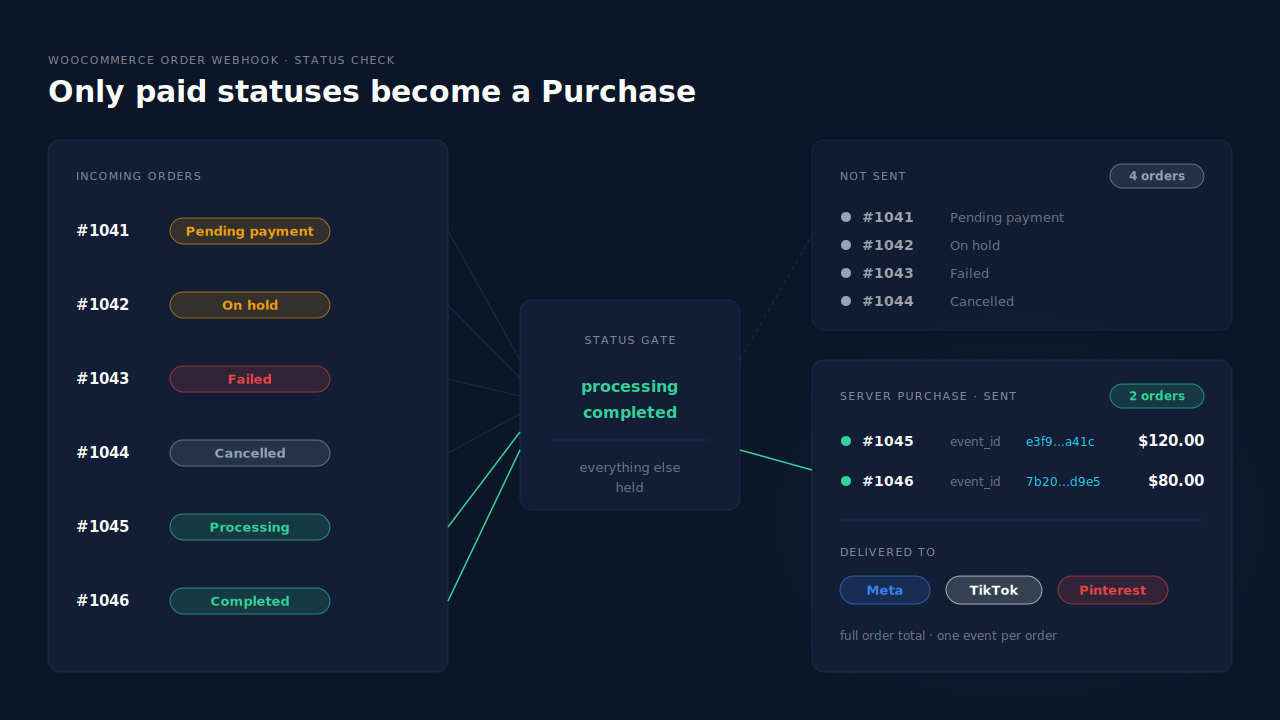
Only two: Processing and Completed. Everything else means the money isn’t in, or has gone back out.
| Status | What it means | Should Meta get a Purchase? |
|---|---|---|
| Pending payment | Order created, no payment received yet | No |
| On hold | Awaiting a manual payment, like a bank transfer or cheque | Not yet — only once it’s marked paid |
| Failed | The payment was declined or didn’t complete | No |
| Processing | Payment received, order not yet shipped | Yes |
| Completed | Paid and fulfilled | Yes |
| Cancelled | Cancelled by you, the shopper, or WooCommerce’s own unpaid-order timeout | No |
| Refunded | Paid, then refunded in full | It was paid — see the refund section below |
Where do the unpaid Purchases come from?
These are the usual patterns:
- Pending orders that time out. WooCommerce holds stock for unpaid orders for the time set under WooCommerce → Settings → Products → Inventory (“Hold stock”), then cancels them. If the pixel fired when the order was placed, the Purchase stays in Meta after the cancellation.
- Bank transfer, cheque and other manual methods. The order goes on hold and the thank-you page loads straight away with payment instructions. A pixel on that page counts the sale before anyone has paid, and some of those orders are never paid.
- Failed payments that still reach a thank-you page. Some gateways send the shopper back to the order-received page whatever the result. If the pixel doesn’t check the order status, a declined card becomes a Purchase.
- Server events on the wrong hook. A plugin that sends its server-side Purchase when the order is created has the same problem as a browser pixel — it just has it on the server. Moving to the Conversions API doesn’t fix the trigger.
Reports of this recur in WooCommerce pixel plugin support forums, the official Meta integration’s included. The trigger point is the cause, not a Meta bug.
How do you confirm unpaid orders are being counted?
Compare, for the same date range, the number of paid orders in WooCommerce with the number of Purchases Meta received. Then place one test order with a manual payment method and watch whether a Purchase arrives before you mark it paid. If it does, your trigger is ahead of payment.
- Count paid orders. In WooCommerce → Orders, filter to a recent week and count the orders in Processing and Completed. That’s your real purchase count.
- Count unpaid orders. Same week, count Pending payment, On hold, Failed and Cancelled. If Meta’s excess is close to this number, you’ve found it.
- Check Meta’s count. In Events Manager, look at the Purchase events received for the same days. Use Events Manager’s count of events received, not the attributed conversions in Ads Manager — those depend on attribution windows and won’t reconcile to orders.
- Run a live test. Enable a manual method such as bank transfer, open Events Manager’s test events tool (the same check used to confirm your Meta CAPI is working), and place an order. If a Purchase appears while the order is still on hold or pending, your setup counts unpaid orders.
- Match order ids. If your events send the WooCommerce order number as
order_id, open a Purchase in the test tool and check its id against the order’s status. A Purchase for an order that is now Cancelled settles the question.
Before you blame the trigger, make sure only one tool sends Purchase. If two do, the excess might be duplicates rather than unpaid orders. The fix for that is covered in why Meta counts extra purchases per order when shoppers return from a payment redirect.
How do you stop unpaid orders from firing a Purchase?
Send Purchase from the order record when its status changes to Processing or Completed, and stop firing it on the thank-you page or at order creation. That moves the trigger to the only point where you know you were paid. It also means the event arrives from your server, so it doesn’t depend on the shopper’s browser at all.
In practice:
- Check your plugin’s settings first. Some pixel plugins let you choose which order statuses count. Limit it to Processing and Completed.
- Switch off the thank-you page Purchase. A pixel on the order-received page can’t know whether a bank transfer will arrive. Remove its Purchase, or make it conditional on payment.
- Send Purchase server-side on the status change. A server event fired when the order moves to Processing or Completed carries the payment decision with it. This is the approach in the guide to tracking WooCommerce purchases server-side to Meta, and it runs through the Conversions API.
- Keep one source per event. Pick one tool to own Purchase. Two tools with two different event ids will each be counted.
What about bank transfers that get paid days later?
Send the Purchase when you mark the order paid, not when it’s placed. The catch is Meta’s time limit: a server event’s event_time can’t be more than seven days old when you send it. If an order sits on hold for longer, its original timestamp falls outside the window. The 7-day event time window in Meta CAPI explains what happens and how to handle it.
What about orders that are paid, then cancelled or refunded?
A Purchase sent for a paid order was correct when it was sent, and fixing the trigger won’t take it back. If you cancel or refund that order later, Ads Manager’s count doesn’t go down on its own. Paid-only sending removes the orders that were never paid; refunds need netting in your own revenue reporting instead.
A store with a high return rate, or one that cancels fraud-flagged orders after payment, will still see Meta’s revenue sit above what it kept.
- Report net revenue yourself. Your ROAS decisions should run on revenue after refunds, matched to the campaign. Why refunds inflate attributed revenue covers how to net them.
- Don’t send twice to correct it. Re-sending a Purchase with a lower value creates a second purchase in Meta’s count, not a correction.
How does PartialLeads decide which WooCommerce orders become a Purchase?
PartialLeads sends a Purchase for every paid WooCommerce order — Processing or Completed — and nothing else. The event comes from WooCommerce’s order webhooks, not the thank-you page, so pending, on-hold, failed and cancelled orders never reach Meta. An order that starts on hold is sent when you mark it paid.
Where the Purchase comes from. The PartialLeads WooCommerce plugin fires nothing on the order-received page. It forwards browse events — view product, add to cart and begin checkout — server-side to Meta, Pinterest and TikTok. The Purchase is owned by the order webhooks, including later status updates, so the order record decides. The same paid-only rule applies to the Google Ads rows written to your Google Sheet.
What it sends. One Purchase per paid order, at the full order total including tax and shipping after discounts, with hashed email and phone from the order. Each event has a deterministic event_id, so a redelivered webhook can’t fire the same order twice. If a bank-transfer order is marked paid after Meta’s seven-day window, the event time is clamped into the window rather than rejected.
Refunds. Refunds are recorded as their own rows and net against revenue in the Purchases ledger and the Attribution report. They aren’t sent to Meta, so Meta’s count still includes an order that was paid and then refunded.
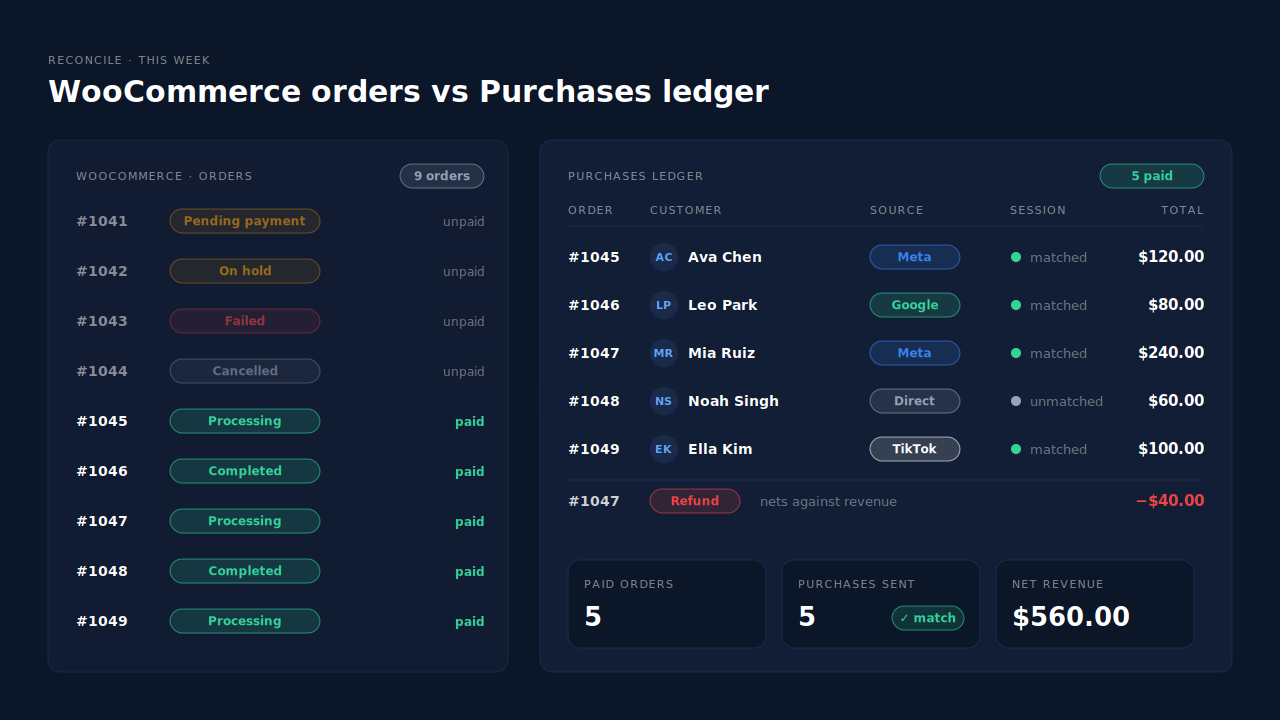
Where you see it working. The Purchases ledger lists every paid order with its value, source and session match. Its weekly count should equal Processing plus Completed in WooCommerce. The Meta CAPI page shows each server Purchase with its status and time, one per order.
The honest constraints. An order is recorded once: if you edit a paid order later — adding an upsell, say — the value isn’t updated or re-sent. PartialLeads’ event ids are its own and don’t deduplicate against another plugin’s browser pixel, so if Meta for WooCommerce or PixelYourSite still sends Purchase, switch theirs off or you’ll keep counting unpaid orders through them. WooCommerce Subscriptions renewals are recorded but not sent; only the first payment is. PartialLeads controls which orders are sent; how Meta attributes them is Meta’s half.
| What breaks | The mechanism | Where you see it in the dashboard |
|---|---|---|
| Pending or failed orders counted as purchases | Purchase sent only when the order is Processing or Completed | Purchases ledger, Meta CAPI page |
| Thank-you page fires before payment | Plugin fires nothing on order-received; Purchase comes from order webhooks | Meta CAPI page, one Purchase per order |
| Bank transfer paid days later | Status updates trigger the send; event time clamped to Meta’s 7-day window | Purchases ledger, CAPI activity log |
| Refunds inflate revenue | Refund rows net against paid revenue | Purchases ledger, Attribution report |
| Two tools both send Purchase | No cross-tool dedup — keep one source per event | Leads-list API column vs Events Manager sources |
Tell us what's broken. We'll fix your tracking — free.
Describe the tracking/attribution problem you're stuck on and we'll map it to a fix: server-side conversions to Meta, Google, TikTok and Pinterest, plus first-party tracking that survives Safari. No code required.
Sources
- https://developers.facebook.com/docs/marketing-api/conversions-api/parameters/server-event
- https://developers.facebook.com/docs/marketing-api/conversions-api/parameters/custom-data
- https://developers.facebook.com/docs/marketing-api/conversions-api/deduplicate-pixel-and-server-events
- https://developers.facebook.com/docs/marketing-api/conversions-api/using-the-api