Low server event coverage means Meta receives far fewer Purchase events from your server than from the browser pixel. Most sales then depend on a browser that ad blockers, closed tabs and gateway redirects can break. The fix is to find where server events drop out, then send Purchase server-side from every paid WooCommerce order and keep one tool as its owner.
The warning usually shows up in Events Manager next to the Purchase event, with a recommendation to send more events through the Conversions API. The confusing part is that your plugin’s settings say the Conversions API is already switched on.
Both can be true. “On” means the plugin can send server events. Coverage measures whether it actually does, for the same purchases the browser reported. This guide covers what the gap means, why WooCommerce plugins produce it, how to find the leak, and how to close it for good.
What does low server event coverage mean for a Purchase event?
It means that for the purchases Meta saw from the browser pixel, only some also arrived from your server through the Conversions API. Meta compares the two channels for each event name. When the server side is thin, Meta is leaning on the browser for most of your conversions, and it recommends closing that gap.
Why Meta cares: a browser event is fragile. It needs the buyer’s browser to load the order-received page, run the pixel script and reach Meta’s servers. Ad blockers, privacy settings, a closed tab or a slow redirect back from a payment gateway can stop any of those steps.
A server event is sent by your system from the order record, so none of those browser problems apply. Meta’s own guidance is to send the same key events through both the pixel and the Conversions API, with a shared event ID so it can merge the pair into one conversion.
Low coverage costs you in two places:
- Fewer purchases counted. Sales that the browser missed and the server never sent are invisible to Meta. Campaigns optimise on a partial picture.
- Weaker matching. Server events can carry hashed email and phone from the order, which Meta uses to tie a purchase to a person. That’s the data behind your Event Match Quality score. Without the server event, Meta only has what the browser supplied.
Why does a WooCommerce store end up sending mostly browser Purchase events?
Usually because the server event is switched off, disconnected, triggered from the same fragile page load as the browser event, stuck in a background queue that never runs, or rejected by Meta. Each of those leaves the pixel reporting purchases while the server stays quiet. The plugin can show “Conversions API: on” through all five.
Is the Conversions API actually connected?
Start with the boring check. Open the plugin’s Meta settings and confirm the pixel ID is the one Events Manager shows, the access token is present, and server events are enabled for Purchase specifically. An expired token or a reconnect prompt means the plugin stopped sending server events while the pixel carried on.
Is the server event fired by the thank-you page?
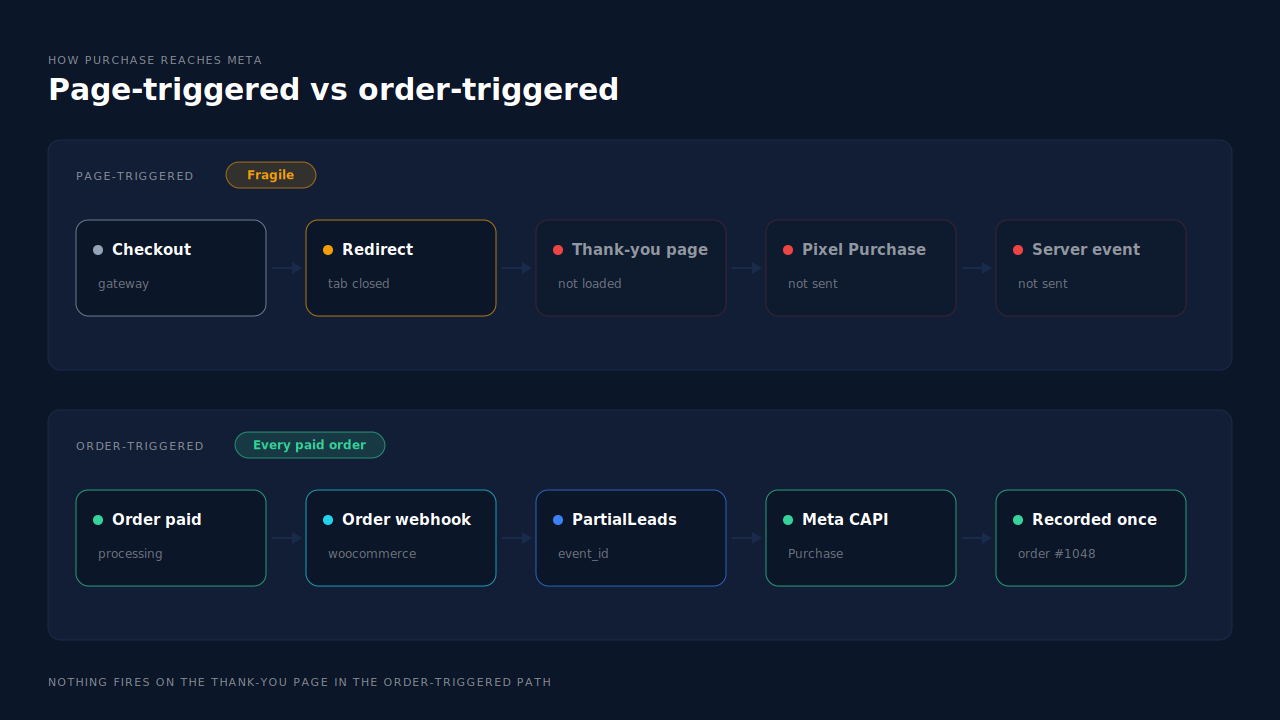
Some setups trigger the server Purchase when the order-received page loads, not when the order is paid. That gives you two channels with one trigger. If a buyer never reaches the page, neither event is sent. If the page loads but a script breaks, you can end up with one channel reporting and the other silent.
Is a background queue delaying or dropping sends?
Plugins often hand server calls to a background task so checkout stays fast. On WordPress, those tasks usually run on WP-Cron, which only fires when someone visits the site. If cron is disabled, blocked or backed up, the queue grows and events arrive late or never.
Is Meta rejecting the server events?
A server event that Meta refuses doesn’t count toward coverage. Common causes are an event_time older than seven days, a malformed parameter, or a test event code left on live traffic. Why Meta rejects CAPI events walks through the error types. Events Manager’s diagnostics and the plugin’s log usually name the reason.
Is page caching skipping the server side?
This mostly hits ViewContent and AddToCart, not Purchase. A full-page cache serves stored HTML, so the pixel script in that HTML still fires, but the PHP that would send the matching server event never runs. Coverage for funnel events drops while Purchase looks fine.
How do you find where the missing server Purchases went?
Compare three counts for the same days: paid orders in WooCommerce, browser Purchase events in Events Manager, and server Purchase events in Events Manager. The gap between paid orders and server events is your leak. Then read the plugin’s log and Events Manager’s diagnostics for those days to see whether sends failed, were rejected or were never attempted.
- Pick a clean window. Three to seven recent days, excluding any day you changed plugins or settings.
- Count paid orders. In WooCommerce, filter to processing and completed. Pending, on-hold, failed and cancelled orders aren’t purchases and shouldn’t be sent.
- Split Purchase by source in Events Manager. Note the browser count and the server count per day.
- Read the failures. Events Manager’s diagnostics and your plugin’s log should show rejected events with a reason. No log entries at all points to a queue or trigger problem, not a rejection.
- Place a test order. Use Events Manager’s test events tool and watch whether a server Purchase arrives within a minute or two, and whether it carries the same event ID as the browser one.
A healthy server path sends a Purchase for every paid order, and Meta accepts nearly all of them. What a healthy Meta CAPI delivery rate looks like covers the acceptance side of that check.
Should you fix the plugin’s server events or move Purchase to the order itself?
Fix the plugin when the leak is a setting: a missing token, a disabled event or a stalled cron job. Move Purchase to the order when the server event is tied to the thank-you page, or keeps breaking after fixes. An event fired by the paid order doesn’t depend on any page, script or browser, so coverage stops being a browser problem.
Triggering Purchase from the order means sending it when WooCommerce records the payment, through an order webhook or a status-change hook. The guide to tracking WooCommerce purchases server-side to Meta lays out that architecture.
Two things to get right when you move it:
- Keep one owner per event. Meta merges a browser and a server Purchase only when both carry the same event ID and event name. Two different tools generate their own IDs, so a plugin’s browser Purchase plus another tool’s server Purchase can count each sale twice. Either one tool sends both with shared IDs, or you switch the other tool’s Purchase off. Why Meta CAPI isn’t deduplicating shows how to spot double counting.
- Watch late payments. Bank-transfer and cash-on-delivery orders become purchases when they’re marked paid, which can be days after checkout. Meta only accepts server events whose
event_timeis within the last seven days, so mark them paid promptly.
Once Purchase is sent from the order, the number that matters is paid orders versus server Purchases sent. If those two match every day, every sale reached Meta through the channel that doesn’t depend on the browser.
How does PartialLeads raise server coverage for WooCommerce purchases?
PartialLeads sends Purchase server-side from WooCommerce order webhooks, so every paid order produces a server event and nothing fires on the thank-you page. The PartialLeads WooCommerce plugin also forwards view product, add to cart and begin checkout to Meta server-side, so funnel events get a server path too, without a browser plugin sitting in between.
Paid orders only. An order is sent when it reaches processing or completed. Pending, on-hold, failed and cancelled orders are not sent. A bank-transfer or cash-on-delivery order goes out when it’s marked paid. WooCommerce Subscriptions renewals are recorded and reported but not sent to Meta; only the first payment is.
What’s in the event. The value is the full order total, including tax and shipping, after discounts. Email and phone from the order are hashed with SHA-256 before sending, and PartialLeads rebuilds the _fbc click cookie from the fbclid when the cookie is missing. An order is recorded once, so a later edit doesn’t change the value or re-send the event.
No double sends from retries. Each event carries a deterministic event_id, so a redelivered webhook or a retried send can’t fire the same Purchase twice.
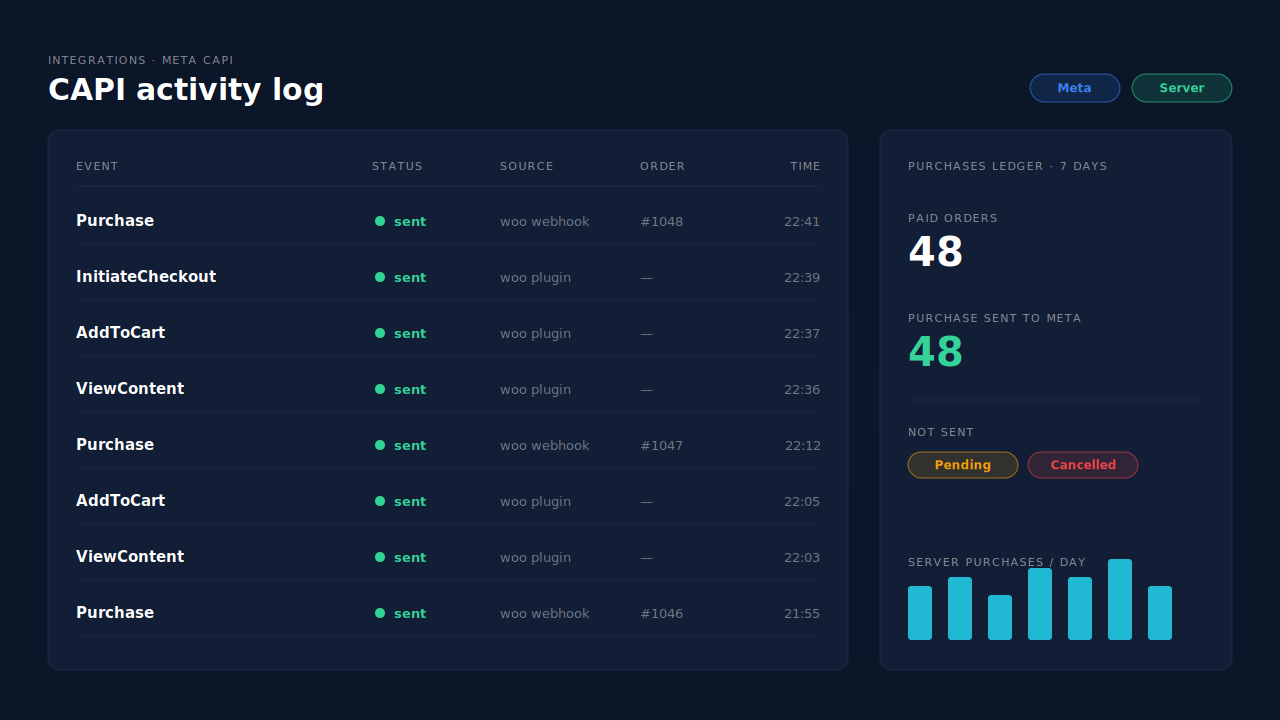
Where you see it working. The CAPI activity log on the Meta CAPI page lists each server send by event name, with its status, time and any error text. The Purchases ledger lists every paid order PartialLeads recorded, matched or unmatched, to reconcile against WooCommerce’s order list. The Leads list’s API column shows which conversion APIs each buyer was sent to.
The honest constraints. PartialLeads’ event IDs are its own, and it doesn’t deduplicate against another plugin’s browser pixel. If Meta for WooCommerce or PixelYourSite also sends Purchase, switch that Purchase off and keep one source per event. PartialLeads doesn’t load a browser Meta Pixel, so keep a Meta base pixel on the site for the _fbp cookie; PartialLeads can’t create _fbp from nothing. It doesn’t choose how Events Manager computes or displays its coverage metric, and it can’t resend orders from before it was connected. Delivery is the half it controls. Whether Meta ties each Purchase to an ad click depends on the identifiers captured and on Meta’s matching.
| What breaks | The mechanism | Where you see it in the dashboard |
|---|---|---|
| Plugin sends mostly browser Purchase events | Server-side Purchase from the WooCommerce order webhook for every paid order | CAPI activity log, Purchases ledger |
| Server event tied to the thank-you page | Nothing fires on the thank-you page; the paid order triggers the send | Purchases ledger, one row per paid order |
| Funnel events have no server path | View product, add to cart and begin checkout forwarded server-side to Meta | CAPI activity log, by event name |
| Webhook redelivered or send retried | Order recorded once, deterministic event_id |
CAPI activity log, one row per event |
| Another plugin still sends Purchase | Not deduplicated across tools — keep one source per event | Events Manager sources vs the Leads-list API column |
Tell us what's broken. We'll fix your tracking — free.
Describe the tracking/attribution problem you're stuck on and we'll map it to a fix: server-side conversions to Meta, Google, TikTok and Pinterest, plus first-party tracking that survives Safari. No code required.
Sources
- https://developers.facebook.com/docs/marketing-api/conversions-api
- https://developers.facebook.com/docs/marketing-api/conversions-api/best-practices
- https://developers.facebook.com/docs/marketing-api/conversions-api/deduplicate-pixel-and-server-events
- https://developers.facebook.com/docs/marketing-api/conversions-api/parameters/server-event
- https://developers.facebook.com/docs/marketing-api/conversions-api/parameters/customer-information-parameters
- https://developers.facebook.com/docs/marketing-api/conversions-api/parameters/fbp-and-fbc