A healthy Meta Conversions API delivery rate is 99–100%. It is a pass/fail number, not one you optimise — below 99% means events are being rejected and something is broken. But a perfect delivery rate proves less than it sounds. It only counts the events you actually attempted, and says nothing about whether Meta matched them to real people.
That gap is where most server-side setups quietly lose money. The dashboard is green, the conversions are missing, and nobody can explain the difference.
What Does a Meta CAPI Delivery Rate Actually Measure?
Delivery rate is the share of the events you sent that Meta accepted: events accepted ÷ events sent. It is a measurement of the HTTP conversation between your server and Meta’s endpoint, nothing more. It starts the moment your code decides to fire an event and ends the moment Meta’s response comes back.
Three separate things happen in a server-side conversion, and the Conversions API only scores the middle one:
- A conversion happens. Someone buys, books, or submits a form.
- You attempt an event, and Meta accepts it. This is delivery.
- Meta resolves that event to a real user. This is match quality.
Delivery rate owns step two. Step one is coverage, and it lives entirely in your code — Meta has no idea a conversion happened if you never told it. Step three is Meta’s graph, which you influence but do not control.
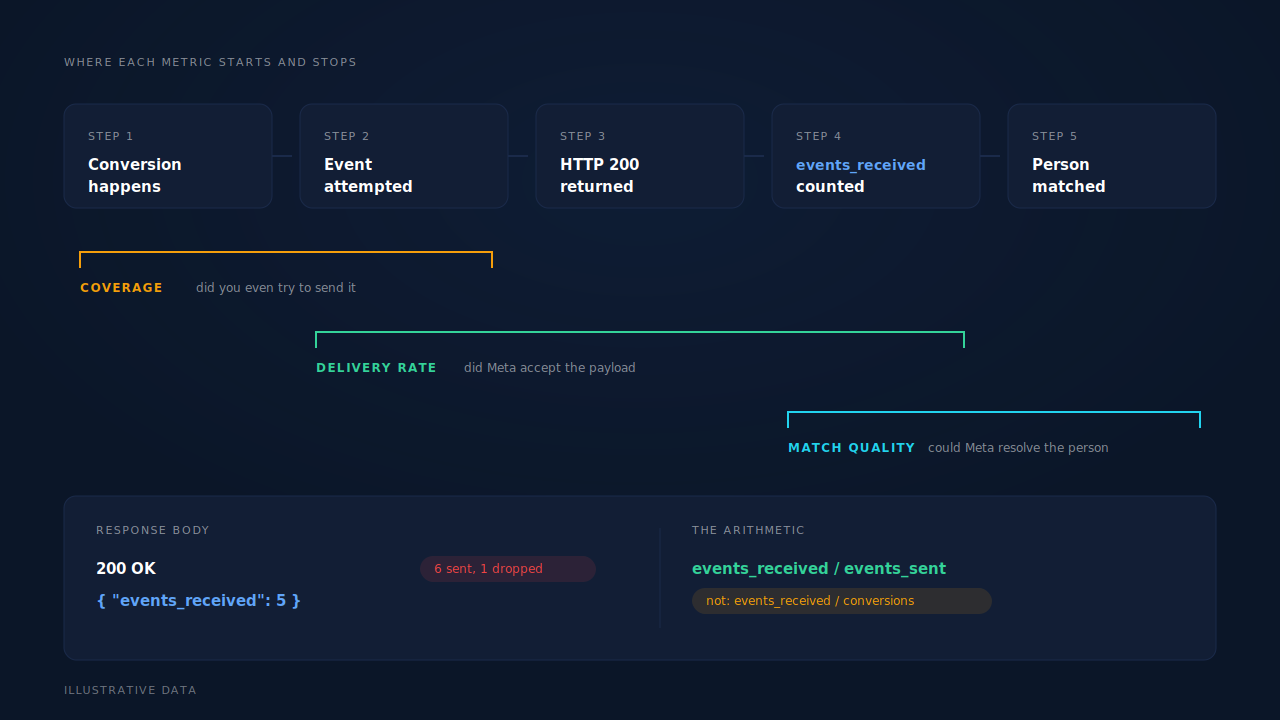
One detail catches nearly everyone: an HTTP 200 is not an acceptance. Meta’s API returns a body containing events_received, and that count can be lower than the number of events in your payload. Send six events, get a 200 back with events_received: 5, and you just lost one without an error in your logs. A delivery rate built on status codes rather than on that count will read 100% forever.
What Is a Healthy Meta CAPI Delivery Rate?
99–100%. There is no acceptable band below that, which makes delivery rate different from every other tracking metric you read.
Event Match Quality has a range because matching depends on the audience. Match rate has a range because identity is hard. Delivery has no range, because rejection is deterministic: Meta refuses events for structural reasons — a bad token, a malformed payload, wrongly hashed customer data, a timestamp outside the window. Fix the structure and every event goes through. Nothing about your traffic or your audience makes 94% a reasonable number.
So read it like a smoke alarm:
- 99–100% — normal. At most a handful of transient network errors or rate limits, retried and cleared.
- 95–99% — one systematic bug hitting a subset: usually one event type, one source, or one payload shape.
- Under 95% — a broken token, a schema change, or a misconfigured dataset. Treat it as an outage.
- 0% — the token expired or was revoked. The most common catastrophic failure and the easiest to miss, because nothing in your own application errors.
If you have never confirmed that events leave your server and arrive at all, start with whether your Meta CAPI is working before you start computing rates on it.
Why Does a 99% Delivery Rate Still Leave You Under-Reporting?
Because the denominator is wrong. Delivery rate divides by events you sent, not by conversions that happened. Every conversion your code never attempted is invisible to the metric — and those are the ones that cost you.
Picture a month with 412 orders in your store admin. Your server attempted 318 events. Meta accepted 317. Delivery rate: 99.7%. Coverage: 77%. Ninety-four conversions were never offered to Meta at all, and the number on your dashboard was green the entire time.
Where the 94 go:
- Browser-dependent firing. If the event only fires from a client-side hook, ad blockers, closed tabs, gateway redirects and crashed scripts each eat a slice.
- Paths without a dispatch site. Manual orders, phone orders, subscription renewals and admin-created records take a code path nobody wired up.
- Silent filters. A rule that skips events without an email, a test-mode check that never got removed, a currency the handler doesn’t recognise.
- Late conversions. A purchase landing outside Meta’s seven-day
event_timewindow is dropped on arrival unless the timestamp is clamped.
Coverage is the number that moves your reporting. Delivery rate just tells you the pipe is clear.
How Do You Calculate Your Real Delivery Rate?
Count three things over the same window, in the same timezone, and divide twice:
coverage       = events attempted  /  conversions that happened
delivery rate  = events accepted   /  events attempted
The first count — conversions that happened — has to come from a system that does not depend on tracking. Your order table, your CRM record count, your payment processor’s ledger. If you count conversions using the same code that fires the events, both numbers move together and the ratio is meaningless.
Four rules keep the arithmetic honest:
- Count
events_received, not 200s. Parse the response body. A partial acceptance is a failure for one event, not a success for the batch. - Exclude test traffic from both counts. Events carrying a
test_event_coderoute to the Test Events tab, not your live dataset, so they belong in neither numerator nor denominator — and keeping test events out of live data is what stops them skewing campaign optimisation too. - Count attempts, not retries. A conversion that failed twice and succeeded on the third try is one delivered event, not three attempts and one success.
- Use the same day boundary everywhere. Your ledger is probably in your business timezone and your logs in UTC. An eight-hour offset invents a phantom gap at either end of the month.
Do this by hand once a month and you will find the leak. Automate it and you will find it the week it starts.
What Makes a Delivery Rate Drop, and How Fast Should You React?
Four failure classes, and they need different reaction times.
Authentication failures stop everything at once. A token is revoked, regenerated by a colleague, or tied to a user who lost access to the asset. Delivery goes to zero and stays there, and every event fired during the outage is gone once it ages past the seven-day window. React within hours, not days.
Payload validation failures hit a subset. One event type or one source starts failing because a field changed shape: a phone number arriving unhashed, a currency code in the wrong case, a value sent as a string. Meta’s error body names the cause with a code, a subcode and an fbtrace_id — Meta rejects CAPI events for a short and diagnosable list of reasons. React within a day.
Timestamp failures look like random drops and are usually a backfill. event_time must fall inside Meta’s seven-day window; older events are refused. When you are catching up after an outage, clamp the timestamp to the oldest accepted value rather than sending the true one and eating a rejection.
Transient failures — rate limits, timeouts, a bad minute at either end — should never reach your delivery rate at all, because a retry queue absorbs them. If they do, you don’t have a retry queue, and that is the actual bug.
One class never shows as a failure: regional data-handling flags. Events from California require data_processing_options to be set correctly, and without it the traffic can be dropped on Meta’s side behind a healthy-looking response. Only reconciling against your own order count catches that one.
Should You Optimise Delivery Rate or Match Quality?
Match quality, every time — once delivery is at 99%+. Delivery is a binary you fix once; Event Match Quality is the number that decides whether Meta’s optimiser can actually use the events you worked so hard to deliver.
The distinction is worth stating plainly, because the two get conflated constantly:
- Delivery rate is measured in your logs. It answers: did Meta take this?
- Event Match Quality is measured by Meta, per event. It answers: could Meta tell who this was?
- Match rate is measured in your own data. It answers: could you tie this conversion to a tracked session in the first place? A useful benchmark for what a good match rate looks like is a different exercise entirely.
A perfectly delivered event with no email, no phone and no click ID is a delivered event that teaches Meta nothing. It counts as a success in your delivery log and contributes almost nothing to optimisation. That is the failure mode worth worrying about, and it is invisible if delivery rate is the only number you check.
The honest split: you control dispatch, the platform controls matching. Get dispatch to 100%, then spend your effort on the identifiers you attach — because those are the other half you can still influence.
How Does PartialLeads Make the Delivery Number Trustworthy?
By removing the browser from the dispatch decision and writing down what happened to every single event.
Purchases arrive server-side from the store or CRM webhook, not from a script in the visitor’s tab, so every order in your admin produces a conversion event regardless of blockers, closed tabs or gateway redirects. That is the claim worth making about delivery: 100% of your orders get sent. Whether Meta ties each one to a user is the platform’s half, and no vendor controls it.
Underneath, five dispatch sites cover the paths that usually go uninstrumented — the hot path, the catch-up worker, real-time conversions, the ecommerce fan-out and inbound purchases — so a conversion doesn’t fall through a gap because it arrived by an unusual route. Each send carries a deterministic event_id (a SHA-256 of the pixel ID, event name and record ID) against a dedup table with a uniqueness constraint, so a redelivered webhook physically cannot double-fire and inflate your numerator.
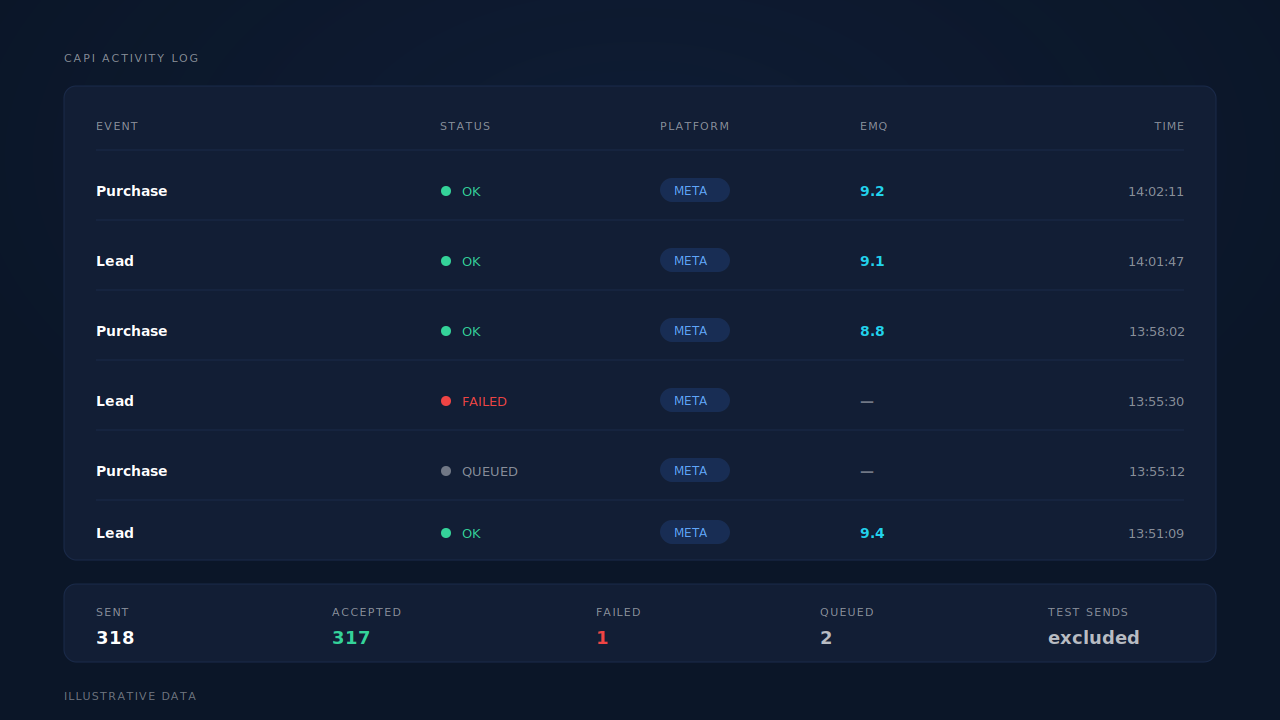
The CAPI activity log is where you read it: one row per send, with the status, the platform, the event name and the error text when there is one. Because the dispatcher compares the events Meta reports receiving against the events it sent, an HTTP 200 that silently drops an event is recorded as a failure rather than a success. The Leads list carries an API column naming which conversion APIs each lead was dispatched to, so per-lead audits don’t require a log dive.
Failures are handled by class rather than blindly retried: authentication errors flip the integration to a reconnect-needed state instead of burning retries, transient errors retry on the next worker cycle, and permanent payload errors stop. Late events have their event_time clamped to Meta’s seven-day maximum, so a catch-up send lands with a clamped timestamp instead of being rejected — which also means backfill is bounded by Meta’s window, not unlimited.
One honest constraint: none of this raises match quality by itself. Server events still need the platform cookies your client-side base tag sets, and the identifiers you collect set the ceiling. With email and phone as required form fields, PartialLeads consistently delivers EMQ 9+ — observed across customer accounts — but that number travels with its condition, and an audience of work emails can resolve lower even with a perfect payload.
| What breaks | The mechanism | Where you see it in the dashboard |
|---|---|---|
| A conversion never produces an event | Purchases arrive server-side from the store or CRM webhook and fan out automatically, independent of the browser | Purchases ledger, matched/unmatched wedge |
| A redelivered webhook double-counts | Deterministic event_id with a uniqueness constraint per config — a resend cannot fire twice |
CAPI activity log |
| An HTTP 200 hides a dropped event | Events received are compared against events sent; a semantic failure is recorded as failed | CAPI activity log, status column |
| An expired token stops sends silently | Auth failures flip the config to reconnect-needed; transient failures retry next cycle; permanent ones stop | Integration status |
| A late conversion misses the window | event_time clamped to Meta’s seven-day maximum so the send still lands |
CAPI activity log |
| You can’t tell which leads were dispatched | Per-lead API column naming every conversion API that lead went to | Leads list |
Recover the leads you're already earning
Tell us what you're trying to track or fix. We'll show you which visitors your forms miss — and how PartialLeads recovers and qualifies them.
Sources
- https://developers.facebook.com/docs/marketing-api/conversions-api/using-the-api
- https://developers.facebook.com/docs/marketing-api/conversions-api/parameters/server-event
- https://developers.facebook.com/docs/marketing-api/conversions-api/deduplicate-pixel-and-server-events
- https://developers.facebook.com/docs/marketing-api/conversions-api/parameters/data-processing-options
- https://developers.facebook.com/docs/marketing-api/conversions-api/best-practices