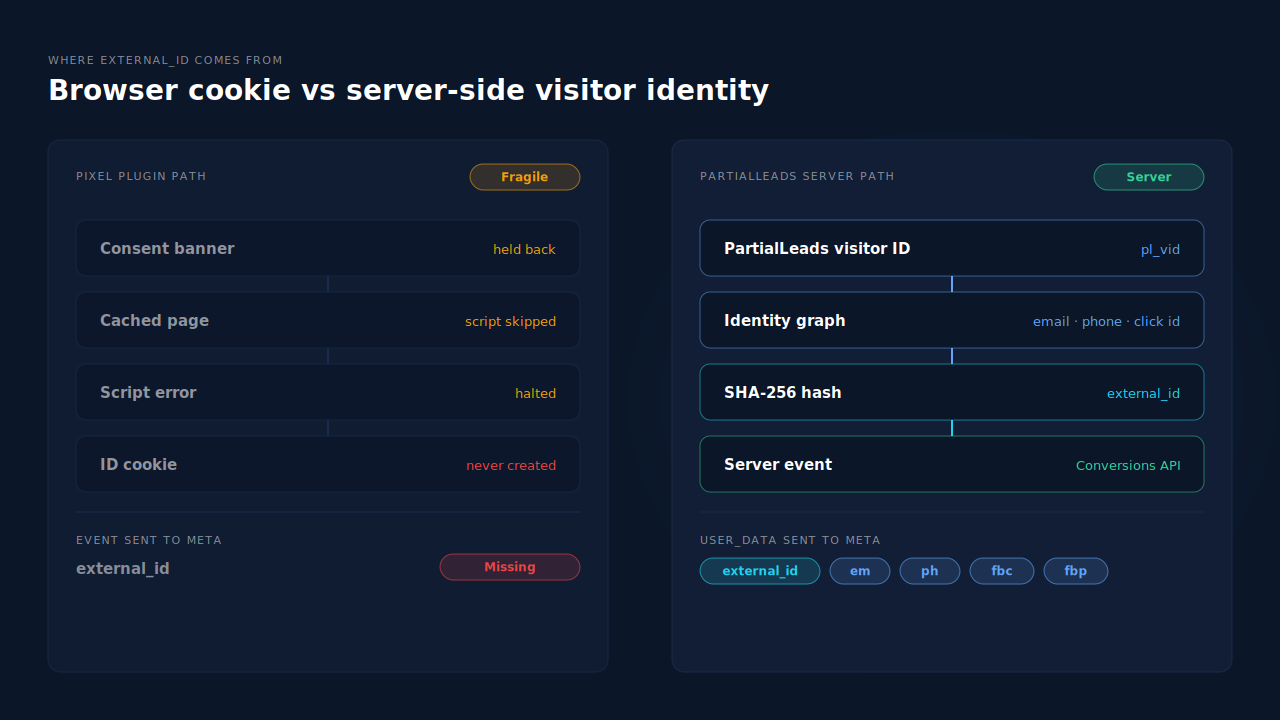
External ID goes missing on WooCommerce because most pixel plugins build it from a first-party cookie they set in the shopper’s browser. When that cookie is never created — held back by a consent banner, skipped on a cached page, or broken by a plugin update — the plugin has nothing to send. Meta then flags your events as missing external_id.
The symptom usually shows up in Events Manager’s diagnostics or its event details: a recommendation to add external_id, or a customer information parameter list for the event that doesn’t include external_id. You check the plugin settings and the option is switched on. You check the browser and the cookie that should hold the ID isn’t there.
Both are true. The setting says “send external_id when I have one.” The cookie is where it would come from. This guide covers what external_id is, why the cookie fails, how to confirm which failure you have, and how to send an ID that doesn’t depend on it.
What is external_id in Meta’s Conversions API?
External_id is an identifier you choose for a person — a customer ID, a user ID or a first-party cookie value — sent with each event so Meta can recognise the same person across events. It’s one of the customer information parameters in the Conversions API, next to hashed email and phone, and Meta recommends hashing it with SHA-256.
It does two jobs:
- Matching. It’s one more signal Meta can use to tie an event to a person. It counts toward your Event Match Quality score alongside email, phone,
fbp,fbc, IP address and user agent. - Continuity. A ViewContent from Tuesday and a Purchase from Friday carrying the same external_id tell Meta both came from one shopper, even when Tuesday’s visit had no email attached.
The key word is stable. An external_id that changes on every visit is worse than useless, because each event claims to be a different person.
Why does the plugin cookie behind external_id never get created?
Because it’s written by the plugin’s own browser script, and anything that stops that script — or stops it writing cookies — leaves no ID to send. The four usual causes are consent tools holding back marketing cookies, page caching serving a copy that skips the setup, JavaScript errors or deferral breaking the script, and plugin updates that change how the ID is created.
Is a consent banner holding the cookie back?
Consent tools block marketing cookies until the shopper clicks accept. If the plugin treats its external_id cookie as marketing, it’s never written for visitors who ignore or reject the banner. Events still fire, but without the ID. In some regions that’s the correct, lawful outcome — the fix is not to bypass consent.
Is page caching skipping the step that sets it?
A full-page cache serves stored HTML. If the cookie is set server-side on the first uncached request, cached visitors never get it. If it’s set by a script, a cache or optimisation plugin that combines, delays or defers JavaScript can stop that script from running before the shopper leaves.
Is a script error or update breaking it?
A JavaScript error from another plugin can halt everything that loads after it, including the code that writes the cookie. And a plugin update can change the cookie’s name, when it’s created or whether it’s created at all. One recent WordPress.org support thread reported exactly that after an update: the plugin’s ID cookie, pbid, was never created, so no external_id reached Meta.
Did it vanish between visits?
Browsers cap how long script-written cookies live, and shoppers clear storage or switch devices. The ID survived the first visit but was gone by the purchase, so the plugin either sent nothing or minted a new ID that doesn’t match the earlier events. That’s the same effect that makes returning customers show as new visitors.
How do you check whether external_id is really missing?
Look in three places: the browser, Events Manager’s test events tool and the plugin’s own log. Confirm whether the cookie exists, whether the browser event carries external_id, and whether the server event carries it. Where it disappears tells you which cause you have.
- Open a private window with consent accepted. Visit a product page and check your browser’s storage for the plugin’s ID cookie. If it’s there, consent isn’t the cause for accepting visitors.
- Repeat without accepting. If the cookie only appears after consent, events from non-consenting shoppers will lack the ID. That’s a policy result, not a bug.
- Watch test events. In Events Manager, open the test events tool and add a product to cart. Check whether the browser and server AddToCart each list external_id among the customer information parameters.
- Clear the cache and retest. Purge the page cache, disable JavaScript deferral for the pixel plugin, and repeat step 3. If the ID appears, caching or script optimisation was the cause.
- Check the console. Open developer tools on a product page. A red error from any plugin before the pixel script loads can explain everything downstream.
If the cookie exists and the browser event has the ID but the server event doesn’t, the plugin isn’t passing it to its server path. That’s one for the plugin’s support forum.
Should external_id come from a cookie or from the order?
From something more durable than a single cookie wherever you can. A customer account ID works for logged-in buyers, but most WooCommerce shoppers check out as guests. The practical answer for guest checkout is a first-party visitor ID that’s attached to every server event and tied to the email and phone the shopper eventually gives you.
A few rules keep it useful:
- Hash it. Send external_id as a SHA-256 hash. Never send a raw email address as external_id; send email in its own hashed field.
- Keep it the same across events. The browse events and the Purchase need the same value for the same person, or Meta sees several people.
- Keep one source per event. If two tools send the same event with different external_ids and different event IDs, Meta may count the sale twice and receive two conflicting identities. Pick one owner per event.
- Don’t treat it as a substitute for email and phone. Hashed email and phone from the order carry far more matching weight. External_id adds continuity; it doesn’t replace them. Read how to fix a low EMQ score for the full order of priority.
The architecture that makes this reliable is the one where Purchase is sent from the paid order itself, not the thank-you page. The guide to tracking WooCommerce purchases server-side to Meta walks through it.
How does PartialLeads send external_id from a WooCommerce store?
Every server-side event PartialLeads sends to Meta carries external_id — a SHA-256 hash of the PartialLeads visitor identity — alongside hashed email and phone. It doesn’t depend on a pixel plugin creating its own cookie, and the same identity links a shopper’s browse events to their paid order.
Where the ID comes from. The PartialLeads tag keeps a visitor ID in localStorage with a first-party cookie as backup. Sessions are joined into one person through an identity graph using email, phone, click IDs and other matches, so a shopper who browses on Tuesday and buys on Friday can be recognised as the same person when they give the same email or phone.
Which events carry it. The PartialLeads WooCommerce plugin forwards view product, add to cart and begin checkout to Meta server-side, including add to cart from the shop grid, the product form and Checkout Blocks. Purchase is sent from WooCommerce order webhooks for every paid order — processing or completed — and nothing fires on the thank-you page. Each carries the hashed external_id, email and phone where captured, plus the full order total on Purchase.
No double sends. Each event has a deterministic event_id, so a redelivered webhook or retried send can’t fire twice.
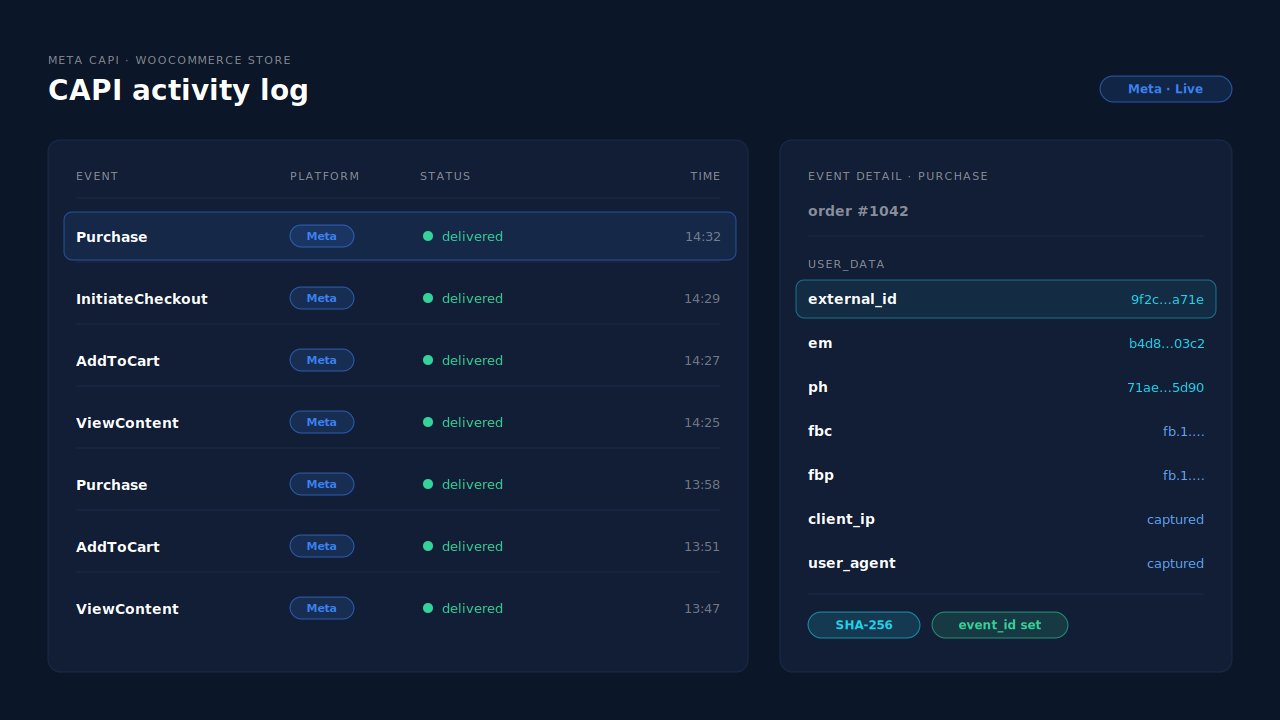
Where you see it working. The Meta CAPI page shows each server send with its event name, status and time, and the event payload shows what was sent to Meta, external_id included. The Leads list’s API column shows which conversion APIs each shopper was sent to, and the Purchases ledger lists every paid order to reconcile against WooCommerce.
The honest constraints. The visitor ID lives in the browser, so a shopper who clears storage or switches devices starts a new one until an email, phone or click ID links them back. It’s not immune to Safari’s storage limits. PartialLeads doesn’t override consent. PartialLeads’ event IDs are its own and don’t deduplicate against another plugin’s browser pixel, so if Meta for WooCommerce or PixelYourSite also sends the same event, switch that one off. Keep a Meta base pixel on the site for the _fbp cookie, which PartialLeads can’t create from nothing. Sending external_id is the half PartialLeads controls; whether Meta matches the person is Meta’s half.
| What breaks | The mechanism | Where you see it in the dashboard |
|---|---|---|
| Plugin’s ID cookie never created | External_id from the PartialLeads visitor identity, not a pixel-plugin cookie | Meta CAPI page, event payload |
| ID changes between browse and purchase | Sessions joined through the identity graph on email, phone and click IDs | Journey timeline on the lead |
| Purchase missing when thank-you page doesn’t load | Purchase sent from WooCommerce order webhooks for every paid order | Purchases ledger, CAPI activity log |
| External_id sent raw or unhashed | SHA-256 hash, with email and phone hashed in their own fields | Meta CAPI page, event payload |
| Two tools send the same event | No cross-tool dedup — keep one source per event | Leads-list API column vs Events Manager sources |
Tell us what's broken. We'll fix your tracking — free.
Describe the tracking/attribution problem you're stuck on and we'll map it to a fix: server-side conversions to Meta, Google, TikTok and Pinterest, plus first-party tracking that survives Safari. No code required.
Sources
- https://developers.facebook.com/docs/marketing-api/conversions-api/parameters/customer-information-parameters
- https://developers.facebook.com/docs/marketing-api/conversions-api/parameters/server-event
- https://developers.facebook.com/docs/marketing-api/conversions-api/best-practices
- https://developers.facebook.com/docs/marketing-api/conversions-api/deduplicate-pixel-and-server-events
- https://developers.facebook.com/docs/meta-pixel/advanced/advanced-matching