There is no single share that holds for every WooCommerce store. How many paid buyers never load your thank-you page depends on your payment gateways, the devices your buyers use and how many of them block tracking scripts. It can be close to nobody on a plain card checkout and most buyers on an off-site gateway. The only number that matters is yours, and you can measure it.
That matters because most WooCommerce tracking plugins send Purchase from that page. A buyer who pays and never loads it is a sale your ad platform never hears about. Your campaigns look weaker than they are, and the algorithm learns from fewer buyers than you actually have.
Below: why paid buyers miss the page, how to measure your own share gateway by gateway, how to read the result, and how to stop depending on the page at all.
Why is there no industry-wide number for this?
Because the causes are specific to each store. The share is the sum of several independent leaks: off-site gateways that fail to send buyers back, buyers who close the tab after paying, blocked scripts, and cached or customised thank-you pages. Your gateway mix and audience decide which leaks you have, so another store’s figure tells you almost nothing about yours.
Two stores selling the same product can land far apart. One takes cards on its own checkout page and sells mostly to desktop buyers. The other takes a wallet, a buy-now-pay-later provider and bank transfers, and sells mostly on phones. The second store has more off-site round trips, more app switches and more chances for the page load to disappear.
Be wary of any fixed percentage you see quoted for this. Measure instead. It takes an afternoon.
Why do paid buyers never reach the thank-you page?
Because the page load is the last step of the purchase, and the money has already moved before it. Anything that interrupts the buyer between paying and loading the order-received page leaves a paid order with no browser Purchase. The main causes are off-site payment round trips, closed tabs, app handoffs on phones, and scripts that are blocked or never run.
Off-site gateways. PayPal, buy-now-pay-later providers and some bank methods send the buyer to another site to approve the payment, then send them back. If the return fails, or the buyer closes the window once the provider says “payment complete”, the page never loads.
App handoffs on phones. A bank check or wallet approval often opens a banking app. The handoff back can land in a different browser or a stale tab, and the tracking cookies are not always there.
Closed tabs. Some buyers see “payment received” and leave. Nothing on your site gets the chance to run.
Blocked or broken scripts. An ad blocker, a strict privacy browser or a declined consent banner can stop the pixel from loading even when the page does. So can a page cache or a customised thank-you page your plugin does not recognise. How ad blockers break conversion tracking covers that leak on its own.
Delayed payments. Bank transfers and some bank debits turn paid days after the order. Nobody revisits the thank-you page when the money clears.
How do you measure your own share?
Compare paid orders with the Purchase events your browser plugin actually delivered, for the same dates, split by payment method. The share that never reached the page is roughly one minus browser Purchases divided by paid orders, per gateway. Do it over a fixed window of at least two weeks so a few odd days don’t skew it.
- Pick a window. The last 14 or 28 complete days. Avoid days with a site change or a plugin update in them.
- Export paid orders from WooCommerce. Keep orders in processing or completed only, with the order id, date and payment method on each row. Pending, on-hold, failed and cancelled orders were never sales, so leave them out or you will overstate the gap.
- Pull Purchase events for the same window from Meta Events Manager, not Ads Manager. Ads Manager applies attribution windows; Events Manager shows what arrived. If your plugin sends browser and server events, look at the browser events alone.
- Match by order id where you can. If your Purchase events carry the order id, the paid orders with no matching event are your missing list. If they don’t, compare counts per day instead.
- Split by payment method. Group the missing orders by gateway. This is where the pattern shows.
- Check the time zone. Your WooCommerce export and Events Manager must use the same one, or orders near midnight land on different days.
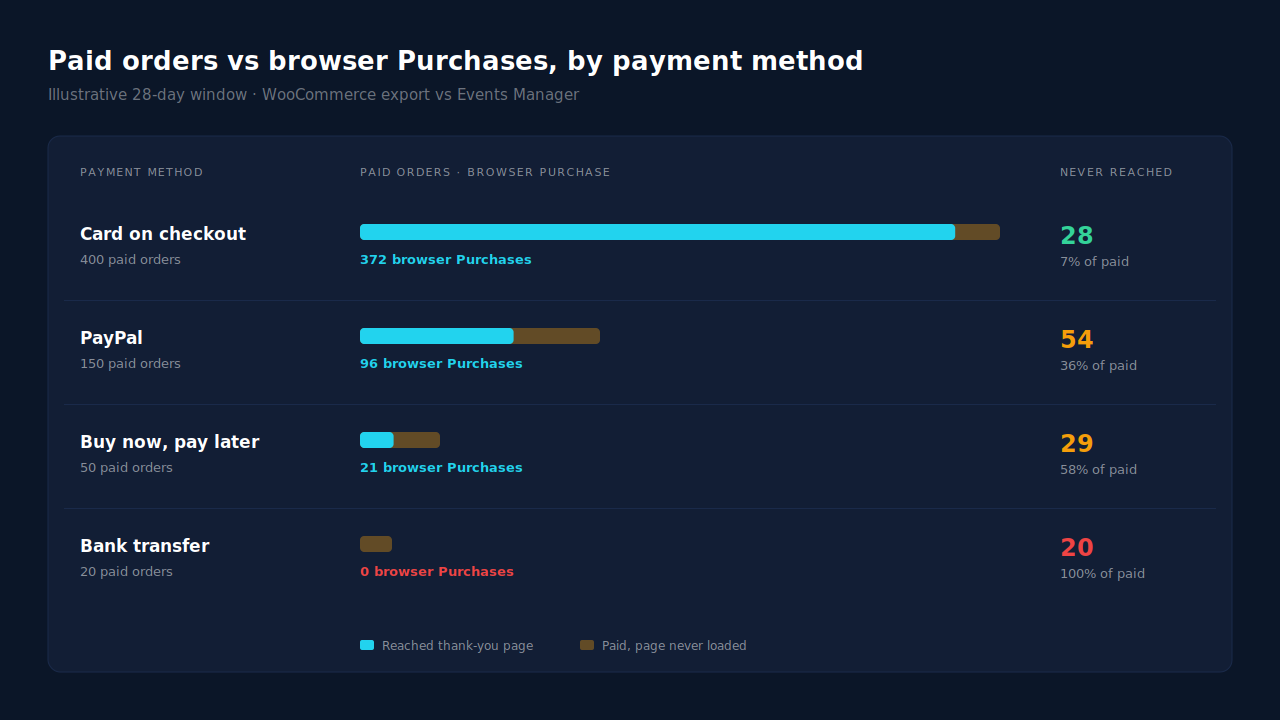
Here is an illustrative result, with made-up round numbers, to show how to read it:
| Payment method | Paid orders | Browser Purchases | Never reached the page |
|---|---|---|---|
| Card on your checkout | 400 | 372 | 28 (7%) |
| PayPal | 150 | 96 | 54 (36%) |
| Buy now, pay later | 50 | 21 | 29 (58%) |
| Bank transfer | 20 | 0 | 20 (100%) |
In that example, the card row is mostly blockers and closed tabs. The rest is the round trip.
How do you read the result?
Look at the shape before the total. A small, even gap across every gateway points to blocked scripts. A gap concentrated in off-site gateways points to the return trip. A gateway at or near zero points to a page your plugin never recognises, or to payments that turn paid after the buyer has left, like bank transfers.
Even gap across gateways. Ad blockers, privacy browsers or consent. The page loads, but the pixel does not. A server-side event fixes this; tweaking the page does not.
Gap concentrated in off-site gateways. The return trip is failing. The gateway’s own settings may help a little, but a buyer who closes the window after approving is still lost.
One gateway at zero. Either the gateway sends buyers to a URL your plugin doesn’t treat as the thank-you page, or the payment becomes paid later. Either way the browser can’t fix it.
More Purchases than paid orders. That is the opposite problem. Your plugin is firing on unpaid orders, or twice per order. Why is my Meta CAPI not deduplicating covers the double-count side.
What does the gap cost you?
Every paid order that never reaches the page is a sale your ad platform does not learn from. Campaigns that rely on the leaky gateways look worse than they are, and the algorithm optimises on a smaller, skewed set of buyers. A store where most mobile buyers pay by wallet is teaching Meta mostly about desktop card buyers.
The cost is not only reporting. Meta’s delivery system uses Purchase events to decide who to show ads to. If a whole gateway’s buyers are missing, the people most likely to use it are underrepresented in what the algorithm learns from. The ROAS column in Ads Manager is lower than your real return, and the ad sets that bring those buyers are the ones most likely to be cut.
How do you close the gap without depending on the page?
Send Purchase from the paid order, not from the page. When a WooCommerce order moves to processing or completed, a server-side event to Meta’s Conversions API fires whether or not the buyer ever returns. That removes gateways, closed tabs and blocked scripts from the question.
You can build that yourself. WooCommerce triggers an action when an order changes status, and a developer can send a server-side Purchase from it. The cost is maintaining it: hashing, retries, errors, and keeping one sender per event so orders don’t count twice.
Keep the Meta base pixel on the site either way. It sets the _fbp cookie that server events use for matching. And for payments that turn paid days later, send the event when the money clears; Meta accepts server events up to seven days old, as covered in the 7-day event time window in Meta CAPI.
How does PartialLeads show and close the gap?
PartialLeads sends Purchase from the WooCommerce order webhook, not the thank-you page. Every paid order, processing or completed, produces one server-side Purchase to Meta, TikTok and Pinterest. The Purchases ledger lists those paid orders, so comparing its count with what your browser plugin reported for the same dates measures exactly how many buyers the page missed.
The Purchase is webhook-owned. The PartialLeads WooCommerce plugin fires nothing on the thank-you page. An order that turns paid sends once, whether the buyer came back from PayPal, closed the tab or blocked every script. Pending, on-hold, failed and cancelled orders are not sent. A bank transfer sends when it is marked paid.
The click is captured before checkout. The PartialLeads tag records the fbclid and UTMs when the buyer first lands, before any redirect. The order is matched to that session by visitor id, email or phone, and _fbc is rebuilt from the fbclid when the cookie is missing. How to attribute WooCommerce orders when the checkout is on another page covers that match in depth.
One Purchase per order. Each order is recorded once, with a deterministic event_id, so a retried send or a redelivered webhook cannot fire twice. The value is the full order total, tax and shipping included, after discounts.
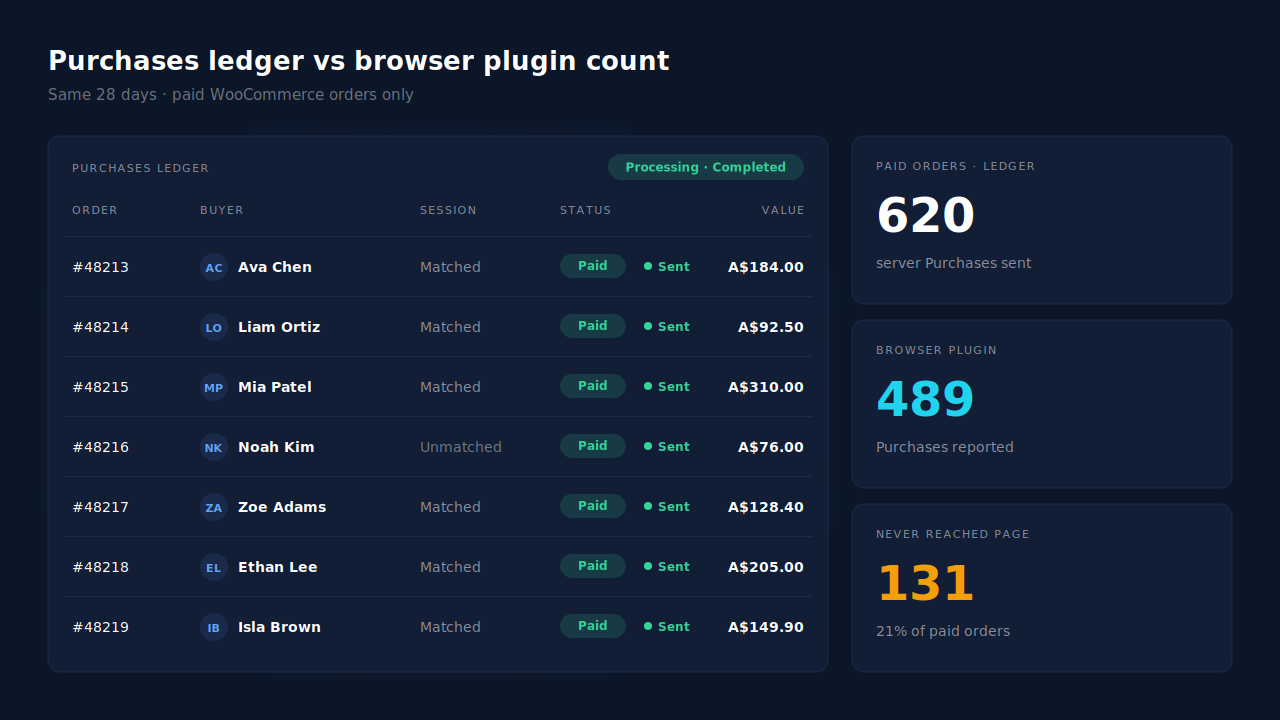
Where you see it working. The Purchases ledger is the paid-order count, matched or unmatched to a session. Put its count for your window beside the browser plugin’s Purchase count, and the difference is your share. The CAPI activity log shows a server Purchase delivered for each order, and the Leads list’s API column shows which platforms each buyer was sent to.
The honest constraints. The ledger gives you the paid-order side; the browser count comes from your plugin or Events Manager, so the comparison is one you make, not a single built-in report. PartialLeads’ event ids are its own. If Meta for WooCommerce or another plugin keeps firing its own Purchase, turn that off once you have measured, and keep one source per event. PartialLeads controls delivery: every paid order is sent. Whether Meta ties it to an ad click depends on the identifiers captured and Meta’s own matching. WooCommerce Subscriptions renewals are recorded but not sent. The pillar guide to tracking WooCommerce purchases server-side covers the full setup.
| What breaks | The mechanism | Where you see it in the dashboard |
|---|---|---|
| Buyer pays off-site and never comes back | Purchase sent from the order webhook when the order turns paid | CAPI activity log, one Purchase per paid order |
| Buyer closes the tab or blocks the pixel | Nothing depends on the page; the paid order is the trigger | Purchases ledger count vs browser Purchase count |
| Bank transfer turns paid days later | Sent when marked paid, event time clamped to Meta’s 7-day window | CAPI activity log timestamp |
| Unpaid or failed order inflates the count | Only processing and completed orders are sent | Purchases ledger, paid orders only |
| Two plugins send Purchase for the same order | No cross-tool dedup, keep one source per event | API column in the Leads list vs Events Manager senders |
Tell us what's broken. We'll fix your tracking — free.
Describe the tracking/attribution problem you're stuck on and we'll map it to a fix: server-side conversions to Meta, Google, TikTok and Pinterest, plus first-party tracking that survives Safari. No code required.
Sources
- https://developers.facebook.com/docs/marketing-api/conversions-api
- https://developers.facebook.com/docs/marketing-api/conversions-api/parameters/server-event
- https://developers.facebook.com/docs/marketing-api/conversions-api/parameters/fbp-and-fbc
- https://developers.facebook.com/docs/marketing-api/conversions-api/deduplicate-pixel-and-server-events