Some Stripe orders go missing from WooCommerce conversion tracking because the Purchase event fires on the thank-you page, and those payments put an extra step between the buyer and that page. A 3D Secure bank check or a redirect-based method can break the return trip. The order is paid. The pixel just never loaded.
That is why the gap is partial. A plain card payment that clears on your checkout page lands the buyer on the order-received page almost every time, and those orders track. The ones that go missing are the payments that needed something more.
It matters because every missing Purchase is a sale your ad platform can’t learn from. The campaigns that bring in those buyers look weaker than they are. Below: which Stripe payments cause the gap, how to tell a missing sale from a payment that never completed, how to measure it on your own store, and how to send Purchase from the order so the payment step no longer decides what gets tracked.
Which Stripe payments skip the WooCommerce thank-you page?
The ones that need the buyer to do something outside your checkout page before the payment completes. In practice that means card payments that trigger a 3D Secure check, payment methods that redirect the buyer to a bank or wallet page, and methods that confirm the payment later rather than on the spot. Each adds a step where the page load can be lost.
3D Secure card checks. 3D Secure is the card network’s extra authentication step: the buyer’s bank asks them to confirm the payment, often in their banking app or with a one-time code. Depending on your Stripe setup, that happens in a pop-up on your checkout or on the bank’s own page. Either way, the buyer is now switching between apps and screens mid-purchase.
When a buyer on a phone approves the payment in their banking app, the handoff back to the browser is where things break. They may land back in a different browser, in a stale tab, or nowhere at all. The bank has approved the charge, Stripe has taken the money, and the order moves to processing. The thank-you page just never loads.
Redirect-based payment methods. Depending on which methods you switch on in your Stripe gateway, some take the buyer to a bank or wallet page to approve the payment and then send them back. That is the same off-site round trip that makes PayPal orders go missing: any break in the return, and no page load.
Delayed confirmation. Some payment methods, such as bank debits, don’t confirm on the spot. The order waits, and only moves to processing once the money is confirmed. A thank-you-page pixel handles this badly both ways: it either fires on an order that is not yet paid, or it never fires, because nobody revisits the page when the payment finally clears.
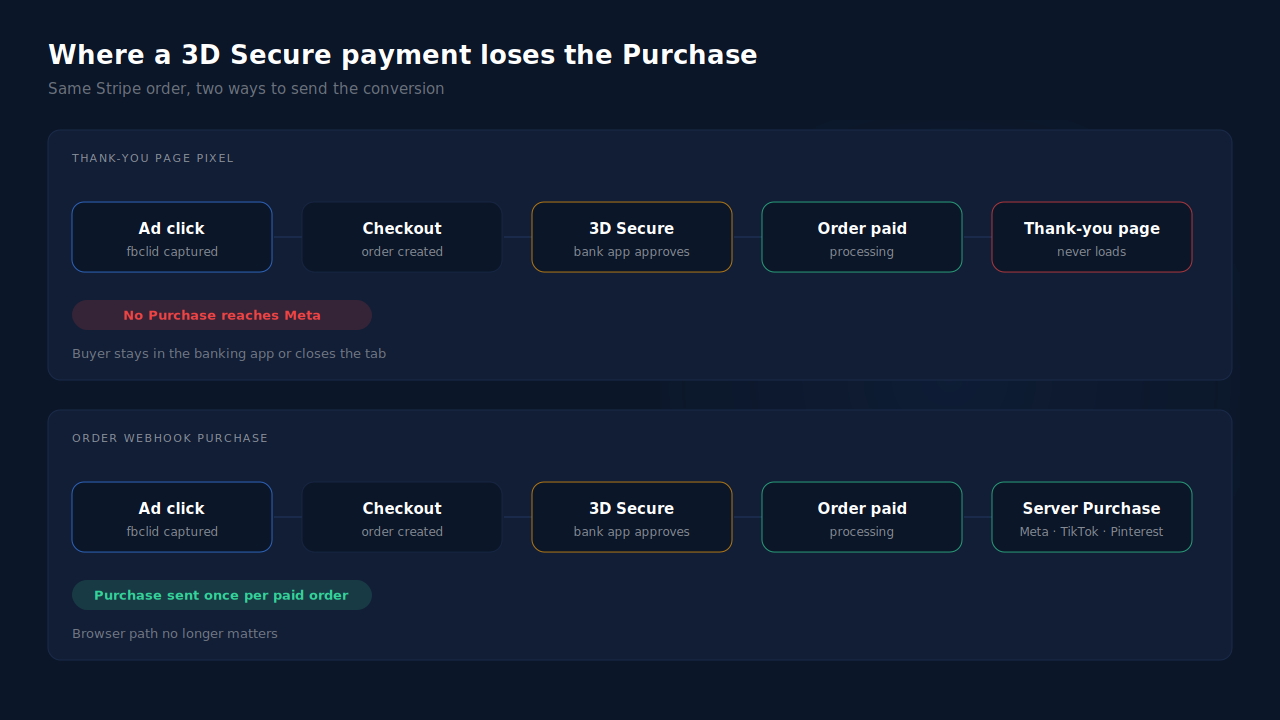
The order itself is untouched by any of this. WooCommerce still holds a paid order with the buyer’s email, phone and total. Only the browser event is gone.
Is every missing Stripe order a missing sale?
No, and this is the first thing to check. Some Stripe orders in WooCommerce are attempts, not sales: a buyer who failed or abandoned the 3D Secure check leaves an order sitting in pending or failed. Those should never reach your ad platform as purchases. The real gap is the paid orders, processing or completed, with no matching Purchase.
That distinction changes the diagnosis. If your WooCommerce order count includes pending and failed Stripe orders, comparing it with Events Manager will overstate the problem. Filter to paid statuses first.
It also changes the fix. Any tool that fires Purchase when an order is created, or when the checkout button is clicked, will count those failed 3D Secure attempts as sales. That inflates reported revenue and teaches the ad algorithm to find people who start payments they never finish. The right trigger is the order becoming paid.
How do you find which Stripe orders are missing?
Compare paid WooCommerce orders with the Purchases Meta actually received, for the same dates, split by payment method and matched by order id where you can. If plain card orders line up close to one-to-one and the shortfall clusters in orders that needed authentication or a redirect, the thank-you page is your leak.
- Export paid orders for a fixed window — the last 14 days works — with the payment method and order id on each row. Keep processing and completed only.
- Pull Purchase events for the same window from Events Manager, not Ads Manager. Ads Manager applies attribution windows; Events Manager shows what arrived.
- Match by order id if your Purchase events carry one. The Stripe orders with no matching event are your missing list.
- Read the order notes on a few of those orders. The notes usually record what the gateway did, which tells you whether the order needed authentication or confirmed later.
- Reproduce it in test mode. Stripe provides test cards that always require authentication. Place a test order, approve the check, then close the tab instead of returning. If the order shows processing and no Purchase arrives, you have found the gap.
Check that both exports use the same time zone, or orders near midnight land on different days and skew the count.
How do you fix missing Stripe purchases without a new tool?
Move Purchase off the thank-you page and onto the order’s change to a paid status. You can do that yourself with a server-side integration to Meta’s Conversions API triggered by the order status change, or by making the return trip more reliable. Only the first removes the dependency on the buyer’s browser.
Make the return more reliable. Keep your Stripe gateway plugin current and prefer the checkout experience that keeps authentication on your page where your setup allows it. This narrows the gap. It cannot close it, because nothing stops a buyer from closing a tab after their bank has approved the charge.
Fire from the order, in your own code. WooCommerce triggers an action when an order changes status. A developer can hook the move to processing and send Purchase server-side at that moment. It fires once, whether or not the buyer returns, and it waits for delayed payments to clear. The cost is maintaining the integration: hashing, retries, error handling.
Keep one owner for Purchase. Whatever sends the server Purchase should be the only thing sending it for that order, or it should share an event_id with the browser event so Meta can pair them. Two senders with different ids swap an undercount for double-counted card orders. The Meta CAPI deduplication debug guide covers that failure.
Keep the Meta base pixel on the site either way. It sets the _fbp cookie that server events use for matching.
What about Stripe payments that confirm days later?
Send them when they are confirmed, not when the order is placed. A delayed payment that clears three days later is a real sale and worth sending. Meta accepts server events up to seven days after they happened, measured by the event_time you send. The 7-day event time window in Meta CAPI explains what happens to events outside it.
There is a timing trade-off. The Purchase arrives in Meta on the day the money clears, which may be a different day from the ad click and the order. Expect daily numbers in Events Manager to lag your order export a little for those methods.
How does PartialLeads send a Purchase for every paid Stripe order?
By sending Purchase from the WooCommerce order webhook, not from the thank-you page. When an order reaches processing or completed, PartialLeads records it once and sends a server-side Purchase to Meta, TikTok and Pinterest. A 3D Secure check, a bank redirect or a payment that clears days later changes nothing, because the paid order is the trigger.
The Purchase is webhook-owned. The PartialLeads WooCommerce plugin fires nothing on the thank-you page. Orders in pending, on-hold, failed or cancelled are not sent, so an abandoned 3D Secure attempt never becomes a Purchase. A delayed payment sends as soon as the order moves to processing.
The click is captured before the payment step. The PartialLeads tag records the fbclid and UTMs when the buyer first lands, before any bank check or redirect. The order is matched to that session by visitor id, email or phone, so a buyer who finished in their banking app can still be tied back to the ad. When the _fbc cookie is missing, it is rebuilt from the fbclid in Meta’s format. For the wider attribution picture, see how to attribute WooCommerce orders when the checkout is on another page.
One Purchase per order. Each order is recorded once, and every send carries a deterministic event_id, a SHA-256 hash of the pixel id, event name and record id. A retried send reuses the id; a redelivered webhook cannot fire twice. The value is the full order total, tax and shipping included, after discounts.
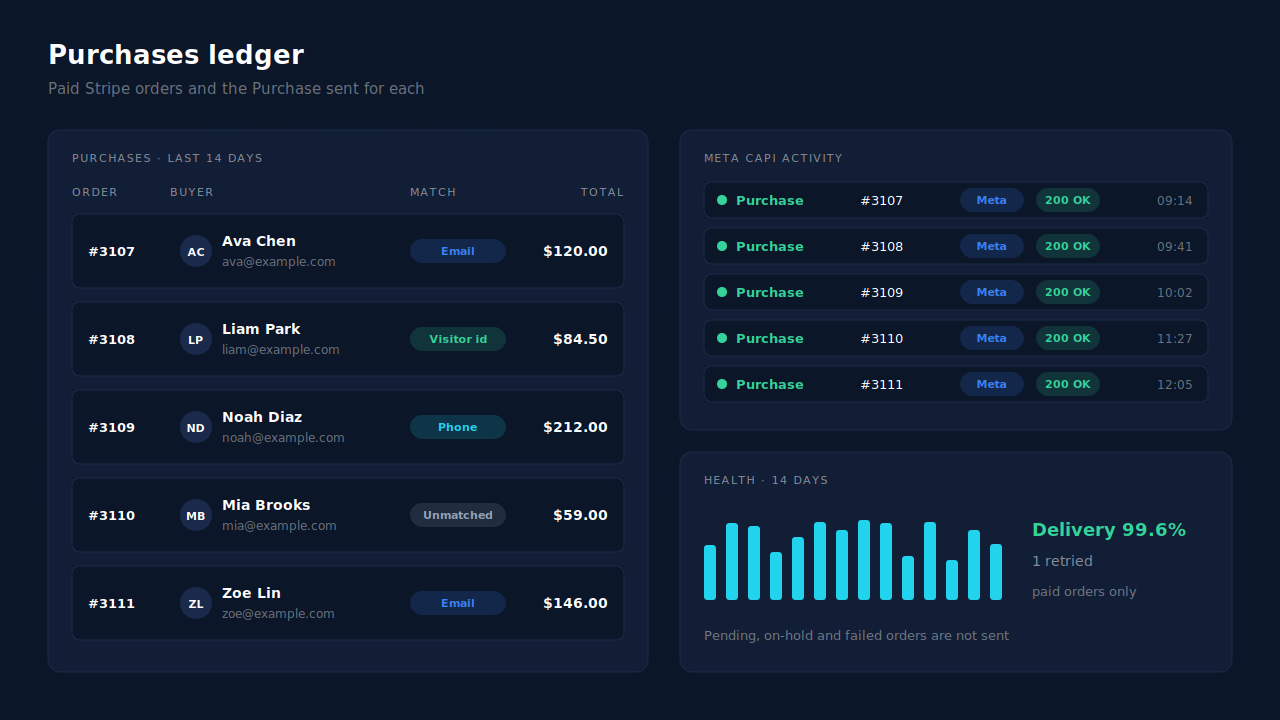
Where you see it working. The Purchases ledger lists every paid order PartialLeads recorded, matched or unmatched to a session, so the Stripe orders missing from Events Manager appear there. The CAPI activity log shows the server Purchase delivered for each. In the Leads list, the API column shows which conversion APIs each buyer was sent to.
The honest constraints. PartialLeads’ event ids are its own. If Meta for WooCommerce or another pixel plugin keeps firing its own Purchase on the thank-you page, plain card orders will count twice, so switch that plugin’s Purchase off and keep one source per event. Delivery is the half PartialLeads controls: every paid order is sent. Whether Meta ties it to an ad click depends on the identifiers captured and Meta’s own matching. A payment confirmed more than seven days after the order is still sent, with its event time clamped to Meta’s window. This covers Stripe payments taken through WooCommerce; if you sell through Stripe directly, attributing Stripe payments to marketing campaigns is the path. The pillar guide to tracking WooCommerce purchases server-side covers the full setup.
| What breaks | The mechanism | Where you see it in the dashboard |
|---|---|---|
| 3D Secure buyer never returns to the thank-you page | Purchase sent from the WooCommerce order webhook, nothing fired on the page | CAPI activity log, one Purchase per paid order |
| Redirect payment returns in a different browser | Order matched to the landing session by visitor id, email or phone; _fbc rebuilt from fbclid |
Purchases ledger, matched rows |
| Failed or abandoned 3D Secure attempt | Only processing and completed orders are sent | Purchases ledger, paid orders only |
| Payment confirms days after the order | Sent when the order turns paid, event time clamped to 7 days | CAPI activity log timestamp |
| Another plugin still fires a browser Purchase | Not deduplicated, keep one source per event | Compare Events Manager senders with the API column |
Tell us what's broken. We'll fix your tracking — free.
Describe the tracking/attribution problem you're stuck on and we'll map it to a fix: server-side conversions to Meta, Google, TikTok and Pinterest, plus first-party tracking that survives Safari. No code required.
Sources
- https://developers.facebook.com/docs/marketing-api/conversions-api
- https://developers.facebook.com/docs/marketing-api/conversions-api/deduplicate-pixel-and-server-events
- https://developers.facebook.com/docs/marketing-api/conversions-api/parameters/fbp-and-fbc
- https://developers.facebook.com/docs/marketing-api/conversions-api/parameters/server-event