Meta doesn’t record your PayPal orders because the Purchase event fires on the WooCommerce thank-you page, and PayPal buyers often never reach it. They leave your store to approve the payment, and if the trip back breaks, the order-received page never loads. The order is paid. The pixel just never ran.
Card payments rarely have this problem, because the buyer never leaves your checkout. That is why the gap looks like a PayPal bug when it is really a page-load problem.
It costs more than a reporting headache. Every missing Purchase is a sale Meta can’t learn from, so campaigns that drive PayPal buyers look weaker than they are. Below: why the redirect drops the event, how to measure the gap in ten minutes, and how to send Purchase from the order so it no longer matters where the buyer’s browser ends up.
Why does PayPal break the Meta Purchase event on WooCommerce?
Because most WooCommerce Meta setups fire Purchase from the browser when the order-received page loads. PayPal moves the payment step off your site. The buyer approves the payment with PayPal, and only if everything goes right do they land back on your thank-you page. Any break in that return trip means no page load, and no Purchase.
Here is the path a PayPal buyer takes, in outline. Details vary by PayPal integration and device, but the shape is the same:
- The buyer clicks the PayPal button at checkout. WooCommerce creates the order.
- They approve the payment in a PayPal window or on PayPal’s own pages, sometimes inside the PayPal app on a phone.
- PayPal confirms the payment and the store marks the order processing.
- The buyer is sent back to your order-received page, and the pixel fires Purchase.
Step 4 is optional from the buyer’s point of view. They already paid. So the event gets lost whenever:
- the buyer closes the PayPal window or tab once they see “payment complete”;
- the PayPal app on a phone hands back to a different browser than the one that started checkout, or to none at all;
- the return is slow, and the buyer leaves before the page finishes loading;
- an ad blocker or consent banner stops the pixel on the one page load that did happen.
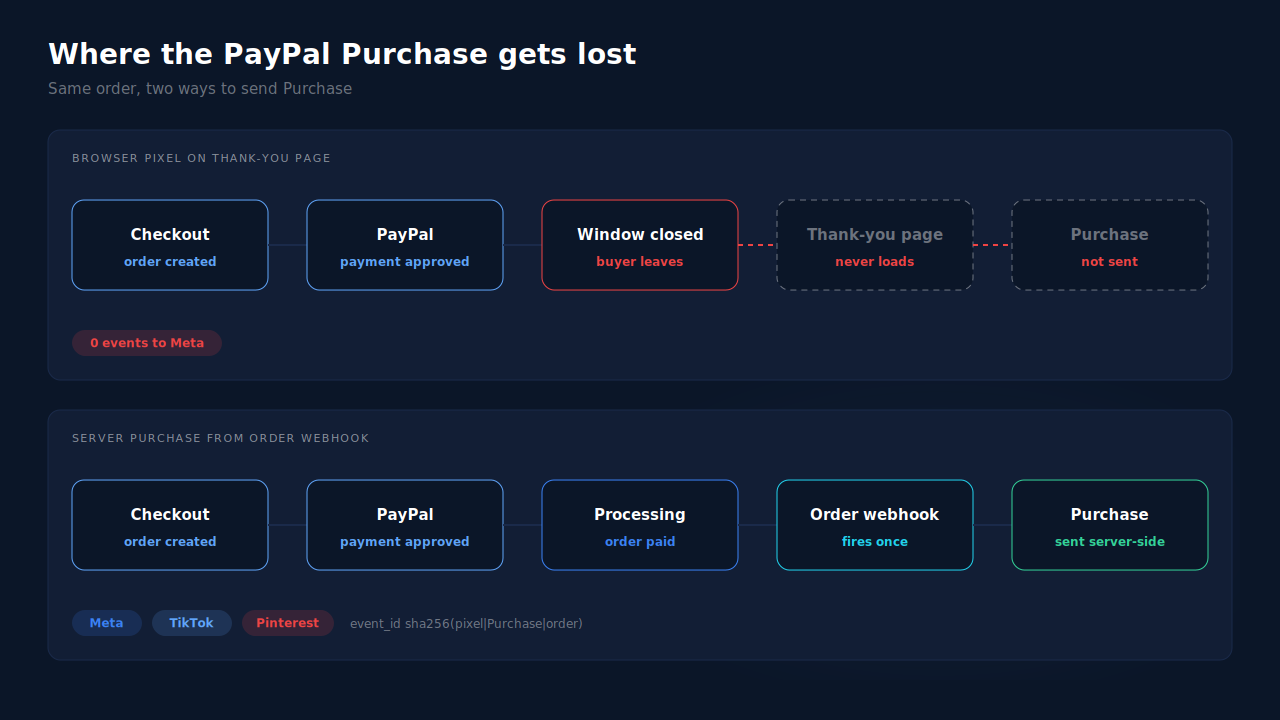
The order itself is untouched by any of this. WooCommerce still has a paid order with the buyer’s email, phone and total. Only the browser event is gone.
Why do card orders track fine while PayPal orders don’t?
Because a card payment usually completes on your own checkout page, so the buyer is already on your site when the order-received page loads. The pixel gets its page load almost every time. A PayPal payment adds a hop away from your domain and back, and every hop is a chance to lose the page load that the event depends on.
That is why the gap sorts itself by payment method. It is not that Meta rejects PayPal orders or that PayPal strips anything from them. Meta never receives an event to reject.
The same logic applies to any payment step that leaves your site: some card payments that need a bank’s 3D Secure check, buy-now-pay-later providers, and bank-redirect methods. PayPal is simply the most common redirect in most WooCommerce stores, so it is where store owners notice first.
There is a second, quieter cost. When a PayPal buyer does make it back but in a different browser, the Purchase that fires may carry none of the identifiers from their original ad click. Meta receives it but can’t tie it to the ad. Attributing WooCommerce orders when the checkout is on another page covers that attribution half in depth.
How do you confirm PayPal is the gap on your store?
Compare Meta’s received Purchases with your paid WooCommerce orders for the same dates, split by payment method. If card orders line up close to one-to-one and PayPal orders fall well short, the thank-you page is your leak. It takes one order export and one Events Manager view.
- Export paid orders for a fixed window — say the last 14 days — from WooCommerce, with the payment method on each order. Count only processing and completed orders.
- Pull Purchase events for the same window from Events Manager, not Ads Manager. Ads Manager applies attribution windows; Events Manager shows what Meta actually received.
- Compare by method. If your store took 100 card orders and 60 PayPal orders in this illustrative example, and Events Manager shows about 150 Purchases, the shortfall sits almost entirely in PayPal.
- Place one real PayPal test order and watch Events Manager’s Test Events tab. Approve the payment, then close the PayPal window instead of returning. If no Purchase arrives but the order shows processing in WooCommerce, you have reproduced the gap.
- Check your time zones match between the WooCommerce export and Events Manager, or orders near midnight land on different days and skew the count.
For a wider health check of the server side once it is in place, see how to know if your Meta CAPI is working.
How do you fix missing PayPal purchases without a new tool?
Move Purchase off the thank-you page and onto the order. You have three options, from weakest to strongest: force the buyer back to the store, fire from the order status change in WordPress yourself, or send the event server-side through Meta’s Conversions API from the paid order. Only the last removes the dependency on the buyer’s browser.
Force the return. Check your PayPal integration’s settings for anything that controls where and how the buyer comes back after paying, and make the return automatic where you can. This narrows the gap. It cannot close it, because nothing stops a buyer from closing the window once they have paid.
Fire from the order, in your own code. WooCommerce triggers an action when an order changes status. A developer can hook the move to processing and send Purchase from the server at that moment. This is the right shape: the order changes status once, whether or not the buyer comes back. It means maintaining your own Conversions API integration, with hashing, retries and error handling.
Send server-side from the paid order, and keep one owner. Whatever sends the server Purchase, it should be the only thing sending Purchase for that order, or it should share an event_id with the browser event so Meta can pair them. Two senders with different ids produce the opposite problem: double-counted card orders. The Meta CAPI deduplication debug guide walks through that failure.
Keep the Meta base pixel on the site either way. It sets the _fbp cookie that server events use for matching; removing it trades a missing-event problem for a match-quality problem.
What happens to PayPal orders that are on hold or pending?
They shouldn’t be sent as purchases until the money is confirmed. Some PayPal payments sit in pending or on-hold for a while, for example while PayPal reviews them. A server-side Purchase that fires on processing or completed waits for that confirmation, then sends. That is the behaviour you want: the ad algorithm learns from sales, not attempts.
If an order stays pending for days, the eventual Purchase is still worth sending. Meta accepts server events up to seven days after they happened, measured by the event’s event_time. The 7-day event time window in Meta CAPI explains what happens to anything later.
How does PartialLeads send a Purchase for every paid PayPal order?
By sending Purchase from the WooCommerce order webhook, not from the thank-you page. When an order reaches processing or completed, PartialLeads records it once and sends a server-side Purchase to Meta, TikTok and Pinterest. The buyer closing the PayPal window, switching browsers or never coming back changes nothing, because the order is the trigger.
The Purchase is webhook-owned. PartialLeads’ WooCommerce plugin fires nothing on the thank-you page. The order webhook creates the Purchase. Orders in pending, on-hold, failed or cancelled are not sent; a PayPal order sends as soon as it is marked paid.
The click is captured before the buyer leaves. The PartialLeads tag records the fbclid and UTMs on the buyer’s first landing, before the PayPal hop. The order is then matched to that earlier session by visitor id, email or phone, and the Purchase carries the ad-click identifiers. When the _fbc cookie is missing, it is rebuilt from the fbclid in Meta’s format. The _fbp cookie still has to come from the Meta base pixel, so keep it installed.
One Purchase per order. Each order is recorded once, and every send carries a deterministic event_id built from a SHA-256 hash of the pixel id, event name and record id. A retry reuses the id; a redelivered webhook cannot send twice. The value is the full order total, tax and shipping included, after discounts.
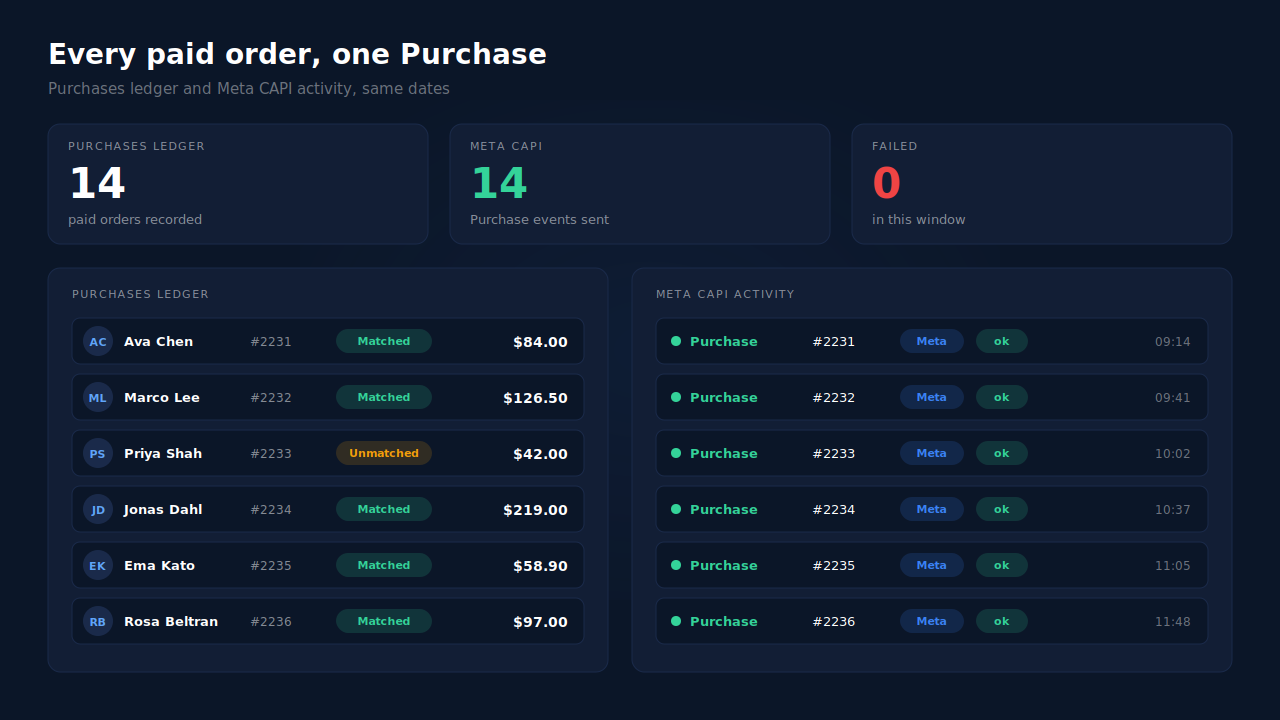
Where you see it working. The Purchases ledger lists every paid order PartialLeads recorded, matched or unmatched to a session, so the PayPal orders missing from Events Manager appear there. The CAPI activity log shows the server Purchase delivered for each. In the Leads list, the API column shows which conversion APIs each buyer was sent to.
The honest constraints. PartialLeads’ event ids are its own. If Meta for WooCommerce or another pixel plugin keeps firing its own Purchase on the thank-you page, card orders will count twice. Switch that plugin’s Purchase off and keep one source per event. Delivery is the half PartialLeads controls: every paid order is sent. Whether Meta ties it to an ad click depends on the identifiers captured and Meta’s own matching. A PayPal payment confirmed more than seven days after the order is still sent, with its event time clamped to Meta’s window. The pillar guide to tracking WooCommerce purchases server-side covers the full setup.
| What breaks | The mechanism | Where you see it in the dashboard |
|---|---|---|
| PayPal buyer never returns to the thank-you page | Purchase sent from the WooCommerce order webhook, nothing fired on the page | CAPI activity log, one Purchase per paid order |
| Buyer returns in a different browser with no click cookies | Order matched to the landing session by visitor id, email or phone; _fbc rebuilt from fbclid |
Purchases ledger, matched rows |
| PayPal payment sits on hold or pending | Only processing and completed orders are sent | Purchases ledger, paid orders only |
| Webhook redelivered or send retried | Order recorded once, deterministic event_id |
CAPI activity log status per event |
| Another plugin still fires a browser Purchase | Not deduplicated — keep one source per event | Compare Events Manager senders with the API column |
Tell us what's broken. We'll fix your tracking — free.
Describe the tracking/attribution problem you're stuck on and we'll map it to a fix: server-side conversions to Meta, Google, TikTok and Pinterest, plus first-party tracking that survives Safari. No code required.
Sources
- https://developers.facebook.com/docs/marketing-api/conversions-api
- https://developers.facebook.com/docs/marketing-api/conversions-api/deduplicate-pixel-and-server-events
- https://developers.facebook.com/docs/marketing-api/conversions-api/parameters/fbp-and-fbc
- https://developers.facebook.com/docs/marketing-api/conversions-api/parameters/server-event